Session Volume Profile + HVN [DAVIES T]
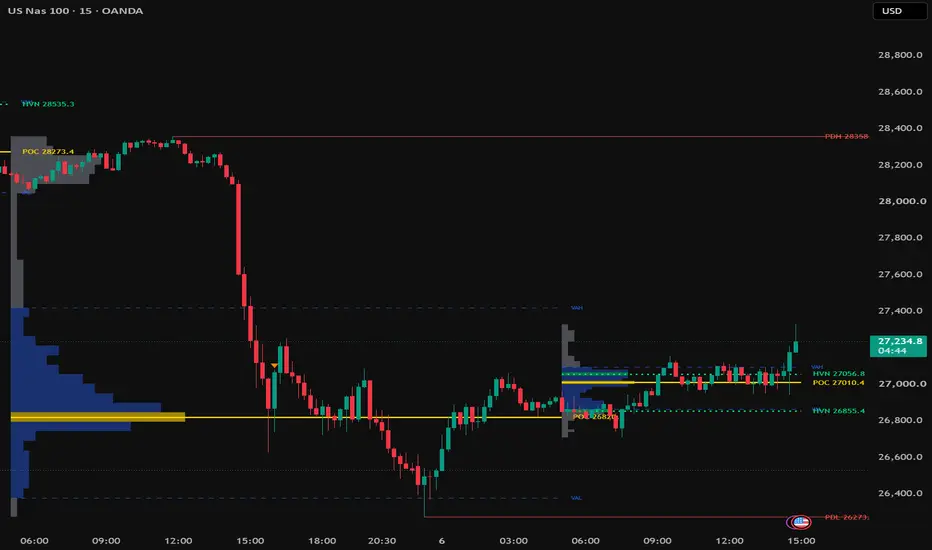
Session Volume Profile + HVN [DAVIES T]
OVERVIEW
A session-based volume profile built for ICT / SMC intraday trading. It plots a volume profile for each trading session (Asia, London, NY RTH, Full Day or Custom) and highlights only the high volume nodes (HVNs) that matter, alongside the POC, value area and previous day/week highs and lows.
HOW IT WORKS
- Each session's volume is distributed across price rows using lower timeframe data (default 1 minute), so the POC, value area and HVNs are placed more accurately than a profile built from chart candles alone.
- Where 1-minute history is not available for older sessions, the script falls back to chart bars automatically.
- Volume from each bar is spread across every row its high-low range covers, rather than being placed at the close.
HIGH VOLUME NODES (HVN)
An HVN is only marked when it passes three filters:
1. It is a local volume peak - higher than a set number of rows above and below it.
2. Its volume is at least a set percentage of the POC volume (default 60%).
3. Only the strongest nodes are kept (default maximum 4 per session).
This keeps the chart clean and avoids the noise of marking every small bump in the profile.
FEATURES
- Session profiles: NY RTH (09:30-16:00), London (02:00-05:00), Asia (20:00-00:00), Full Day or Custom, all in New York time by default.
- Full Day mode resets on the calendar day, so it works on 24/7 crypto markets.
- POC line with price label, plus VAH / VAL lines (value area % adjustable, default 70%).
- HVN lines with price labels, highlighted in the histogram.
- Extend Last N Sessions: POC and HVN lines from recent sessions extend right as reference levels, independent of how many full histograms are shown.
- Live profile for the current session, updating in real time.
- PDH / PDL and PWH / PWL lines, drawn from the candle where each high or low formed, with their own day/week timezone setting (use UTC to match exchange candles on crypto).
ALERTS
- Touch Prior Session HVN
- Touch Prior Session POC
- Trade Through PDH / PDL
- Trade Through PWH / PWL
SETTINGS TIPS
- Fewer HVNs: raise "HVN Min % of POC Volume" or the "HVN Peak Lookaround".
- More HVNs: lower the minimum % or raise "Max HVNs per Session".
- For a clean chart, set "Sessions with Full Profile" to 1 and "Extend Last N Sessions" to 3-5. You get today's profile plus recent POC/HVN levels without extra histograms.
- Best used on intraday charts (1m to 15m).
DISCLAIMER
This indicator is a tool for analysis and education only. It is not financial advice. Always manage your risk.
OVERVIEW
A session-based volume profile built for ICT / SMC intraday trading. It plots a volume profile for each trading session (Asia, London, NY RTH, Full Day or Custom) and highlights only the high volume nodes (HVNs) that matter, alongside the POC, value area and previous day/week highs and lows.
HOW IT WORKS
- Each session's volume is distributed across price rows using lower timeframe data (default 1 minute), so the POC, value area and HVNs are placed more accurately than a profile built from chart candles alone.
- Where 1-minute history is not available for older sessions, the script falls back to chart bars automatically.
- Volume from each bar is spread across every row its high-low range covers, rather than being placed at the close.
HIGH VOLUME NODES (HVN)
An HVN is only marked when it passes three filters:
1. It is a local volume peak - higher than a set number of rows above and below it.
2. Its volume is at least a set percentage of the POC volume (default 60%).
3. Only the strongest nodes are kept (default maximum 4 per session).
This keeps the chart clean and avoids the noise of marking every small bump in the profile.
FEATURES
- Session profiles: NY RTH (09:30-16:00), London (02:00-05:00), Asia (20:00-00:00), Full Day or Custom, all in New York time by default.
- Full Day mode resets on the calendar day, so it works on 24/7 crypto markets.
- POC line with price label, plus VAH / VAL lines (value area % adjustable, default 70%).
- HVN lines with price labels, highlighted in the histogram.
- Extend Last N Sessions: POC and HVN lines from recent sessions extend right as reference levels, independent of how many full histograms are shown.
- Live profile for the current session, updating in real time.
- PDH / PDL and PWH / PWL lines, drawn from the candle where each high or low formed, with their own day/week timezone setting (use UTC to match exchange candles on crypto).
ALERTS
- Touch Prior Session HVN
- Touch Prior Session POC
- Trade Through PDH / PDL
- Trade Through PWH / PWL
SETTINGS TIPS
- Fewer HVNs: raise "HVN Min % of POC Volume" or the "HVN Peak Lookaround".
- More HVNs: lower the minimum % or raise "Max HVNs per Session".
- For a clean chart, set "Sessions with Full Profile" to 1 and "Extend Last N Sessions" to 3-5. You get today's profile plus recent POC/HVN levels without extra histograms.
- Best used on intraday charts (1m to 15m).
DISCLAIMER
This indicator is a tool for analysis and education only. It is not financial advice. Always manage your risk.

คำจำกัดสิทธิ์ความรับผิดชอบ
ข้อมูลและบทความไม่ได้มีวัตถุประสงค์เพื่อก่อให้เกิดกิจกรรมทางการเงิน, การลงทุน, การซื้อขาย, ข้อเสนอแนะ หรือคำแนะนำประเภทอื่น ๆ ที่ให้หรือรับรองโดย TradingView อ่านเพิ่มเติมใน ข้อกำหนดการใช้งาน
คำจำกัดสิทธิ์ความรับผิดชอบ
ข้อมูลและบทความไม่ได้มีวัตถุประสงค์เพื่อก่อให้เกิดกิจกรรมทางการเงิน, การลงทุน, การซื้อขาย, ข้อเสนอแนะ หรือคำแนะนำประเภทอื่น ๆ ที่ให้หรือรับรองโดย TradingView อ่านเพิ่มเติมใน ข้อกำหนดการใช้งาน