ที่อัปเดต:
CandelaCharts - Block Concepts
Get this and other exclusive indicators in CandelaCharts - Clarity Over Noise
This indicator is part of CandelaCharts's Paid Space. Subscribe for $119.99/month to use it on your charts along with the author's other exclusive indicators. You pay right on TradingView and get access straight away.
Explore CandelaCharts - Clarity Over Noise 📝 Overview
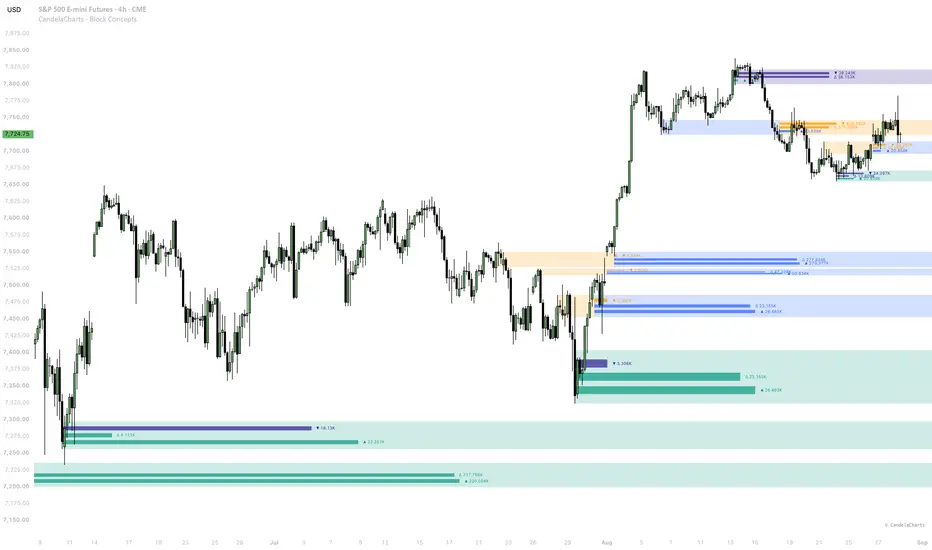
The CandelaCharts - Block Concepts is a powerful toolkit inspired by ICT principles, designed to identify and highlight key areas of potential support and resistance.

It includes the following block types:
The toolkit automatically detects and marks these blocks on the chart, enabling traders to quickly pinpoint critical zones for analysis and decision-making.
📦 Features
The Block Concepts toolkit offers a comprehensive set of features designed to enhance trading precision and decision-making. Key features include:
⚙️ Settings
⚡️ Showcase
All blocks display their volume by default. Additionally, we provide the option to show plain boxes without volume information.
Order Blocks

Breaker Blocks

Suspension Blocks

Rejection Blocks

🚨 Alerts
The indicator provides the ability to set alerts for various significant market events related to its core features.
You can configure alerts for the following key events:
These alerts ensure you remain informed about crucial market conditions, enabling you to react promptly and refine your trading strategy with timely updates.
⚠️ Disclaimer
These tools are exclusively available on the TradingView platform.
Our charting tools are intended solely for informational and educational purposes and should not be regarded as financial, investment, or trading advice. They are not designed to predict market movements or offer specific recommendations. Users should be aware that past performance is not indicative of future results and should not rely on these tools for financial decisions. By using these charting tools, the purchaser agrees that the seller and creator hold no responsibility for any decisions made based on information provided by the tools. The purchaser assumes full responsibility and liability for any actions taken and their consequences, including potential financial losses or investment outcomes that may result from the use of these products.
By purchasing, the customer acknowledges and accepts that neither the seller nor the creator is liable for any undesired outcomes stemming from the development, sale, or use of these products. Additionally, the purchaser agrees to indemnify the seller from any liability. If invited through the Friends and Family Program, the purchaser understands that any provided discount code applies only to the initial purchase of Candela's subscription. The purchaser is responsible for canceling or requesting cancellation of their subscription if they choose not to continue at the full retail price. In the event the purchaser no longer wishes to use the products, they must unsubscribe from the membership service, if applicable.
We do not offer reimbursements, refunds, or chargebacks. Once these Terms are accepted at the time of purchase, no reimbursements, refunds, or chargebacks will be issued under any circumstances.
By continuing to use these charting tools, the user confirms their understanding and acceptance of these Terms as outlined in this disclaimer.
The CandelaCharts - Block Concepts is a powerful toolkit inspired by ICT principles, designed to identify and highlight key areas of potential support and resistance.
It includes the following block types:
- Order Blocks
- Breaker Blocks
- Rejection Blocks
- Suspension Blocks
The toolkit automatically detects and marks these blocks on the chart, enabling traders to quickly pinpoint critical zones for analysis and decision-making.
📦 Features
The Block Concepts toolkit offers a comprehensive set of features designed to enhance trading precision and decision-making. Key features include:
- MTF (Multi-Timeframe Analysis)
- Consequent Encroachment (Mean Line)
- Bias Filtering
- Drawing Modes (Basic, OTE, Quadrants, Profile)
- Block Alignment (Full, Middle, Accurate, Precise, Sequence)
- Threshold Filtering
- Hide Overlap
- Advanced Styling (Borders, Labels)
⚙️ Settings
- Show [Type]: Controls whether specific block types (OB, BB, Rejection, Suspension) are displayed on the chart.
- Timeframe: Specifies the timeframe used to detect each block (MTF).
- Filter Bias: Filter blocks by Bullish, Bearish, or Both.
- Lookback (OB/BB): Determines the detection sensitivity for Order Blocks and Breaker Blocks.
- Alignment: Position Blocks based on various options like Full, Middle, Accurate, Precise, and Sequence.
- Threshold: Filter out non-significant blocks based on their size.
- History: Sets the maximum number of past blocks to display.
- Hide Overlap: Removes overlapping Blocks from view.
- Extend: Extends the block length to the current candle.
- Drawing Mode: Sets the visual style for blocks (Basic, OTE, Quadrants, Profile).
- Show OTE Box: Displays an Optimal Trade Entry zone when OTE mode is active.
- Show Border: Defines the border width and line style.
- Show Mean: Configures the midpoint line's width and style within the Block (Consequent Encroachment - CE).
- Labels: Toggles labels and configures their size, position, and color.
⚡️ Showcase
All blocks display their volume by default. Additionally, we provide the option to show plain boxes without volume information.
Order Blocks
Breaker Blocks
Suspension Blocks
Rejection Blocks
🚨 Alerts
The indicator provides the ability to set alerts for various significant market events related to its core features.
You can configure alerts for the following key events:
- Order Block Formation
- Breaker Block Formation
- Rejection Block Formation
- Suspension Block Formation
These alerts ensure you remain informed about crucial market conditions, enabling you to react promptly and refine your trading strategy with timely updates.
⚠️ Disclaimer
These tools are exclusively available on the TradingView platform.
Our charting tools are intended solely for informational and educational purposes and should not be regarded as financial, investment, or trading advice. They are not designed to predict market movements or offer specific recommendations. Users should be aware that past performance is not indicative of future results and should not rely on these tools for financial decisions. By using these charting tools, the purchaser agrees that the seller and creator hold no responsibility for any decisions made based on information provided by the tools. The purchaser assumes full responsibility and liability for any actions taken and their consequences, including potential financial losses or investment outcomes that may result from the use of these products.
By purchasing, the customer acknowledges and accepts that neither the seller nor the creator is liable for any undesired outcomes stemming from the development, sale, or use of these products. Additionally, the purchaser agrees to indemnify the seller from any liability. If invited through the Friends and Family Program, the purchaser understands that any provided discount code applies only to the initial purchase of Candela's subscription. The purchaser is responsible for canceling or requesting cancellation of their subscription if they choose not to continue at the full retail price. In the event the purchaser no longer wishes to use the products, they must unsubscribe from the membership service, if applicable.
We do not offer reimbursements, refunds, or chargebacks. Once these Terms are accepted at the time of purchase, no reimbursements, refunds, or chargebacks will be issued under any circumstances.
By continuing to use these charting tools, the user confirms their understanding and acceptance of these Terms as outlined in this disclaimer.
Release Note
CandelaCharts - Block Concepts 1.0.1- Add Mitigation Blocks
- Expose more inputs for block coonfiguration

🔵 Tools that give you the edge: candelacharts.com/.
🔵 Join our free discord for updates: candelacharts.com/community
คำจำกัดสิทธิ์ความรับผิดชอบ
ข้อมูลและบทความไม่ได้มีวัตถุประสงค์เพื่อก่อให้เกิดกิจกรรมทางการเงิน, การลงทุน, การซื้อขาย, ข้อเสนอแนะ หรือคำแนะนำประเภทอื่น ๆ ที่ให้หรือรับรองโดย TradingView อ่านเพิ่มเติมใน ข้อกำหนดการใช้งาน