RSI 𝝙 Map
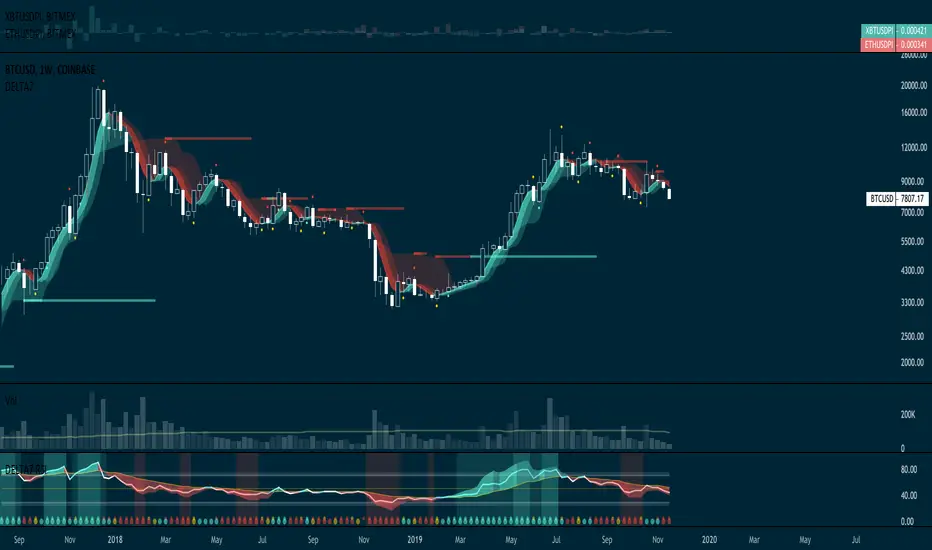
RSI 𝝙 is a full study system of several RSI analysis that can be used on different timeframes and adapt strategy to trending markets or trading ranges.
Default Settings:
RSI: 13
Linear Regression of RSI: 34
Signal RSI: 5
Long RSI: 55
RSI 𝝙 Histogram: Delta between RSI and Long RSI based on Signal RSI_Length.
Activate Vertical Bar Highlights and/or Signal Candle Flags for:
- RSI Oversold/Overbought. (Default: Highlight Bar)
- Signal RSI Oversold/Overbought. (Default: Highlight Bar)
- RSI crossing its Linear Regression . (Default: Signal Candle Flag)
- RSI crossing its Long RSI . (Default: Off)
- Signal RSI crossing its RSI . (Default: Off)
- Signal RSI crossing its Long RSI . (Default: Off)
- RSI 𝝙 Histogram crossing baseline. (Default: Off)
Users can also do extra tuning in Style Section of Format options.
The market behaves differently when the pacing changes, volatility changes and when it trends or when it ranges. Develop an understanding of it with the help of this study.
Avoid risking more than 1% per trade. Be responsible for always making a priority about protecting capital and risk management. Develop emotional control and use this RSI study to develop a more complete trading system without any need for extra indicators other than Price and Volume .
👆active signals:
RSI Overbought/Oversold
Signal RSI Overbought/Oversold
RSI crossing Linear Regression
👆active signals:
RSI Overbought/Oversold
Signal RSI Overbought/Oversold
Signal RSI crossing RSI
Signal RSI crossing Long RSI
👆active signals:
RSI Overbought/Oversold
Signal RSI Overbought/Oversold
RSI crossing Linear Regression
RSI crossing Long RSI
Signal RSI crossing RSI
No changes made into the model. Everything working as it should.
Don't forget that you can activate/deactivate signals that behave better for the timeframe and security you are looking at.
Added Ichimoku Cloud (21,55,144,21) - [Default: Inactive]
Added Hull MA (34) - [Default: Active]
- Changed Delta Histogram model based on Exponential Moving Average to Linear Regression calculation providing slightly better results on D and 240 TF.
Changed Delta Histogram Signal model to be smoothened based on simple moving average instead of linear regression.
This is not a strategy tester as result signals are produced earlier and this script is faster.
Changed RSI EMAs default settings to 13 and 21
These settings offer best equilibrium and symbiotics analysis between the RSI and the Hull.
You would want to have both to more or less agree.
Use this script in combination with RSI Delta script
Adjusted some colors (default setting is configured to dark themes)
3 Optimized strategies that can be selected in Options dialog:
1. Price vs Hull Clouds (Embedded Hulls or Free HullMa+ Indicator)
2. RSI vs EMA Clouds (See Premium RSI Delta Study or Free RSI+ Indicator)
3. RSI Delta Histogram (See RSI Delta Study)
If you get access to this premium study you will also get the RSI Delta one ( available at tradingview.com/script/a6duoZEw-RSI-𝝙-Map/)
Add the ability to activate/deactivate an extra Long Hull (default to 144) - See Indicator Format Dialog for full Options
Extra Options :
- Background Highlights based on RSI oversold/overbought
- Ichimoku Cloud super long Settings (Objective is outline important levels)
- One Simple Moving Average (Default: 21)
- One Extra Hull Moving Average (Default: 144)
Some cosmetic changes were also made to the L-!-S candle flags.
This Indicator is best used in combination with Delta RSI (Premium) and OBV+ Histogram (Free)
If Delta Score is Bullish
If Delta Score is Neutral
If Delta Score is Bearish
Ichimoku Cloud now active by default with settings on 55 Tenkan ,144 Kijun, 233 Senkou B and 34 Displacement.
Also made changes to standard default settings for be more optimized.
All these changes are backtested with impressive results on 4H and D timeframes but ultimately what matters is your entries/exits and how you manage and trail stop losses.
Background RSI OS/OB Highlights now Active by default
Hull and RSI settings also adjust to better fit multiple timeframes and facility human analysis (rather than computed backtesting)
A reminder that you can also enable/disable background highlights and other extra studies like the Ichimoku Cloud and a set of 2 SMA or EMA.
Introduced Background Bands active by default.
( — ) Means stay Flat (or take profits, or simply adjust to tighter stop loss). We can also use location of this flag define the stop.
( • ) Means trend Bullish or Bearish. This triggers bias to place an Long/Short entry. We can place the stop based on previous — or instead move the stop to where the signal show up.
- include Wide Ichimoku Cloud active by default in Cloud Only Mode (to activate Tenkan, Kijun snd Chikou check options)
- Delta Clouds inactive by default (can be activated in options)
Now you have total 2 individual strategies that can be combined into a 3rd one.
Delta Bands still the default with solid back test results on multiple mainframes above 4H.
Removed Delta Clouds. They look great on chart but figure out they bring a lot of doubt during trading.
If you looking for health of the trend just look at the color of the Delta Band Linear Regression Moving Average and ideally weather they form a U/V-shape (up or down). Or simply switch to 4x higher time-frame.
You can also switch your RSI Delta to Histogram-Only mode and you can measure the health of the momentum and trend and have cleaner divergences that standard RSI doesn't show.
The idea is to streamline analysis of the Delta Bands with the analysis provided by the Delta RSI. These two should be working together more effective analysis and trend confluence.
The Ichimoku Cloud is active by default in Cloud Only mode. This removes a bit of clutter out of the chart and just show straight away the very long trends relative to price. They also serve great function of outlining great important 50% levels just cycle between D, W and M to identify straight lines in the clouds as they give levels of interest for your supply/demand basis analysis.
After publishing this article the following changes were made:
Delta Bands were changed from 14 instead of 21. The reason behind this change is because it offer better setups over time and it makes sense both RSI and the Bands taking data from same number of candles so you can do multi-time-frame analysis with a solid basis and consistency.
The RSI Delta oscillator now has both Bands Scoring and RSI Scoring active by default. By having this scoring included you get to see on chart one more sensitive and this one taking in consideration the health of momentum which can clear your judgment of any doubts about sticking to a current position.
The Ichimoku Cloud in Cloud-Only mode (default) now has a displacement of 1 and full mode 14.
Tutorial: telegra.ph/VSH-RSI-Delta-07-17
tradingview.com/chart/ctcSFAgA/
Cloud Senkou A line now visible
LOVE RSI!
Ichimoku Cloud now is SD Cloud (a simplified version that only show a thinner cloud based on Base Length and with Displacement of only 1)
This approach allow to simplify the analysis and promote switch between different time-frames to find suitable opportunities.
For position trade Cloud Strategy is best. RSI strategy is good for swings or position.
You should observe the asset you trading which ones are offering solid streaks as well less fake-outs as possible.
Option to automatically apply Higher Time frame (one above Intraday -> D -> W -> M -> 4M)
For simplicity reduce strategy choice to 3 (plus Higher Time-frame ones. A total of 6)
SD Clouds replaced with Delta Cloud
• Tunning of color scheme of EMA/SMA cloud
+ SD Cloud replaced with Kurutoga Cloud (active by default)
+ Delta Cloud is now formed by the Delta Bands + Kurutoga Leading Line (active by default)
+ Delta Scoring applied to candles now are disabled by default. Turn on in options.
+ Info chart include more descriptive legends.
• Changed order of options.
• Default settings now optimized for cleaner or at least least noisy while providing utility. (It's the one I frequently use, see screen bellow).
Whenever necessary you can activate other options as necessary for other visual information.
• Added ability to only see Delta Cloud and DK Cloud independently from Delta Price MA and Kurutoga Cloud.
• Some slight tweaks in coloring.
Default View
All clouds active
• Update in Momentum Background Highlight model and removed it from scoring options
• Changes and default settings.
• re-organized default options.
• Some transparency tweaking
• Added Price-Delta-2 Scoring (Same as Base Scoring in RSI Delta Oscillator)
• Some changes to default settings
• Transparency tuned up.
• Renamed my system to name to DELTA7 and DELTA7 RSI
• re-added momentum scoring option (alerts can now be triggered with it)
• default scoring back to RSI-Delta.
• Some Visual/Cosmetic Tweaks
• Scoring is Active by default in flag mode.
สคริปต์แบบเฉพาะผู้ได้รับเชิญเท่านั้น
เฉพาะผู้ใช้งานที่ผู้เขียนอนุมัตเท่านั้นจึงจะสามารถเข้าถึงสคริปต์นี้ได้ คุณจะต้องขอและได้รับอนุญาตก่อนใช้งาน ซึ่งโดยทั่วไปจะได้รับอนุญาตหลังจากชำระเงินแล้ว สำหรับรายละเอียดเพิ่มเติม โปรดทำตามคำแนะนำของผู้เขียนด้านล่าง หรือติดต่อ D7R โดยตรง
TradingView ไม่แนะนำให้จ่ายเงินหรือใช้สคริปต์ เว้นแต่คุณจะเชื่อถือผู้เขียนและเข้าใจวิธีการทำงานของสคริปต์นั้นอย่างถ่องแท้ คุณยังสามารถหาทางเลือกแบบโอเพนซอร์สฟรีได้ใน สคริปต์ชุมชนของเรา
คำแนะนำของผู้เขียน

คำจำกัดสิทธิ์ความรับผิดชอบ
สคริปต์แบบเฉพาะผู้ได้รับเชิญเท่านั้น
เฉพาะผู้ใช้งานที่ผู้เขียนอนุมัตเท่านั้นจึงจะสามารถเข้าถึงสคริปต์นี้ได้ คุณจะต้องขอและได้รับอนุญาตก่อนใช้งาน ซึ่งโดยทั่วไปจะได้รับอนุญาตหลังจากชำระเงินแล้ว สำหรับรายละเอียดเพิ่มเติม โปรดทำตามคำแนะนำของผู้เขียนด้านล่าง หรือติดต่อ D7R โดยตรง
TradingView ไม่แนะนำให้จ่ายเงินหรือใช้สคริปต์ เว้นแต่คุณจะเชื่อถือผู้เขียนและเข้าใจวิธีการทำงานของสคริปต์นั้นอย่างถ่องแท้ คุณยังสามารถหาทางเลือกแบบโอเพนซอร์สฟรีได้ใน สคริปต์ชุมชนของเรา