XAUUSD EMA + Stochastic Signal Indicator
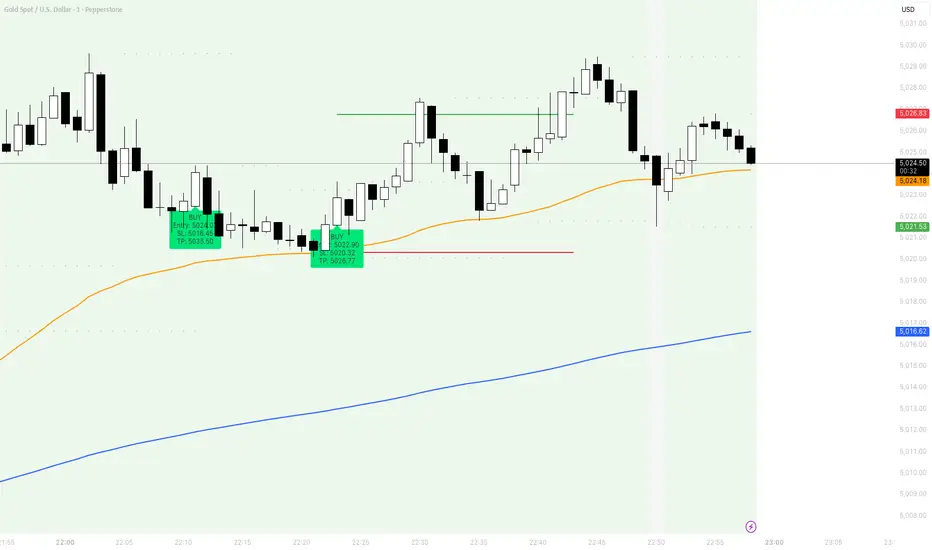
Use it like this:
Step 1
Paste into TradingView Pine Editor.
Step 2
Click Add to chart.
Step 3
Use it on XAUUSD 1-minute.
Step 4
Check signal validity mechanically:
Buy only when price is above both EMAs
Sell only when price is below both EMAs
Ignore all signals when price is between EMAs
Step 5
Adjust the two inputs that matter most:
Stop Buffer (ticks)
Swing Pivot Left/Right Bars
Best starting point:
Swing Pivot Left = 3
Swing Pivot Right = 3
Stop Buffer = 20 ticks
Step 1
Paste into TradingView Pine Editor.
Step 2
Click Add to chart.
Step 3
Use it on XAUUSD 1-minute.
Step 4
Check signal validity mechanically:
Buy only when price is above both EMAs
Sell only when price is below both EMAs
Ignore all signals when price is between EMAs
Step 5
Adjust the two inputs that matter most:
Stop Buffer (ticks)
Swing Pivot Left/Right Bars
Best starting point:
Swing Pivot Left = 3
Swing Pivot Right = 3
Stop Buffer = 20 ticks

คำจำกัดสิทธิ์ความรับผิดชอบ
ข้อมูลและบทความไม่ได้มีวัตถุประสงค์เพื่อก่อให้เกิดกิจกรรมทางการเงิน, การลงทุน, การซื้อขาย, ข้อเสนอแนะ หรือคำแนะนำประเภทอื่น ๆ ที่ให้หรือรับรองโดย TradingView อ่านเพิ่มเติมใน ข้อกำหนดการใช้งาน
คำจำกัดสิทธิ์ความรับผิดชอบ
ข้อมูลและบทความไม่ได้มีวัตถุประสงค์เพื่อก่อให้เกิดกิจกรรมทางการเงิน, การลงทุน, การซื้อขาย, ข้อเสนอแนะ หรือคำแนะนำประเภทอื่น ๆ ที่ให้หรือรับรองโดย TradingView อ่านเพิ่มเติมใน ข้อกำหนดการใช้งาน