ที่อัปเดต:
Daily ATR 2 and 10 Percent Value
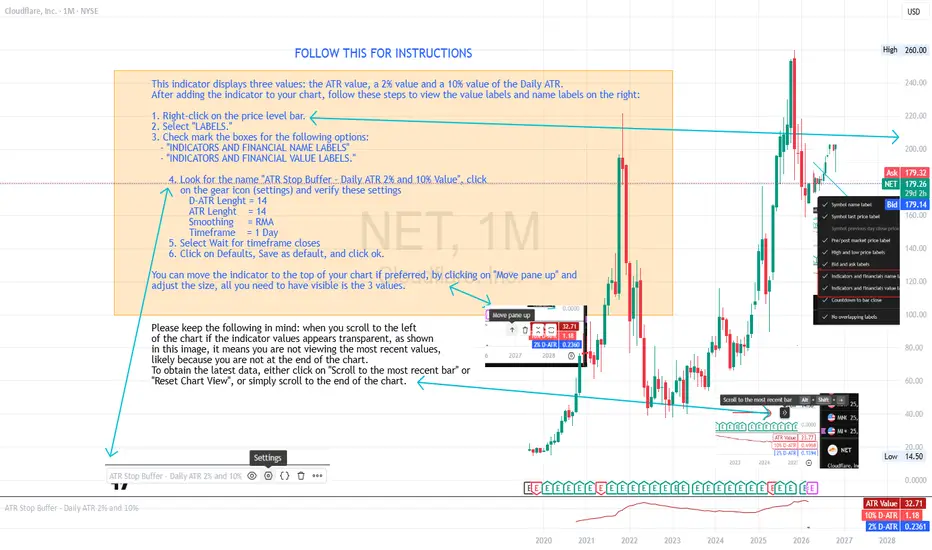
This indicator shows three values: the main ATR value, a 2% value,
and a 10% Value of the Daily ATR.
After you have added the indicator to your chart, follow these steps
to be able to see the values and labels on the right.
1. Right-click on the price level bar or click the gear icon at the bottom
2. Click on LABELS
3. Select with a check mark the following two
INDICATORS AND FINANCIAL NAME LABELS
and INDICATORS AND FINANCIAL VALUE LABELS
4. Look for D-ATR % Value, click on the gear icon and verify these settings
- D-ATR Lenght = 14
- ATR Lenght = 14
- Smoothing = RMA
- Timeframe = 1 Day
5. Select Wait for timeframe closes
6. Click on Defaults, Save as default, and click ok.
You can move the indicator to the top of your chart if preferred, by clicking
on Move pane up.
Slightly modifications from other indicators.
Release Note
This indicator displays three values: the ATR value, a 2% value and a 10% value of the Daily ATR. After adding the indicator to your chart, follow these steps to view the value labels and name labels on the right:
1. Right-click on the price level bar.
2. Select "LABELS."
3. Check mark the boxes for the following options:
- "INDICATORS AND FINANCIAL NAME LABELS"
- "INDICATORS AND FINANCIAL VALUE LABELS."
4. Look for the name "ATR Stop Buffer - Daily ATR 2% and 10% Value", click
on the gear icon (settings) and verify these settings
D-ATR Lenght = 14
ATR Lenght = 14
Smoothing = RMA
Timeframe = 1 Day
5. Select Wait for timeframe closes
6. Click on Defaults, Save as default, and click ok.
You can move the indicator to the top of your chart if preferred, by clicking on "Move pane up" and
adjust the size, all you need to have visible is the 3 values.
Release Note
Updated to Version 6 of PineScript
คำจำกัดสิทธิ์ความรับผิดชอบ
ข้อมูลและบทความไม่ได้มีวัตถุประสงค์เพื่อก่อให้เกิดกิจกรรมทางการเงิน, การลงทุน, การซื้อขาย, ข้อเสนอแนะ หรือคำแนะนำประเภทอื่น ๆ ที่ให้หรือรับรองโดย TradingView อ่านเพิ่มเติมใน ข้อกำหนดการใช้งาน
คำจำกัดสิทธิ์ความรับผิดชอบ
ข้อมูลและบทความไม่ได้มีวัตถุประสงค์เพื่อก่อให้เกิดกิจกรรมทางการเงิน, การลงทุน, การซื้อขาย, ข้อเสนอแนะ หรือคำแนะนำประเภทอื่น ๆ ที่ให้หรือรับรองโดย TradingView อ่านเพิ่มเติมใน ข้อกำหนดการใช้งาน