ที่อัปเดต:
Helios Multi-Session ORB / IB + VWAP + ATR
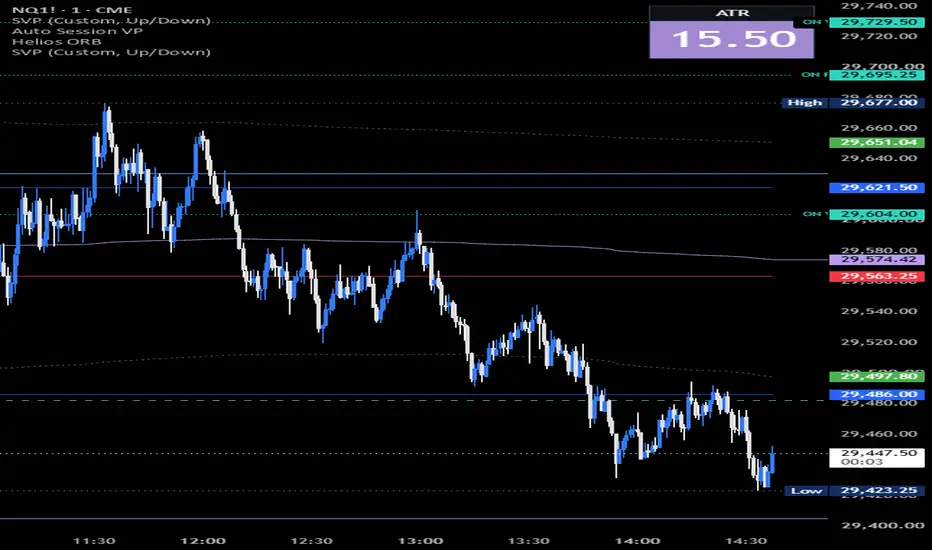
# Helios — Multi-Session ORB / IB + VWAP + ATR
**Helios** combines multi-session Opening Ranges (ORB), Initial Balance (IB), session-anchored VWAPs, standard deviation bands, and an ATR volatility dashboard into one customizable indicator.
Designed for intraday traders, Helios provides a clean way to monitor key session price levels, evaluate price relative to volume-weighted averages, and assess current market volatility without overcrowding the chart.
## Key Features
**1. Multi-Session Opening Ranges (ORB) & Initial Balance (IB)**
Automatically plots the high and low of opening ranges across 14 configurable trading sessions and market events.
Supported sessions include:
- **Asia:** Globex, Sydney, Tokyo, and China Cash Open
- **Europe:** Frankfurt, London, and London Funds
- **United States:** Dealer Positioning, US Economic Data, NY Momentum, NYSE Open, Post-Lunch, and Power Hour
- **Initial Balance:** New York Initial Balance (IB)
Each session supports independently selectable **5, 15, 30, or 60-minute opening ranges**.
Opening ranges are calculated using 1-minute data for greater precision, even when viewing higher intraday timeframes.
Ranges become visible only after their formation window completes, preventing unfinished ranges from being displayed as established levels.
**2. Intelligent Range Extensions**
Helios keeps the chart organized by automatically managing historical and active opening ranges.
- The most recently completed opening range extends forward with price.
- Previous ranges stop extending when the next enabled opening range appears.
- Historical ranges remain visible for context.
- Optional formation boxes highlight each opening range.
- Customizable high, low, midpoint, and session labels.
- Optional cutoff at the 16:00 New York close.
This makes it easier to identify potential support, resistance, breakout, and rejection levels throughout the trading day.
**3. Dual Session-Anchored VWAP**
Helios includes two independently configurable Volume Weighted Average Prices:
- **Overnight VWAP:** Anchored at 18:00 New York time.
- **Regular Trading Hours VWAP:** Anchored at 09:30 New York time.
The Overnight VWAP can optionally continue through the regular session until 16:00 ET.
Both VWAPs support configurable standard deviation bands:
- ±1σ
- ±2σ
- ±3σ
Optional shading provides a visual representation of price dispersion around each VWAP.
These levels can help traders evaluate intraday price positioning, potential mean-reversion areas, and momentum continuation.
**4. ATR Volatility Dashboard**
An integrated Average True Range (ATR) dashboard provides a quick overview of current market volatility.
Volatility is classified into four regimes:
- **Low:** Relatively compressed price movement
- **Normal:** Typical volatility conditions
- **Elevated:** Increased volatility and larger price fluctuations
- **Extreme:** Exceptionally high volatility conditions
The dashboard supports automatic instrument-specific thresholds for NQ/MNQ, ES/MES, YM/MYM, and GC/MGC, along with supported indices and CFDs.
Additional features include:
- Custom ATR periods
- Automatic or manual volatility thresholds
- Color-coded volatility regimes
- Configurable dashboard position
- Simple, Standard, and Detailed display modes
- Futures contract dollar-per-point and ATR-based dollar-range information
The ATR dashboard is informational only and does not alter the opening ranges or generate trading signals.
## How to Use Helios
**Opening Range Breakouts:** Identify potential directional opportunities when price breaks above or below a completed session's opening range.
**VWAP Confluence:** Evaluate whether opening range breakouts align with the current session's VWAP positioning.
**Mean Reversion:** Monitor reactions near VWAP standard deviation bands and established session highs or lows.
**Volatility Awareness:** Use the ATR dashboard to contextualize price movement and adjust risk management to prevailing volatility conditions.
**Cross-Session Analysis:** Compare price reactions around opening ranges established during Asian, European, and US trading hours.
## Customization
All sessions can be individually enabled or disabled. Traders can customize range durations, line extensions, colors, labels, formation boxes, VWAPs, standard deviation bands, and ATR display settings to suit their preferred chart layout.
## Important Notes
- This is a charting and market-analysis indicator, not an automated trading strategy.
- Helios does not automatically execute trades or generate buy/sell signals.
- Opening ranges use available 1-minute intrabar data, subject to TradingView's historical data limits and the selected chart timeframe.
- VWAP calculations depend on the instrument's available volume data.
- Session scheduling uses the relevant market's local time zone, accounting for applicable daylight saving changes.
**Helios is built around three core elements: session structure, volume-weighted price positioning, and volatility.**
The goal is to provide traders with a streamlined view of important intraday reference levels while keeping price action at the center of every decision.
*Disclaimer: This indicator is provided for educational and informational purposes only. It does not constitute financial advice. Trading involves risk, and no indicator guarantees profitable results.*
---
Courtesy of David
**Helios** combines multi-session Opening Ranges (ORB), Initial Balance (IB), session-anchored VWAPs, standard deviation bands, and an ATR volatility dashboard into one customizable indicator.
Designed for intraday traders, Helios provides a clean way to monitor key session price levels, evaluate price relative to volume-weighted averages, and assess current market volatility without overcrowding the chart.
## Key Features
**1. Multi-Session Opening Ranges (ORB) & Initial Balance (IB)**
Automatically plots the high and low of opening ranges across 14 configurable trading sessions and market events.
Supported sessions include:
- **Asia:** Globex, Sydney, Tokyo, and China Cash Open
- **Europe:** Frankfurt, London, and London Funds
- **United States:** Dealer Positioning, US Economic Data, NY Momentum, NYSE Open, Post-Lunch, and Power Hour
- **Initial Balance:** New York Initial Balance (IB)
Each session supports independently selectable **5, 15, 30, or 60-minute opening ranges**.
Opening ranges are calculated using 1-minute data for greater precision, even when viewing higher intraday timeframes.
Ranges become visible only after their formation window completes, preventing unfinished ranges from being displayed as established levels.
**2. Intelligent Range Extensions**
Helios keeps the chart organized by automatically managing historical and active opening ranges.
- The most recently completed opening range extends forward with price.
- Previous ranges stop extending when the next enabled opening range appears.
- Historical ranges remain visible for context.
- Optional formation boxes highlight each opening range.
- Customizable high, low, midpoint, and session labels.
- Optional cutoff at the 16:00 New York close.
This makes it easier to identify potential support, resistance, breakout, and rejection levels throughout the trading day.
**3. Dual Session-Anchored VWAP**
Helios includes two independently configurable Volume Weighted Average Prices:
- **Overnight VWAP:** Anchored at 18:00 New York time.
- **Regular Trading Hours VWAP:** Anchored at 09:30 New York time.
The Overnight VWAP can optionally continue through the regular session until 16:00 ET.
Both VWAPs support configurable standard deviation bands:
- ±1σ
- ±2σ
- ±3σ
Optional shading provides a visual representation of price dispersion around each VWAP.
These levels can help traders evaluate intraday price positioning, potential mean-reversion areas, and momentum continuation.
**4. ATR Volatility Dashboard**
An integrated Average True Range (ATR) dashboard provides a quick overview of current market volatility.
Volatility is classified into four regimes:
- **Low:** Relatively compressed price movement
- **Normal:** Typical volatility conditions
- **Elevated:** Increased volatility and larger price fluctuations
- **Extreme:** Exceptionally high volatility conditions
The dashboard supports automatic instrument-specific thresholds for NQ/MNQ, ES/MES, YM/MYM, and GC/MGC, along with supported indices and CFDs.
Additional features include:
- Custom ATR periods
- Automatic or manual volatility thresholds
- Color-coded volatility regimes
- Configurable dashboard position
- Simple, Standard, and Detailed display modes
- Futures contract dollar-per-point and ATR-based dollar-range information
The ATR dashboard is informational only and does not alter the opening ranges or generate trading signals.
## How to Use Helios
**Opening Range Breakouts:** Identify potential directional opportunities when price breaks above or below a completed session's opening range.
**VWAP Confluence:** Evaluate whether opening range breakouts align with the current session's VWAP positioning.
**Mean Reversion:** Monitor reactions near VWAP standard deviation bands and established session highs or lows.
**Volatility Awareness:** Use the ATR dashboard to contextualize price movement and adjust risk management to prevailing volatility conditions.
**Cross-Session Analysis:** Compare price reactions around opening ranges established during Asian, European, and US trading hours.
## Customization
All sessions can be individually enabled or disabled. Traders can customize range durations, line extensions, colors, labels, formation boxes, VWAPs, standard deviation bands, and ATR display settings to suit their preferred chart layout.
## Important Notes
- This is a charting and market-analysis indicator, not an automated trading strategy.
- Helios does not automatically execute trades or generate buy/sell signals.
- Opening ranges use available 1-minute intrabar data, subject to TradingView's historical data limits and the selected chart timeframe.
- VWAP calculations depend on the instrument's available volume data.
- Session scheduling uses the relevant market's local time zone, accounting for applicable daylight saving changes.
**Helios is built around three core elements: session structure, volume-weighted price positioning, and volatility.**
The goal is to provide traders with a streamlined view of important intraday reference levels while keeping price action at the center of every decision.
*Disclaimer: This indicator is provided for educational and informational purposes only. It does not constitute financial advice. Trading involves risk, and no indicator guarantees profitable results.*
---
Courtesy of David
Release Note
- US Economic Data MACRO high/low- Changed VWAP to work with either dashed or solid so you can run both in NY
- Added box removal from unused space on compact ATR and .00 so the box size stays consistent
Release Note
Added the four lines to helios-orb-ib.pine: previous-day RTH high/low (PD H / PD L) and overnight high/low (ON H / ON L), each with its own customizable label. What the levels mean:
- PD H / PD L: the high and low of the 09:30–16:00 ET session. They're locked in when RTH closes at 16:00 and stay on the chart until the next RTH session finishes. During today's RTH they show yesterday's levels.
- ON H / ON L: the high and low from 18:00 ET to 09:30 ET. They are replaced when the next overnight session starts at 18:00.
Release Note
- Added an "Extend to Price Scale" toggle to both the Overnight and the RTH VWAP settings groups (Off by default).- The key levels in now only show up once their session has closed.
Release Note
New settings are added to the two VWAP groups:- The band colours that were worked out from the VWAP line's colour are removed.
- The 12 band plots now use the new width and line-style settings.

คำจำกัดสิทธิ์ความรับผิดชอบ
ข้อมูลและบทความไม่ได้มีวัตถุประสงค์เพื่อก่อให้เกิดกิจกรรมทางการเงิน, การลงทุน, การซื้อขาย, ข้อเสนอแนะ หรือคำแนะนำประเภทอื่น ๆ ที่ให้หรือรับรองโดย TradingView อ่านเพิ่มเติมใน ข้อกำหนดการใช้งาน
คำจำกัดสิทธิ์ความรับผิดชอบ
ข้อมูลและบทความไม่ได้มีวัตถุประสงค์เพื่อก่อให้เกิดกิจกรรมทางการเงิน, การลงทุน, การซื้อขาย, ข้อเสนอแนะ หรือคำแนะนำประเภทอื่น ๆ ที่ให้หรือรับรองโดย TradingView อ่านเพิ่มเติมใน ข้อกำหนดการใช้งาน