Volume Profile Sniper
► Overview
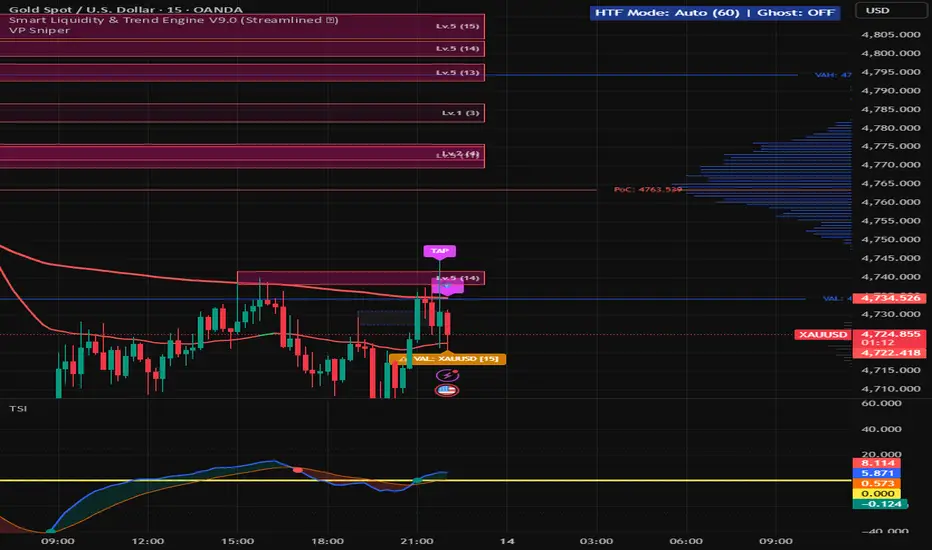
The Volume Profile is a staple tool for order flow and support/resistance traders, but manually monitoring price action around key volume nodes can be tedious. The Volume Profile Sniper (VP Sniper) is designed to bridge the gap between passive level-drawing and active execution. It calculates a dynamic Volume Profile and introduces a unique Proximity Radar System that alerts you exactly when the price enters a micro-zone around key liquidity levels.
► What Makes This Script Original?
Standard Volume Profile indicators simply draw lines on the chart. Traders often miss entries because the price misses the exact line by a few ticks.
The originality of the VP Sniper lies in its Proximity Tolerance (%) logic. Instead of requiring a strict, exact price cross, the script builds an invisible percentage-based "kill zone" (tolerance band) around the Point of Control (PoC), Value Area High (VAH), and Value Area Low (VAL). When the price enters this specific percentage buffer, the script proactively prints visual "Sniper" tags on the chart (⚠️ VAL, ⚠️ VAH, 🎯 PoC) and fires alerts. This proactive approach allows traders to prepare for an entry before or as the level is tested, rather than after the fact.
► How It Works (Underlying Concepts)
Volume Binning: The script scans historical bars based on either a fixed lookback depth or the visible chart range. It determines the highest and lowest prices within that window and divides the range into user-defined price rows (bins). It then distributes the volume into these bins. You can choose to calculate 'Both' volumes, or isolate 'Bullish' / 'Bearish' volumes to see where buyers or sellers dominated.
Value Area Calculation: The script first identifies the Point of Control (PoC) – the price bin with the highest volume. To calculate the Value Area (VA), it uses an iterative outward expansion algorithm. It starts at the PoC and compares the volume of the bins immediately above and below it, adding the larger volume to a running total until it captures the target percentage of the total volume (default is 68%, representing one standard deviation in a normal distribution).
Radar Alert Logic: For the sniper alerts, the script calculates dynamic upper and lower boundaries: Upper Bound = Level * (1 + Tolerance %) and Lower Bound = Level * (1 - Tolerance %). If the current bar's high or low penetrates this specific math band, the alert is triggered.
► How to Use It in Trading
Reversion Trades (Fading the Edges): In a ranging market, the Value Area represents fair value. Traders can use the Radar alerts at VAH (Value Area High) to look for short opportunities (price is overvalued) and VAL (Value Area Low) for long opportunities (price is undervalued). The proximity alert ensures you catch the wick rejections.
Breakout & Retest: If price breaks strongly out of the Value Area, traders can wait for the Radar to alert them on a pullback retest of the VAH or VAL from the outside, turning former resistance into support (or vice versa).
The PoC Magnet: The PoC acts as a center of gravity. If you are in a trade from the VAL or VAH, the PoC alert serves as an excellent dynamic Take-Profit (TP) zone, as price naturally gravitates back to high-volume nodes.
► Key Settings
Lookback & Bins: Choose between Fixed lookback depth or Visible Range. Adjust the number of volume bars (bins) for higher or lower resolution.
Volume Type: Filter the profile by Bullish, Bearish, or Total volume.
Sniper Entry Settings: Enable/disable the radar. Tweak the Proximity Tolerance (%) (e.g., 0.1% or 0.05%) based on the volatility of the asset you are trading. Lower timeframes or less volatile assets require a tighter tolerance.
(Disclaimer: This script is for educational and analytical purposes only. Past performance does not guarantee future results. Always use proper risk management.)
The Volume Profile is a staple tool for order flow and support/resistance traders, but manually monitoring price action around key volume nodes can be tedious. The Volume Profile Sniper (VP Sniper) is designed to bridge the gap between passive level-drawing and active execution. It calculates a dynamic Volume Profile and introduces a unique Proximity Radar System that alerts you exactly when the price enters a micro-zone around key liquidity levels.
► What Makes This Script Original?
Standard Volume Profile indicators simply draw lines on the chart. Traders often miss entries because the price misses the exact line by a few ticks.
The originality of the VP Sniper lies in its Proximity Tolerance (%) logic. Instead of requiring a strict, exact price cross, the script builds an invisible percentage-based "kill zone" (tolerance band) around the Point of Control (PoC), Value Area High (VAH), and Value Area Low (VAL). When the price enters this specific percentage buffer, the script proactively prints visual "Sniper" tags on the chart (⚠️ VAL, ⚠️ VAH, 🎯 PoC) and fires alerts. This proactive approach allows traders to prepare for an entry before or as the level is tested, rather than after the fact.
► How It Works (Underlying Concepts)
Volume Binning: The script scans historical bars based on either a fixed lookback depth or the visible chart range. It determines the highest and lowest prices within that window and divides the range into user-defined price rows (bins). It then distributes the volume into these bins. You can choose to calculate 'Both' volumes, or isolate 'Bullish' / 'Bearish' volumes to see where buyers or sellers dominated.
Value Area Calculation: The script first identifies the Point of Control (PoC) – the price bin with the highest volume. To calculate the Value Area (VA), it uses an iterative outward expansion algorithm. It starts at the PoC and compares the volume of the bins immediately above and below it, adding the larger volume to a running total until it captures the target percentage of the total volume (default is 68%, representing one standard deviation in a normal distribution).
Radar Alert Logic: For the sniper alerts, the script calculates dynamic upper and lower boundaries: Upper Bound = Level * (1 + Tolerance %) and Lower Bound = Level * (1 - Tolerance %). If the current bar's high or low penetrates this specific math band, the alert is triggered.
► How to Use It in Trading
Reversion Trades (Fading the Edges): In a ranging market, the Value Area represents fair value. Traders can use the Radar alerts at VAH (Value Area High) to look for short opportunities (price is overvalued) and VAL (Value Area Low) for long opportunities (price is undervalued). The proximity alert ensures you catch the wick rejections.
Breakout & Retest: If price breaks strongly out of the Value Area, traders can wait for the Radar to alert them on a pullback retest of the VAH or VAL from the outside, turning former resistance into support (or vice versa).
The PoC Magnet: The PoC acts as a center of gravity. If you are in a trade from the VAL or VAH, the PoC alert serves as an excellent dynamic Take-Profit (TP) zone, as price naturally gravitates back to high-volume nodes.
► Key Settings
Lookback & Bins: Choose between Fixed lookback depth or Visible Range. Adjust the number of volume bars (bins) for higher or lower resolution.
Volume Type: Filter the profile by Bullish, Bearish, or Total volume.
Sniper Entry Settings: Enable/disable the radar. Tweak the Proximity Tolerance (%) (e.g., 0.1% or 0.05%) based on the volatility of the asset you are trading. Lower timeframes or less volatile assets require a tighter tolerance.
(Disclaimer: This script is for educational and analytical purposes only. Past performance does not guarantee future results. Always use proper risk management.)

คำจำกัดสิทธิ์ความรับผิดชอบ
ข้อมูลและบทความไม่ได้มีวัตถุประสงค์เพื่อก่อให้เกิดกิจกรรมทางการเงิน, การลงทุน, การซื้อขาย, ข้อเสนอแนะ หรือคำแนะนำประเภทอื่น ๆ ที่ให้หรือรับรองโดย TradingView อ่านเพิ่มเติมใน ข้อกำหนดการใช้งาน
คำจำกัดสิทธิ์ความรับผิดชอบ
ข้อมูลและบทความไม่ได้มีวัตถุประสงค์เพื่อก่อให้เกิดกิจกรรมทางการเงิน, การลงทุน, การซื้อขาย, ข้อเสนอแนะ หรือคำแนะนำประเภทอื่น ๆ ที่ให้หรือรับรองโดย TradingView อ่านเพิ่มเติมใน ข้อกำหนดการใช้งาน