OPEN-SOURCE SCRIPT
Edo S/R Zones
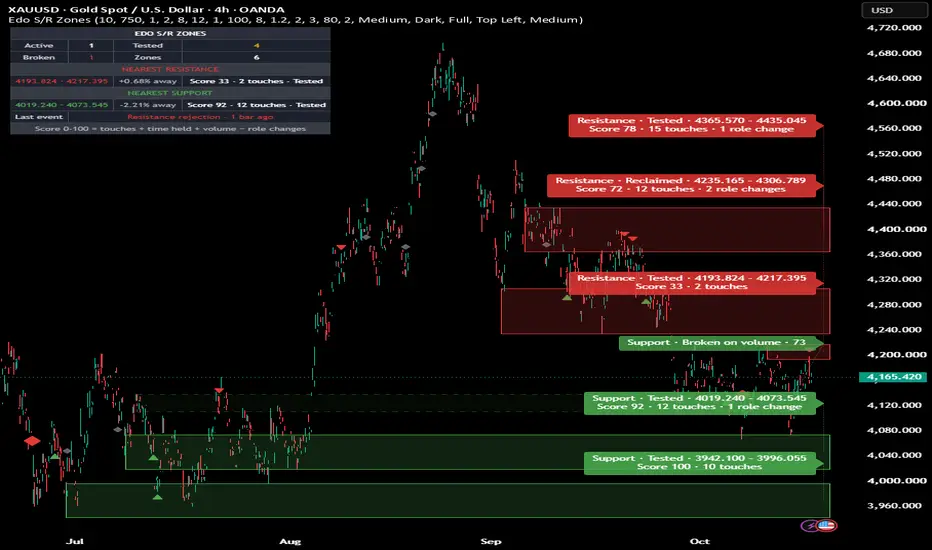
Edo S/R Zones — Support and Resistance Zones from Confirmed Pivots, Fitted to Volume, Scored 0-100 and Tracked as Active, Tested, Reclaimed or Broken


Support and resistance are the oldest tool in technical analysis and also the most subjective: two traders in front of the same chart rarely draw the same levels. Edo S/R Zones removes the guesswork. It takes the pivots price itself has confirmed, groups the ones that fall at the same height into a single zone sized by volatility, places the inner edge of each new zone at the nearest volume node, scores every zone from 0 to 100 and follows it bar by bar as Active, Tested, Reclaimed or Broken.
Each zone is drawn as a box projected to the right of the last bar, red while it sits above price as resistance and green while it sits below price as support. A two-line label in the right margin reads, for example, Resistance · Tested · 745.43 – 747.83 / Score 44 · 3 touches. A compact panel counts the zones by state, shows the nearest resistance above and the nearest support below with the percentage distance to each, and recalls the last event. Everything is built from confirmed pivots and every state, mark, score and alert is decided on the close of the bar, so the indicator does not repaint. It is fully self-contained: zones, scores and states are derived from the price series alone.
HOW A ZONE IS BORN
A pivot high is a bar whose high is the highest of a fixed number of bars on each side; a pivot low is the mirror. When a pivot is confirmed, the indicator builds a candidate zone from the wick towards the inside. With Volume Node Snap on, the volume of the last closed bars (Volume Profile Bars, 100 by default) is spread over 24 price rows within a distance measured in ATR, and the zone runs from the wick to the nearest high-volume node: a row that is a local peak and holds at least 1.3 times the average row. At a support the volume of bullish bars counts double; at a resistance, the volume of bearish bars. The thickness is clamped between a quarter of an ATR and the cluster tolerance. Without a node, without volume data or with the snap at 0, the zone runs from the wick to the body of the pivot bar.
Before drawing it, the indicator checks whether the pivot fits an existing live zone: within one ATR-based tolerance of its centre, or overlapping it, or sitting almost against it. If it fits, the existing zone absorbs the pivot, adds a touch and widens to include it as long as it stays under twice the tolerance. If it does not fit, a new zone is born with a single touch. Broken zones are only checked second, and hitting one reactivates it. By default a zone becomes visible once it has two touches.
THE SCORE
Every zone carries a 0-100 score, updated on bar close. Touches weigh 50 points: clustered pivots plus passed tests, with six or more earning the full block. Time held weighs 25 points, measured against half the configured lifetime. Volume weighs 25 points: the average volume of the pivot bars against the 50-bar average, with twice the average earning the full block. On instruments that publish no volume, those 25 points are redistributed between touches and time. Then Role Change Penalty takes 8 points off for every time the zone has been broken, up to 3 breaks, so a level that has already given way ranks below one that never did.
THE STATES
A zone is Active while price has not yet put it to the test. It becomes Tested when a bar enters the zone and closes back on the same side it came from, and every test adds a touch. It becomes Broken when a bar closes on the other side; the close is required, not the wick. A break on a bar trading at least 1.2 times the 50-bar average volume is shown as Broken on volume. A broken zone stops extending, turns dashed and faded and stays on the chart as a reference. If a confirmed pivot later turns inside its tolerance without fitting any live zone, the zone returns to life with its role inverted and is shown as Reclaimed, keeping its history and its role change count.
DYNAMIC ROLE
A zone's role is decided by where price closes relative to it: above the zone it is a support and paints green, below it a resistance and paints red. While price trades inside the zone it keeps the role of the side it came from, still under test, until a close on the other side breaks it. This reproduces the classic support-resistance flip.
REJECTIONS AND RETESTS (CONTEXT, NOT ENTRIES)
A triangle marks a rejection when a bar enters one of the nearest zones, closes back on the side it came from and leaves a wick into the zone of at least half its range. Only the zones nearest to the close count (Rejection Signals, 2 by default), so far zones add no markers. A diamond marks the first time price comes back into a broken zone and closes on the side it broke to: coloured and larger when that bar traded at least 1.2 times the 50-bar average volume, small and grey without volume. Min Bars Between Markers (3) keeps a zone tested on several bars in a row from filling the chart; the panel and the alerts keep every event. These marks describe how price behaved at a level. They are context, not entry signals: tested as stand-alone entries, the data show no edge.
LABELS
All labels end at the right edge, at most 8 bars to the right of the last bar so they stay inside the default right margin, and are stacked from the top so they never cover each other. Show Zone Prices adds the price range to each live label. A broken zone carries a single line and a dotted connector, and only the most recently broken zones keep a label (Labels on Broken Zones, 2 by default). Zone Opacity defaults to 80 so wicks stay visible inside the boxes. Extend Zones still controls how far the boxes project. A zone beyond the visible candles keeps its label with an arrow towards it (▲ above, ▼ below), only the nearest one on each side, and when there are more labels than fit the zones farthest from the price lose their text first; they stay on the panel and in the alerts. In rare cases a label can still partly cover a rejection triangle or a retest diamond: the tooltip of the zone and the panel give the same information.
ZONE LIFETIME AND LIMIT
Every zone remembers the last bar price touched it. If more bars than the configured lifetime pass without contact (750 by default: about three years on the daily chart), the zone is retired whatever its score. The indicator keeps at most eight zones; when room is needed it removes the oldest broken zone first and, if there is none, the live zone that has gone longest without a touch. Pruning is never by score.
INFORMATION PANEL
Panel Detail has two modes. Full shows the count of zones by state, the nearest resistance and the nearest support (range, percentage distance from the close, score, touches and state), the last event and a footer with the score formula. Compact shows only the nearest resistance and support, the last event and a context footer. Keep Panel Off the Zones, on by default, moves the panel to another corner when the chosen one would cover the latest candles, the zones or their labels (or, if no corner is free, to the one that covers the least), and moves it back when there is room again; turn it off to pin the panel to the chosen corner. The panel also comes in two sizes and two themes, and can be hidden.
ALERTS
Ten predefined alerts, all decided on bar close. New zone: a confirmed pivot fits no existing zone. Zone reactivated: a confirmed pivot respects a broken zone again from the other side. Resistance tested and Support tested: price enters a zone and closes back on the same side, on any zone. Resistance broken and Support broken: price closes through a zone. Support rejection and Resistance rejection: a test with a long wick on one of the nearest zones. Retest after break · high volume and Retest after break · low volume: a broken zone is retested from its new side on a high-volume bar or on a bar without high volume.
HOW TO READ IT
Read the panel before any decision: where the next resistance is, where the next support is and how far away each sits. Use the score as a quality filter: an Active zone with two touches is a hypothesis, a Tested zone with six touches, few role changes and a score above 70 is a fact of the chart. Use broken zones for the flip, and read the volume of the break and of the retest to see how price behaved on its first return to the level.
WHAT CHANGES WHEN A NEW BAR ARRIVES
New zones, tests, breaks, retests, rejections, scores, the last event and every alert are decided on the close of the bar and never move afterwards. On the live bar the right end of the zones and the labels follow the last bar, and the role colour and the panel distances follow the close in progress. The panel corner and the label positions follow the visible part of the chart, so they can change when you scroll or zoom. There are no higher-timeframe functions: all logic runs on the current chart timeframe.
CONFIGURATION
Zones sets the pivot length (10), the zone lifetime (750), the cluster tolerance in ATR (1.0), the minimum touches to show (2), the maximum number of zones (8), whether broken zones are kept, how far zones extend (12), Volume Node Snap (1.0), Volume Profile Bars (100), Role Change Penalty (8) and High Volume (1.2). Signals sets the rejection zones (2), the retest diamonds and the minimum bars between markers (3). Style exposes the colours, zone opacity (80), labels, prices on labels, labels on broken zones, label size and the Dark/Light theme. Panel controls visibility, detail, position, the automatic corner and size. The defaults are calibrated to work without adjustment on stocks, crypto, forex, indices and futures, on any timeframe.
OPEN SOURCE
Edo S/R Zones is published as a free open source indicator. The full Pine Script is publicly accessible on TradingView for study, adaptation and integration into any workflow. Part of the Edolab Markets free tools ecosystem, all available on TradingView.
This indicator is a technical analysis tool for educational and informational purposes only. It does not generate automatic buy or sell signals and should not be considered financial advice. Trading financial markets involves significant risk of capital loss. Past performance does not guarantee future results. Always use proper risk management.
Support and resistance are the oldest tool in technical analysis and also the most subjective: two traders in front of the same chart rarely draw the same levels. Edo S/R Zones removes the guesswork. It takes the pivots price itself has confirmed, groups the ones that fall at the same height into a single zone sized by volatility, places the inner edge of each new zone at the nearest volume node, scores every zone from 0 to 100 and follows it bar by bar as Active, Tested, Reclaimed or Broken.
Each zone is drawn as a box projected to the right of the last bar, red while it sits above price as resistance and green while it sits below price as support. A two-line label in the right margin reads, for example, Resistance · Tested · 745.43 – 747.83 / Score 44 · 3 touches. A compact panel counts the zones by state, shows the nearest resistance above and the nearest support below with the percentage distance to each, and recalls the last event. Everything is built from confirmed pivots and every state, mark, score and alert is decided on the close of the bar, so the indicator does not repaint. It is fully self-contained: zones, scores and states are derived from the price series alone.
HOW A ZONE IS BORN
A pivot high is a bar whose high is the highest of a fixed number of bars on each side; a pivot low is the mirror. When a pivot is confirmed, the indicator builds a candidate zone from the wick towards the inside. With Volume Node Snap on, the volume of the last closed bars (Volume Profile Bars, 100 by default) is spread over 24 price rows within a distance measured in ATR, and the zone runs from the wick to the nearest high-volume node: a row that is a local peak and holds at least 1.3 times the average row. At a support the volume of bullish bars counts double; at a resistance, the volume of bearish bars. The thickness is clamped between a quarter of an ATR and the cluster tolerance. Without a node, without volume data or with the snap at 0, the zone runs from the wick to the body of the pivot bar.
Before drawing it, the indicator checks whether the pivot fits an existing live zone: within one ATR-based tolerance of its centre, or overlapping it, or sitting almost against it. If it fits, the existing zone absorbs the pivot, adds a touch and widens to include it as long as it stays under twice the tolerance. If it does not fit, a new zone is born with a single touch. Broken zones are only checked second, and hitting one reactivates it. By default a zone becomes visible once it has two touches.
THE SCORE
Every zone carries a 0-100 score, updated on bar close. Touches weigh 50 points: clustered pivots plus passed tests, with six or more earning the full block. Time held weighs 25 points, measured against half the configured lifetime. Volume weighs 25 points: the average volume of the pivot bars against the 50-bar average, with twice the average earning the full block. On instruments that publish no volume, those 25 points are redistributed between touches and time. Then Role Change Penalty takes 8 points off for every time the zone has been broken, up to 3 breaks, so a level that has already given way ranks below one that never did.
THE STATES
A zone is Active while price has not yet put it to the test. It becomes Tested when a bar enters the zone and closes back on the same side it came from, and every test adds a touch. It becomes Broken when a bar closes on the other side; the close is required, not the wick. A break on a bar trading at least 1.2 times the 50-bar average volume is shown as Broken on volume. A broken zone stops extending, turns dashed and faded and stays on the chart as a reference. If a confirmed pivot later turns inside its tolerance without fitting any live zone, the zone returns to life with its role inverted and is shown as Reclaimed, keeping its history and its role change count.
DYNAMIC ROLE
A zone's role is decided by where price closes relative to it: above the zone it is a support and paints green, below it a resistance and paints red. While price trades inside the zone it keeps the role of the side it came from, still under test, until a close on the other side breaks it. This reproduces the classic support-resistance flip.
REJECTIONS AND RETESTS (CONTEXT, NOT ENTRIES)
A triangle marks a rejection when a bar enters one of the nearest zones, closes back on the side it came from and leaves a wick into the zone of at least half its range. Only the zones nearest to the close count (Rejection Signals, 2 by default), so far zones add no markers. A diamond marks the first time price comes back into a broken zone and closes on the side it broke to: coloured and larger when that bar traded at least 1.2 times the 50-bar average volume, small and grey without volume. Min Bars Between Markers (3) keeps a zone tested on several bars in a row from filling the chart; the panel and the alerts keep every event. These marks describe how price behaved at a level. They are context, not entry signals: tested as stand-alone entries, the data show no edge.
LABELS
All labels end at the right edge, at most 8 bars to the right of the last bar so they stay inside the default right margin, and are stacked from the top so they never cover each other. Show Zone Prices adds the price range to each live label. A broken zone carries a single line and a dotted connector, and only the most recently broken zones keep a label (Labels on Broken Zones, 2 by default). Zone Opacity defaults to 80 so wicks stay visible inside the boxes. Extend Zones still controls how far the boxes project. A zone beyond the visible candles keeps its label with an arrow towards it (▲ above, ▼ below), only the nearest one on each side, and when there are more labels than fit the zones farthest from the price lose their text first; they stay on the panel and in the alerts. In rare cases a label can still partly cover a rejection triangle or a retest diamond: the tooltip of the zone and the panel give the same information.
ZONE LIFETIME AND LIMIT
Every zone remembers the last bar price touched it. If more bars than the configured lifetime pass without contact (750 by default: about three years on the daily chart), the zone is retired whatever its score. The indicator keeps at most eight zones; when room is needed it removes the oldest broken zone first and, if there is none, the live zone that has gone longest without a touch. Pruning is never by score.
INFORMATION PANEL
Panel Detail has two modes. Full shows the count of zones by state, the nearest resistance and the nearest support (range, percentage distance from the close, score, touches and state), the last event and a footer with the score formula. Compact shows only the nearest resistance and support, the last event and a context footer. Keep Panel Off the Zones, on by default, moves the panel to another corner when the chosen one would cover the latest candles, the zones or their labels (or, if no corner is free, to the one that covers the least), and moves it back when there is room again; turn it off to pin the panel to the chosen corner. The panel also comes in two sizes and two themes, and can be hidden.
ALERTS
Ten predefined alerts, all decided on bar close. New zone: a confirmed pivot fits no existing zone. Zone reactivated: a confirmed pivot respects a broken zone again from the other side. Resistance tested and Support tested: price enters a zone and closes back on the same side, on any zone. Resistance broken and Support broken: price closes through a zone. Support rejection and Resistance rejection: a test with a long wick on one of the nearest zones. Retest after break · high volume and Retest after break · low volume: a broken zone is retested from its new side on a high-volume bar or on a bar without high volume.
HOW TO READ IT
Read the panel before any decision: where the next resistance is, where the next support is and how far away each sits. Use the score as a quality filter: an Active zone with two touches is a hypothesis, a Tested zone with six touches, few role changes and a score above 70 is a fact of the chart. Use broken zones for the flip, and read the volume of the break and of the retest to see how price behaved on its first return to the level.
WHAT CHANGES WHEN A NEW BAR ARRIVES
New zones, tests, breaks, retests, rejections, scores, the last event and every alert are decided on the close of the bar and never move afterwards. On the live bar the right end of the zones and the labels follow the last bar, and the role colour and the panel distances follow the close in progress. The panel corner and the label positions follow the visible part of the chart, so they can change when you scroll or zoom. There are no higher-timeframe functions: all logic runs on the current chart timeframe.
CONFIGURATION
Zones sets the pivot length (10), the zone lifetime (750), the cluster tolerance in ATR (1.0), the minimum touches to show (2), the maximum number of zones (8), whether broken zones are kept, how far zones extend (12), Volume Node Snap (1.0), Volume Profile Bars (100), Role Change Penalty (8) and High Volume (1.2). Signals sets the rejection zones (2), the retest diamonds and the minimum bars between markers (3). Style exposes the colours, zone opacity (80), labels, prices on labels, labels on broken zones, label size and the Dark/Light theme. Panel controls visibility, detail, position, the automatic corner and size. The defaults are calibrated to work without adjustment on stocks, crypto, forex, indices and futures, on any timeframe.
OPEN SOURCE
Edo S/R Zones is published as a free open source indicator. The full Pine Script is publicly accessible on TradingView for study, adaptation and integration into any workflow. Part of the Edolab Markets free tools ecosystem, all available on TradingView.
This indicator is a technical analysis tool for educational and informational purposes only. It does not generate automatic buy or sell signals and should not be considered financial advice. Trading financial markets involves significant risk of capital loss. Past performance does not guarantee future results. Always use proper risk management.
สคริปต์แบบโอเพนซอร์ส
ด้วยเจตนารมณ์หลักของ TradingView ผู้สร้างสคริปต์นี้ได้ทำให้เป็นโอเพนซอร์ส เพื่อให้เทรดเดอร์สามารถตรวจสอบและยืนยันฟังก์ชันการทำงานของมันได้ ขอชื่นชมผู้เขียน! แม้ว่าคุณจะใช้งานได้ฟรี แต่โปรดจำไว้ว่าการเผยแพร่โค้ดซ้ำจะต้องเป็นไปตาม กฎระเบียบการใช้งาน ของเรา

EdoLab Markets – Precision Trading Tools
Get Exclusive Indicators:
edolab.io
All content provided is for informational and educational purposes only. Past performance does not guarantee future results.
Get Exclusive Indicators:
edolab.io
All content provided is for informational and educational purposes only. Past performance does not guarantee future results.
คำจำกัดสิทธิ์ความรับผิดชอบ
ข้อมูลและบทความไม่ได้มีวัตถุประสงค์เพื่อก่อให้เกิดกิจกรรมทางการเงิน, การลงทุน, การซื้อขาย, ข้อเสนอแนะ หรือคำแนะนำประเภทอื่น ๆ ที่ให้หรือรับรองโดย TradingView อ่านเพิ่มเติมใน ข้อกำหนดการใช้งาน
สคริปต์แบบโอเพนซอร์ส
ด้วยเจตนารมณ์หลักของ TradingView ผู้สร้างสคริปต์นี้ได้ทำให้เป็นโอเพนซอร์ส เพื่อให้เทรดเดอร์สามารถตรวจสอบและยืนยันฟังก์ชันการทำงานของมันได้ ขอชื่นชมผู้เขียน! แม้ว่าคุณจะใช้งานได้ฟรี แต่โปรดจำไว้ว่าการเผยแพร่โค้ดซ้ำจะต้องเป็นไปตาม กฎระเบียบการใช้งาน ของเรา
EdoLab Markets – Precision Trading Tools
Get Exclusive Indicators:
edolab.io
All content provided is for informational and educational purposes only. Past performance does not guarantee future results.
Get Exclusive Indicators:
edolab.io
All content provided is for informational and educational purposes only. Past performance does not guarantee future results.
คำจำกัดสิทธิ์ความรับผิดชอบ
ข้อมูลและบทความไม่ได้มีวัตถุประสงค์เพื่อก่อให้เกิดกิจกรรมทางการเงิน, การลงทุน, การซื้อขาย, ข้อเสนอแนะ หรือคำแนะนำประเภทอื่น ๆ ที่ให้หรือรับรองโดย TradingView อ่านเพิ่มเติมใน ข้อกำหนดการใช้งาน