OPEN-SOURCE SCRIPT
ที่อัปเดต: Profit Percentage Tracker
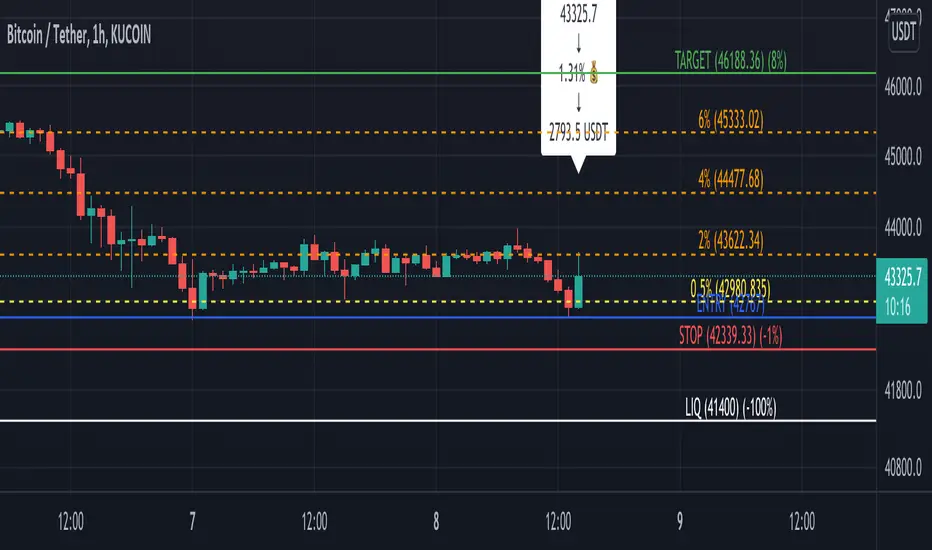
This script provides a quick and easy way to visualize profits in a chart, based on the given entry date and price.
Optionally, alerts can be sent when profits cross up the given "profit unit".
In short:
For alerts to be displayed, a "script alert" must be created right after the script was added to the chart:
- tradingview.com/support/solutions/43000597494-script-alerts/
(Choose 'Profits' as condition and 'Any alert() function call')
Good to know: if you check "Notify on app", alerts can be delivered directly to your phone:
i.imgur.com/CH71E9C.jpg
Prerequirements:
The chart's timezone has to be set to "Exchange" (this is required in order to support the alert's logic):
- kodify.net/tradingview/platform/exchange-time-zone
Optionally, alerts can be sent when profits cross up the given "profit unit".
In short:
- Tracks how much profit one could take based on the input "entry date" and the input "entry price"
- These inputs are interactive (tradingview.com/blog/en/pine-scripts-are-now-interactive-27147)
- Displays the result in a label on top of the last candle
- (Optional) Sends alerts based on the given "profit unit", that is: if '0.5' is given, then an alert is triggered every time the profit is raised by that number
(Be careful with low values, as TradingView could stop an alert if it triggers too much.)
For alerts to be displayed, a "script alert" must be created right after the script was added to the chart:
- tradingview.com/support/solutions/43000597494-script-alerts/
(Choose 'Profits' as condition and 'Any alert() function call')
Good to know: if you check "Notify on app", alerts can be delivered directly to your phone:
i.imgur.com/CH71E9C.jpg
Prerequirements:
The chart's timezone has to be set to "Exchange" (this is required in order to support the alert's logic):
- kodify.net/tradingview/platform/exchange-time-zone
Release Note
Refactoring and the introduction of two input variables:- alertPrefix: Add a custom prefix to the first line of the alert to indicate whatever you like. E.g.: "[FUTURES]". (A trailing white space will be added automatically.)
- shoudDebugInfo: Check this box to see the values of the main variables on the chart, below bars. This is for debugging purposes only.
Also notice that the input variable "shouldSendAlerts" was removed; alerts are sent if there is a TradingView alert created / configured beforehand... and the opposite is also true. So the variable wasn't really necessary.
Release Note
Fixes a typo.Release Note
Adds a "targetSymbol". That's the symbol for which the indicator is being configured.This allows for switching to other symbols in the same tab without showing wrong profit data.
If you would like to add multiple profit indicators for different symbols, just insert another profit indicator that targets the new symbol.
Notice: the entry must match the chart's symbol exactly. That is, for example: "BTCUSDT" (instead of just "BTC").
Release Note
In this update, the following new features were added:- Both long and short positions are now supported
- Helper lines can be now displayed / hidden, such as:
- Target percentage lines
- Entry, target, stop and liquidation lines
- For developers:
- The script can format the body of the alert as JSON, so one could send it to a server and automate the trading
Happy trading!
Release Note
(Just updated the chart image.)Release Note
- Show negative percentage on the STOP and LIQ line labels.
Release Note
- Fix an issue where labels/lines would be added on top of each other under certain conditions.
Release Note
- The target percentage lines now also show the value in parenthesis. E.g. "1.5% (41716.5)"
- Add the position "size" to the webhook payload (good for some exchanges like FTX)
- Remove some pesky leading spaces
- Add some code documentation
- Refactor / reorganization
Release Note
- Fix the price format on the added lines.
Release Note
- Initialize the metadata array before the actual script; this fixes an issue where the profit label would not show.
Release Note
- Update the chart image
Release Note
- Add Kucoin's Alice to the metadata list.
Release Note
- "Currency profit" (e.g. "275.29 USDT") can now be displayed just below the profit percentage label
- "Currency profit" is enabled by default. In order for it to be properly calculated, remember to fill in the "size" field
- The metadata for "FTMUSDT" (Kucoin) was added
Release Note
- Fix entry / current price label formatting
- Add code documentation
Release Note
- Add FTX's BTC, ETC and LUNA metadata (perp)
Release Note
- Fix an error where the alert would be stopped by TradingView in a very specific scenario where metadata would not be available for the current exchange.
Release Note
- Add metadata information into the debug label; in case a metadata value is empty, a ⚠️ will be displayed for that value.
Release Note
- Add "offset" and "stop limit" information to the debugging label.
Release Note
- Displays the current and metadata exchange information in the debugging label.
- Displays a warning in case the exchanges don't match.
Release Note
Only payload changes:- The payload now includes raw numbers instead of formatted ones (#.##)
- DYDX metadata was added (Kucoin)
- Fix typo in the debug label
Release Note
- Add APE metadata (Kucoin).
Release Note
- Add two more decimals for the prices displayed on the labels (#.## becomes #.####).
- Add WAVES metadata (Kucoin).
- Add IOST metadata (Kucoin).
Release Note
- Add the "next stop-limit" line (hidden by default); it shows where the next stop-limit would be, based on the "offset" field
- Add ATOM metadata (Kucoin)
- Add ZIL metadata (Kucoin)
Release Note
- Refactor around the debugging label for better clarity
- Add LUNA metadata (Kucoin)
- Add RUNE metadata (Kucoin)
- Add SAND metadata (Kucoin)
Release Note
- Fix a visibility issue of the "next stop limit" line
Release Note
- In addition to the next stop-limit line, the script can now also display the current stop-limit line
Release Note
- Add LINK metadata (Kucoin)
Release Note
- Add SHIBA metadata (Kucoin)
- Updated some decimal labels to display very low numbers (like SHIBA ones) correctly (i.e. "#.####" to "#.########")
Release Note
- Add FIDA metadata (FTX)
- Add XRP metadata (Kucoin)
Release Note
- Add NEAR metadata (Kucoin).
Release Note
- Add NEAR metadata (FTX)
- Add AAVE metadata (Kucoin)
Release Note
- Add ZRX metadata (FTX)
Release Note
- Add APE metadata (FTX)
- Add WAVES metadata (FTX)
Release Note
- Add GMT metadata (Kucoin)
- Add TRX metadata (Kucoin)
Release Note
- Add the profitPercentageTrigger that fine tunes server-side execution.
Release Note
- Add the profit percentage trigger line
- Enhancements around next stop-limit lines
- Refactoring
Release Note
- Fix issue of the percentage trigger line being plotted multiple times
Release Note
- [Trading Automation] Adds support for adding Kucoin API's key, secret and passphrase into the JSON payload
Release Note
- Fix formatting issues
Release Note
- Add current stop limit string into the debug view
Release Note
- Add the profit percentage trigger into the alert logic
Release Note
- Add trigger alert String in the debug view
Release Note
- Enhancements & clean up
Release Note
- Fix alert logic
Release Note
- Add flag to indicate Kucoin spot orders
Release Note
- Add LUNC metadata (Kucoin)
- Fix number formatting
Release Note
- Add a custom percentage line to quickly check the entry price value based on the inserted percentage.
- Reformatted the JSON with most relevant information at the top (good for the Apple Watch heehee)
- Fix lines percentage formatting
Release Note
- JSON formatting
Release Note
- Add LUNC metadata (FTX)
- Add current price into JSON payload
Release Note
- Lines refactoring, documentation
- Remove FTX related info
- Add Kucoin's futures LTC
Release Note
- Add Binance's LUNCUSDT pair
Release Note
- Add Kucoin WAVES futures contract
- Fix profit percentage in server's payload
Release Note
- New Kucoin future contracts: AVAX, GALA
Release Note
- Add FTM (Kucoin Future)
- Add GMT (Kucoin Future)
- Refactor around the custom percentage line
Release Note
- Add new Kucoin future contracts: APT, LDO, MANA, OCEAN, ONE and XMR
Release Note
- Add Kucoin SOL Futures contract
- Remove Kucoin auth fields
Release Note
- Add new Kucoin Futures contracts: ADA, GAS, NEAR, STORJ
Release Note
- Minor input reordering.
สคริปต์แบบโอเพนซอร์ส
ด้วยเจตนารมณ์หลักของ TradingView ผู้สร้างสคริปต์นี้ได้ทำให้เป็นโอเพนซอร์ส เพื่อให้เทรดเดอร์สามารถตรวจสอบและยืนยันฟังก์ชันการทำงานของมันได้ ขอชื่นชมผู้เขียน! แม้ว่าคุณจะใช้งานได้ฟรี แต่โปรดจำไว้ว่าการเผยแพร่โค้ดซ้ำจะต้องเป็นไปตาม กฎระเบียบการใช้งาน ของเรา

คำจำกัดสิทธิ์ความรับผิดชอบ
ข้อมูลและบทความไม่ได้มีวัตถุประสงค์เพื่อก่อให้เกิดกิจกรรมทางการเงิน, การลงทุน, การซื้อขาย, ข้อเสนอแนะ หรือคำแนะนำประเภทอื่น ๆ ที่ให้หรือรับรองโดย TradingView อ่านเพิ่มเติมใน ข้อกำหนดการใช้งาน
สคริปต์แบบโอเพนซอร์ส
ด้วยเจตนารมณ์หลักของ TradingView ผู้สร้างสคริปต์นี้ได้ทำให้เป็นโอเพนซอร์ส เพื่อให้เทรดเดอร์สามารถตรวจสอบและยืนยันฟังก์ชันการทำงานของมันได้ ขอชื่นชมผู้เขียน! แม้ว่าคุณจะใช้งานได้ฟรี แต่โปรดจำไว้ว่าการเผยแพร่โค้ดซ้ำจะต้องเป็นไปตาม กฎระเบียบการใช้งาน ของเรา
คำจำกัดสิทธิ์ความรับผิดชอบ
ข้อมูลและบทความไม่ได้มีวัตถุประสงค์เพื่อก่อให้เกิดกิจกรรมทางการเงิน, การลงทุน, การซื้อขาย, ข้อเสนอแนะ หรือคำแนะนำประเภทอื่น ๆ ที่ให้หรือรับรองโดย TradingView อ่านเพิ่มเติมใน ข้อกำหนดการใช้งาน