OPEN-SOURCE SCRIPT
ที่อัปเดต: Execution Window Planner [AGPro Series]
Execution Window Planner [AGPro Series]
🧠 Core Idea
Where is the cleanest active price window for evaluating execution context?
📌 Overview / What it does
Execution Window Planner [AGPro Series] is a chart-first execution-readiness tool built to answer one practical question: is price currently sitting inside a clean review window, or is the context too early, too late, too stretched, or already invalidated?
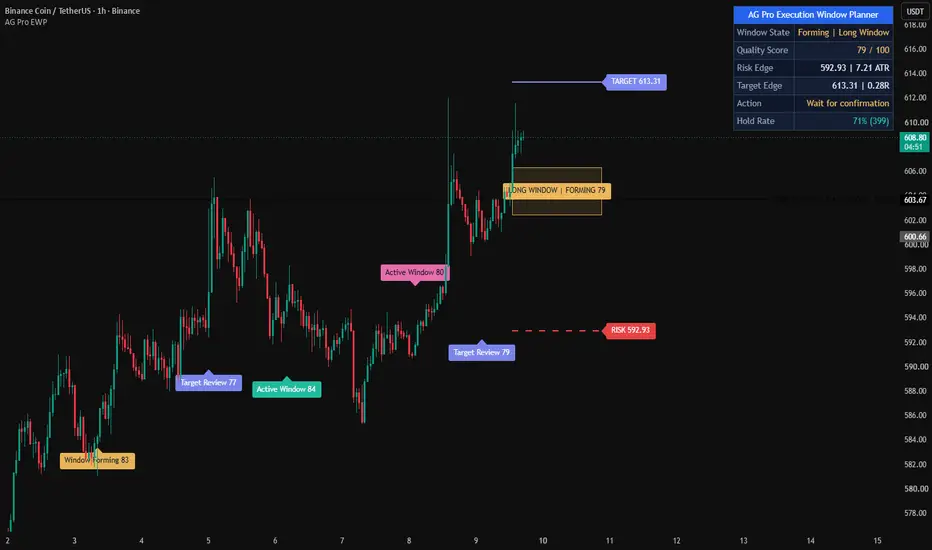
The script maps an active execution window box, a risk edge, a target edge, compact state labels, and a premium AGPro panel. It converts window width, structure alignment, volatility fit, trend support, candle confirmation, and room-to-risk context into a transparent 0-100 Quality Score.
It does not predict price movement, automate orders, or issue buy/sell commands. The output is designed as an analytical planning layer for traders who want cleaner context before making their own execution decisions.
🎯 Purpose & Design Philosophy
This script was built for traders who already have a directional thesis but need a disciplined way to judge whether the current price area is actually usable for execution review.
Many tools show trend, signals, support/resistance, or zones. The missing piece is often the active decision window: the price area where risk is still definable, target room still exists, volatility is not distorted, and confirmation is not too weak.
The design philosophy is simple: execution quality should be evaluated through a defined window, not through excitement around a single candle.
⚡ Why This Script Is Different
Most tools focus on printing a signal, marking a generic support/resistance area, or showing a large multi-feature trading dashboard.
This script does NOT act as a full trading suite, signal service, position sizing tool, ICT/FVG map, order block map, or generic zone scanner.
Instead, it keeps one narrow purpose: identify and score the current execution window using risk edge, target edge, structure, volatility, trend support, and candle confirmation. The result is a focused decision layer rather than another broad indicator.
⚙️ Methodology
1. Context Detection
The script detects the active planning side automatically from trend structure, or lets the user force a long-bias or short-bias view.
2. Reference Mapping
It builds a risk edge from recent structure and a target edge from broader structure or ATR-adjusted room.
3. Window Construction
It creates an active execution window around the current trend reference, then limits that window between the risk edge and target edge.
4. Reaction Evaluation
It scores window width, structure alignment, volatility fit, trend support, and candle confirmation into a 0-100 Quality Score.
5. Visual Output
The chart displays the execution window box, risk/target edges, state labels, alerts, and a premium AGPro panel with the key decision fields.
🗺️ How to Read the Chart
Execution Window = the current price area where the script is evaluating execution context.
Risk Edge = the structure-based invalidation edge for the active window.
Target Edge = the nearest meaningful target-side reference or ATR-adjusted room marker.
Labels = the current window state, score tier, risk distance, and room-to-risk context.
Colors = teal for stronger bullish execution windows, pink for bearish or invalidation contexts, amber for forming/waiting states, and indigo for target-edge or transition states.
Panel = the fastest summary of window state, quality score, risk edge, target edge, and next action.
🚦 Signals & States
• ACTIVE → the execution window meets the quality threshold and confirmation filter.
• FORMING → the window is improving but still needs cleaner confirmation.
• WAIT → the context exists, but structure, volatility, room, or confirmation is not strong enough yet.
• BLOCKED → there is no clean execution window in the current context.
• TARGET EDGE → price has reached the mapped target-side reference and reaction quality should be evaluated.
• INVALIDATED → price closed beyond the active risk edge.
🔔 Alerts Logic
ACTIVE Window alerts trigger when the state upgrades into ACTIVE.
Downgrade alerts trigger when the active window weakens from a stronger previous state.
Risk Edge alerts trigger when price closes beyond the current risk edge.
Target Edge alerts trigger when price reaches the current target edge.
Alerts are attention markers only. They are not trading instructions.
🧩 Confluence Logic
The strongest execution-window context appears when several conditions align:
• Price remains inside the mapped execution window
• The risk edge is still structurally valid
• The target edge leaves enough room relative to risk
• Trend support agrees with the active side
• Candle structure confirms the same direction
• Volatility is close to its recent baseline
When these elements align, the Quality Score improves and the panel state becomes easier to interpret.
📊 When to Use
• When you already have a directional thesis and want to evaluate execution context
• During trend continuation setups where risk and target references remain clear
• Around pullback or reset areas where timing and risk quality matter
• Before reacting to a potential continuation candle
• When you want a cleaner planning layer instead of another simple signal indicator
⚠️ When NOT to Use
• During very low-liquidity conditions where candles print irregularly
• During high-noise chop where risk and target edges change too quickly
• During extreme volatility spikes where ATR context becomes distorted
• On symbols with poor price continuity or unreliable session behavior
• As a standalone reason to enter or exit a trade
🎛️ Key Inputs
• Setup Direction → Auto detects the active planning side, or the user can force Long Bias / Short Bias.
• Sensitivity → controls how selective the model is.
• Structure Lookback → controls how risk edge, target edge, and structure context are mapped.
• Minimum ACTIVE Score → defines the score threshold required for ACTIVE state.
• Confirmation Mode → controls how much trend and candle confirmation must align.
• Label Cooldown Bars → controls historical label density.
• Max Visible Labels → limits older state labels to keep the chart readable.
• Label Detail → Compact is the default clean publication view; Balanced and Full can show more risk/room context.
• Label Offset Strength / Lane Strength → smart placement controls that keep labels near price without burying them inside candles or pushing them too far away on higher timeframes.
• Panel Location / Theme / Font Size → controls the AGPro panel presentation.
• Label Font Size → controls all on-chart labels.
🖥️ Interface & Visual Design
The panel is designed as a compact decision dashboard, not a large command center. The first row uses the standard AGPro merged blue header row, and the remaining rows focus only on the information needed to evaluate the current execution window.
The chart visuals stay restrained: one active execution window, one risk edge, one target edge, a current quality tag, and moderate historical state labels. The goal is a premium, readable chart that does not feel empty but also avoids clutter.
🧪 Practical Usage Workflow
1. Read the panel state first.
2. Check whether price is inside or near the execution window.
3. Compare the risk edge and target edge.
4. Review the Quality Score and confirmation state.
5. Interpret labels as context markers, not as trade commands.
6. Confirm the broader market context with your own process.
🔍 Interpretation Guidelines
ACTIVE does not mean guaranteed continuation. It means the current window has passed the script's rule-based quality model.
FORMING means the setup may be developing, but the script does not yet see enough confirmation.
WAIT means the context may exist, but the window quality is not clean enough.
BLOCKED means the current chart does not offer a useful execution window under the selected settings.
TARGET EDGE means the chart has reached the mapped target-side reference, so reaction quality becomes more important than chasing the move.
INVALIDATED means the risk edge has been broken and the active window should be reset.
🚫 What This Script Is NOT
• Not a prediction engine
• Not financial advice
• Not an auto-trading system
• Not a guaranteed signal tool
• Not a full trading suite
• Not an ICT/FVG or order block map
• Not a generic support/resistance zone scanner
⚠️ Limitations & Transparency
Execution-window quality is rule-based and depends on the selected inputs, timeframe, symbol behavior, and available chart data.
Different timeframes can produce different risk and target edges because market structure changes with resolution.
Fast volatility expansion can make the current edge distances less stable.
Low-volume markets may produce weaker confirmation quality.
The script should be interpreted inside broader market context, not in isolation.
🧠 Market Context Notes
Execution quality is usually strongest when structure, volatility, and trend behavior are aligned.
If volatility expands too quickly, the window can become stretched even if direction looks strong.
If the target edge is too close, the setup may have limited room even when the trend looks clean.
If the risk edge is too far away, the setup may require too much tolerance relative to the available room.
🧾 Use Case Examples
When price pulls back toward the active trend reference, remains inside the execution window, and the risk edge is still structurally protected, the Quality Score may improve.
When price reaches the target edge after an ACTIVE window, the script can shift into TARGET EDGE state so the user can evaluate reaction behavior instead of treating the move as fresh.
When price closes beyond the risk edge, the window becomes INVALIDATED and the panel shifts to a reset-oriented state.
🧱 System Philosophy
Execution Window Planner follows the AGPro Series approach: build scripts that help traders make a decision, not just see another signal.
The script is intentionally narrow. It focuses on one practical question and keeps the chart output centered around that question.
🔐 Non-Promise Statement
No script can provide certainty.
No score guarantees future movement.
No alert should be treated as an instruction to trade.
📉 Risk Disclosure
Trading involves risk.
Users are responsible for their own analysis, execution choices, risk management, and trading outcomes.
This script is for educational and analytical use only and does not provide financial advice.
📚 Educational Note
The best use of this script is to study how execution context changes as price moves between risk edge, execution window, and target edge.
Use it as a structured planning aid, not as a replacement for your own market analysis.
🧠 Core Idea
Where is the cleanest active price window for evaluating execution context?
📌 Overview / What it does
Execution Window Planner [AGPro Series] is a chart-first execution-readiness tool built to answer one practical question: is price currently sitting inside a clean review window, or is the context too early, too late, too stretched, or already invalidated?
The script maps an active execution window box, a risk edge, a target edge, compact state labels, and a premium AGPro panel. It converts window width, structure alignment, volatility fit, trend support, candle confirmation, and room-to-risk context into a transparent 0-100 Quality Score.
It does not predict price movement, automate orders, or issue buy/sell commands. The output is designed as an analytical planning layer for traders who want cleaner context before making their own execution decisions.
🎯 Purpose & Design Philosophy
This script was built for traders who already have a directional thesis but need a disciplined way to judge whether the current price area is actually usable for execution review.
Many tools show trend, signals, support/resistance, or zones. The missing piece is often the active decision window: the price area where risk is still definable, target room still exists, volatility is not distorted, and confirmation is not too weak.
The design philosophy is simple: execution quality should be evaluated through a defined window, not through excitement around a single candle.
⚡ Why This Script Is Different
Most tools focus on printing a signal, marking a generic support/resistance area, or showing a large multi-feature trading dashboard.
This script does NOT act as a full trading suite, signal service, position sizing tool, ICT/FVG map, order block map, or generic zone scanner.
Instead, it keeps one narrow purpose: identify and score the current execution window using risk edge, target edge, structure, volatility, trend support, and candle confirmation. The result is a focused decision layer rather than another broad indicator.
⚙️ Methodology
1. Context Detection
The script detects the active planning side automatically from trend structure, or lets the user force a long-bias or short-bias view.
2. Reference Mapping
It builds a risk edge from recent structure and a target edge from broader structure or ATR-adjusted room.
3. Window Construction
It creates an active execution window around the current trend reference, then limits that window between the risk edge and target edge.
4. Reaction Evaluation
It scores window width, structure alignment, volatility fit, trend support, and candle confirmation into a 0-100 Quality Score.
5. Visual Output
The chart displays the execution window box, risk/target edges, state labels, alerts, and a premium AGPro panel with the key decision fields.
🗺️ How to Read the Chart
Execution Window = the current price area where the script is evaluating execution context.
Risk Edge = the structure-based invalidation edge for the active window.
Target Edge = the nearest meaningful target-side reference or ATR-adjusted room marker.
Labels = the current window state, score tier, risk distance, and room-to-risk context.
Colors = teal for stronger bullish execution windows, pink for bearish or invalidation contexts, amber for forming/waiting states, and indigo for target-edge or transition states.
Panel = the fastest summary of window state, quality score, risk edge, target edge, and next action.
🚦 Signals & States
• ACTIVE → the execution window meets the quality threshold and confirmation filter.
• FORMING → the window is improving but still needs cleaner confirmation.
• WAIT → the context exists, but structure, volatility, room, or confirmation is not strong enough yet.
• BLOCKED → there is no clean execution window in the current context.
• TARGET EDGE → price has reached the mapped target-side reference and reaction quality should be evaluated.
• INVALIDATED → price closed beyond the active risk edge.
🔔 Alerts Logic
ACTIVE Window alerts trigger when the state upgrades into ACTIVE.
Downgrade alerts trigger when the active window weakens from a stronger previous state.
Risk Edge alerts trigger when price closes beyond the current risk edge.
Target Edge alerts trigger when price reaches the current target edge.
Alerts are attention markers only. They are not trading instructions.
🧩 Confluence Logic
The strongest execution-window context appears when several conditions align:
• Price remains inside the mapped execution window
• The risk edge is still structurally valid
• The target edge leaves enough room relative to risk
• Trend support agrees with the active side
• Candle structure confirms the same direction
• Volatility is close to its recent baseline
When these elements align, the Quality Score improves and the panel state becomes easier to interpret.
📊 When to Use
• When you already have a directional thesis and want to evaluate execution context
• During trend continuation setups where risk and target references remain clear
• Around pullback or reset areas where timing and risk quality matter
• Before reacting to a potential continuation candle
• When you want a cleaner planning layer instead of another simple signal indicator
⚠️ When NOT to Use
• During very low-liquidity conditions where candles print irregularly
• During high-noise chop where risk and target edges change too quickly
• During extreme volatility spikes where ATR context becomes distorted
• On symbols with poor price continuity or unreliable session behavior
• As a standalone reason to enter or exit a trade
🎛️ Key Inputs
• Setup Direction → Auto detects the active planning side, or the user can force Long Bias / Short Bias.
• Sensitivity → controls how selective the model is.
• Structure Lookback → controls how risk edge, target edge, and structure context are mapped.
• Minimum ACTIVE Score → defines the score threshold required for ACTIVE state.
• Confirmation Mode → controls how much trend and candle confirmation must align.
• Label Cooldown Bars → controls historical label density.
• Max Visible Labels → limits older state labels to keep the chart readable.
• Label Detail → Compact is the default clean publication view; Balanced and Full can show more risk/room context.
• Label Offset Strength / Lane Strength → smart placement controls that keep labels near price without burying them inside candles or pushing them too far away on higher timeframes.
• Panel Location / Theme / Font Size → controls the AGPro panel presentation.
• Label Font Size → controls all on-chart labels.
🖥️ Interface & Visual Design
The panel is designed as a compact decision dashboard, not a large command center. The first row uses the standard AGPro merged blue header row, and the remaining rows focus only on the information needed to evaluate the current execution window.
The chart visuals stay restrained: one active execution window, one risk edge, one target edge, a current quality tag, and moderate historical state labels. The goal is a premium, readable chart that does not feel empty but also avoids clutter.
🧪 Practical Usage Workflow
1. Read the panel state first.
2. Check whether price is inside or near the execution window.
3. Compare the risk edge and target edge.
4. Review the Quality Score and confirmation state.
5. Interpret labels as context markers, not as trade commands.
6. Confirm the broader market context with your own process.
🔍 Interpretation Guidelines
ACTIVE does not mean guaranteed continuation. It means the current window has passed the script's rule-based quality model.
FORMING means the setup may be developing, but the script does not yet see enough confirmation.
WAIT means the context may exist, but the window quality is not clean enough.
BLOCKED means the current chart does not offer a useful execution window under the selected settings.
TARGET EDGE means the chart has reached the mapped target-side reference, so reaction quality becomes more important than chasing the move.
INVALIDATED means the risk edge has been broken and the active window should be reset.
🚫 What This Script Is NOT
• Not a prediction engine
• Not financial advice
• Not an auto-trading system
• Not a guaranteed signal tool
• Not a full trading suite
• Not an ICT/FVG or order block map
• Not a generic support/resistance zone scanner
⚠️ Limitations & Transparency
Execution-window quality is rule-based and depends on the selected inputs, timeframe, symbol behavior, and available chart data.
Different timeframes can produce different risk and target edges because market structure changes with resolution.
Fast volatility expansion can make the current edge distances less stable.
Low-volume markets may produce weaker confirmation quality.
The script should be interpreted inside broader market context, not in isolation.
🧠 Market Context Notes
Execution quality is usually strongest when structure, volatility, and trend behavior are aligned.
If volatility expands too quickly, the window can become stretched even if direction looks strong.
If the target edge is too close, the setup may have limited room even when the trend looks clean.
If the risk edge is too far away, the setup may require too much tolerance relative to the available room.
🧾 Use Case Examples
When price pulls back toward the active trend reference, remains inside the execution window, and the risk edge is still structurally protected, the Quality Score may improve.
When price reaches the target edge after an ACTIVE window, the script can shift into TARGET EDGE state so the user can evaluate reaction behavior instead of treating the move as fresh.
When price closes beyond the risk edge, the window becomes INVALIDATED and the panel shifts to a reset-oriented state.
🧱 System Philosophy
Execution Window Planner follows the AGPro Series approach: build scripts that help traders make a decision, not just see another signal.
The script is intentionally narrow. It focuses on one practical question and keeps the chart output centered around that question.
🔐 Non-Promise Statement
No script can provide certainty.
No score guarantees future movement.
No alert should be treated as an instruction to trade.
📉 Risk Disclosure
Trading involves risk.
Users are responsible for their own analysis, execution choices, risk management, and trading outcomes.
This script is for educational and analytical use only and does not provide financial advice.
📚 Educational Note
The best use of this script is to study how execution context changes as price moves between risk edge, execution window, and target edge.
Use it as a structured planning aid, not as a replacement for your own market analysis.
Release Note
UPDATE NOTES - V1.2This update focuses on label rhythm, chart readability, and cleaner public-release presentation.
The core purpose of the script remains unchanged.
This release improves how historical execution-window labels are spaced and retained across intraday and higher-timeframe views.
This script continues to function as an analytical and visualization tool.
It does not attempt to predict price direction or provide guaranteed outcomes.
------------------------
What Changed
------------------------
* Refined default label cooldown
State labels now use a wider default spacing so repeated forming and active-window labels do not crowd the chart.
* Reduced default visible-label retention
The default retained label count was reduced slightly to keep the publication view cleaner on 4H, daily, and weekly screenshots.
* Switched default label detail to Compact
Labels now start with the cleaner compact format by default while Balanced and Full detail remain available in settings.
* Increased repeated-state filtering
Repeated labels now require a larger score change or more time between same-state prints.
------------------------
Visual Improvements
------------------------
* Improved chart readability by reducing historical label clustering.
* Preserved centered execution-window badges and right-side tags.
* Preserved contrast-aware text behavior across state labels and tags.
* Kept panel readability and the merged blue header standard unchanged.
------------------------
Interface & Usability
------------------------
* Preserved panel location, panel theme, panel font size, label font size, and show/hide controls.
* Preserved the dedicated right-side tag visibility control.
* Improved first-glance interpretation without changing the execution-window model.
------------------------
Behavior Notes
------------------------
This update does not change the core analytical logic of the script.
The goal is to improve clarity and usability, not to introduce new predictive behavior.
Users should interpret outputs the same way as before, but with cleaner label cadence.
------------------------
Limitations Reminder
------------------------
The script remains a rule-based analytical tool.
Market conditions such as volatility, liquidity, and timeframe differences may affect how states appear.
Outputs should always be interpreted within broader market context.
------------------------
Risk Reminder
------------------------
This script is for educational and analytical purposes only.
It does not provide financial advice or guaranteed trading outcomes.
Users remain responsible for their own decisions.
Release Note
🔧 UPDATE NOTES - 1.3This update adds a hold-rate proof layer to the Execution Window Planner. The core
window engine, scoring, risk edge and target edge remain unchanged. This script
continues to function as an analytical visualization tool. It does not predict
price direction or provide guaranteed outcomes.
------------------------
What Changed
------------------------
- Hold-Rate Proof Layer
The panel now tracks how often an Active execution window defended its risk edge
through a defined window before losing it, with sample size shown.
- Thesis-Aligned Statistic
The proof reflects the script's core idea - a clean window that holds its risk
structure - by measuring the risk edge directly, rather than distant target
behavior.
- Honest, Non-Repaint Statistics
Each Active window is counted once. Samples are confirmed-bar gated, closing beyond
the risk edge inside the window counts as a non-hold, and the rate is built from
completed windows only so it is not inflated.
- New Proof Input
A dedicated proof group adds Proof Hold Window Bars so the hold test can be tuned
per market and timeframe.
- Cleaner Label Spacing Internals
Label clearance and lane spacing now use volatility-based minimums for consistent
placement across symbols and price scales.
------------------------
Visual Improvements
------------------------
- Kept the premium execution window, centered badge, risk and target rails intact
- Preserved the contrast-safe label, tag and badge text
- Maintained moderate, non-overlapping label density
- No added chart clutter from the proof layer
------------------------
Interface & Usability
------------------------
- Added a Hold Rate proof row to the decision panel
- Improved first-glance trust with a visible track-record context
- Kept all existing settings and defaults backward compatible
- Enhanced overall experience without changing the core engine
------------------------
Behavior Notes
------------------------
This update does not change how the window, risk edge, target edge or the score
are computed. The goal is added proof context. Outputs should be interpreted the
same way as before.
------------------------
Limitations Reminder
------------------------
The script remains a rule-based analytical tool. Volatility, liquidity and
timeframe differences can affect how windows and statistics appear. Always
interpret outputs within broader market context.
------------------------
Risk Reminder
------------------------
This script is for educational and analytical purposes only. It does not provide
financial advice or guaranteed trading outcomes. Users remain responsible for
their own decisions.
Release Note
Version 1.4 – Unified Execution PlanThis update consolidates the active execution workflow while preserving the window-quality engine, confirmed state events, alerts, and Hold Rate proof.
• Removed the duplicate right-side quality tag that repeated the state and score already shown inside the execution window.
• Rebuilt the centered window badge as a single-line direction, state, and quality summary.
• Added live prices to the Risk and Target rail tags.
• Increased historical label spacing and candle clearance while retaining five meaningful state labels.
• Hardened the panel header by recreating both blue cells after each clear before merging the single title row.
สคริปต์แบบโอเพนซอร์ส
ด้วยเจตนารมณ์หลักของ TradingView ผู้สร้างสคริปต์นี้ได้ทำให้เป็นโอเพนซอร์ส เพื่อให้เทรดเดอร์สามารถตรวจสอบและยืนยันฟังก์ชันการทำงานของมันได้ ขอชื่นชมผู้เขียน! แม้ว่าคุณจะใช้งานได้ฟรี แต่โปรดจำไว้ว่าการเผยแพร่โค้ดซ้ำจะต้องเป็นไปตาม กฎระเบียบการใช้งาน ของเรา

🧠 Trading Suite - Flagship Workflow
tradingview.com/script/XJmX3p98-Trading-Suite-AGPro-Series/
🔷 Crypto Setup Planner - Multi-Symbol Planner
tradingview.com/script/LgVRo7Ql-Crypto-Setup-Planner-AGPro-Series/
tradingview.com/script/XJmX3p98-Trading-Suite-AGPro-Series/
🔷 Crypto Setup Planner - Multi-Symbol Planner
tradingview.com/script/LgVRo7Ql-Crypto-Setup-Planner-AGPro-Series/
คำจำกัดสิทธิ์ความรับผิดชอบ
ข้อมูลและบทความไม่ได้มีวัตถุประสงค์เพื่อก่อให้เกิดกิจกรรมทางการเงิน, การลงทุน, การซื้อขาย, ข้อเสนอแนะ หรือคำแนะนำประเภทอื่น ๆ ที่ให้หรือรับรองโดย TradingView อ่านเพิ่มเติมใน ข้อกำหนดการใช้งาน
สคริปต์แบบโอเพนซอร์ส
ด้วยเจตนารมณ์หลักของ TradingView ผู้สร้างสคริปต์นี้ได้ทำให้เป็นโอเพนซอร์ส เพื่อให้เทรดเดอร์สามารถตรวจสอบและยืนยันฟังก์ชันการทำงานของมันได้ ขอชื่นชมผู้เขียน! แม้ว่าคุณจะใช้งานได้ฟรี แต่โปรดจำไว้ว่าการเผยแพร่โค้ดซ้ำจะต้องเป็นไปตาม กฎระเบียบการใช้งาน ของเรา
🧠 Trading Suite - Flagship Workflow
tradingview.com/script/XJmX3p98-Trading-Suite-AGPro-Series/
🔷 Crypto Setup Planner - Multi-Symbol Planner
tradingview.com/script/LgVRo7Ql-Crypto-Setup-Planner-AGPro-Series/
tradingview.com/script/XJmX3p98-Trading-Suite-AGPro-Series/
🔷 Crypto Setup Planner - Multi-Symbol Planner
tradingview.com/script/LgVRo7Ql-Crypto-Setup-Planner-AGPro-Series/
คำจำกัดสิทธิ์ความรับผิดชอบ
ข้อมูลและบทความไม่ได้มีวัตถุประสงค์เพื่อก่อให้เกิดกิจกรรมทางการเงิน, การลงทุน, การซื้อขาย, ข้อเสนอแนะ หรือคำแนะนำประเภทอื่น ๆ ที่ให้หรือรับรองโดย TradingView อ่านเพิ่มเติมใน ข้อกำหนดการใช้งาน