OPEN-SOURCE SCRIPT
Güncellendi OB Identify + Verify v1.8
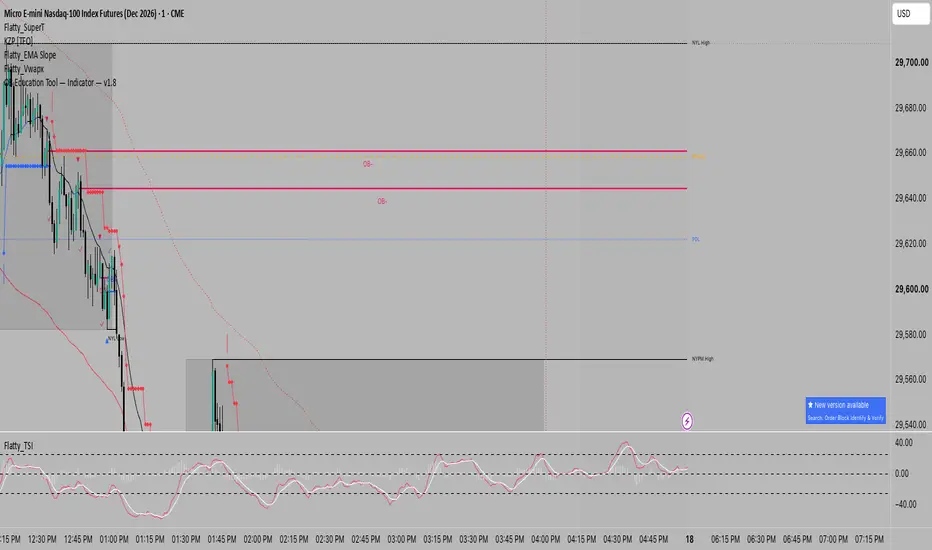
OB Identify + Verify
An educational tool to help you identify and verify ICT-style Order Blocks on any timeframe. It marks the key candles involved in OB formation so you can learn to spot them yourself.
━━━ CHART LEGEND ━━━
▲ = Bullish OB candle (last down-close before upward displacement)
▼ = Bearish OB candle (last up-close before downward displacement)
✓ = Displacement confirmed (candle closed beyond OB open)
OB+ = Bullish Order Block — expect price to find support here
OB- = Bearish Order Block — expect price to find resistance here
━━━ HOW ORDER BLOCKS FORM ━━━
Bullish OB (OB+)
1. A down-close candle forms (sellers in control)
2. The next candle displaces upward and CLOSES ABOVE the down-close candle's open
3. The down-close candle is now marked as the Order Block
4. Price may return to this level as SUPPORT
Bearish OB (OB-)
1. An up-close candle forms (buyers in control)
2. The next candle displaces downward and CLOSES BELOW the up-close candle's open
3. The up-close candle is now marked as the Order Block
4. Price may return to this level as RESISTANCE
━━━ WHEN IS AN OB INVALIDATED? ━━━
An Order Block is invalidated when price CLOSES THROUGH the OB level:
• OB+ invalid = price closes BELOW the line
• OB- invalid = price closes ABOVE the line
The line will stop extending when this happens (if "Stop Line at Mitigation" is enabled).
━━━ HOW TO USE THIS INDICATOR ━━━
Step 1: Identify
Look for the ▲/▼ markers — these show you which candle is the Order Block.
Step 2: Verify
The ✓ confirms that displacement was strong enough. No checkmark = no valid OB.
Step 3: Wait for Return
Price often returns to OB levels. Watch for price to come back to the OB+ line (support) or OB- line (resistance).
Step 4: Confirm Context
IMPORTANT: This indicator detects the pattern only. For higher-probability setups, verify that the OB forms at a significant level such as:
• Higher timeframe Fair Value Gap (FVG)
• Previous Order Block
• Liquidity sweep (swing high/low taken)
• Key support/resistance
━━━ SETTINGS GUIDE ━━━
ATR Multiplier (Displacement Filter)
Controls how strong the displacement candle must be:
• 0.5 = More OBs, some weaker
• 1.0 = Balanced (default)
• 1.5+ = Fewer OBs, higher quality
Timeframe suggestions:
• 1m charts: 0.8 – 1.2
• 5m charts: 0.5 – 1.0
• 15m charts: 0.5 – 0.8
• 4H charts: 0.3 – 0.7
Max OBs
Limits how many OBs display to keep your chart clean. Default is 5 each for bullish/bearish.
Stop Line at Mitigation
When ON, the OB line ends when price closes through it (invalidation). When OFF, lines extend indefinitely.
━━━ TIPS FOR LEARNING ━━━
1. Start with markers ON — watch how OBs form in real-time
2. Increase ATR multiplier if you see too many weak OBs
3. Zoom out — check if the OB aligns with higher timeframe levels
4. Practice identifying the OB candle before the indicator marks it
━━━ CREDITS ━━━
Based on ICT (Inner Circle Trader) Order Block concepts. Built for educational purposes to help traders learn to identify these patterns independently.
An educational tool to help you identify and verify ICT-style Order Blocks on any timeframe. It marks the key candles involved in OB formation so you can learn to spot them yourself.
━━━ CHART LEGEND ━━━
▲ = Bullish OB candle (last down-close before upward displacement)
▼ = Bearish OB candle (last up-close before downward displacement)
✓ = Displacement confirmed (candle closed beyond OB open)
OB+ = Bullish Order Block — expect price to find support here
OB- = Bearish Order Block — expect price to find resistance here
━━━ HOW ORDER BLOCKS FORM ━━━
Bullish OB (OB+)
1. A down-close candle forms (sellers in control)
2. The next candle displaces upward and CLOSES ABOVE the down-close candle's open
3. The down-close candle is now marked as the Order Block
4. Price may return to this level as SUPPORT
Bearish OB (OB-)
1. An up-close candle forms (buyers in control)
2. The next candle displaces downward and CLOSES BELOW the up-close candle's open
3. The up-close candle is now marked as the Order Block
4. Price may return to this level as RESISTANCE
━━━ WHEN IS AN OB INVALIDATED? ━━━
An Order Block is invalidated when price CLOSES THROUGH the OB level:
• OB+ invalid = price closes BELOW the line
• OB- invalid = price closes ABOVE the line
The line will stop extending when this happens (if "Stop Line at Mitigation" is enabled).
━━━ HOW TO USE THIS INDICATOR ━━━
Step 1: Identify
Look for the ▲/▼ markers — these show you which candle is the Order Block.
Step 2: Verify
The ✓ confirms that displacement was strong enough. No checkmark = no valid OB.
Step 3: Wait for Return
Price often returns to OB levels. Watch for price to come back to the OB+ line (support) or OB- line (resistance).
Step 4: Confirm Context
IMPORTANT: This indicator detects the pattern only. For higher-probability setups, verify that the OB forms at a significant level such as:
• Higher timeframe Fair Value Gap (FVG)
• Previous Order Block
• Liquidity sweep (swing high/low taken)
• Key support/resistance
━━━ SETTINGS GUIDE ━━━
ATR Multiplier (Displacement Filter)
Controls how strong the displacement candle must be:
• 0.5 = More OBs, some weaker
• 1.0 = Balanced (default)
• 1.5+ = Fewer OBs, higher quality
Timeframe suggestions:
• 1m charts: 0.8 – 1.2
• 5m charts: 0.5 – 1.0
• 15m charts: 0.5 – 0.8
• 4H charts: 0.3 – 0.7
Max OBs
Limits how many OBs display to keep your chart clean. Default is 5 each for bullish/bearish.
Stop Line at Mitigation
When ON, the OB line ends when price closes through it (invalidation). When OFF, lines extend indefinitely.
━━━ TIPS FOR LEARNING ━━━
1. Start with markers ON — watch how OBs form in real-time
2. Increase ATR multiplier if you see too many weak OBs
3. Zoom out — check if the OB aligns with higher timeframe levels
4. Practice identifying the OB candle before the indicator marks it
━━━ CREDITS ━━━
Based on ICT (Inner Circle Trader) Order Block concepts. Built for educational purposes to help traders learn to identify these patterns independently.
Sürüm Notları
v1.9 — Alerts + reliability fixesNEW: Alerts
You can now set alerts for three events (turn each on or off under Inputs → Alerts):
• New OB formed: fires when the displacement candle closes, with the OB level in the message
• Price taps OB level: fires the first time price returns to an active OB (once per OB)
• OB invalidated: fires when a candle closes through an active OB level
How to set up: Create Alert → Condition: this indicator → pick either
"Any alert() function call" (every event you enabled, with the price level), or
a single condition (New OB+, OB- Tapped, OB+ Invalidated, etc.).
Tip: use "Once Per Bar Close" for New OB and Invalidated so they only fire on closed candles.
IMPROVED
• The displacement candle must now close in the direction of the move. A large
candle closing the opposite way no longer creates an OB, so you get fewer false OBs.
• With "Stop Line at Mitigation" OFF, invalidated OBs now show as dashed lines
so you can tell them apart from active ones.
• New setting: "Keep Mitigated OBs (per side)" controls how many invalidated
OBs stay on the chart for reference (default 3, set 0 to remove them right away).
FIXED
• "Max Bullish/Bearish OBs" could show more active OBs than the limit.
• Invalidated OBs piled up in the background on long charts, slowing the script down.
Existing settings, colors and markers are unchanged.
Sürüm Notları
Moved: this indicator continues as "Order Block Identify & Verify"New version with alerts (new OB, tap, invalidation), improved displacement
filtering and bug fixes:
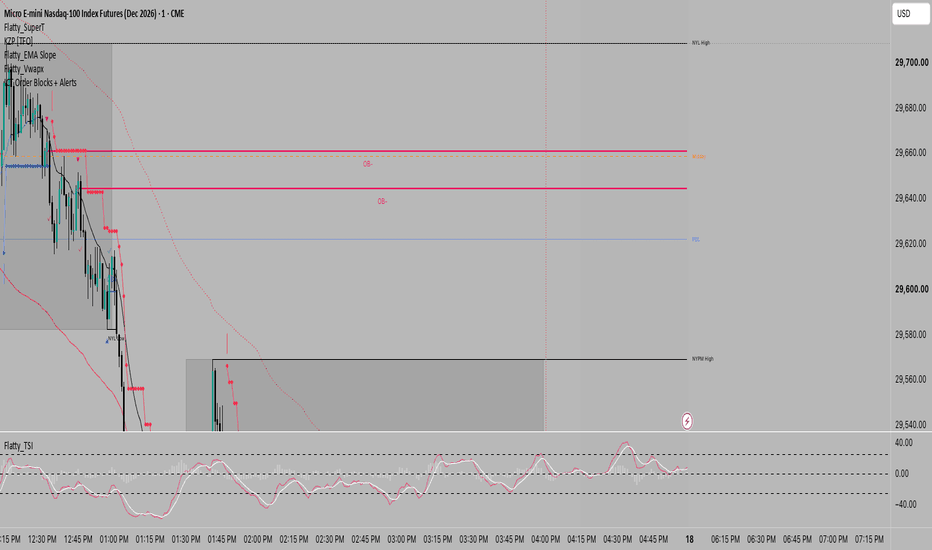
This version will no longer be updated.
Sürüm Notları
updated the correct link for the new codeAçık kaynak kodlu komut dosyası
Gerçek TradingView ruhuyla, bu komut dosyasının mimarı, yatırımcıların işlevselliğini inceleyip doğrulayabilmesi için onu açık kaynaklı hale getirdi. Yazarı tebrik ederiz! Ücretsiz olarak kullanabilseniz de, kodu yeniden yayınlamanın Topluluk Kurallarımıza tabi olduğunu unutmayın.

Feragatname
Bilgiler ve yayınlar, TradingView tarafından sağlanan veya onaylanan finansal, yatırım, alım satım veya diğer türden tavsiye veya öneriler anlamına gelmez ve teşkil etmez. Kullanım Koşulları bölümünde daha fazlasını okuyun.
Açık kaynak kodlu komut dosyası
Gerçek TradingView ruhuyla, bu komut dosyasının mimarı, yatırımcıların işlevselliğini inceleyip doğrulayabilmesi için onu açık kaynaklı hale getirdi. Yazarı tebrik ederiz! Ücretsiz olarak kullanabilseniz de, kodu yeniden yayınlamanın Topluluk Kurallarımıza tabi olduğunu unutmayın.
Feragatname
Bilgiler ve yayınlar, TradingView tarafından sağlanan veya onaylanan finansal, yatırım, alım satım veya diğer türden tavsiye veya öneriler anlamına gelmez ve teşkil etmez. Kullanım Koşulları bölümünde daha fazlasını okuyun.