OPEN-SOURCE SCRIPT
Güncellendi Trend Momentum Breakout [AlphaPine]
Overview
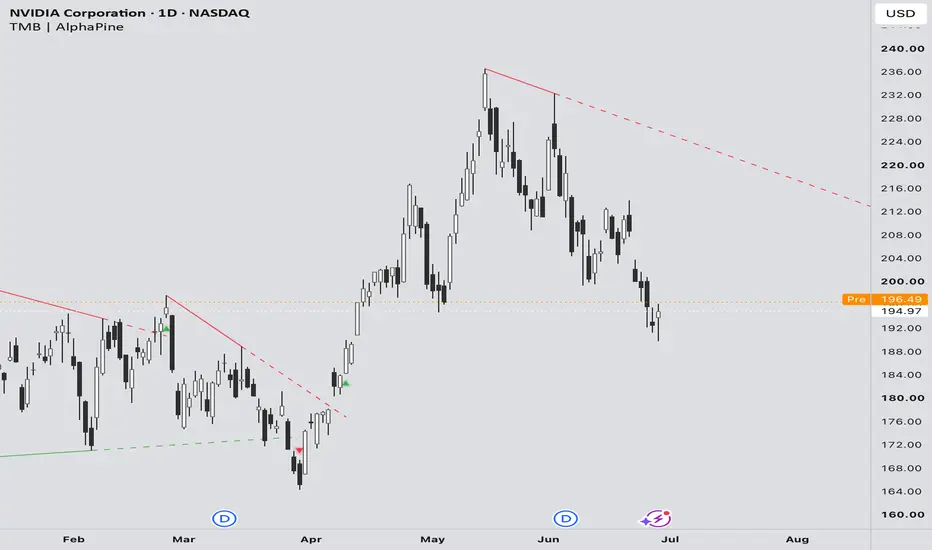
Trend Momentum Breakout [AlphaPine] is built for traders who use trendline breaks as part of their market-structure review.
The indicator displays support and resistance trendline references, keeps the chart focused on recent structure, and highlights breakout conditions based on the selected confirmation settings.
It is designed to answer one focused chart-reading question:
Where is price showing a confirmed break of a support or resistance trendline reference?
This indicator is not a complete trading system. It is a structure layer that can be used alongside broader market context, price action, volume, higher-timeframe bias, risk planning, and a trader's own execution rules.
What It Shows
Visual Legend
How To Use
Add the indicator to a liquid market and start with the default settings.
Use the visible trendline references as market-structure context. When a breakout marker appears, treat it as a confirmed structure event, not as an automatic trade entry.
Traders can adjust the structure scale, chart cleanliness, breakout confirmation, optional volume filter, display style, and optional moving averages to match their chart-reading workflow.
Alerts can be used to monitor breakout conditions without watching every chart continuously. Alerts should be treated as notifications, not automatic trade instructions.
Confirmation Behavior
Breakout markers appear only after the indicator has enough confirmed chart structure to display an active trendline reference. A marker is shown when price confirms a break under the selected settings.
Optional volume confirmation can be enabled for traders who want an additional participation filter.
Important Live-Chart Note
This indicator uses confirmed chart structure. Confirmed structure requires time to form, so historical trendlines can look cleaner than what a trader would have seen live at the original turning point.
This is normal for structure-based indicators. Historical plots should be used for review and learning, not as proof of profitability or as evidence that every past marker was tradable in real time.
For live use, wait for the current bar to close, the trendline to be confirmed, and the breakout marker or alert to appear under the selected settings.
Settings Overview
The default settings are designed to keep the chart readable while showing recent support and resistance trendline structure.
Available controls include:
Moving Averages
Moving averages are included as an optional chart overlay only.
They are useful when traders want basic trend context without adding a separate moving average indicator. They do not turn Trend Momentum Breakout into a trend-following system and should still be interpreted with the broader chart.
Best Use
This indicator is intended for markets and timeframes where traders already use trendline structure as part of their analysis.
Good fit:
Less suitable for:
Trading Notes
Resistance and support are often better understood as areas, not perfect single-price levels. This indicator draws trendlines as visual references because its purpose is trendline breakout mapping. Traders should still account for spread, volatility, liquidity, candle context, and nearby support/resistance zones.
Breakouts can fail. A confirmed trendline break does not remove the need for risk management, invalidation planning, and broader market context.
What Makes It Useful
Trend Momentum Breakout helps organize trendline breakout analysis by combining structure references, confirmation markers, visual controls, optional volume context, optional moving averages, and alert support into one focused indicator.
The goal is not to replace a trader's decision process. The goal is to make trendline breakout structure easier to see, review, and monitor.
Disclaimer
This indicator is for educational and analytical use only. It is not financial advice and does not guarantee any trading result. Traders are responsible for their own analysis, risk management, and execution decisions.
Trend Momentum Breakout [AlphaPine] is built for traders who use trendline breaks as part of their market-structure review.
The indicator displays support and resistance trendline references, keeps the chart focused on recent structure, and highlights breakout conditions based on the selected confirmation settings.
It is designed to answer one focused chart-reading question:
Where is price showing a confirmed break of a support or resistance trendline reference?
This indicator is not a complete trading system. It is a structure layer that can be used alongside broader market context, price action, volume, higher-timeframe bias, risk planning, and a trader's own execution rules.
What It Shows
- Support and resistance trendline references.
- Bullish breakout markers after resistance breaks.
- Bearish breakout markers after support breaks.
- Smaller and larger structure views.
- Optional volume confirmation.
- Optional moving averages for trend context.
- Optional structure point markers for visual review.
- Alerts for monitored breakout conditions.
Visual Legend
- Red line: resistance trendline reference.
- Green line: support trendline reference.
- Thicker line: larger structure.
- Thinner line: smaller structure.
- Dashed line: projected or recently broken trendline segment.
- Green up marker: bullish resistance breakout.
- Red down marker: bearish support breakout.
- Gray marker: optional structure point marker.
How To Use
Add the indicator to a liquid market and start with the default settings.
Use the visible trendline references as market-structure context. When a breakout marker appears, treat it as a confirmed structure event, not as an automatic trade entry.
Traders can adjust the structure scale, chart cleanliness, breakout confirmation, optional volume filter, display style, and optional moving averages to match their chart-reading workflow.
Alerts can be used to monitor breakout conditions without watching every chart continuously. Alerts should be treated as notifications, not automatic trade instructions.
Confirmation Behavior
Breakout markers appear only after the indicator has enough confirmed chart structure to display an active trendline reference. A marker is shown when price confirms a break under the selected settings.
Optional volume confirmation can be enabled for traders who want an additional participation filter.
Important Live-Chart Note
This indicator uses confirmed chart structure. Confirmed structure requires time to form, so historical trendlines can look cleaner than what a trader would have seen live at the original turning point.
This is normal for structure-based indicators. Historical plots should be used for review and learning, not as proof of profitability or as evidence that every past marker was tradable in real time.
For live use, wait for the current bar to close, the trendline to be confirmed, and the breakout marker or alert to appear under the selected settings.
Settings Overview
The default settings are designed to keep the chart readable while showing recent support and resistance trendline structure.
Available controls include:
- Structure lookback and scale.
- Maximum visible lines.
- Trendline selectiveness.
- Advanced structure sensitivity.
- Scan depth and chart-performance balance.
- Breakout confirmation strictness.
- Optional volume confirmation.
- Recent marker display.
- Marker size and visibility.
- Trendline and marker colors.
- Optional moving averages.
- Alert controls and cooldown.
Moving Averages
Moving averages are included as an optional chart overlay only.
They are useful when traders want basic trend context without adding a separate moving average indicator. They do not turn Trend Momentum Breakout into a trend-following system and should still be interpreted with the broader chart.
Best Use
This indicator is intended for markets and timeframes where traders already use trendline structure as part of their analysis.
Good fit:
- Trendline breakout review.
- Market structure mapping.
- Support and resistance break monitoring.
- Discretionary trade planning.
- Multi-timeframe chart review.
- Breakout watchlists with alert support.
Less suitable for:
- Automatic buy/sell execution.
- Low-liquidity markets with erratic candles.
- Choppy conditions where trendline breaks may be less informative.
- Using historical markers as standalone proof of profitability.
Trading Notes
Resistance and support are often better understood as areas, not perfect single-price levels. This indicator draws trendlines as visual references because its purpose is trendline breakout mapping. Traders should still account for spread, volatility, liquidity, candle context, and nearby support/resistance zones.
Breakouts can fail. A confirmed trendline break does not remove the need for risk management, invalidation planning, and broader market context.
What Makes It Useful
Trend Momentum Breakout helps organize trendline breakout analysis by combining structure references, confirmation markers, visual controls, optional volume context, optional moving averages, and alert support into one focused indicator.
The goal is not to replace a trader's decision process. The goal is to make trendline breakout structure easier to see, review, and monitor.
Disclaimer
This indicator is for educational and analytical use only. It is not financial advice and does not guarantee any trading result. Traders are responsible for their own analysis, risk management, and execution decisions.
Sürüm Notları
v2.0: real-time history, break negation and a cleaner structure logWhat changed
- History now matches what was visible live. Each trendline is formed only from structure that was already confirmed at that bar. Each break is recorded on the bar it happens and is never redrawn or moved later. The original description's live-chart note ("historical trendlines can look cleaner than what a trader would have seen live") no longer applies to trendlines and breaks from v2.0 on.
- New: break negation. A break is negated when price closes back across the broken trendline within the negation window. A negated break gets its own marker and alert, so a failed breakout is visible quickly.
- Retired lines stay on the chart. A trendline that stops being relevant is retired from that bar and stays visible, faded, instead of disappearing. The structure log stays complete for review.
- New optional filters: a minimum break distance and a moving-average filter, both off by default. The volume filter is still available.
- Alerts: upward break, downward break, and a negation alert for each. Each alert fires once per bar close, and its wording names the structure, for example "resistance trendline broken upward". The alert cooldown setting is removed.
Visual legend additions
- Orange marker: a negated break.
- Faded line: a retired trendline, kept for review.
- Break markers are unchanged: green up for an upward break of resistance, red down for a downward break of support.
New and changed settings
- Breakout: minimum break distance, moving-average filter, negation window.
- Display: negation markers, retired lines, negation window.
- Colors: a negation color, and an optional grayscale mode for trendlines.
- Defaults stay close to v1, so existing charts look familiar.
What to expect after updating
v1 redrew its history as new swings formed. v2.0 shows history as it was known at each bar, so the two can differ:
- you may see some breaks that v1 later removed;
- v1 may have shown some breaks that v2.0 does not.
Breaks can and do fail. Use the negation marker and your own invalidation plan.
This indicator is for educational and analytical use only. It is not financial advice and does not guarantee any trading result. Traders are responsible for their own analysis, risk management and execution decisions.
Açık kaynak kodlu komut dosyası
Gerçek TradingView ruhuyla, bu komut dosyasının mimarı, yatırımcıların işlevselliğini inceleyip doğrulayabilmesi için onu açık kaynaklı hale getirdi. Yazarı tebrik ederiz! Ücretsiz olarak kullanabilseniz de, kodu yeniden yayınlamanın Topluluk Kurallarımıza tabi olduğunu unutmayın.

Get access to AlphaPine invite-only indicators:
alphapinelab.com
Visit the website to learn how to use AlphaPine indicators.
For market research and informational purposes only. Not financial advice.
alphapinelab.com
Visit the website to learn how to use AlphaPine indicators.
For market research and informational purposes only. Not financial advice.
Feragatname
Bilgiler ve yayınlar, TradingView tarafından sağlanan veya onaylanan finansal, yatırım, alım satım veya diğer türden tavsiye veya öneriler anlamına gelmez ve teşkil etmez. Kullanım Koşulları bölümünde daha fazlasını okuyun.
Açık kaynak kodlu komut dosyası
Gerçek TradingView ruhuyla, bu komut dosyasının mimarı, yatırımcıların işlevselliğini inceleyip doğrulayabilmesi için onu açık kaynaklı hale getirdi. Yazarı tebrik ederiz! Ücretsiz olarak kullanabilseniz de, kodu yeniden yayınlamanın Topluluk Kurallarımıza tabi olduğunu unutmayın.
Get access to AlphaPine invite-only indicators:
alphapinelab.com
Visit the website to learn how to use AlphaPine indicators.
For market research and informational purposes only. Not financial advice.
alphapinelab.com
Visit the website to learn how to use AlphaPine indicators.
For market research and informational purposes only. Not financial advice.
Feragatname
Bilgiler ve yayınlar, TradingView tarafından sağlanan veya onaylanan finansal, yatırım, alım satım veya diğer türden tavsiye veya öneriler anlamına gelmez ve teşkil etmez. Kullanım Koşulları bölümünde daha fazlasını okuyun.