Key Level Confluence & Target Zones [PhenLabs]
🎯 Overview
Key Level Confluence & Target Zones [PhenLabs] is an analytical overlay and trade-planning indicator built on Pine Script v6. Traders who combine daily and weekly high/low levels (`PDH`, `PDL`, `PDC`, `PWH`, `PWL`) with pivot points (`P`, `R1`–`R3`, `S1`–`S3`), swing highs/lows, and institutional round numbers often end up with twenty or more competing horizontal lines on the chart. This script suppresses lone single-source lines, plots a clean shaded zone only where at least one price-structure level and one formula level cluster within an ATR-scaled tolerance, and converts closed-bar reactions at those zones into a full non-repainting trade plan.
🧠 How It Works — Non-Repainting State Machine
Every confluence zone, signal, and trade plan is governed by a deterministic closed-bar state machine (`LEVEL_COLLECTION -> CONFLUENCE_MERGE -> REACTION_CHECK -> IN_TRADE`):
⚙️ Under the Hood — Mathematical Formulation
1. Multi-Source Confluence Scoring & Width Normalization
Each merged cluster is required to hold both a structural price level (`hasS`) and a formula pivot/round level (`hasF`). Zone thickness is floored at `0.12 * ta.atr(14)` for clean chart legibility, and each zone receives a bounded `0–100` confluence score weighted by stack count, weekly structure presence (`wk`), and swing structure presence (`sw`):
Pine Script®
2. All-Plan Activity Normalization & Candle Displacement
To ensure identical functionality across stocks, futures, crypto, and spot forex on all TradingView plans (without relying on plan-gated footprint feeds), relative participation (`actV`) uses 20-bar relative volume when volume is reported and automatically falls back to normalized true range (`(high - low) / ta.atr(14)`) on volume-free feeds:
Pine Script®
3. Multi-Profile UDT Tournament & Honest Auto Ledger
Five independent `Ledger` instances run in parallel on closed bars so that `Auto (Best EV)` maintains its own live trade record rather than copying hindsight numbers from a single fixed profile:
📊 Visual Walkthrough & Telemetry Dashboard
🛠️ Input Guide
Group 1 — Signals
Group 2 — Confluence Zones
Group 3 — Trade Plan
Group 4 — Display
🚀 Built-In Alerts & Pine Screener
The first six `plot()` calls expose `Signal (+1 Buy / -1 Sell)`, `Active Plan Direction`, `Nearest Support Score`, `Nearest Resistance Score`, `Active Zones`, and `Avg R per Trade` directly to the Pine Screener and Data Window. Six `alertcondition()` triggers are included:
Key Level Confluence & Target Zones [PhenLabs] is an analytical overlay and trade-planning indicator built on Pine Script v6. Traders who combine daily and weekly high/low levels (`PDH`, `PDL`, `PDC`, `PWH`, `PWL`) with pivot points (`P`, `R1`–`R3`, `S1`–`S3`), swing highs/lows, and institutional round numbers often end up with twenty or more competing horizontal lines on the chart. This script suppresses lone single-source lines, plots a clean shaded zone only where at least one price-structure level and one formula level cluster within an ATR-scaled tolerance, and converts closed-bar reactions at those zones into a full non-repainting trade plan.
- Multi-Source Confluence Clustering: Collects prior-period daily and weekly highs/lows/closes alongside chart-timeframe swing pivots (`SWING H`, `SWING L`), formula pivot levels (`Traditional`, `Fibonacci`, or `Camarilla`), and institutional round-number steps. A zone is formed only when at least one structure level and one formula level sit within `Merge Tolerance (ATR)` of each other (`default 0.35 ATR`).
- Closed-Bar Hold vs. Breakout Verification: Evaluates price interactions at scored confluence zones on confirmed bar closes (`barstate.isconfirmed`) across two reaction types: `HOLD` reversals (wick rejection inside the zone with a close back outside and relative activity confirmation) and `BREAKOUT` continuations (body displacement closing beyond the far boundary by the configured ATR buffer).
- Automated Entry, Auto-BE Stop & Magnet-Snapped Targets: Projects a closed-bar `ENTRY`, an ATR-clamped `SL` (`0.5` to `3.0 ATR`), and a three-tier `TP1` / `TP2` / `TP3` target ladder with partial scale-out tracking (`50%` at `TP1`, `30%` at `TP2`, `20%` at `TP3`), automatic break-even stop ratcheting after `TP1`, and optional `TP2` magnet snapping to the nearest opposing confluence zone.
🧠 How It Works — Non-Repainting State Machine
Every confluence zone, signal, and trade plan is governed by a deterministic closed-bar state machine (`LEVEL_COLLECTION -> CONFLUENCE_MERGE -> REACTION_CHECK -> IN_TRADE`):
- Stage 1 (`LEVEL_COLLECTION`):
On intraday and daily charts, the script retrieves completed prior-day (`PDH`, `PDL`, `PDC`) and prior-week (`PWH`, `PWL`, `PWC`) structure levels alongside confirmed chart-timeframe swing pivots (`ta.pivothigh()` and `ta.pivotlow()`). It then calculates daily and weekly pivot levels (`P`, `R1`–`R3`, `S1`–`S3`) using the selected `Pivot Formula` (`Traditional`, `Fibonacci`, or `Camarilla`) plus nearby psychological round numbers. - Stage 2 (`CONFLUENCE_MERGE`):
All candidate levels are sorted from lowest to highest and grouped whenever adjacent levels sit within `Merge Tolerance (ATR)` (`0.35 * ta.atr(14)` by default) and the total cluster span remains within `2.0 * Merge Tolerance (ATR)`. A candidate cluster becomes an active Key Level Confluence Zone only if it contains at least `Min Sources per Zone` (`default 2`) AND includes both a price-structure source (`PDH/PDL/PWH/PWL/Swing`) and a formula source (`Pivot/Round`). Lone levels are never drawn. - Stage 3 (`REACTION_CHECK`):
When price interacts with a scored confluence zone on a confirmed bar close, the engine evaluates two reaction modes:
• Hold Reversal (`HOLD`): Price wicks into or slightly through a support or resistance confluence zone (`within 0.5 ATR`), prints a rejection wick ratio exceeding the profile threshold, and closes back outside the zone with relative volume/range activity (`actV`) above threshold.
• Confirmed Breakout (`BREAKOUT`): Price closes beyond the far boundary of the confluence zone by at least the profile's ATR breakout buffer with a strong candle body-to-range ratio (`math.abs(close - open) / math.max(high - low, syminfo.mintick)`).
• Highest-Score Priority: If multiple zones qualify on the same bar, the zone with the highest `0–100` confluence score takes precedence. - Stage 4 (`IN_TRADE` — Full Trade Plan & Lifecycle):
Upon a confirmed signal, the script locks `ENTRY` at the bar's `close`, places `SL` beyond the zone's far boundary and signal wick (`clamped between 0.5 ATR and 3.0 ATR`), and projects `TP1`, `TP2`, and `TP3`. On subsequent confirmed bars, conservative stop-first ordering checks `SL` before `TP1`–`TP3`. Reaching `TP1` books `50%` of the position and moves `SL` to `ENTRY` (`Break-Even`); `TP2` books `30%`; and `TP3`, a stop hit, or `Time Exit (bars)` closes the remaining share.
⚙️ Under the Hood — Mathematical Formulation
1. Multi-Source Confluence Scoring & Width Normalization
Each merged cluster is required to hold both a structural price level (`hasS`) and a formula pivot/round level (`hasF`). Zone thickness is floored at `0.12 * ta.atr(14)` for clean chart legibility, and each zone receives a bounded `0–100` confluence score weighted by stack count, weekly structure presence (`wk`), and swing structure presence (`sw`):
2. All-Plan Activity Normalization & Candle Displacement
To ensure identical functionality across stocks, futures, crypto, and spot forex on all TradingView plans (without relying on plan-gated footprint feeds), relative participation (`actV`) uses 20-bar relative volume when volume is reported and automatically falls back to normalized true range (`(high - low) / ta.atr(14)`) on volume-free feeds:
3. Multi-Profile UDT Tournament & Honest Auto Ledger
Five independent `Ledger` instances run in parallel on closed bars so that `Auto (Best EV)` maintains its own live trade record rather than copying hindsight numbers from a single fixed profile:
- Profile 0 — Balanced: Requires score `>= 36`, wick defense `>= 0.35`, breakout body `>= 0.50`, breakout buffer `0.10 ATR`, relative activity `>= 0.90`, and `1.0x` target/stop scaling.
- Profile 1 — Strict 3x+ Stack: Requires score `>= 54` (`3+` stacked sources), wick defense `>= 0.45`, breakout body `>= 0.60`, breakout buffer `0.15 ATR`, and relative activity `>= 1.10`.
- Profile 2 — Scalp Fast: Uses faster confirmation (`wick >= 0.30`, `body >= 0.45`, `buffer 0.05 ATR`, `activity >= 0.80`) with `0.75x` stop and target scaling.
- Profile 3 — Swing Wide: Uses wider structural confirmation (`wick >= 0.40`, `body >= 0.55`, `buffer 0.20 ATR`, `activity >= 1.00`) with `1.50x` stop and target scaling.
- Profile 4 — Auto (Live Selection): Before each new trade, selects the fixed profile (`0–3`) with the highest realized average R (`sumR / trades`, minimum `3` closed trades, defaulting to `Balanced` during warm-up) and records the resulting trade in its own separate live ledger.
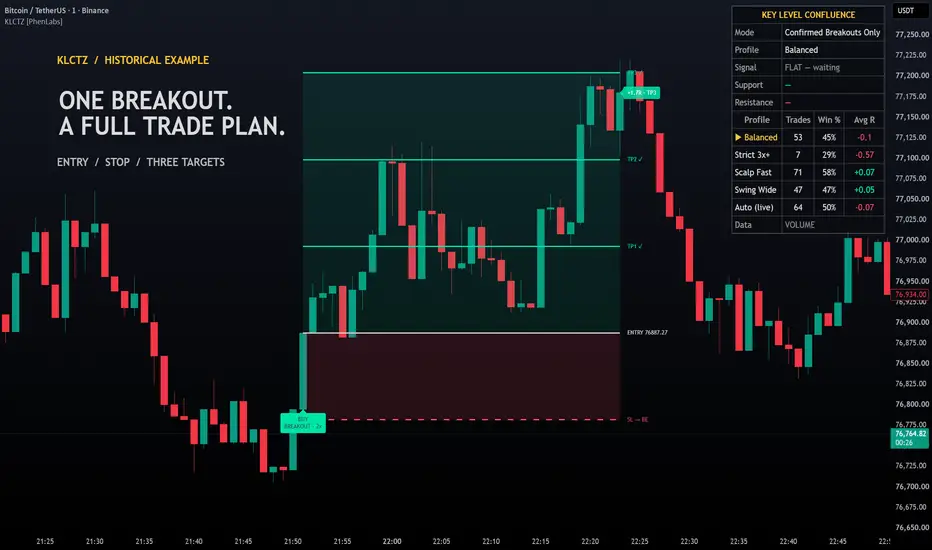
📊 Visual Walkthrough & Telemetry Dashboard
- Key Level Confluence Zones: Displays the nearest `Zones Shown` (`default 4`) around current price. Zones above price tint crimson (`Resistance`), zones below price tint emerald (`Support`), and zones straddling price tint gold, with opacity scaled by the `0–100` confluence score and a right-aligned badge listing every constituent level (for example, `3x CONFLUENCE [PDL + S1 + SWING L] · 60`).
- Trade Plan Projections: Plots the active and most recent `Past Plans Shown` (`default 4`) with shaded risk/reward boxes, `ENTRY`, `SL`, and `TP1`–`TP3` rays, checkmarks (`TP1 ✓`, `TP2 ✓`, `TP3 ✓`) as targets are reached, automatic `SL -> BE` label updates after `TP1`, and a final realized R badge (`+2.00R · TP3`, `+0.50R · BE STOP`, or `-1.00R · STOP`).
- Top-Right Telemetry Table: Reports the active `Trade Mode`, selected `Profile` (including which profile `Auto` is currently routing to), active trade state, nearest Support and Resistance confluence zones, a 5-row performance comparison across `Balanced`, `Strict 3x+`, `Scalp Fast`, `Swing Wide`, and `Auto (live)`, and the active participation feed (`VOLUME` vs `RANGE PROXY`).
🛠️ Input Guide
Group 1 — Signals
- Trade Mode: Select `Both (Hold + Breakout)`, `Hold Reversals Only`, or `Confirmed Breakouts Only` (`default Both (Hold + Breakout)`).
- Profile: Choose `Auto (Best EV)`, `Balanced`, `Strict 3x+ Stack`, `Scalp Fast`, or `Swing Wide` (`default Auto (Best EV)`).
Group 2 — Confluence Zones
- Pivot Formula: Choose `Traditional`, `Fibonacci`, or `Camarilla` pivot calculations (`default Traditional`).
- Merge Tolerance (ATR): Maximum distance in `ta.atr(14)` units for merging adjacent levels into one confluence zone (`default 0.35`).
- Min Sources per Zone: Minimum number of agreeing levels required to plot a zone (`default 2`).
- Swing Length: Left/right bar lookback for confirmed chart-timeframe swing highs and lows (`default 10`).
- Include Round Numbers: Includes institutional round-number steps in the formula level pool (`default true`).
Group 3 — Trade Plan
- Stop Buffer (ATR): Extra ATR cushion added beyond the zone edge and signal wick (`default 0.25`, with total stop distance clamped to `0.5–3.0 ATR`).
- Targets: TP1 / TP2 / TP3 (R): Base R-multiples for the three take-profit levels (`default 1.0 / 2.0 / 3.0`).
- Snap TP2 to Next Opposing Zone: Automatically snaps `TP2` just inside the nearest opposing confluence zone when one sits between `TP1` and `TP3` (`default true`).
- Time Exit (bars): Maximum bars a trade plan can remain open before closing at market (`default 60`).
Group 4 — Display
- Past Plans Shown: Number of historical trade plans retained on the chart (`default 4`).
- Zones Shown: Number of nearest active confluence zones displayed around current price (`default 4`).
- Table Size: Adjusts the top-right dashboard size between `Tiny`, `Small`, and `Normal` (`default Small`).
- Bull / Bear / Zone: Custom colors for bullish elements (`#00E5A8`), bearish elements (`#FF4D6D`), and neutral/header accents (`#F5C542`).
🚀 Built-In Alerts & Pine Screener
The first six `plot()` calls expose `Signal (+1 Buy / -1 Sell)`, `Active Plan Direction`, `Nearest Support Score`, `Nearest Resistance Score`, `Active Zones`, and `Avg R per Trade` directly to the Pine Screener and Data Window. Six `alertcondition()` triggers are included:
- `KLCTZ Bullish Entry`
- `KLCTZ Bearish Entry`
- `KLCTZ Any Entry`
- `KLCTZ TP1 Hit`
- `KLCTZ TP3 Hit`
- `KLCTZ Stop Hit`
⚠️ Risk Disclaimer
This indicator is an analytical decision-support tool designed for educational and informational purposes only. Historical profile win rates and average R-multiples are computed from closed-bar state-machine simulations on the active chart history and do not predict or guarantee future performance. Always validate setups within your own risk management framework.

TradingView Charting w/ Crypto Systems: phenlabs.com
Join our growing community: discord.gg/phen
All content provided by PhenLabs is for informational & educational purposes only. Past performance does not guarantee future results.
Join our growing community: discord.gg/phen
All content provided by PhenLabs is for informational & educational purposes only. Past performance does not guarantee future results.
Feragatname
Bilgiler ve yayınlar, TradingView tarafından sağlanan veya onaylanan finansal, yatırım, alım satım veya diğer türden tavsiye veya öneriler anlamına gelmez ve teşkil etmez. Kullanım Koşulları bölümünde daha fazlasını okuyun.
TradingView Charting w/ Crypto Systems: phenlabs.com
Join our growing community: discord.gg/phen
All content provided by PhenLabs is for informational & educational purposes only. Past performance does not guarantee future results.
Join our growing community: discord.gg/phen
All content provided by PhenLabs is for informational & educational purposes only. Past performance does not guarantee future results.
Feragatname
Bilgiler ve yayınlar, TradingView tarafından sağlanan veya onaylanan finansal, yatırım, alım satım veya diğer türden tavsiye veya öneriler anlamına gelmez ve teşkil etmez. Kullanım Koşulları bölümünde daha fazlasını okuyun.