LDO-PVSRA-Vol [1.2]
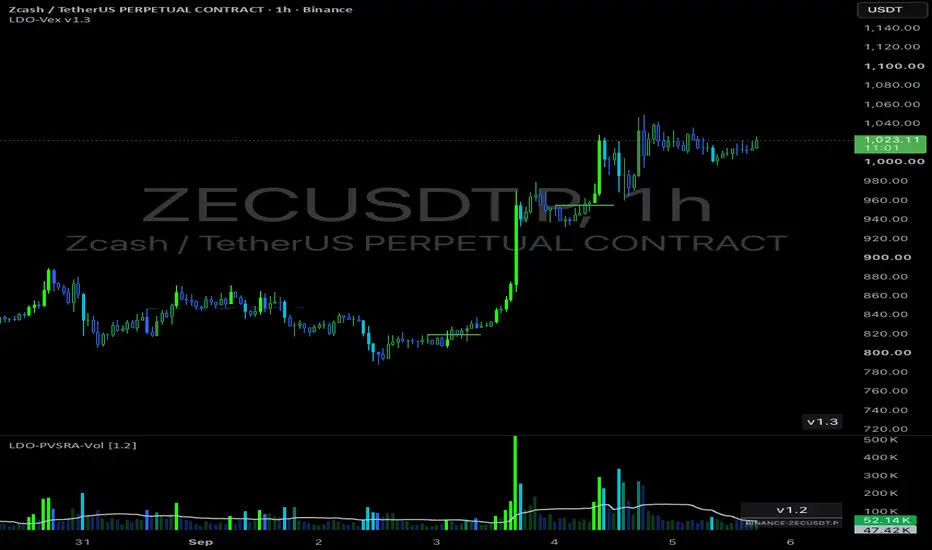
Volume bars coloured by PVSRA classification instead of plain up/down, so a
volume spike tells you its direction and its size at a glance.
── Reading it ──
Bright green / bright cyan — 200% "climax" volume. The big ones.
Mid green / blue — 150% "rising" volume. Above average, worth noting.
Faded — normal volume. Deliberately recessed so it sits
in the background and the vector bars pop.
Green is a bar that closed up, blue/cyan a bar that closed down. Brightness is
the size of the volume, hue is the direction. (Averages are taken from the ten
candles BEFORE the current one, which is the standard PVSRA calculation.)
── Changing the colours ──
All colour settings are in the INPUTS tab, not the Style tab. TradingView's
Style tab cannot recolour this plot and its picker there will appear to do
nothing — use Inputs.
There are three colour groups, each with an Up and a Down picker:
"200% volume — climax" the bright pair
"150% volume — rising" the mid pair
"Normal volume — faded" the background pair
Normal volume also has two extras:
Colour mode — "By direction" keeps the green/blue split. "Single colour"
paints every normal bar the same neutral shade, so the pane
reads as spike-vs-background rather than up-vs-down. Useful if
your candles already show you direction.
Fade % — how recessed normal volume looks. 0 is solid, 65 is the
default, higher pushes it further back.
Match these to whatever candle colouring you already run and the two panes will
agree by eye as well as by logic.
── Using Binance volume ──
"Use volume of the equivalent BINANCE PERP chart" is ON by default, and on
crypto symbols it pulls volume from the matching Binance perpetual rather than
whatever exchange your chart is on. That is where the volume actually trades,
so the classification is far more meaningful than volume from a thin venue.
The feed it settled on is printed in the small label at the bottom right of the
pane. If the perpetual does not exist it quietly falls back to your chart's own
volume — and that label will say so, so you always know what you are looking at.
Want a specific feed instead? Tick "Force override symbol" and type it in. On
non-crypto symbols the setting does nothing and your chart volume is used.
── Setting alerts ──
Two alerts are built in:
"Vector volume (150% or 200%)" — any above-average bar
"Climax volume (200%)" — the big ones only
To set one: click the alert clock (or right-click the chart, Add alert), set
Condition to LDO-PVSRA-Vol, then pick one of the two from the dropdown
underneath. Set the trigger to "Once per bar close" unless you want to be
pinged mid-candle by a spike that fades before the bar finishes.
Alerts fire off the same volume feed the bars are drawn from, so a Binance-perp
alert on a non-Binance chart works as you would expect.
── The rest of the settings ──
Thresholds — the 2.0x and 1.5x multipliers. The defaults are the standard
PVSRA values; raise them for fewer, more selective bars.
Volume MA — optional average line over the histogram, off by default.
Price pane — optionally colour your candles with the same classification.
Leave it off if you already run a PVSRA candle script.
Version label — the small bottom-right box. Turn it off if it is in your way.
── Credits ──
Derived from the open-source PVSRA volume work of infernix and peshocore,
under the Mozilla Public License 2.0. Independent derivative; not affiliated
with, and not named in reference to, Traders Reality or Pattern Watchers.
volume spike tells you its direction and its size at a glance.
── Reading it ──
Bright green / bright cyan — 200% "climax" volume. The big ones.
Mid green / blue — 150% "rising" volume. Above average, worth noting.
Faded — normal volume. Deliberately recessed so it sits
in the background and the vector bars pop.
Green is a bar that closed up, blue/cyan a bar that closed down. Brightness is
the size of the volume, hue is the direction. (Averages are taken from the ten
candles BEFORE the current one, which is the standard PVSRA calculation.)
── Changing the colours ──
All colour settings are in the INPUTS tab, not the Style tab. TradingView's
Style tab cannot recolour this plot and its picker there will appear to do
nothing — use Inputs.
There are three colour groups, each with an Up and a Down picker:
"200% volume — climax" the bright pair
"150% volume — rising" the mid pair
"Normal volume — faded" the background pair
Normal volume also has two extras:
Colour mode — "By direction" keeps the green/blue split. "Single colour"
paints every normal bar the same neutral shade, so the pane
reads as spike-vs-background rather than up-vs-down. Useful if
your candles already show you direction.
Fade % — how recessed normal volume looks. 0 is solid, 65 is the
default, higher pushes it further back.
Match these to whatever candle colouring you already run and the two panes will
agree by eye as well as by logic.
── Using Binance volume ──
"Use volume of the equivalent BINANCE PERP chart" is ON by default, and on
crypto symbols it pulls volume from the matching Binance perpetual rather than
whatever exchange your chart is on. That is where the volume actually trades,
so the classification is far more meaningful than volume from a thin venue.
The feed it settled on is printed in the small label at the bottom right of the
pane. If the perpetual does not exist it quietly falls back to your chart's own
volume — and that label will say so, so you always know what you are looking at.
Want a specific feed instead? Tick "Force override symbol" and type it in. On
non-crypto symbols the setting does nothing and your chart volume is used.
── Setting alerts ──
Two alerts are built in:
"Vector volume (150% or 200%)" — any above-average bar
"Climax volume (200%)" — the big ones only
To set one: click the alert clock (or right-click the chart, Add alert), set
Condition to LDO-PVSRA-Vol, then pick one of the two from the dropdown
underneath. Set the trigger to "Once per bar close" unless you want to be
pinged mid-candle by a spike that fades before the bar finishes.
Alerts fire off the same volume feed the bars are drawn from, so a Binance-perp
alert on a non-Binance chart works as you would expect.
── The rest of the settings ──
Thresholds — the 2.0x and 1.5x multipliers. The defaults are the standard
PVSRA values; raise them for fewer, more selective bars.
Volume MA — optional average line over the histogram, off by default.
Price pane — optionally colour your candles with the same classification.
Leave it off if you already run a PVSRA candle script.
Version label — the small bottom-right box. Turn it off if it is in your way.
── Credits ──
Derived from the open-source PVSRA volume work of infernix and peshocore,
under the Mozilla Public License 2.0. Independent derivative; not affiliated
with, and not named in reference to, Traders Reality or Pattern Watchers.

Feragatname
Bilgiler ve yayınlar, TradingView tarafından sağlanan veya onaylanan finansal, yatırım, alım satım veya diğer türden tavsiye veya öneriler anlamına gelmez ve teşkil etmez. Kullanım Koşulları bölümünde daha fazlasını okuyun.
Feragatname
Bilgiler ve yayınlar, TradingView tarafından sağlanan veya onaylanan finansal, yatırım, alım satım veya diğer türden tavsiye veya öneriler anlamına gelmez ve teşkil etmez. Kullanım Koşulları bölümünde daha fazlasını okuyun.