OPEN-SOURCE SCRIPT
Stochastic Range Regime [MarkitTick]
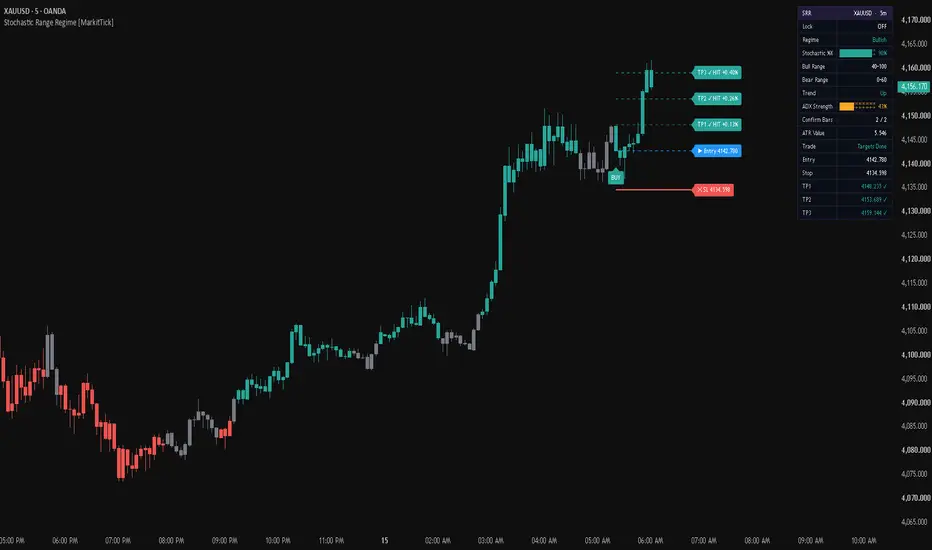
💡 This overlay classifies every bar as bullish, bearish or neutral by asking two questions at once: is price above or below its moving average, and where does the smoothed Stochastic %K sit inside a range that you define? When both answers agree for enough consecutive bars, the candles take the regime color. When a confirmed regime begins, the script prints a Buy or Sell label at bar close and draws an ATR-based stop with three targets.
The Stochastic is used here as a gauge of position inside the recent high-low range, read in the context of trend direction, and not as a stand-alone overbought and oversold trigger.
✨ Originality and Utility
The Stochastic Oscillator is normally read against fixed overbought and oversold lines. This script gives the bullish side and the bearish side of the market each their own adjustable %K window. The windows are set separately, they may overlap, and trend direction decides which one applies.
With the default settings the bullish window starts at 40 and has no upper limit, and the bearish window ends at 60 and has no lower limit. In an uptrend, %K only has to stay at or above 40 to keep the regime bullish. In a downtrend, %K only has to stay at or below 60 to keep the regime bearish. A deep pullback against the trend, or a rally against a downtrend, drops the state back to neutral.
What you get from this:
● Mashup justification
The script combines four standard tools, and each one answers a different question.
The regime needs the first two to agree, and the last two only act as an optional gate and as a sizing tool. Nothing in the combination is merged just for the sake of it: remove the trend average and the regime has no direction, remove the Stochastic and it has no position-in-range condition.
🔬 Methodology and Concepts
• Step 1: Stochastic position
The raw Stochastic is 100 times (source minus the lowest low of the last N bars) divided by (the highest high minus the lowest low of the last N bars). It is 0 at the low of the range and 100 at the high. The default length is 14 and the default source is the close. If the highest high equals the lowest low, the bar has no value.
The raw value is then averaged with a simple moving average (default 3 bars) to give %K. Setting %K Smoothing to 1 turns this average off.
Optionally, Adaptive Smoothing applies one more average (EMA, WMA or RMA) on top of %K before the regime is read. With None selected, %K is left exactly as it is.
• Step 2: Trend direction
A simple moving average of the Trend Source (default close, length 50) decides direction. The trend is up when the source is above the average and down when it is below. If the two are exactly equal, the trend is neither up nor down.
• Step 3: Raw regime
• Step 4: Confirmation
Two counters track how many consecutive bars the raw bullish and raw bearish conditions have held. The confirmed regime becomes bullish or bearish only when its counter reaches Regime Confirm Bars (default 2). Any bar that breaks the raw condition restarts that counter from zero. Everything else is neutral.
• Step 5: Signal
A signal is issued on a closed bar when the confirmed regime changes into bullish or bearish from any other state. The signal also has to pass these checks:
The filters are evaluated only on the bar where the regime changes. If a filter blocks the change on that bar, no signal is issued later for the same regime run.
• Step 6: Trade levels
Entry is the close of the signal bar. The stop sits at entry plus or minus the stop multiple times ATR (default 1.5 times a 14-bar ATR). The three targets sit at the TP multiples times ATR from entry (default 1.0, 2.0 and 3.0). Targets entered out of order are sorted from nearest to farthest.
A signal is suppressed if ATR is not available yet, if the stop distance is not larger than one minimum price tick, or if the levels would reach zero or below (the stop for a long, the farthest target for a short).
• Step 7: Trade tracking
🎨 Visual Guide
• Dashboard
A two-column table in the corner you choose. The header shows SRR with the symbol and timeframe. The rows are:
The progress bars are green at 66 percent or more of the scale, amber from 33 percent and red below that. This coloring reflects where the value sits on the 0 to 100 scale. It is not a verdict on the market.
Rows with a tinted warning fill appear when the HTF timeframe is lower than the chart timeframe (the filter is skipped) or when the target multiples were entered out of order and were sorted.
• Standard charts only
On Heikin Ashi, Renko, Kagi, Point and Figure, Range and Line Break charts the script shows a red notice in the middle of the chart. It draws no candles and issues no signals there, because those chart types show synthetic prices.
📖 How to Use
A regime describes current conditions. It is not a forecast, and the stop and targets are fixed ATR distances, not predictions.
● Alerts
Seven alert conditions are available: Buy Signal, Sell Signal, Close On New Signal, TP1 Hit, TP2 Hit, TP3 Hit and Stop Hit.
The script also sends message-style alerts. Entry alerts carry the action word, ticker, timeframe, direction, entry, stop, the three targets and the regime. Exit alerts carry the action word, ticker, timeframe, direction, entry, stop and the target that was hit. Partial close messages are used for TP1 and TP2, and close messages for TP3, the stop or a new signal.
Entry, stop and new-signal alerts are sent at bar close. Target alerts are sent once per bar, as soon as the target is touched.
● Bar-close behavior and repainting warning
⚙️ Inputs and Settings
• Core Settings
• Filters
• Trade Tools
• Visuals, Dashboard, Alerts and Colors
● Trade level notes
This is an indicator, not a backtesting strategy. It has no performance report, and it shows no win rate or profit figures. The stop and the three targets are fixed multiples of ATR. With the defaults, the third target sits at twice the stop distance (3.0 divided by 1.5). Position size, risk per trade and the decision to act on any signal remain yours.
Past behavior of a regime or of a signal does not guarantee that it will repeat.
🔍 Deconstruction of the Underlying Scientific and Academic Framework
• Range normalization
The Stochastic Oscillator is credited to George C. Lane in the 1950s. It places the latest price inside the high-low range of the last N bars, from 0 at the low to 100 at the high. Because the result is bounded, the readings can be compared between instruments with very different price levels. Lane's premise is that momentum changes direction before price does.
• Why the raw value is smoothed
The raw value can jump when the oldest bar leaves the look-back window, which is why Lane averaged it before using it. Averaging smooths the series but adds lag, so the smoothing length trades noise against delay. The optional Adaptive Smoothing methods weight the window differently from the plain average and follow the same trade-off.
• Position in range read together with trend
It is widely noted that an overbought or oversold reading does not by itself mean a reversal, and that in a strong trend the oscillator can stay near an extreme for a long time. Lane also considered his signals more reliable when taken in the direction of the major trend. Reading %K position only when it agrees with the direction of a moving average follows from these points. The upper part of the range is accepted inside a bullish regime and the lower part inside a bearish one.
• The trend filter
The simple moving average is the equal-weight mean of the last N values. A price above or below an average is the usual way to read direction. It is widely noted that the average lags, that crossovers arrive late and that it whipsaws in trading ranges. These are the conditions where the neutral state and the optional ADX gate are meant to help.
• Persistence rule
The confirmation counters turn the raw condition into a state that must hold for a number of consecutive bars. This is a simple debounce. It reduces one-bar flips, and its cost is that a regime appears later by the number of confirmation bars minus one.
• Volatility scaling with ATR
J. Welles Wilder introduced the true range and the Average True Range in 1978. True range is the largest of the high minus the low, the high minus the previous close, and the low minus the previous close, so gaps are included. ATR smooths it, and the built-in version is the RMA of true range. ATR measures how much price typically moves per bar and says nothing about direction. It is expressed in price units, so it should be used on the instrument it was measured on. Setting the stop and targets in ATR multiples lets the distances follow current volatility.
• Trend strength with ADX
Wilder also created the Directional Movement Index and the ADX in 1978, as a filter to keep a trader out of sideways markets. ADX measures how strong a trend is without giving its direction. Readings above 25 are commonly read as a strong trend and readings below 20 as a weak or absent one, with the area between as indeterminate. ADX is built from several layers of smoothing, so it lags and can whipsaw, and other analysis is needed to confirm what it shows. The default minimum of 20 in this script sits at that boundary.
• Higher timeframe agreement
When enabled, the same regime calculation is repeated on the chosen higher timeframe and read from its last completed bar. The signal then needs both timeframes to point the same way.
• Limits
Every input here is a rolling calculation on past bars, so the script describes conditions that already exist. It does not predict price.
⚠️ Disclaimer
All provided scripts and indicators are strictly for educational exploration and must not be interpreted as financial advice or a recommendation to execute trades. We expressly disclaim all liability for any financial losses or damages that may result, directly or indirectly, from the reliance on or application of these tools. Market participation carries inherent risk where past performance never guarantees future returns, leaving all investment decisions and due diligence solely at your own discretion.
The Stochastic is used here as a gauge of position inside the recent high-low range, read in the context of trend direction, and not as a stand-alone overbought and oversold trigger.
✨ Originality and Utility
The Stochastic Oscillator is normally read against fixed overbought and oversold lines. This script gives the bullish side and the bearish side of the market each their own adjustable %K window. The windows are set separately, they may overlap, and trend direction decides which one applies.
With the default settings the bullish window starts at 40 and has no upper limit, and the bearish window ends at 60 and has no lower limit. In an uptrend, %K only has to stay at or above 40 to keep the regime bullish. In a downtrend, %K only has to stay at or below 60 to keep the regime bearish. A deep pullback against the trend, or a rally against a downtrend, drops the state back to neutral.
What you get from this:
- A three-state read of the market (bullish, bearish, neutral) that is easy to scan on the candles.
- Signals only at the moment a confirmed regime begins, instead of a signal on every oscillator cross.
- Optional higher timeframe agreement and an optional ADX strength gate.
- A complete trade plan drawn on the chart: entry, stop and three targets sized from ATR.
● Mashup justification
The script combines four standard tools, and each one answers a different question.
- The Stochastic %K shows where the close sits inside the recent range. It says nothing about direction.
- The simple moving average shows trend direction. It says nothing about where price sits in the recent range.
- ADX (optional) measures trend strength without direction, so it can gate signals in weak markets.
- ATR measures volatility without direction, so it sizes the stop and targets on the same instrument.
The regime needs the first two to agree, and the last two only act as an optional gate and as a sizing tool. Nothing in the combination is merged just for the sake of it: remove the trend average and the regime has no direction, remove the Stochastic and it has no position-in-range condition.
🔬 Methodology and Concepts
• Step 1: Stochastic position
The raw Stochastic is 100 times (source minus the lowest low of the last N bars) divided by (the highest high minus the lowest low of the last N bars). It is 0 at the low of the range and 100 at the high. The default length is 14 and the default source is the close. If the highest high equals the lowest low, the bar has no value.
The raw value is then averaged with a simple moving average (default 3 bars) to give %K. Setting %K Smoothing to 1 turns this average off.
Optionally, Adaptive Smoothing applies one more average (EMA, WMA or RMA) on top of %K before the regime is read. With None selected, %K is left exactly as it is.
• Step 2: Trend direction
A simple moving average of the Trend Source (default close, length 50) decides direction. The trend is up when the source is above the average and down when it is below. If the two are exactly equal, the trend is neither up nor down.
• Step 3: Raw regime
- Raw bullish: the trend is up and %K is inside the Bull Range (default 40 to 100, both ends included).
- Raw bearish: the trend is down and %K is inside the Bear Range (default 0 to 60, both ends included).
- If a range is entered with its low above its high, the two values are swapped automatically.
• Step 4: Confirmation
Two counters track how many consecutive bars the raw bullish and raw bearish conditions have held. The confirmed regime becomes bullish or bearish only when its counter reaches Regime Confirm Bars (default 2). Any bar that breaks the raw condition restarts that counter from zero. Everything else is neutral.
• Step 5: Signal
A signal is issued on a closed bar when the confirmed regime changes into bullish or bearish from any other state. The signal also has to pass these checks:
- The chart must be a standard chart type.
- If HTF Confirmation is on, the higher timeframe regime must match.
- If the Chop Filter is on, ADX must be at or above the minimum.
- The stop and target levels must be valid (see Step 6).
The filters are evaluated only on the bar where the regime changes. If a filter blocks the change on that bar, no signal is issued later for the same regime run.
• Step 6: Trade levels
Entry is the close of the signal bar. The stop sits at entry plus or minus the stop multiple times ATR (default 1.5 times a 14-bar ATR). The three targets sit at the TP multiples times ATR from entry (default 1.0, 2.0 and 3.0). Targets entered out of order are sorted from nearest to farthest.
A signal is suppressed if ATR is not available yet, if the stop distance is not larger than one minimum price tick, or if the levels would reach zero or below (the stop for a long, the farthest target for a short).
• Step 7: Trade tracking
- Targets are marked as hit when the bar's high (long) or low (short) reaches them.
- The stop is marked as hit only when a bar closes beyond it, not on a wick.
- When the third target is hit, or the stop is hit, the trade is considered closed.
- After a stop, later target touches are ignored.
- If a new signal appears while the previous trade is still open, the old trade is closed by the new one and its drawings are replaced.
🎨 Visual Guide
- Regime candles: the script draws its own candles. Teal green means a confirmed bullish regime, red means a confirmed bearish regime and gray means neutral. These are the default colors and can be changed in the Colors group. Switching off Color Candles removes them.
- Buy label: appears below the signal bar, pointing up, in the bullish color with white text.
- Sell label: appears above the signal bar, pointing down, in the bearish color with white text.
- Stop line: a solid red line, drawn from the signal bar to the right.
- Entry line: a dashed blue line at the signal bar close.
- Target lines: three dashed teal lines. TP1 is the lightest and TP3 the most solid.
- Level labels: sit at the right end of each line and show the price. If two levels round to the same price they share one label, for example Entry and TP1 together.
- Hit labels: when a target is reached its label text changes to show that it was hit, with the percentage move from entry. The stop label does the same, using the closing price of the bar that closed beyond it.
- Line length: while a trade is open the lines extend ten bars beyond the latest bar. After a trade closes they stop ten bars after the closing bar.
• Dashboard
A two-column table in the corner you choose. The header shows SRR with the symbol and timeframe. The rows are:
- Lock: whether the signal lock is active.
- Regime: Bullish, Bearish or Neutral. It shows a dash until enough bars have filled.
- Stochastic %K: a ten-block bar with its percentage value.
- Bull Range and Bear Range: the two windows in use after any automatic swap.
- Trend: Up or Down.
- ADX Strength: a ten-block bar with its value.
- Chop Filter: Pass or Blocked (shown only when the filter is on).
- HTF Regime: the higher timeframe state, or Skipped (shown only when HTF Confirmation is on).
- Adaptive Smoothing: the method and length (shown only when a method is selected).
- Confirm Bars: the current count against the number required.
- ATR Value, Trade status, Entry, Stop, TP1, TP2 and TP3, with a check mark added to a level once it has been hit.
The progress bars are green at 66 percent or more of the scale, amber from 33 percent and red below that. This coloring reflects where the value sits on the 0 to 100 scale. It is not a verdict on the market.
Rows with a tinted warning fill appear when the HTF timeframe is lower than the chart timeframe (the filter is skipped) or when the target multiples were entered out of order and were sorted.
• Standard charts only
On Heikin Ashi, Renko, Kagi, Point and Figure, Range and Line Break charts the script shows a red notice in the middle of the chart. It draws no candles and issues no signals there, because those chart types show synthetic prices.
📖 How to Use
- Add the script to a standard candlestick chart. The first bars show a dash on the dashboard until the Stochastic, its smoothing and the trend average have enough history.
- Read the candle colors as the current regime. Gray candles mean that trend direction and %K position do not agree, or that the confirmation count has not been completed yet.
- Use the Confirm Bars row to see how close a new regime is to being confirmed.
- A Buy or Sell label marks the first closed bar of a newly confirmed regime. The drawn entry, stop and targets belong to that signal.
- Watch the Trade row and the hit labels to follow the trade state. Stopped means a close beyond the stop, and Targets Done means the third target was reached.
- Tighten or widen the windows to change how demanding the regime is. For example, a higher Bull Range Low requires the close to sit higher inside the recent range before a bullish regime counts.
- Turn on HTF Confirmation to require the same regime on a higher timeframe, or the Chop Filter to ignore regime changes while ADX is below your minimum.
A regime describes current conditions. It is not a forecast, and the stop and targets are fixed ATR distances, not predictions.
● Alerts
Seven alert conditions are available: Buy Signal, Sell Signal, Close On New Signal, TP1 Hit, TP2 Hit, TP3 Hit and Stop Hit.
The script also sends message-style alerts. Entry alerts carry the action word, ticker, timeframe, direction, entry, stop, the three targets and the regime. Exit alerts carry the action word, ticker, timeframe, direction, entry, stop and the target that was hit. Partial close messages are used for TP1 and TP2, and close messages for TP3, the stop or a new signal.
Entry, stop and new-signal alerts are sent at bar close. Target alerts are sent once per bar, as soon as the target is touched.
● Bar-close behavior and repainting warning
- Signals, labels and entry levels are created only on a closed bar and do not change afterwards.
- While a bar is still forming, the candle color, the Regime row, the %K bar and the other dashboard values can change as price moves, and they settle at the close. Do not treat the color of the live bar as final.
- Target hit marks and their alerts react to the bar's high or low while the bar is open.
- When one bar touches several levels, the order in which they were touched is not known from bar data. Targets are marked by the bar range and the stop by the close.
- HTF Confirmation reads the last completed higher timeframe bar, so that value does not change while the higher timeframe bar is forming.
⚙️ Inputs and Settings
• Core Settings
- Stochastic Length (default 14): the look-back of the high-low range. A longer range makes %K move more slowly.
- %K Smoothing (default 3): the simple average applied to the raw value. 1 turns it off.
- Source: the price placed inside the range (default close).
- Trend MA Length (default 50) and Trend Source (default close): the moving average and the price compared against it.
• Filters
- Bull Range Low and High (default 40 and 100): the %K window that counts as bullish when the trend is up.
- Bear Range Low and High (default 0 and 60): the %K window that counts as bearish when the trend is down.
- Regime Confirm Bars (default 2): consecutive bars needed before a regime counts. Higher values mean fewer flips and later signals.
- Use HTF Confirmation and HTF Timeframe (default off, 240): require the same regime on the higher timeframe. A timeframe lower than the chart is skipped and the dashboard says so.
- Use Chop Filter, ADX Length and ADX Min Strength (default off, 14, 20): block signals when ADX is below the minimum.
- Adaptive Smoothing and its length (default None, 5): extra smoothing of %K with EMA, WMA or RMA. The higher timeframe regime uses the same setting.
• Trade Tools
- Lock Signal (default off): blocks new signals on the latest bar so the trade currently drawn stays as it is. Signals on earlier bars are not affected.
- ATR Length (default 14): the volatility measure that sizes the levels.
- SL ATR Mult (default 1.5) and TP1, TP2, TP3 ATR Mult (default 1.0, 2.0, 3.0): the distances from entry in ATR units.
• Visuals, Dashboard, Alerts and Colors
- Color Candles and Show Buy/Sell Signals switch the regime candles and the signal labels on or off.
- Show Dashboard and Dashboard Position control the table and its corner.
- The Alerts group sets the action words sent in the message-style alerts (long, short, close long, close short, partial close long, partial close short).
- The Colors group sets the regime, level line, label, dashboard and warning colors.
● Trade level notes
This is an indicator, not a backtesting strategy. It has no performance report, and it shows no win rate or profit figures. The stop and the three targets are fixed multiples of ATR. With the defaults, the third target sits at twice the stop distance (3.0 divided by 1.5). Position size, risk per trade and the decision to act on any signal remain yours.
Past behavior of a regime or of a signal does not guarantee that it will repeat.
🔍 Deconstruction of the Underlying Scientific and Academic Framework
• Range normalization
The Stochastic Oscillator is credited to George C. Lane in the 1950s. It places the latest price inside the high-low range of the last N bars, from 0 at the low to 100 at the high. Because the result is bounded, the readings can be compared between instruments with very different price levels. Lane's premise is that momentum changes direction before price does.
• Why the raw value is smoothed
The raw value can jump when the oldest bar leaves the look-back window, which is why Lane averaged it before using it. Averaging smooths the series but adds lag, so the smoothing length trades noise against delay. The optional Adaptive Smoothing methods weight the window differently from the plain average and follow the same trade-off.
• Position in range read together with trend
It is widely noted that an overbought or oversold reading does not by itself mean a reversal, and that in a strong trend the oscillator can stay near an extreme for a long time. Lane also considered his signals more reliable when taken in the direction of the major trend. Reading %K position only when it agrees with the direction of a moving average follows from these points. The upper part of the range is accepted inside a bullish regime and the lower part inside a bearish one.
• The trend filter
The simple moving average is the equal-weight mean of the last N values. A price above or below an average is the usual way to read direction. It is widely noted that the average lags, that crossovers arrive late and that it whipsaws in trading ranges. These are the conditions where the neutral state and the optional ADX gate are meant to help.
• Persistence rule
The confirmation counters turn the raw condition into a state that must hold for a number of consecutive bars. This is a simple debounce. It reduces one-bar flips, and its cost is that a regime appears later by the number of confirmation bars minus one.
• Volatility scaling with ATR
J. Welles Wilder introduced the true range and the Average True Range in 1978. True range is the largest of the high minus the low, the high minus the previous close, and the low minus the previous close, so gaps are included. ATR smooths it, and the built-in version is the RMA of true range. ATR measures how much price typically moves per bar and says nothing about direction. It is expressed in price units, so it should be used on the instrument it was measured on. Setting the stop and targets in ATR multiples lets the distances follow current volatility.
• Trend strength with ADX
Wilder also created the Directional Movement Index and the ADX in 1978, as a filter to keep a trader out of sideways markets. ADX measures how strong a trend is without giving its direction. Readings above 25 are commonly read as a strong trend and readings below 20 as a weak or absent one, with the area between as indeterminate. ADX is built from several layers of smoothing, so it lags and can whipsaw, and other analysis is needed to confirm what it shows. The default minimum of 20 in this script sits at that boundary.
• Higher timeframe agreement
When enabled, the same regime calculation is repeated on the chosen higher timeframe and read from its last completed bar. The signal then needs both timeframes to point the same way.
• Limits
Every input here is a rolling calculation on past bars, so the script describes conditions that already exist. It does not predict price.
⚠️ Disclaimer
All provided scripts and indicators are strictly for educational exploration and must not be interpreted as financial advice or a recommendation to execute trades. We expressly disclaim all liability for any financial losses or damages that may result, directly or indirectly, from the reliance on or application of these tools. Market participation carries inherent risk where past performance never guarantees future returns, leaving all investment decisions and due diligence solely at your own discretion.
Açık kaynak kodlu komut dosyası
Gerçek TradingView ruhuyla, bu komut dosyasının mimarı, yatırımcıların işlevselliğini inceleyip doğrulayabilmesi için onu açık kaynaklı hale getirdi. Yazarı tebrik ederiz! Ücretsiz olarak kullanabilseniz de, kodu yeniden yayınlamanın Topluluk Kurallarımıza tabi olduğunu unutmayın.

💡 Proprietary indicators. Original research. Built by analysts who trade.
📢 Free Telegram: t.me/MarkitTick_Updates
👑 Premium: TradingView Marketplace
📘 Guides: markittick.com
📢 Free Telegram: t.me/MarkitTick_Updates
👑 Premium: TradingView Marketplace
📘 Guides: markittick.com
Feragatname
Bilgiler ve yayınlar, TradingView tarafından sağlanan veya onaylanan finansal, yatırım, alım satım veya diğer türden tavsiye veya öneriler anlamına gelmez ve teşkil etmez. Kullanım Koşulları bölümünde daha fazlasını okuyun.
Açık kaynak kodlu komut dosyası
Gerçek TradingView ruhuyla, bu komut dosyasının mimarı, yatırımcıların işlevselliğini inceleyip doğrulayabilmesi için onu açık kaynaklı hale getirdi. Yazarı tebrik ederiz! Ücretsiz olarak kullanabilseniz de, kodu yeniden yayınlamanın Topluluk Kurallarımıza tabi olduğunu unutmayın.
💡 Proprietary indicators. Original research. Built by analysts who trade.
📢 Free Telegram: t.me/MarkitTick_Updates
👑 Premium: TradingView Marketplace
📘 Guides: markittick.com
📢 Free Telegram: t.me/MarkitTick_Updates
👑 Premium: TradingView Marketplace
📘 Guides: markittick.com
Feragatname
Bilgiler ve yayınlar, TradingView tarafından sağlanan veya onaylanan finansal, yatırım, alım satım veya diğer türden tavsiye veya öneriler anlamına gelmez ve teşkil etmez. Kullanım Koşulları bölümünde daha fazlasını okuyun.