Güncellendi
StormCore Engine: OTE, Alligator & Volume Profile
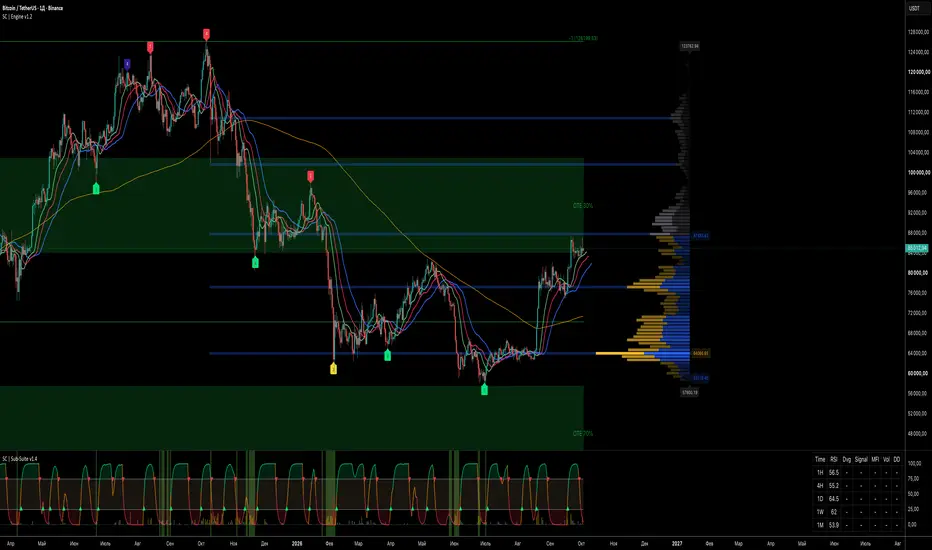
The StormCore Engine is a modular, all-in-one technical analysis tool designed to consolidate three powerful trading methodologies into a single, highly optimized script. By combining Optimal Trade Entry (OTE) zones, a modernized Williams Alligator, and a dynamic Volume Profile with node detection, this engine helps traders identify liquidity zones, trend alignments, and key volume clusters without exhausting indicator limits on the chart.
This script is built with a modular architecture, meaning every core component can be toggled on or off via a "Master Toggle" in the settings, keeping your workspace clean and reducing CPU load when specific tools are not in use.
### Core Modules
1. Optimal Trade Entry (OTE)
This module automatically plots Fibonacci retracement levels (including the 62% and 79% "sweet spot" boxes) anchored either to the visible chart area, custom date ranges, or higher timeframe swings.
- Features fractal detection to identify potential market structure shifts.
- Customizable Fibonacci extensions for dynamic profit-taking targets.
2. Super Alligator
A modernized take on the classic Bill Williams Alligator indicator. It utilizes SMMA-based Jaw, Teeth, and Lips to gauge trend direction and momentum.
- Signal Generation: Prints explicit Buy/Sell markers only when the "mouth" is fully open and the gap between the close price and the Lips exceeds a user-defined percentage.
- Trend Filters: Includes optional SMA 200 and VWAP filters to ensure signals only fire in the direction of the macro trend or intraday fair value.
3. Volume Profile & Node Detection
Calculates the trading volume at specific price levels over a user-defined lookback period.
- Displays the Point of Control (POC) and Value Area High/Low (VAH/VAL).
- Node Detection Algorithm: Highlights high-volume Peaks and low-volume Troughs within the profile, which often act as significant support and resistance barriers.
### Practical Application (How to Use)
A high-probability setup occurs when multiple modules align:
- Wait for the price to retrace into the OTE 70% box.
- Check if this zone coincides with a Volume Profile Peak (indicating strong historical liquidity).
- Await a confirming signal from the Super Alligator (e.g., a Buy triangle firing above the VWAP filter) to execute the trade.
All modules are calculated independently but rendered cleanly to avoid chart clutter. Adjust the settings for your specific asset and timeframe.
Developed by Andy Storm | AI-StormCore.
This script is built with a modular architecture, meaning every core component can be toggled on or off via a "Master Toggle" in the settings, keeping your workspace clean and reducing CPU load when specific tools are not in use.
### Core Modules
1. Optimal Trade Entry (OTE)
This module automatically plots Fibonacci retracement levels (including the 62% and 79% "sweet spot" boxes) anchored either to the visible chart area, custom date ranges, or higher timeframe swings.
- Features fractal detection to identify potential market structure shifts.
- Customizable Fibonacci extensions for dynamic profit-taking targets.
2. Super Alligator
A modernized take on the classic Bill Williams Alligator indicator. It utilizes SMMA-based Jaw, Teeth, and Lips to gauge trend direction and momentum.
- Signal Generation: Prints explicit Buy/Sell markers only when the "mouth" is fully open and the gap between the close price and the Lips exceeds a user-defined percentage.
- Trend Filters: Includes optional SMA 200 and VWAP filters to ensure signals only fire in the direction of the macro trend or intraday fair value.
3. Volume Profile & Node Detection
Calculates the trading volume at specific price levels over a user-defined lookback period.
- Displays the Point of Control (POC) and Value Area High/Low (VAH/VAL).
- Node Detection Algorithm: Highlights high-volume Peaks and low-volume Troughs within the profile, which often act as significant support and resistance barriers.
### Practical Application (How to Use)
A high-probability setup occurs when multiple modules align:
- Wait for the price to retrace into the OTE 70% box.
- Check if this zone coincides with a Volume Profile Peak (indicating strong historical liquidity).
- Await a confirming signal from the Super Alligator (e.g., a Buy triangle firing above the VWAP filter) to execute the trade.
All modules are calculated independently but rendered cleanly to avoid chart clutter. Adjust the settings for your specific asset and timeframe.
Developed by Andy Storm | AI-StormCore.
Sürüm Notları
🚀 StormCore Engine Update: Release v1.2In this major update, the StormCore engine receives a massive architectural and functional upgrade: a fourth independent module, the Divergence Master, has been integrated into the unified analytical suite.
The existing Optimal Trade Entry (OTE) zones, trend context (Super Alligator), and volume liquidity distribution (Volume Profile) are now supercharged with multi-indicator momentum and divergence confirmation.
📦 What's New in Version v1.2
New Module: Divergence Master (📉)
Multi-Oscillator Analysis: Simultaneous price divergence scanning across 11 indicators (MACD, RSI, Stochastic, CCI, Momentum, OBV, VW MACD, CMF, MFI, and an External Data Source).
StormCore Auto: MTF Dynamics: Algorithmic swing period adaptation based on the active timeframe (1M = 2, 1W = 4, 1D = 20), featuring intraday noise filtering. A manual override remains available for precise tuning.
Regular & Hidden Divergences: Detection of both reversal setups and trend continuation signals.
False Breakout Filtering (Slope Validation): A strict built-in algorithm invalidates incorrect signals by filtering out instances where the price or oscillator breaks the divergence trendline.
Divergence Confluence Counter: The indicator tallies the number of overlapping oscillator signals. The higher the number on the chart label, the stronger the statistical edge of the setup.
UI/UX & Architecture Optimization
Master Toggles Hierarchy: A master switch is now located at the very top of the settings menu, allowing you to instantly toggle the entire Divergence module without affecting the rest of your workspace.
Visual Noise Protection: The Show Only Last Divergence option keeps your chart clean by erasing historical lines and displaying only the most recent, actionable formations.
Alert System Integration
A complete alert pool is built-in for trading automation and bot integration (Positive/Negative Regular & Hidden Divergences).
Pine Script v6 Codebase
The code is strictly optimized for Pine Script v6 standards. Calculations execute globally to guarantee historical stability and eliminate buffer desync when switching timeframes.
💡 Mastering the 4-Module Synergy
Trend Context: Assess the market phase using the Super Alligator.
Liquidity & Volumes: Identify key price levels (POC, VAH/VAL) with the Volume Profile.
Reaction Zone: Wait for the asset to retrace into premium/discount levels using the OTE Fib Zones.
Entry Trigger: Look for a cluster divergence confirmation from the Divergence Master firing directly inside the OTE zone or on a Value Area boundary.

Feragatname
Bilgiler ve yayınlar, TradingView tarafından sağlanan veya onaylanan finansal, yatırım, alım satım veya diğer türden tavsiye veya öneriler anlamına gelmez ve teşkil etmez. Kullanım Koşulları bölümünde daha fazlasını okuyun.
Feragatname
Bilgiler ve yayınlar, TradingView tarafından sağlanan veya onaylanan finansal, yatırım, alım satım veya diğer türden tavsiye veya öneriler anlamına gelmez ve teşkil etmez. Kullanım Koşulları bölümünde daha fazlasını okuyun.