[blackcat] L1 NinjaTrader and Linear Regression Channel
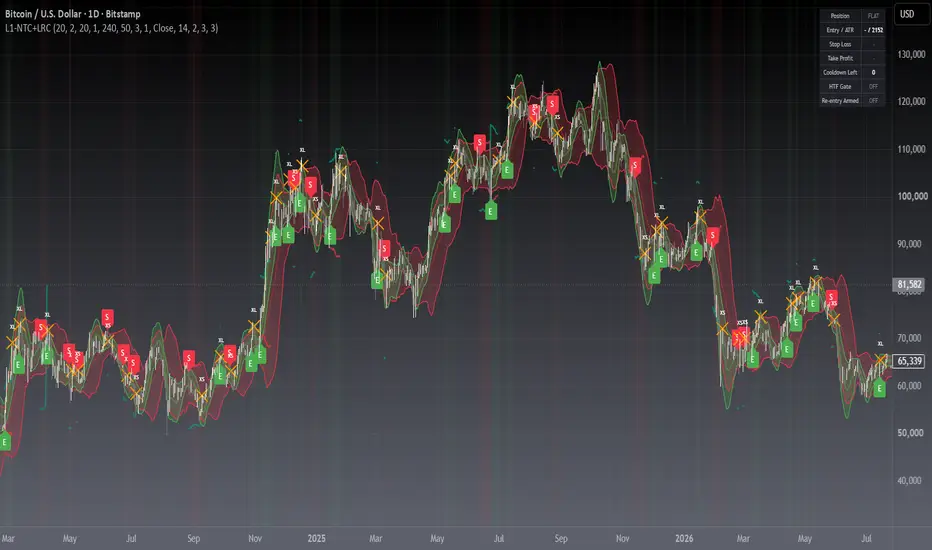
█ OVERVIEW
A dual-channel trend system that pairs the NinjaTrader channel with a linear regression channel into a complete two-way framework: entry and exit signals, ATR based stop and target levels, a position dashboard, and a full alert set.
Both channels stay on the chart as in the original open-source version, so you keep the visuals you know while the new logic handles the decisions.
█ CONCEPTS
The NinjaTrader channel (red) measures short-term volatility around a moving average; the regression channel (green) measures the statistical trend and its deviation. A cross of the regression mean becomes the directional trigger.
Key principles:
• Price crossing the regression mean defines the intended direction.
• The NinjaTrader channel acts as the volatility guard: leaving its outer band ends the trade.
• Every signal is state aware, so long and short can never be reported at once.
█ HOW TO USE
1 — Add the indicator to any chart. The defaults, length 20 on both channels, suit intraday and swing timeframes.
2 — Read the labels: E is a long entry, S a short entry, XL and XS are exits, RL and RS are optional re-entries.
3 — Trade with the Stop Loss and Take Profit lines; both are ATR based and adapt to volatility.
4 — Tune inputs by group: Channels, Multi-Timeframe, Signals, Risk, Visual.
Input Parameters
• Channel Length and Multiplier: NinjaTrader channel, default 20 bars and 2.0 standard deviations.
• LR Channel Length and LR Multiplier: regression channel, default 20 bars and 1.0 standard deviation.
• Enable Long Signals and Enable Short Signals: switch either side off for one-directional markets.
• Require LR Slope Alignment: entries only in the direction the regression line points, on by default.
• Cooldown Bars: minimum spacing between signals, default 3, set 0 to disable.
• Same-bar Entry/Exit Exclusivity: exits win over entries on the same bar.
• Enable Re-entry with Anchor Window and Breakout Source: re-arm a trade when price breaks the exit extreme.
• ATR Length, Stop Loss, Take Profit, Chandelier Trailing Stop: risk sizing, default 14, 2.0 and 3.0 times ATR, trailing off.
• HTF Direction Gate with HTF Timeframe and HTF EMA Length: optional higher timeframe filter, off by default.
• Display toggles for each channel, the labels, the background tint and the dashboard.
█ FEATURES
• Two-way signals governed by a position state machine, cooldown and same-bar resolution.
• ATR stop-loss and take-profit plotted as lines, plus an optional chandelier trailing stop.
• Position dashboard: state, entry price, ATR, stop, target, cooldown, HTF gate, re-entry status.
• Background tint reveals the position state at a glance.
• Six alertconditions plus six dynamic alerts carrying price, stop and target, all confirmed once per bar close.
█ SIGNALS
Visual Elements
• Green E label: long entry, price crossed back above the regression mean.
• Red S label: short entry, price crossed back below the regression mean.
• Orange XL and XS labels: position ended by the opposite cross or an outer band break.
• Teal RL and maroon RS labels: optional re-entry, shown only when enabled.
• Red channel, green channel and their midlines: the raw structure behind every signal.
█ IMPLEMENTATION NOTES
Built on ta.sma, ta.stdev, ta.linreg, ta.atr, ta.highest, ta.lowest, ta.crossover and ta.crossunder. Crossing checks are computed unconditionally on every bar so their internal history stays intact. The optional higher timeframe gate reads the last closed HTF bar with lookahead enabled, which keeps it non-repainting. Alerts fire once per bar close, so nothing re-fires inside a forming bar.
█ LIMITATIONS
• Mean-crossing triggers lag in strong chop; raise Cooldown Bars or enable the HTF gate in ranging markets.
• The two channels look similar; use the display toggles to isolate one when the chart feels busy.
• Signals are close-based by design, so an entry is taken on the following bar.
• Best on liquid, trending symbols. Validate on your own market and timeframe before risking capital.
█ NOTES
• Version 2 of the original open-source dual-channel indicator; channel maths and naming are unchanged.
• Not investment advice; this is an analytical tool.
═════════════════════════════════════════════════════════════════════════
For questions or feedback, use the comments section below.
Feel free to use and modify — attribution appreciated.
A dual-channel trend system that pairs the NinjaTrader channel with a linear regression channel into a complete two-way framework: entry and exit signals, ATR based stop and target levels, a position dashboard, and a full alert set.
Both channels stay on the chart as in the original open-source version, so you keep the visuals you know while the new logic handles the decisions.
█ CONCEPTS
The NinjaTrader channel (red) measures short-term volatility around a moving average; the regression channel (green) measures the statistical trend and its deviation. A cross of the regression mean becomes the directional trigger.
Key principles:
• Price crossing the regression mean defines the intended direction.
• The NinjaTrader channel acts as the volatility guard: leaving its outer band ends the trade.
• Every signal is state aware, so long and short can never be reported at once.
█ HOW TO USE
1 — Add the indicator to any chart. The defaults, length 20 on both channels, suit intraday and swing timeframes.
2 — Read the labels: E is a long entry, S a short entry, XL and XS are exits, RL and RS are optional re-entries.
3 — Trade with the Stop Loss and Take Profit lines; both are ATR based and adapt to volatility.
4 — Tune inputs by group: Channels, Multi-Timeframe, Signals, Risk, Visual.
Input Parameters
• Channel Length and Multiplier: NinjaTrader channel, default 20 bars and 2.0 standard deviations.
• LR Channel Length and LR Multiplier: regression channel, default 20 bars and 1.0 standard deviation.
• Enable Long Signals and Enable Short Signals: switch either side off for one-directional markets.
• Require LR Slope Alignment: entries only in the direction the regression line points, on by default.
• Cooldown Bars: minimum spacing between signals, default 3, set 0 to disable.
• Same-bar Entry/Exit Exclusivity: exits win over entries on the same bar.
• Enable Re-entry with Anchor Window and Breakout Source: re-arm a trade when price breaks the exit extreme.
• ATR Length, Stop Loss, Take Profit, Chandelier Trailing Stop: risk sizing, default 14, 2.0 and 3.0 times ATR, trailing off.
• HTF Direction Gate with HTF Timeframe and HTF EMA Length: optional higher timeframe filter, off by default.
• Display toggles for each channel, the labels, the background tint and the dashboard.
█ FEATURES
• Two-way signals governed by a position state machine, cooldown and same-bar resolution.
• ATR stop-loss and take-profit plotted as lines, plus an optional chandelier trailing stop.
• Position dashboard: state, entry price, ATR, stop, target, cooldown, HTF gate, re-entry status.
• Background tint reveals the position state at a glance.
• Six alertconditions plus six dynamic alerts carrying price, stop and target, all confirmed once per bar close.
█ SIGNALS
Visual Elements
• Green E label: long entry, price crossed back above the regression mean.
• Red S label: short entry, price crossed back below the regression mean.
• Orange XL and XS labels: position ended by the opposite cross or an outer band break.
• Teal RL and maroon RS labels: optional re-entry, shown only when enabled.
• Red channel, green channel and their midlines: the raw structure behind every signal.
█ IMPLEMENTATION NOTES
Built on ta.sma, ta.stdev, ta.linreg, ta.atr, ta.highest, ta.lowest, ta.crossover and ta.crossunder. Crossing checks are computed unconditionally on every bar so their internal history stays intact. The optional higher timeframe gate reads the last closed HTF bar with lookahead enabled, which keeps it non-repainting. Alerts fire once per bar close, so nothing re-fires inside a forming bar.
█ LIMITATIONS
• Mean-crossing triggers lag in strong chop; raise Cooldown Bars or enable the HTF gate in ranging markets.
• The two channels look similar; use the display toggles to isolate one when the chart feels busy.
• Signals are close-based by design, so an entry is taken on the following bar.
• Best on liquid, trending symbols. Validate on your own market and timeframe before risking capital.
█ NOTES
• Version 2 of the original open-source dual-channel indicator; channel maths and naming are unchanged.
• Not investment advice; this is an analytical tool.
═════════════════════════════════════════════════════════════════════════
For questions or feedback, use the comments section below.
Feel free to use and modify — attribution appreciated.

Don't miss out! The first and most important thing to do is to join my Discord chat now! Click here to start your adventure: discord.com/invite/ZTGpQJq My new github for more pine development soon: github.com/wxt-coder
Feragatname
Bilgiler ve yayınlar, TradingView tarafından sağlanan veya onaylanan finansal, yatırım, alım satım veya diğer türden tavsiye veya öneriler anlamına gelmez ve teşkil etmez. Kullanım Koşulları bölümünde daha fazlasını okuyun.
Don't miss out! The first and most important thing to do is to join my Discord chat now! Click here to start your adventure: discord.com/invite/ZTGpQJq My new github for more pine development soon: github.com/wxt-coder
Feragatname
Bilgiler ve yayınlar, TradingView tarafından sağlanan veya onaylanan finansal, yatırım, alım satım veya diğer türden tavsiye veya öneriler anlamına gelmez ve teşkil etmez. Kullanım Koşulları bölümünde daha fazlasını okuyun.