Güncellendi
TheStrat TTO: Triangle They Out (Stop Hunt Entries)
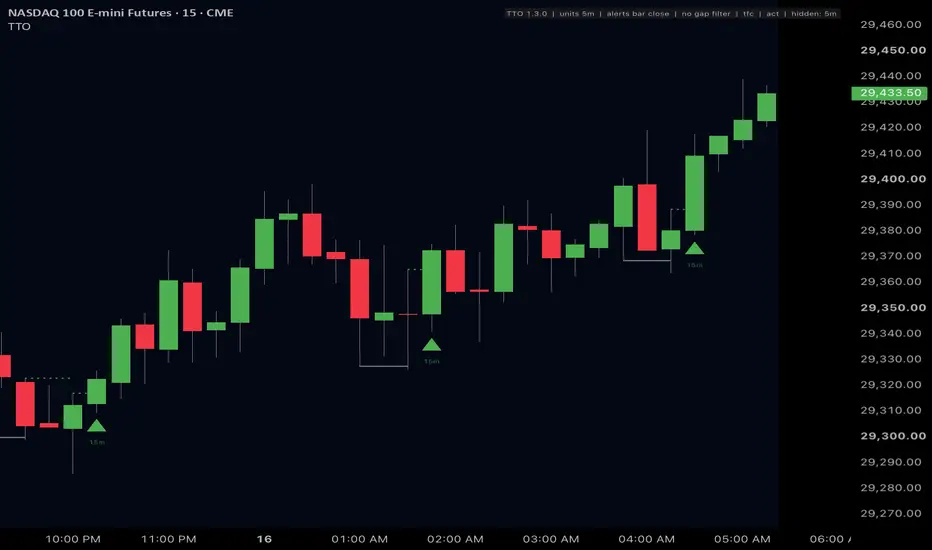
TTO automates the Triangle They Out, a pattern taught by Rob Smith, the creator of TheStrat. The name describes the setup: price action forms a triangle, the move out of it runs the stops of the traders positioned at its edge (it "takes them out"), and we look to enter after they are stopped out, in the original direction.
How the indicator reads it: a pullback leaves a point of structure. A later bar sweeps it, running the stops that sit beyond it, and closes back inside. The entry is a break of that sweep bar's opposite extreme, and the sweep extreme is where the trade is wrong. Display and alerts only: no orders, no strategy, no performance claims.
READING THE CHART
Green and red always mean bull and bear, never good and bad.
HOW A SETUP FORMS
Bullish shown; bearish is the mirror.
The flush extreme becomes structure itself. When a later setup sweeps it, and it is old enough (default 8 bars of its timeframe), that is a sweep of a sweep: the same liquidity taken twice. Younger re-sweeps are usually chop churning its own lows, so they grade as ordinary setups and can be hidden.
TIMEFRAMES
Four slots, default 5m, 15m, 30m and 1H, each switchable and set to any timeframe you like. Each slot runs its own detector on bars built from one lower-timeframe stream, so the chart timeframe is only zoom: a 5m chart and a 15m chart show the same setups at the same times, coarser charts just draw them smaller. Line width and triangle size grow with each slot's rank, finest thinnest.
By default a slot is hidden on charts above its own timeframe, so a Daily chart isn't buried in 5-minute entries: a 5m chart shows all four default slots, a 1H chart shows the 1H slot. Hidden slots keep running in the background, so whatever a slot does show is the same on every chart. One switch turns this off.
FILTERS
Filters hide marks and silence alerts. The detectors run unfiltered underneath, so turning a filter on or off never changes what was found, only what is shown.
With both default filters on, marks are deliberately sparse. Advanced > Mark filtered-out sweeps shows every hidden setup with the reason it was hidden.
ALERTS
Create one alert on the indicator with the condition "Any alert() function call". It carries every shown sweep and entry with the trigger and stop reference in the message, and respects every filter and toggle. Separate conditions also exist for sweeps, entries, and sweeps of a sweep.
The status tag in the corner says which timing you have. "alerts live": the chart's bars are the finest slot (a 5m chart with the 5m slot on), and the entry alert fires the moment price crosses the trigger. "alerts bar close": the chart is coarser than the finest slot, and the alert comes at the chart bar's close.
DOES IT REPAINT?
No. Detector state advances on confirmed bars only, and closed bars never change on reload. Entries are tested on every bar of the lower-timeframe stream, so the triangle sits on the bar that actually crossed rather than at the end of a higher-timeframe bar. With a filter on, a live alert reads the filter at the moment of the crossing while the marker reads it at the bar's close, so inside one bar the two can disagree. With every filter off they cannot.
KNOWN LIMITATIONS
OPEN SOURCE
The full source is published under the Mozilla Public License 2.0, with a README and changelog. The repository link is in my signature.
Trading involves risk. This is a charting tool, not financial advice. Past results do not guarantee future results.
How the indicator reads it: a pullback leaves a point of structure. A later bar sweeps it, running the stops that sit beyond it, and closes back inside. The entry is a break of that sweep bar's opposite extreme, and the sweep extreme is where the trade is wrong. Display and alerts only: no orders, no strategy, no performance claims.
READING THE CHART
- Grey line: the swept structure, from the bar that made it to the sweep bar.
- Dotted green or red line: an armed setup's trigger. It runs right until the setup enters or dies. A faint end means it died without trading.
- Green or red triangle: the entry, on the bar that traded through the trigger. The text is the timeframe it came from (5m, 15m, 1H).
- x2 on the triangle: a sweep of a sweep. The level that got swept was itself an earlier sweep extreme.
- Soft green or red box: the fair value gap that qualified the setup, labeled with its timeframe. Stacked boxes are gaps nested across timeframes.
Green and red always mean bull and bear, never good and bad.
HOW A SETUP FORMS
Bullish shown; bearish is the mirror.
- Structure: every confirmed three-bar fractal low on a watched timeframe is remembered until it is broken, or swept and resolved. A newer low does not erase an older one.
- Flush: a bar trades below a remembered low. The running low is the flush extreme.
- Reclaim: within the reclaim window (default 2 bars after the newest low), a close back above a swept low arms the setup on the deepest low reclaimed. The trigger is that bar's high; the stop reference is the flush extreme. Setting the window to 0 requires the sweep bar itself to close back inside.
- Extension: while armed, a deeper low that still closes above the level moves the trigger and stop reference to that bar.
- Kill: a close back below the armed level.
- Entry: price trades through the trigger.
The flush extreme becomes structure itself. When a later setup sweeps it, and it is old enough (default 8 bars of its timeframe), that is a sweep of a sweep: the same liquidity taken twice. Younger re-sweeps are usually chop churning its own lows, so they grade as ordinary setups and can be hidden.
TIMEFRAMES
Four slots, default 5m, 15m, 30m and 1H, each switchable and set to any timeframe you like. Each slot runs its own detector on bars built from one lower-timeframe stream, so the chart timeframe is only zoom: a 5m chart and a 15m chart show the same setups at the same times, coarser charts just draw them smaller. Line width and triangle size grow with each slot's rank, finest thinnest.
By default a slot is hidden on charts above its own timeframe, so a Daily chart isn't buried in 5-minute entries: a 5m chart shows all four default slots, a 1H chart shows the 1H slot. Hidden slots keep running in the background, so whatever a slot does show is the same on every chart. One switch turns this off.
FILTERS
Filters hide marks and silence alerts. The detectors run unfiltered underneath, so turning a filter on or off never changes what was found, only what is shown.
- Fair value gap (on by default): the sweep extreme must sit inside a live same-direction gap on the setup's own timeframe or a higher one, never a lower one. A gap dies the moment price trades fully through it.
- Timeframe continuity (on by default, Daily): up to three timeframes must all be on the trade's side of their open, checked at the sweep and again at the entry. This is the same rule TheStrat Suite uses for full timeframe continuity.
- ACT trend direction (off by default): my ACT (Alignment-Colored Trend) indicator's trend reading must agree with the setup. Main trend means price is above (for longs) or below (for shorts) the opens of two higher timeframes, Daily and Weekly on the default ladder. Counter-trend means those two disagree and a mid timeframe (4H) has broken out in the setup's direction. Choose trend or counter-trend, or main trend only; no trend blocks both sides. ACT's logic is built into TTO, so ACT itself does not need to be on the chart.
With both default filters on, marks are deliberately sparse. Advanced > Mark filtered-out sweeps shows every hidden setup with the reason it was hidden.
ALERTS
Create one alert on the indicator with the condition "Any alert() function call". It carries every shown sweep and entry with the trigger and stop reference in the message, and respects every filter and toggle. Separate conditions also exist for sweeps, entries, and sweeps of a sweep.
The status tag in the corner says which timing you have. "alerts live": the chart's bars are the finest slot (a 5m chart with the 5m slot on), and the entry alert fires the moment price crosses the trigger. "alerts bar close": the chart is coarser than the finest slot, and the alert comes at the chart bar's close.
DOES IT REPAINT?
No. Detector state advances on confirmed bars only, and closed bars never change on reload. Entries are tested on every bar of the lower-timeframe stream, so the triangle sits on the bar that actually crossed rather than at the end of a higher-timeframe bar. With a filter on, a live alert reads the filter at the moment of the crossing while the marker reads it at the bar's close, so inside one bar the two can disagree. With every filter off they cannot.
KNOWN LIMITATIONS
- Slot bars are built from lower-timeframe data. Beyond your plan's intrabar history, older bars have nothing to build from and the indicator is quiet there.
- A slot above 30m that sits between the finest slot and the chart timeframe can't be built accurately and switches itself off. The status tag lists it.
- A setup that arms on a session's final bar resolves on the next session's open.
- TradingView keeps the most recent 500 lines; each shown setup draws two, so very long histories lose their oldest marks.
OPEN SOURCE
The full source is published under the Mozilla Public License 2.0, with a README and changelog. The repository link is in my signature.
Trading involves risk. This is a charting tool, not financial advice. Past results do not guarantee future results.
Sürüm Notları
New Features: TTO now runs in TradingView's Pine Screener on 2H, 4H, daily and weekly scans. New defaults to avoid clutter:
- Only the 15m slot is on. The 5m, 30m and 1H slots keep their timeframes and switch on in Settings.
- Draw qualifying gaps is off. The gap filter still runs. Turn the setting on to see the boxes.
Also in this update:
- Hovering an entry marker explains it: timeframe, direction, trigger, stop reference, and what x2 means.
Charts that already have TTO keep their current settings. Use Defaults > Reset settings in the indicator's settings to pick up the new defaults.
No change to detection, filters or alerts.
Sürüm Notları
Bug Fix: Fixes an issue with alerts that could cause them to repeat multiple times.Sürüm Notları
Bug fixes and optimizations. Higher-timeframe setups now arm when their bar closes instead of a bar late. Sweep alerts fire once per bar. New: optional stop and trail display (off by default), screener columns for armed setups with trigger and distance. Lays groundwork for linking between different indicators. No change to detection, filters or alert conditions.
Tools for traders and investors smart enough to keep it simple 😘👌
➡️ SETUP SCREENER GUIDE: TheStratSuite.com/scanner/guide
🤑 TheStrat Suite is now FREE & open source: TheStratSuite.com
345strategies.com · github.com/345-strategies
➡️ SETUP SCREENER GUIDE: TheStratSuite.com/scanner/guide
🤑 TheStrat Suite is now FREE & open source: TheStratSuite.com
345strategies.com · github.com/345-strategies
Feragatname
Bilgiler ve yayınlar, TradingView tarafından sağlanan veya onaylanan finansal, yatırım, alım satım veya diğer türden tavsiye veya öneriler anlamına gelmez ve teşkil etmez. Kullanım Koşulları bölümünde daha fazlasını okuyun.
Tools for traders and investors smart enough to keep it simple 😘👌
➡️ SETUP SCREENER GUIDE: TheStratSuite.com/scanner/guide
🤑 TheStrat Suite is now FREE & open source: TheStratSuite.com
345strategies.com · github.com/345-strategies
➡️ SETUP SCREENER GUIDE: TheStratSuite.com/scanner/guide
🤑 TheStrat Suite is now FREE & open source: TheStratSuite.com
345strategies.com · github.com/345-strategies
Feragatname
Bilgiler ve yayınlar, TradingView tarafından sağlanan veya onaylanan finansal, yatırım, alım satım veya diğer türden tavsiye veya öneriler anlamına gelmez ve teşkil etmez. Kullanım Koşulları bölümünde daha fazlasını okuyun.