Prop Firm Position Sizer by Hristo
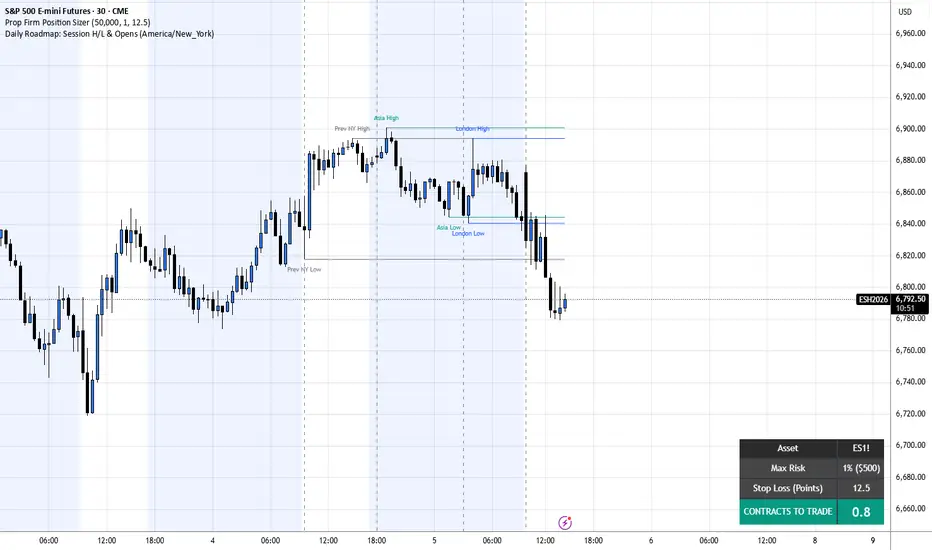
This Pine Script is a custom TradingView indicator designed to help futures and prop firm traders calculate their exact position size (number of contracts) based on strict risk management parameters.
Here is a breakdown of how the script works, its calculations, and what it displays.
1. Core Purpose
The script calculates how many contracts you should trade so that if your Stop Loss is hit, you only lose a specific, pre-defined percentage of your total account size. It updates dynamically depending on the asset you are viewing.
2. User Inputs
When you add this script to your chart, it provides a settings menu ("Risk Settings") where you can input three main variables:
Account Size ($): Your total trading capital (Default is $50,000, typical for prop firm evaluations).
Risk per Trade (%): The percentage of your account you are willing to lose on a single trade (Default is 1.0%).
Stop Loss (Points): The distance of your stop loss from your entry price, measured in points (Default is 12.5 points).
3. The Math & Calculations
Behind the scenes, the script calculates the following:
Max Risk ($): It converts your risk percentage into a flat dollar amount. For example, 1% of a $50,000 account equals $500.
Point Value Detection: It uses TradingView's built-in syminfo.pointvalue function. This automatically knows that 1 point on the S&P 500 (ES) is worth $50, while 1 point on the Nasdaq (NQ) is worth $20.
Cost Per Contract: It multiplies your Stop Loss distance by the point value to figure out how much you would lose per single contract if you get stopped out.
Final Position Size: It divides your Max Risk ($) by the Cost Per Contract to determine how many contracts you can safely afford to trade. It rounds this number to one decimal place (e.g., 1.4 contracts).
4. Visual Output (The Widget)
Instead of plotting lines or shapes on the chart, the script creates a sleek, color-coded table widget in the bottom-right corner of your screen. To save processing power, it only draws this table on the most recent candle (if barstate.islast).
The table displays four rows of useful information:
Asset: The current ticker symbol you are viewing (e.g., ES1!).
Max Risk: Shows both your selected risk percentage and the resulting dollar amount.
Stop Loss: Displays your input stop loss in points.
CONTRACTS TO TRADE: The final calculated position size, highlighted in a bright green box (#089981) with large text so you can read it quickly before entering a trade.
A Quick Note on the Output
Because the script uses math.round(rawContracts, 1), it will output sizes like 1.4. If you are trading standard futures, you cannot trade fractional contracts. A trader using this script would typically interpret "1.4" as trading 1 standard contract and 4 micro contracts (e.g., 1 ES and 4 MES).
Here is a breakdown of how the script works, its calculations, and what it displays.
1. Core Purpose
The script calculates how many contracts you should trade so that if your Stop Loss is hit, you only lose a specific, pre-defined percentage of your total account size. It updates dynamically depending on the asset you are viewing.
2. User Inputs
When you add this script to your chart, it provides a settings menu ("Risk Settings") where you can input three main variables:
Account Size ($): Your total trading capital (Default is $50,000, typical for prop firm evaluations).
Risk per Trade (%): The percentage of your account you are willing to lose on a single trade (Default is 1.0%).
Stop Loss (Points): The distance of your stop loss from your entry price, measured in points (Default is 12.5 points).
3. The Math & Calculations
Behind the scenes, the script calculates the following:
Max Risk ($): It converts your risk percentage into a flat dollar amount. For example, 1% of a $50,000 account equals $500.
Point Value Detection: It uses TradingView's built-in syminfo.pointvalue function. This automatically knows that 1 point on the S&P 500 (ES) is worth $50, while 1 point on the Nasdaq (NQ) is worth $20.
Cost Per Contract: It multiplies your Stop Loss distance by the point value to figure out how much you would lose per single contract if you get stopped out.
Final Position Size: It divides your Max Risk ($) by the Cost Per Contract to determine how many contracts you can safely afford to trade. It rounds this number to one decimal place (e.g., 1.4 contracts).
4. Visual Output (The Widget)
Instead of plotting lines or shapes on the chart, the script creates a sleek, color-coded table widget in the bottom-right corner of your screen. To save processing power, it only draws this table on the most recent candle (if barstate.islast).
The table displays four rows of useful information:
Asset: The current ticker symbol you are viewing (e.g., ES1!).
Max Risk: Shows both your selected risk percentage and the resulting dollar amount.
Stop Loss: Displays your input stop loss in points.
CONTRACTS TO TRADE: The final calculated position size, highlighted in a bright green box (#089981) with large text so you can read it quickly before entering a trade.
A Quick Note on the Output
Because the script uses math.round(rawContracts, 1), it will output sizes like 1.4. If you are trading standard futures, you cannot trade fractional contracts. A trader using this script would typically interpret "1.4" as trading 1 standard contract and 4 micro contracts (e.g., 1 ES and 4 MES).

Feragatname
Bilgiler ve yayınlar, TradingView tarafından sağlanan veya onaylanan finansal, yatırım, alım satım veya diğer türden tavsiye veya öneriler anlamına gelmez ve teşkil etmez. Kullanım Koşulları bölümünde daha fazlasını okuyun.
Feragatname
Bilgiler ve yayınlar, TradingView tarafından sağlanan veya onaylanan finansal, yatırım, alım satım veya diğer türden tavsiye veya öneriler anlamına gelmez ve teşkil etmez. Kullanım Koşulları bölümünde daha fazlasını okuyun.