OPEN-SOURCE SCRIPT
Güncellendi Initial Balance Break Planner [AGPro Series]
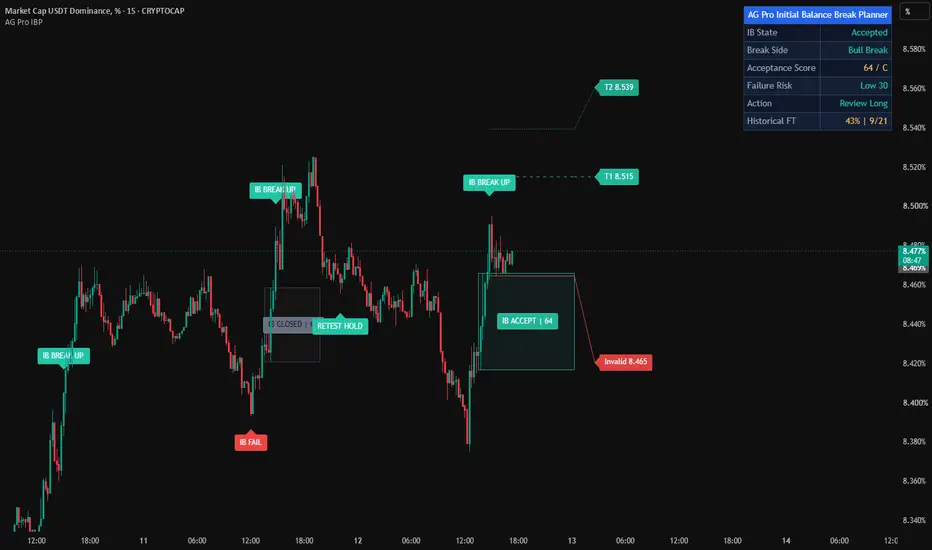
Initial Balance Break Planner [AGPro Series]
🧠 Core Idea
Is the Initial Balance break being accepted, or is it becoming vulnerable to failure back inside the balance?
📌 Overview / What it does
Initial Balance Break Planner [AGPro Series] is an intraday session planning tool built around the first major balance of the trading session. It maps a configurable Initial Balance window, tracks the first break beyond that balance, and evaluates whether that break has enough quality to deserve structured review. The default showcase workflow is designed for intraday charts up to 60 minutes.
The script produces a locked Initial Balance box, break review labels, acceptance labels, failure-risk labels, failed-IB markers, target rails, and an invalidation reference. The panel summarizes the active state through IB State, Break Side, Acceptance Score, Failure Risk, and Action.
It does not predict future price movement, automate trades, or tell the user what to buy or sell. It is a rule-based decision-support overlay for reading Initial Balance behavior with more structure.
🎯 Purpose & Design Philosophy
This script was built to solve a common intraday problem: many traders can see that price broke the first balance, but they still need a cleaner way to judge whether that break is accepted, stretched, weak, or vulnerable.
The tool is designed for traders who use session structure, Initial Balance concepts, intraday breakouts, and structured risk review. Its purpose is not to create another simple breakout signal. Its purpose is to turn the Initial Balance break into a practical planning framework.
The design philosophy is simple: map the balance, evaluate the break, show the risk, project the planning rails, and keep the next action readable.
⚡ Why This Script Is Different
Most opening-range tools focus on basic breakout direction, raw high/low levels, or target projections.
This script does NOT clone ORB Quality or Opening Range Failure Zones. ORB Quality is focused on opening range breakout quality and drive continuation. Opening Range Failure Zones is focused on failed opening range probes and reclaim zones.
Instead, Initial Balance Break Planner focuses on the post-IB decision layer: is the first Initial Balance break accepted, does the retest response support the break, where is the invalidation reference, where are the target rails, and what should the trader review next?
⚙️ Methodology
1. Context Detection
The script builds the Initial Balance from a configurable session window. The default uses the first 60 minutes of the New York regular session.
2. Reference Mapping
Once the IB window ends, the script locks the IB high, IB low, and midpoint. The box remains centered with an internal state label so the chart stays visually clear.
3. Reaction Evaluation
After the first break, the planner scores the setup using:
• IB width
• Break close quality
• Retest response
• Relative volume support
• Volatility fit
4. Visual Output
The chart displays break labels, acceptance labels, risk-review labels, failed-IB markers, target rails, and an invalidation rail. The panel converts the model into a compact next-action state.
🗺️ How to Read the Chart
The Initial Balance box represents the first session balance selected by the user.
Break labels show when price closes beyond the IB edge with enough buffer to start review.
Acceptance labels appear when the break has enough score, enough confirmation time, and controlled failure risk.
Failure-risk labels warn that the break is weakening or returning back inside the balance.
Target rails show measured planning references from the broken IB edge.
The invalidation rail marks the area where the break begins losing acceptance quality.
Panel colors summarize the current state:
• Teal → stronger acceptance or constructive long-side context
• Pink → bearish break side or failed context
• Amber → watch, risk review, or unresolved state
• Indigo / blue → active planning context
🚦 Signals & States
• IB READY → the Initial Balance has locked and the planner is ready to track the first break
• BREAK UP REVIEW → price closed beyond the upper IB edge and long-side review has started
• BREAK DOWN REVIEW → price closed beyond the lower IB edge and short-side review has started
• RETEST HOLD → price retested the broken IB edge without clearly losing it
• ACCEPTED → the break met the acceptance threshold with controlled failure risk
• RISK REVIEW → the break is not yet accepted and failure vulnerability is rising
• FAILED IB → price failed back inside the Initial Balance with elevated weakness context
🔔 Alerts Logic
Alerts trigger when the script detects:
• A bullish IB break review
• A bearish IB break review
• Bullish IB acceptance
• Bearish IB acceptance
• Failure-risk review
• Failed return back inside the IB
Alerts are attention markers only. They are not trade instructions.
🧩 Confluence Logic
The strongest context appears when the break close is clean, the IB width is balanced, volume is supportive, volatility is not overheated, and the retest response holds the broken edge.
When these elements align, the Acceptance Score improves and the panel can move from Observe Retest into Review Long or Review Short.
📊 When to Use
• Intraday markets with clear session structure
• 1-minute to 60-minute charts
• Index, futures, FX, and liquid crypto sessions
• Initial Balance breakout review
• Session expansion planning
• Post-break retest evaluation
• Risk and target planning after the first session balance breaks
⚠️ When NOT to Use
• Very low-liquidity symbols
• Extremely noisy micro timeframes
• Markets with poor session definition
• Events with abnormal volatility spikes
• Symbols where volume data is unreliable and should not be weighted heavily
• Higher timeframes where the selected IB session has little practical meaning
• 4H, daily, weekly, or monthly charts where a one-session Initial Balance cannot be mapped cleanly
🎛️ Key Inputs
• Initial Balance Window → defines the balance-building period
• Tracking Session → defines when break review can update
• Sensitivity → adjusts how selective the planner is
• Acceptance Lookback → controls the review window after the first break
• Minimum Acceptance Score → sets the threshold for accepted-break states
• Confirmation Mode → chooses confirmed-bar behavior or live updating
• Break Buffer ATR → controls how far price must close beyond the IB edge
• Retest Response Buffer ATR → controls retest tolerance around the broken edge
• Failure Buffer ATR → controls how quickly returning inside the IB raises risk
• Target Rail Multiples → control measured target references
• Max Visible IB Boxes → controls how many recent balance boxes stay on the chart
• Max Visible Labels → controls how many recent event labels stay on the chart
• Show IB Ready Labels → optionally displays a readiness label when the Initial Balance locks
• Visual Settings → control labels, box count, rail projection, and spacing
• Panel Settings → control panel visibility, location, theme, and font size
🖥️ Interface & Visual Design
The script uses a chart-first design. The Initial Balance box is the main anchor, and the centered box label keeps the active state visible without requiring a large dashboard.
Event labels are deliberately compact and offset away from candles. Target rails and invalidation rails are projected only after a break, so the chart remains clean during the balance-building phase.
The AG Pro panel uses a single merged blue header row and five compact rows so the user can quickly scan state, side, score, risk, and action.
🧪 Practical Usage Workflow
1. Read the panel after the Initial Balance locks.
2. Wait for price to break one IB edge.
3. Check whether the break receives a clean score or moves into risk review.
4. Watch the broken edge for retest behavior.
5. Use the target rails and invalidation rail as planning references.
6. Interpret the result within broader market context.
🔍 Interpretation Guidelines
The Acceptance Score is a quality score, not a prediction. Higher scores mean the break has better internal structure according to the script's rules.
Failure Risk is a warning layer. It rises when price loses acceptance quality, moves back inside the IB, shows weak close behavior, or lacks participation.
The Action row is the most practical summary. It helps the user decide whether the environment is still building, waiting, reviewing, accepted, vulnerable, or better left alone.
🚫 What This Script Is NOT
• Not a prediction engine
• Not financial advice
• Not auto trading
• Not guaranteed signals
• Not a generic ORB breakout system
• Not Opening Range Failure Zones
• Not a broad support/resistance or order-block map
⚠️ Limitations & Transparency
Initial Balance behavior changes across symbols, sessions, and timeframes. A 60-minute IB on one market may behave differently from the same window on another market.
Relative volume can be less useful on symbols where reported volume is incomplete or inconsistent.
Fast news events, thin liquidity, and unusual volatility can reduce the usefulness of any session-break model.
The script evaluates rule-based context only. It cannot know future order flow or guarantee what price will do next.
🧠 Market Context Notes
Initial Balance analysis is most useful when the session has a meaningful opening phase and a clear expansion phase.
A clean break usually needs more than a line cross. The break should show location, acceptance, participation, and controlled risk.
A weak break can still travel further, and a strong break can still fail. The script is designed to help structure the review, not remove uncertainty.
🧾 Use Case Examples
When price breaks above the IB high, receives a strong acceptance score, holds the broken edge on retest, and keeps failure risk low, the panel may move into Review Long.
When price breaks below the IB low but quickly returns back inside the balance with weak close quality, the panel may move into Failure Watch or Failed Back In.
When the IB is too wide, volatility is unstable, and the break lacks volume support, the planner can remain cautious even if price has crossed the edge.
🧱 System Philosophy
The AGPro Series approach is built around decision structure, not raw signal output.
Initial Balance Break Planner follows that philosophy by combining a visible session reference with a score, risk layer, target references, and a next-action panel.
The goal is to make the chart easier to interpret without making the chart crowded.
🔐 Non-Promise Statement
This script does not provide certainty.
It does not guarantee that an accepted break will continue or that a vulnerable break will reverse.
All outputs should be interpreted as structured analytical context.
📉 Risk Disclosure
Trading involves risk.
Users are responsible for their own analysis, execution, and risk management.
This script is not financial advice and does not provide guaranteed trading outcomes.
📚 Educational Note
Initial Balance analysis can help traders study how a session moves from balance into expansion, but it should always be combined with broader market structure, liquidity, volatility, and personal execution rules.
🧠 Core Idea
Is the Initial Balance break being accepted, or is it becoming vulnerable to failure back inside the balance?
📌 Overview / What it does
Initial Balance Break Planner [AGPro Series] is an intraday session planning tool built around the first major balance of the trading session. It maps a configurable Initial Balance window, tracks the first break beyond that balance, and evaluates whether that break has enough quality to deserve structured review. The default showcase workflow is designed for intraday charts up to 60 minutes.
The script produces a locked Initial Balance box, break review labels, acceptance labels, failure-risk labels, failed-IB markers, target rails, and an invalidation reference. The panel summarizes the active state through IB State, Break Side, Acceptance Score, Failure Risk, and Action.
It does not predict future price movement, automate trades, or tell the user what to buy or sell. It is a rule-based decision-support overlay for reading Initial Balance behavior with more structure.
🎯 Purpose & Design Philosophy
This script was built to solve a common intraday problem: many traders can see that price broke the first balance, but they still need a cleaner way to judge whether that break is accepted, stretched, weak, or vulnerable.
The tool is designed for traders who use session structure, Initial Balance concepts, intraday breakouts, and structured risk review. Its purpose is not to create another simple breakout signal. Its purpose is to turn the Initial Balance break into a practical planning framework.
The design philosophy is simple: map the balance, evaluate the break, show the risk, project the planning rails, and keep the next action readable.
⚡ Why This Script Is Different
Most opening-range tools focus on basic breakout direction, raw high/low levels, or target projections.
This script does NOT clone ORB Quality or Opening Range Failure Zones. ORB Quality is focused on opening range breakout quality and drive continuation. Opening Range Failure Zones is focused on failed opening range probes and reclaim zones.
Instead, Initial Balance Break Planner focuses on the post-IB decision layer: is the first Initial Balance break accepted, does the retest response support the break, where is the invalidation reference, where are the target rails, and what should the trader review next?
⚙️ Methodology
1. Context Detection
The script builds the Initial Balance from a configurable session window. The default uses the first 60 minutes of the New York regular session.
2. Reference Mapping
Once the IB window ends, the script locks the IB high, IB low, and midpoint. The box remains centered with an internal state label so the chart stays visually clear.
3. Reaction Evaluation
After the first break, the planner scores the setup using:
• IB width
• Break close quality
• Retest response
• Relative volume support
• Volatility fit
4. Visual Output
The chart displays break labels, acceptance labels, risk-review labels, failed-IB markers, target rails, and an invalidation rail. The panel converts the model into a compact next-action state.
🗺️ How to Read the Chart
The Initial Balance box represents the first session balance selected by the user.
Break labels show when price closes beyond the IB edge with enough buffer to start review.
Acceptance labels appear when the break has enough score, enough confirmation time, and controlled failure risk.
Failure-risk labels warn that the break is weakening or returning back inside the balance.
Target rails show measured planning references from the broken IB edge.
The invalidation rail marks the area where the break begins losing acceptance quality.
Panel colors summarize the current state:
• Teal → stronger acceptance or constructive long-side context
• Pink → bearish break side or failed context
• Amber → watch, risk review, or unresolved state
• Indigo / blue → active planning context
🚦 Signals & States
• IB READY → the Initial Balance has locked and the planner is ready to track the first break
• BREAK UP REVIEW → price closed beyond the upper IB edge and long-side review has started
• BREAK DOWN REVIEW → price closed beyond the lower IB edge and short-side review has started
• RETEST HOLD → price retested the broken IB edge without clearly losing it
• ACCEPTED → the break met the acceptance threshold with controlled failure risk
• RISK REVIEW → the break is not yet accepted and failure vulnerability is rising
• FAILED IB → price failed back inside the Initial Balance with elevated weakness context
🔔 Alerts Logic
Alerts trigger when the script detects:
• A bullish IB break review
• A bearish IB break review
• Bullish IB acceptance
• Bearish IB acceptance
• Failure-risk review
• Failed return back inside the IB
Alerts are attention markers only. They are not trade instructions.
🧩 Confluence Logic
The strongest context appears when the break close is clean, the IB width is balanced, volume is supportive, volatility is not overheated, and the retest response holds the broken edge.
When these elements align, the Acceptance Score improves and the panel can move from Observe Retest into Review Long or Review Short.
📊 When to Use
• Intraday markets with clear session structure
• 1-minute to 60-minute charts
• Index, futures, FX, and liquid crypto sessions
• Initial Balance breakout review
• Session expansion planning
• Post-break retest evaluation
• Risk and target planning after the first session balance breaks
⚠️ When NOT to Use
• Very low-liquidity symbols
• Extremely noisy micro timeframes
• Markets with poor session definition
• Events with abnormal volatility spikes
• Symbols where volume data is unreliable and should not be weighted heavily
• Higher timeframes where the selected IB session has little practical meaning
• 4H, daily, weekly, or monthly charts where a one-session Initial Balance cannot be mapped cleanly
🎛️ Key Inputs
• Initial Balance Window → defines the balance-building period
• Tracking Session → defines when break review can update
• Sensitivity → adjusts how selective the planner is
• Acceptance Lookback → controls the review window after the first break
• Minimum Acceptance Score → sets the threshold for accepted-break states
• Confirmation Mode → chooses confirmed-bar behavior or live updating
• Break Buffer ATR → controls how far price must close beyond the IB edge
• Retest Response Buffer ATR → controls retest tolerance around the broken edge
• Failure Buffer ATR → controls how quickly returning inside the IB raises risk
• Target Rail Multiples → control measured target references
• Max Visible IB Boxes → controls how many recent balance boxes stay on the chart
• Max Visible Labels → controls how many recent event labels stay on the chart
• Show IB Ready Labels → optionally displays a readiness label when the Initial Balance locks
• Visual Settings → control labels, box count, rail projection, and spacing
• Panel Settings → control panel visibility, location, theme, and font size
🖥️ Interface & Visual Design
The script uses a chart-first design. The Initial Balance box is the main anchor, and the centered box label keeps the active state visible without requiring a large dashboard.
Event labels are deliberately compact and offset away from candles. Target rails and invalidation rails are projected only after a break, so the chart remains clean during the balance-building phase.
The AG Pro panel uses a single merged blue header row and five compact rows so the user can quickly scan state, side, score, risk, and action.
🧪 Practical Usage Workflow
1. Read the panel after the Initial Balance locks.
2. Wait for price to break one IB edge.
3. Check whether the break receives a clean score or moves into risk review.
4. Watch the broken edge for retest behavior.
5. Use the target rails and invalidation rail as planning references.
6. Interpret the result within broader market context.
🔍 Interpretation Guidelines
The Acceptance Score is a quality score, not a prediction. Higher scores mean the break has better internal structure according to the script's rules.
Failure Risk is a warning layer. It rises when price loses acceptance quality, moves back inside the IB, shows weak close behavior, or lacks participation.
The Action row is the most practical summary. It helps the user decide whether the environment is still building, waiting, reviewing, accepted, vulnerable, or better left alone.
🚫 What This Script Is NOT
• Not a prediction engine
• Not financial advice
• Not auto trading
• Not guaranteed signals
• Not a generic ORB breakout system
• Not Opening Range Failure Zones
• Not a broad support/resistance or order-block map
⚠️ Limitations & Transparency
Initial Balance behavior changes across symbols, sessions, and timeframes. A 60-minute IB on one market may behave differently from the same window on another market.
Relative volume can be less useful on symbols where reported volume is incomplete or inconsistent.
Fast news events, thin liquidity, and unusual volatility can reduce the usefulness of any session-break model.
The script evaluates rule-based context only. It cannot know future order flow or guarantee what price will do next.
🧠 Market Context Notes
Initial Balance analysis is most useful when the session has a meaningful opening phase and a clear expansion phase.
A clean break usually needs more than a line cross. The break should show location, acceptance, participation, and controlled risk.
A weak break can still travel further, and a strong break can still fail. The script is designed to help structure the review, not remove uncertainty.
🧾 Use Case Examples
When price breaks above the IB high, receives a strong acceptance score, holds the broken edge on retest, and keeps failure risk low, the panel may move into Review Long.
When price breaks below the IB low but quickly returns back inside the balance with weak close quality, the panel may move into Failure Watch or Failed Back In.
When the IB is too wide, volatility is unstable, and the break lacks volume support, the planner can remain cautious even if price has crossed the edge.
🧱 System Philosophy
The AGPro Series approach is built around decision structure, not raw signal output.
Initial Balance Break Planner follows that philosophy by combining a visible session reference with a score, risk layer, target references, and a next-action panel.
The goal is to make the chart easier to interpret without making the chart crowded.
🔐 Non-Promise Statement
This script does not provide certainty.
It does not guarantee that an accepted break will continue or that a vulnerable break will reverse.
All outputs should be interpreted as structured analytical context.
📉 Risk Disclosure
Trading involves risk.
Users are responsible for their own analysis, execution, and risk management.
This script is not financial advice and does not provide guaranteed trading outcomes.
📚 Educational Note
Initial Balance analysis can help traders study how a session moves from balance into expansion, but it should always be combined with broader market structure, liquidity, volatility, and personal execution rules.
Sürüm Notları
UPDATE NOTES - VERSION 1.1This update focuses on readability, visual hierarchy, and public-release presentation controls.
The core purpose of the script remains unchanged.
This release improves how the existing Initial Balance logic is presented, organized, and interpreted on the chart.
This script continues to function as an analytical and visualization tool.
It does not attempt to predict price direction or provide guaranteed outcomes.
------------------------
What Changed
------------------------
* Reworked Initial Balance box text into a separate centered badge
The IB state is now displayed as a dedicated label instead of being embedded directly inside the transparent box.
* Added Adaptive HTF Projection
Forward rendering now adapts on daily, weekly, and monthly charts so wider screenshots remain cleaner.
* Added Box Badge Anchor
Users can slightly adjust the horizontal placement of the centered IB state badge without changing the calculation model.
* Expanded interface controls
The panel now supports Elite Dark, Slate, and Clean Light themes, plus the existing location controls.
* Added Huge font option
Chart labels and panel text now include a Huge option for larger publication screenshots.
* Improved live panel positioning
Changing panel location now updates the existing panel position during the latest chart render.
------------------------
Visual Improvements
------------------------
* Improved chart readability by separating the IB box from its state text.
* Reduced the chance of low-contrast text sitting directly on transparent chart zones.
* Refined the visual hierarchy between the IB box, break labels, target rails, invalidation rail, and panel.
* Preserved the compact premium label style from the original publication view.
------------------------
Interface & Usability
------------------------
* Optimized panel theme selection for dark, slate, and light chart layouts.
* Improved label readability through expanded font-size control.
* Added better control over box-badge placement for crowded intraday charts.
* Enhanced overall user experience without changing the core Initial Balance model.
------------------------
Behavior Notes
------------------------
This update does not change the core analytical logic of the script.
Initial Balance construction, break detection, acceptance scoring, retest logic, failure-risk evaluation, target rails, invalidation context, labels, and alerts remain conceptually unchanged.
The goal is to improve clarity and usability, not to introduce new predictive behavior.
------------------------
Limitations Reminder
------------------------
The script remains a rule-based analytical tool.
Market conditions such as volatility, liquidity, session structure, and timeframe differences may affect how breaks and acceptance states appear.
Outputs should always be interpreted within broader market context.
------------------------
Risk Reminder
------------------------
This script is for educational and analytical purposes only.
It does not provide financial advice or guaranteed trading outcomes.
Users remain responsible for their own decisions.
Sürüm Notları
🔧 UPDATE NOTES - 1.2This update adds a follow-through proof layer and contrast-safe label text to the
Initial Balance Break Planner. The core IB engine and acceptance logic remain
unchanged. This script continues to function as an analytical session-planning
tool. It does not predict price direction or provide guaranteed outcomes.
------------------------
What Changed
------------------------
- Follow-Through Proof Layer
The panel now tracks how often an Accepted break reached Target Rail 1 before the
break invalidated, with sample size shown.
- Contrast-Safe Label Text
Event labels, the IB box badge and the T1 / T2 / invalidation tags now adapt their
text color to the badge color, so amber and other light backgrounds use dark text
for clean readability.
- Honest, Non-Repaint Statistics
Each proof sample is confirmed-bar gated, uses a fixed resolution window plus a
session-reset timeout, and resolves same-bar ambiguity conservatively as a non-win.
- New Proof Input
A dedicated proof group adds Proof Window Bars so the follow-through test can be
tuned per market and timeframe.
------------------------
Visual Improvements
------------------------
- Improved readability of amber and light-colored labels and badges
- Preserved the centered IB box badge and clean rail styling
- Maintained moderate, non-overlapping label density
- No added chart clutter from the proof layer
------------------------
Interface & Usability
------------------------
- Added a Follow-Through proof row to the planner panel
- Improved first-glance trust with a visible track-record context
- Kept all existing settings and defaults backward compatible
- Enhanced overall experience without changing the core engine
------------------------
Behavior Notes
------------------------
This update does not change how the Initial Balance, breaks, acceptance score,
failure risk or rails are computed. The goal is added proof context and cleaner
label styling. Outputs should be interpreted the same way as before.
------------------------
Limitations Reminder
------------------------
The script remains a rule-based analytical tool intended for intraday timeframes
of 60 minutes or less. Volatility, liquidity, session and timeframe differences
can affect how the balance, breaks and statistics appear. Always interpret outputs
within broader market context.
------------------------
Risk Reminder
------------------------
This script is for educational and analytical purposes only. It does not provide
financial advice or guaranteed trading outcomes. Users remain responsible for
their own decisions.
Sürüm Notları
Version 1.3 – Bounded Session OwnershipThis release strengthens session-to-session object ownership, active acceptance continuity, and planning-rail readability while preserving the Initial Balance construction, first-break selection, acceptance score, retest response, relative-volume, volatility-fit, and failure-risk engine.
• Completed Initial Balance boxes now stop at the next session boundary and their centered badges are repositioned inside the completed box, preventing an older projection from overlapping the new active balance.
• Active box projection and planning rails now stop at the configured tracking-session boundary, and unresolved proof episodes close as non-follow outcomes instead of leaking into the next session.
• The active box now keeps one horizontally and vertically centered `IB STATE | SCORE` badge as its primary visual owner.
• T1, T2, and Invalidation badges now include exact prices, use configurable forward offset and font-aware ATR separation, and retain explicit ownership through connector segments when their displayed positions move away from the source rails.
• A failed break now retires the target, invalidation, connector, and badge family together while the terminal IB box and panel state preserve the failed session context.
• Accepted state now remains latched for the active session unless a confirmed failure supersedes it, preventing temporary score movement from reverting an already accepted break to review state.
• Live Updating acceptance now arms its frozen historical proof episode on the first confirmed bar and can create only one proof episode per session.
• The Historical FT row now withholds the rate until the configurable minimum resolved sample count is reached, then reports both wins and total resolved episodes.
• Historical event badges now obey both count and bar-age limits, while the default label and context spacing were increased to reduce repeated intraday clutter.
• The panel now uses a create-once merged blue header lifecycle, clean show/hide recreation, and stronger semantic contrast in the Clean Light theme.
Açık kaynak kodlu komut dosyası
Gerçek TradingView ruhuyla, bu komut dosyasının mimarı, yatırımcıların işlevselliğini inceleyip doğrulayabilmesi için onu açık kaynaklı hale getirdi. Yazarı tebrik ederiz! Ücretsiz olarak kullanabilseniz de, kodu yeniden yayınlamanın Topluluk Kurallarımıza tabi olduğunu unutmayın.

Trading Suite | Flagship Workflow :
tradingview.com/script/XJmX3p98-Trading-Suite-AGPro-Series/
Crypto Setup Planner | Multi-Symbol Analysis :
tradingview.com/script/LgVRo7Ql-Crypto-Setup-Planner-AGPro-Series/
tradingview.com/script/XJmX3p98-Trading-Suite-AGPro-Series/
Crypto Setup Planner | Multi-Symbol Analysis :
tradingview.com/script/LgVRo7Ql-Crypto-Setup-Planner-AGPro-Series/
Feragatname
Bilgiler ve yayınlar, TradingView tarafından sağlanan veya onaylanan finansal, yatırım, alım satım veya diğer türden tavsiye veya öneriler anlamına gelmez ve teşkil etmez. Kullanım Koşulları bölümünde daha fazlasını okuyun.
Açık kaynak kodlu komut dosyası
Gerçek TradingView ruhuyla, bu komut dosyasının mimarı, yatırımcıların işlevselliğini inceleyip doğrulayabilmesi için onu açık kaynaklı hale getirdi. Yazarı tebrik ederiz! Ücretsiz olarak kullanabilseniz de, kodu yeniden yayınlamanın Topluluk Kurallarımıza tabi olduğunu unutmayın.
Trading Suite | Flagship Workflow :
tradingview.com/script/XJmX3p98-Trading-Suite-AGPro-Series/
Crypto Setup Planner | Multi-Symbol Analysis :
tradingview.com/script/LgVRo7Ql-Crypto-Setup-Planner-AGPro-Series/
tradingview.com/script/XJmX3p98-Trading-Suite-AGPro-Series/
Crypto Setup Planner | Multi-Symbol Analysis :
tradingview.com/script/LgVRo7Ql-Crypto-Setup-Planner-AGPro-Series/
Feragatname
Bilgiler ve yayınlar, TradingView tarafından sağlanan veya onaylanan finansal, yatırım, alım satım veya diğer türden tavsiye veya öneriler anlamına gelmez ve teşkil etmez. Kullanım Koşulları bölümünde daha fazlasını okuyun.