OPEN-SOURCE SCRIPT
已更新 Price Acceptance Reversal Planner [AGPro Series]
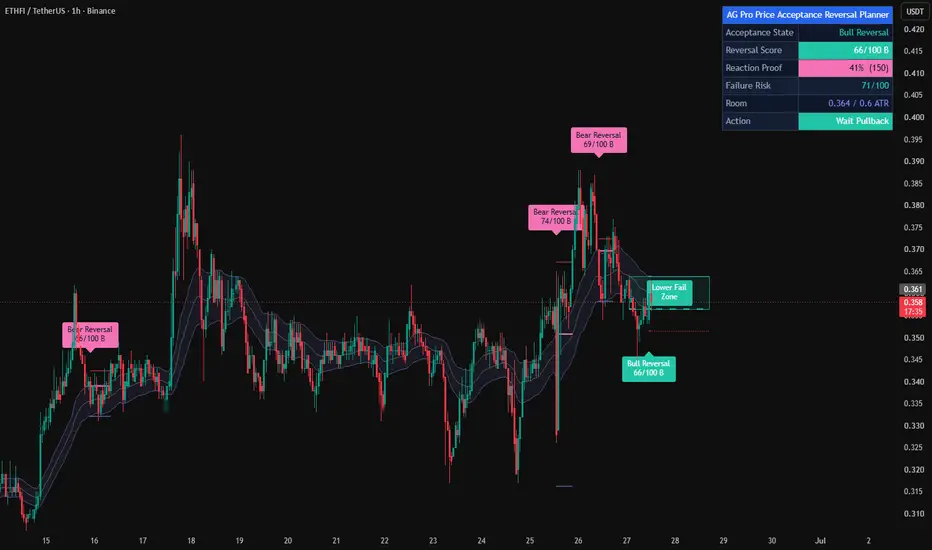
Price Acceptance Reversal Planner [AGPro Series]
🧠 Core Idea
Is price failing acceptance and starting a structured reversal context with clear risk, room, and next-action guidance?
📌 Overview / What it does
Price Acceptance Reversal Planner [AGPro Series] is a chart-first reversal planning tool built around price acceptance failure.
The script studies whether price has spent enough time accepting above or below a dynamic fair-value band. When that acceptance starts to fail, it evaluates close-back behavior, reversal candle quality, volume response, invalidation distance, and target room, then converts the context into a 0-100 reversal readiness score.
It produces acceptance bands, failed-acceptance zones, reversal trigger rails, invalidation shelves, target-room guides, labels, alerts, and a clean AGPro planning panel. Optional shelf and room boxes are available for users who want a heavier map, while the default public view stays lighter. It does not predict price direction, automate trading, or claim that every acceptance failure must reverse.
🎯 Purpose & Design Philosophy
This script was built for traders who want a structured way to evaluate when accepted price behavior is starting to break down.
Many charts show price spending time above or below a perceived fair-value area before suddenly rotating back through that area. The useful question is not only where price traded, but whether that accepted behavior is now failing with enough quality to deserve review.
The design supports a planning mindset: identify the acceptance state, detect failure, score reversal quality, locate invalidation, review target room, and decide whether to wait, review, or stand aside.
⚡ Why This Script Is Different
Most acceptance tools focus on volume profile, value area, POC, or static market-profile references.
This script does NOT try to become a Price Acceptance Profile clone, Acceptance Breakout Planner clone, volume profile tool, POC tracker, generic support/resistance map, or broad reversal signal generator.
Instead, it focuses on the decision layer after acceptance starts failing. The core output is not a simple buy or sell marker. The output is a structured reversal plan with score, failure risk, invalidation shelf, target-room guide, and next-action state.
⚙️ Methodology
1. Context Detection
The script builds a dynamic price acceptance band around an adaptive fair-value anchor and tracks whether price is accepting above, below, or inside that band.
2. Reference Mapping
The failed acceptance edge becomes the reversal trigger. The recent failure extreme becomes the invalidation shelf. The opposite side of the band, or an ATR fallback, becomes the target-room guide.
3. Reaction Evaluation
The score model evaluates time in acceptance, close-back failure strength, reversal candle quality, relative volume response, target room, and risk efficiency.
4. Visual Output
Qualified events are displayed through failed-acceptance zones, trigger rails, invalidation shelves, target-room bands, compact labels, alerts, and the AGPro planning panel.
🗺️ How to Read the Chart
Zones = compact failed-acceptance areas where price accepted above or below the band and then rotated back through the relevant edge.
Labels = acceptance watch, reversal ready, invalidation, and target-room review markers.
Colors = teal marks bullish lower-acceptance failure, pink marks bearish upper-acceptance failure, amber marks watch states, and indigo marks target-room references.
Panel = the panel summarizes Acceptance State, Reversal Score, Failure Risk, Room, and Action.
🚦 Signals & States
• Upper Acceptance Watch → price has accepted above the band long enough to watch for failure evidence.
• Lower Acceptance Watch → price has accepted below the band long enough to watch for failure evidence.
• Bear Reversal Ready → upper acceptance failed with enough reversal quality, risk structure, and room.
• Bull Reversal Ready → lower acceptance failed with enough reversal quality, risk structure, and room.
• Acceptance Reversal Invalidated → price crossed the active invalidation shelf.
• Target Room Review → price reached the active target-room guide.
🔔 Alerts Logic
Alerts trigger when upper/lower acceptance watch states appear, when bull/bear reversal readiness is confirmed, when the active invalidation shelf is crossed, or when price reaches the target-room guide.
Alerts are attention markers. They are not trade instructions, entry signals, exit signals, or automated strategy commands.
🧩 Confluence Logic
The strongest planner states appear when multiple conditions align:
Time in acceptance + close-back failure + reversal candle quality + volume response + clean invalidation distance + usable target room.
When only partial evidence appears, the script remains in watch mode or stand-aside mode.
📊 When to Use
• After price spends time accepting above or below a dynamic fair-value band
• Around failed acceptance, failed continuation, or rotation-back contexts
• During reversal review workflows where risk and room need structure
• When a trader wants a decision engine rather than another generic signal marker
⚠️ When NOT to Use
• Extremely low-liquidity symbols
• Very noisy micro-timeframes
• News-driven gaps or abnormal candles
• Markets where price is violently trending and acceptance failure keeps failing
• Situations where the user expects automatic buy/sell instructions
🎛️ Key Inputs
• Acceptance Anchor Length → controls the dynamic fair-value anchor.
• Acceptance Band Width ATR → controls the band around the anchor.
• Minimum Acceptance Bars → defines how long price must accept above or below the band before failure can qualify.
• Failure Close Distance ATR → controls how cleanly price must close back through the failed edge.
• Minimum Reversal Score → sets the 0-100 threshold for READY events.
• Invalidation Shelf Buffer ATR → places the invalidation shelf beyond the failure extreme.
• Target Room ATR Fallback → builds a target-room guide when the opposite band side is too close.
• Visual settings → control zones, rails, labels, panel location, panel theme, and font sizes.
🖥️ Interface & Visual Design
The interface is built to stay chart-first.
The live acceptance band shows the current reference area. Compact event boxes show where acceptance failed. Trigger rails define the failed edge. Invalidation rails define where the active reversal context weakens. Target-room guides show the next review area without making a promise.
The panel keeps the decision summary compact, readable, and consistent with AGPro public-release formatting.
🧪 Practical Usage Workflow
1. Read the panel to identify the current Acceptance State.
2. Check whether price is accepting above, below, or inside the band.
3. Watch for failed-acceptance labels and reversal readiness score.
4. Review the invalidation shelf and target-room guide.
5. Interpret the context with broader structure, volatility, and personal risk rules.
🔍 Interpretation Guidelines
Acceptance watch means price has stayed outside the band long enough to deserve observation, but reversal is not confirmed.
Reversal ready means the script found stronger failure, candle, risk, and room evidence.
Invalidation means the active context weakened according to the script rules.
Target-room review means price reached a planned review area, not that price must stop or reverse there.
🚫 What This Script Is NOT
• Not a prediction engine
• Not financial advice
• Not an auto trading system
• Not a guaranteed signal tool
• Not a Price Acceptance Profile clone
• Not an Acceptance Breakout Planner clone
• Not a volume profile, value area, or POC tool
• Not a generic support/resistance map
• Not an order block or FVG map
⚠️ Limitations & Transparency
Price acceptance behavior changes across symbols, timeframes, sessions, and volatility regimes.
Some acceptance failures continue to fail again. Some reversal-ready states may invalidate quickly. Some symbols have weak volume data, which can reduce the usefulness of the volume component.
The script provides structured context, not certainty.
🧠 Market Context Notes
Acceptance failure often matters when price spends time outside a fair-value area and then rotates back through the acceptance edge.
The most useful contexts usually combine enough time in acceptance, a clean close-back failure, a strong reversal candle, usable target room, and a clear invalidation shelf.
🧾 Use Case Examples
When price accepts above the band for several bars, then closes back through the upper edge with bearish pressure and enough room below, the script may classify the context as a bearish acceptance reversal plan.
When price accepts below the band for several bars, then closes back through the lower edge with bullish pressure and enough room above, the script may classify the context as a bullish acceptance reversal plan.
🧱 System Philosophy
Price Acceptance Reversal Planner follows the AGPro decision-engine approach:
Context first.
Failure evidence before reaction.
Risk before target.
Room before excitement.
Attention markers instead of promises.
🔐 Non-Promise Statement
No script can guarantee a reversal, outcome, or market reaction.
No score, state, label, alert, rail, or zone should be interpreted as certainty.
📉 Risk Disclosure
Trading involves risk.
Users remain responsible for their own decisions, execution, risk management, and interpretation.
This script is for educational and analytical purposes only and does not provide financial advice.
📚 Educational Note
Use the output as a structured review layer. The strongest readings usually come from combining the planner state with broader market structure, volatility, liquidity conditions, and personal risk rules.
🧠 Core Idea
Is price failing acceptance and starting a structured reversal context with clear risk, room, and next-action guidance?
📌 Overview / What it does
Price Acceptance Reversal Planner [AGPro Series] is a chart-first reversal planning tool built around price acceptance failure.
The script studies whether price has spent enough time accepting above or below a dynamic fair-value band. When that acceptance starts to fail, it evaluates close-back behavior, reversal candle quality, volume response, invalidation distance, and target room, then converts the context into a 0-100 reversal readiness score.
It produces acceptance bands, failed-acceptance zones, reversal trigger rails, invalidation shelves, target-room guides, labels, alerts, and a clean AGPro planning panel. Optional shelf and room boxes are available for users who want a heavier map, while the default public view stays lighter. It does not predict price direction, automate trading, or claim that every acceptance failure must reverse.
🎯 Purpose & Design Philosophy
This script was built for traders who want a structured way to evaluate when accepted price behavior is starting to break down.
Many charts show price spending time above or below a perceived fair-value area before suddenly rotating back through that area. The useful question is not only where price traded, but whether that accepted behavior is now failing with enough quality to deserve review.
The design supports a planning mindset: identify the acceptance state, detect failure, score reversal quality, locate invalidation, review target room, and decide whether to wait, review, or stand aside.
⚡ Why This Script Is Different
Most acceptance tools focus on volume profile, value area, POC, or static market-profile references.
This script does NOT try to become a Price Acceptance Profile clone, Acceptance Breakout Planner clone, volume profile tool, POC tracker, generic support/resistance map, or broad reversal signal generator.
Instead, it focuses on the decision layer after acceptance starts failing. The core output is not a simple buy or sell marker. The output is a structured reversal plan with score, failure risk, invalidation shelf, target-room guide, and next-action state.
⚙️ Methodology
1. Context Detection
The script builds a dynamic price acceptance band around an adaptive fair-value anchor and tracks whether price is accepting above, below, or inside that band.
2. Reference Mapping
The failed acceptance edge becomes the reversal trigger. The recent failure extreme becomes the invalidation shelf. The opposite side of the band, or an ATR fallback, becomes the target-room guide.
3. Reaction Evaluation
The score model evaluates time in acceptance, close-back failure strength, reversal candle quality, relative volume response, target room, and risk efficiency.
4. Visual Output
Qualified events are displayed through failed-acceptance zones, trigger rails, invalidation shelves, target-room bands, compact labels, alerts, and the AGPro planning panel.
🗺️ How to Read the Chart
Zones = compact failed-acceptance areas where price accepted above or below the band and then rotated back through the relevant edge.
Labels = acceptance watch, reversal ready, invalidation, and target-room review markers.
Colors = teal marks bullish lower-acceptance failure, pink marks bearish upper-acceptance failure, amber marks watch states, and indigo marks target-room references.
Panel = the panel summarizes Acceptance State, Reversal Score, Failure Risk, Room, and Action.
🚦 Signals & States
• Upper Acceptance Watch → price has accepted above the band long enough to watch for failure evidence.
• Lower Acceptance Watch → price has accepted below the band long enough to watch for failure evidence.
• Bear Reversal Ready → upper acceptance failed with enough reversal quality, risk structure, and room.
• Bull Reversal Ready → lower acceptance failed with enough reversal quality, risk structure, and room.
• Acceptance Reversal Invalidated → price crossed the active invalidation shelf.
• Target Room Review → price reached the active target-room guide.
🔔 Alerts Logic
Alerts trigger when upper/lower acceptance watch states appear, when bull/bear reversal readiness is confirmed, when the active invalidation shelf is crossed, or when price reaches the target-room guide.
Alerts are attention markers. They are not trade instructions, entry signals, exit signals, or automated strategy commands.
🧩 Confluence Logic
The strongest planner states appear when multiple conditions align:
Time in acceptance + close-back failure + reversal candle quality + volume response + clean invalidation distance + usable target room.
When only partial evidence appears, the script remains in watch mode or stand-aside mode.
📊 When to Use
• After price spends time accepting above or below a dynamic fair-value band
• Around failed acceptance, failed continuation, or rotation-back contexts
• During reversal review workflows where risk and room need structure
• When a trader wants a decision engine rather than another generic signal marker
⚠️ When NOT to Use
• Extremely low-liquidity symbols
• Very noisy micro-timeframes
• News-driven gaps or abnormal candles
• Markets where price is violently trending and acceptance failure keeps failing
• Situations where the user expects automatic buy/sell instructions
🎛️ Key Inputs
• Acceptance Anchor Length → controls the dynamic fair-value anchor.
• Acceptance Band Width ATR → controls the band around the anchor.
• Minimum Acceptance Bars → defines how long price must accept above or below the band before failure can qualify.
• Failure Close Distance ATR → controls how cleanly price must close back through the failed edge.
• Minimum Reversal Score → sets the 0-100 threshold for READY events.
• Invalidation Shelf Buffer ATR → places the invalidation shelf beyond the failure extreme.
• Target Room ATR Fallback → builds a target-room guide when the opposite band side is too close.
• Visual settings → control zones, rails, labels, panel location, panel theme, and font sizes.
🖥️ Interface & Visual Design
The interface is built to stay chart-first.
The live acceptance band shows the current reference area. Compact event boxes show where acceptance failed. Trigger rails define the failed edge. Invalidation rails define where the active reversal context weakens. Target-room guides show the next review area without making a promise.
The panel keeps the decision summary compact, readable, and consistent with AGPro public-release formatting.
🧪 Practical Usage Workflow
1. Read the panel to identify the current Acceptance State.
2. Check whether price is accepting above, below, or inside the band.
3. Watch for failed-acceptance labels and reversal readiness score.
4. Review the invalidation shelf and target-room guide.
5. Interpret the context with broader structure, volatility, and personal risk rules.
🔍 Interpretation Guidelines
Acceptance watch means price has stayed outside the band long enough to deserve observation, but reversal is not confirmed.
Reversal ready means the script found stronger failure, candle, risk, and room evidence.
Invalidation means the active context weakened according to the script rules.
Target-room review means price reached a planned review area, not that price must stop or reverse there.
🚫 What This Script Is NOT
• Not a prediction engine
• Not financial advice
• Not an auto trading system
• Not a guaranteed signal tool
• Not a Price Acceptance Profile clone
• Not an Acceptance Breakout Planner clone
• Not a volume profile, value area, or POC tool
• Not a generic support/resistance map
• Not an order block or FVG map
⚠️ Limitations & Transparency
Price acceptance behavior changes across symbols, timeframes, sessions, and volatility regimes.
Some acceptance failures continue to fail again. Some reversal-ready states may invalidate quickly. Some symbols have weak volume data, which can reduce the usefulness of the volume component.
The script provides structured context, not certainty.
🧠 Market Context Notes
Acceptance failure often matters when price spends time outside a fair-value area and then rotates back through the acceptance edge.
The most useful contexts usually combine enough time in acceptance, a clean close-back failure, a strong reversal candle, usable target room, and a clear invalidation shelf.
🧾 Use Case Examples
When price accepts above the band for several bars, then closes back through the upper edge with bearish pressure and enough room below, the script may classify the context as a bearish acceptance reversal plan.
When price accepts below the band for several bars, then closes back through the lower edge with bullish pressure and enough room above, the script may classify the context as a bullish acceptance reversal plan.
🧱 System Philosophy
Price Acceptance Reversal Planner follows the AGPro decision-engine approach:
Context first.
Failure evidence before reaction.
Risk before target.
Room before excitement.
Attention markers instead of promises.
🔐 Non-Promise Statement
No script can guarantee a reversal, outcome, or market reaction.
No score, state, label, alert, rail, or zone should be interpreted as certainty.
📉 Risk Disclosure
Trading involves risk.
Users remain responsible for their own decisions, execution, risk management, and interpretation.
This script is for educational and analytical purposes only and does not provide financial advice.
📚 Educational Note
Use the output as a structured review layer. The strongest readings usually come from combining the planner state with broader market structure, volatility, liquidity conditions, and personal risk rules.
發行說明
🔧 UPDATE NOTES - V1.2This update focuses on zone-label readability, chart clarity, and premium visual presentation.
The core purpose of the script remains unchanged.
This release improves how the existing acceptance-failure zones, optional risk shelf, and optional target-room zones are presented on the chart.
This script continues to function as an analytical and visualization tool.
It does not attempt to predict price direction or provide guaranteed outcomes.
------------------------
What Changed
------------------------
• Failure Zone labels rebuilt as centered premium badges
Upper Fail and Lower Fail zone text is no longer rendered as native box text. It now uses separate centered badge labels for stronger contrast and cleaner publication screenshots.
• Optional Risk Shelf label refined
When Shelf / Room Boxes are enabled, the Risk Shelf label now appears as a separate centered badge instead of low-contrast text inside the transparent box.
• Optional Target Room label refined
Target Room text now follows the same centered badge treatment, keeping optional detail boxes readable without changing their logic.
• Core acceptance-reversal logic preserved
Acceptance tracking, failure scoring, reversal readiness, invalidation, target-room logic, panel values, and alerts remain unchanged.
------------------------
Visual Improvements
------------------------
• Improved chart readability by removing native box-text rendering from zone objects
• Added contrast-safe centered badges for important zone identifiers
• Reduced washed-out text appearance on dark and light chart themes
• Preserved the popular original layout while making key zone labels look more premium
------------------------
Interface & Usability
------------------------
• Existing Failure Zones toggle remains supported
• Existing Shelf / Room Boxes toggle remains supported
• Existing Label Font Size input continues to control the new centered zone badges
• Panel layout and panel controls remain unchanged
------------------------
Behavior Notes
------------------------
This update does not change the core analytical logic of the script.
The goal is to improve clarity and usability, not to introduce new predictive behavior.
Users should interpret outputs the same way as before, but with improved visual structure.
------------------------
Limitations Reminder
------------------------
The script remains a rule-based analytical tool.
Market conditions such as volatility, liquidity, and timeframe differences may affect how acceptance and reversal states appear.
Outputs should always be interpreted within broader market context.
------------------------
Risk Reminder
------------------------
This script is for educational and analytical purposes only.
It does not provide financial advice or guaranteed trading outcomes.
Users remain responsible for their own decisions.
發行說明
🔧 UPDATE NOTES - V1.3This update focuses on readability, decision clarity, and an added empirical proof layer.
The core purpose of the script remains unchanged.
This release improves how the existing acceptance-reversal logic is presented and
interpreted on the chart, and adds a transparent reaction proof rate.
This script continues to function as an analytical and visualization tool.
It does not attempt to predict price direction or provide guaranteed outcomes.
------------------------
What Changed
------------------------
• Added a stop-aware Reaction Proof rate
A new panel row tracks how often a reversal event produces reversal-side
follow-through that reaches its target before an equal adverse move, measured
symmetrically from the event close so the figure is not inflated. It is
evaluated only on confirmed bars and shows "Building (n)" until at least 6
samples exist so the figure stays honest.
• Upgraded label and badge contrast
All event labels and centered zone badges now use a luminance-based ink rule,
so text stays sharp on bright bull, bear, neutral and accent fills instead of
washing out.
• Added vertical anti-collision for event labels
Watch, reversal, invalidation and target-review labels now separate cleanly
instead of stacking on the same price band on compressed and lower-timeframe
views.
• Reduced overlapping failure zones
The chart now keeps a single active failure zone, badge and rail set that is
replaced when a new reversal context forms, instead of stacking boxes on the
slowly-moving acceptance band. Reversal event markers remain as spaced history.
• Filled decision cells in the panel
Reversal Score, Reaction Proof and Action now render as filled state-colored
cells with contrast-corrected text, so the current decision reads at a glance.
• Hardened the ATR baseline
The internal ATR reference now falls back to true range before the minimum tick,
keeping band width, failure distance, rails and label offsets stable on thin or
gapped data.
------------------------
Visual Improvements
------------------------
• Improved chart readability by adjusting label and badge contrast
• Reduced visual clutter so overlapping event labels no longer stack
• Refined visual hierarchy so the panel decision cells stand out more clearly
• Adjusted positioning of labels to keep them off the candles
------------------------
Interface & Usability
------------------------
• Optimized panel layout for clearer information flow with a dedicated proof row
• Improved label readability for better chart interaction
• Adjusted default visual settings for a more balanced appearance
• Enhanced overall user experience without changing core logic
------------------------
Behavior Notes
------------------------
This update does not change the core acceptance-reversal logic of the script.
The goal is to improve clarity, usability, and transparency, not to introduce
new predictive behavior.
Users should interpret outputs the same way as before, but with improved visual
structure and an added context-only proof statistic.
------------------------
Limitations Reminder
------------------------
The script remains a rule-based analytical tool.
Market conditions such as volatility, liquidity, and timeframe differences may
affect how states, zones, and the proof rate appear.
Outputs should always be interpreted within broader market context.
------------------------
Risk Reminder
------------------------
This script is for educational and analytical purposes only.
It does not provide financial advice or guaranteed trading outcomes.
Users remain responsible for their own decisions.
開源腳本
秉持TradingView一貫精神,這個腳本的創作者將其設為開源,以便交易者檢視並驗證其功能。向作者致敬!您可以免費使用此腳本,但請注意,重新發佈代碼需遵守我們的社群規範。

🧠 Trading Suite - Flagship Workflow
tradingview.com/script/XJmX3p98-Trading-Suite-AGPro-Series/
🔷 Crypto Setup Planner - Multi-Symbol Planner
tradingview.com/script/LgVRo7Ql-Crypto-Setup-Planner-AGPro-Series/
tradingview.com/script/XJmX3p98-Trading-Suite-AGPro-Series/
🔷 Crypto Setup Planner - Multi-Symbol Planner
tradingview.com/script/LgVRo7Ql-Crypto-Setup-Planner-AGPro-Series/
免責聲明
這些資訊和出版物並非旨在提供,也不構成TradingView提供或認可的任何形式的財務、投資、交易或其他類型的建議或推薦。請閱讀使用條款以了解更多資訊。
開源腳本
秉持TradingView一貫精神,這個腳本的創作者將其設為開源,以便交易者檢視並驗證其功能。向作者致敬!您可以免費使用此腳本,但請注意,重新發佈代碼需遵守我們的社群規範。
🧠 Trading Suite - Flagship Workflow
tradingview.com/script/XJmX3p98-Trading-Suite-AGPro-Series/
🔷 Crypto Setup Planner - Multi-Symbol Planner
tradingview.com/script/LgVRo7Ql-Crypto-Setup-Planner-AGPro-Series/
tradingview.com/script/XJmX3p98-Trading-Suite-AGPro-Series/
🔷 Crypto Setup Planner - Multi-Symbol Planner
tradingview.com/script/LgVRo7Ql-Crypto-Setup-Planner-AGPro-Series/
免責聲明
這些資訊和出版物並非旨在提供,也不構成TradingView提供或認可的任何形式的財務、投資、交易或其他類型的建議或推薦。請閱讀使用條款以了解更多資訊。