OPEN-SOURCE SCRIPT
DKS 30 Minute ORB with Multi-Timeframe Bias and HTF Zones
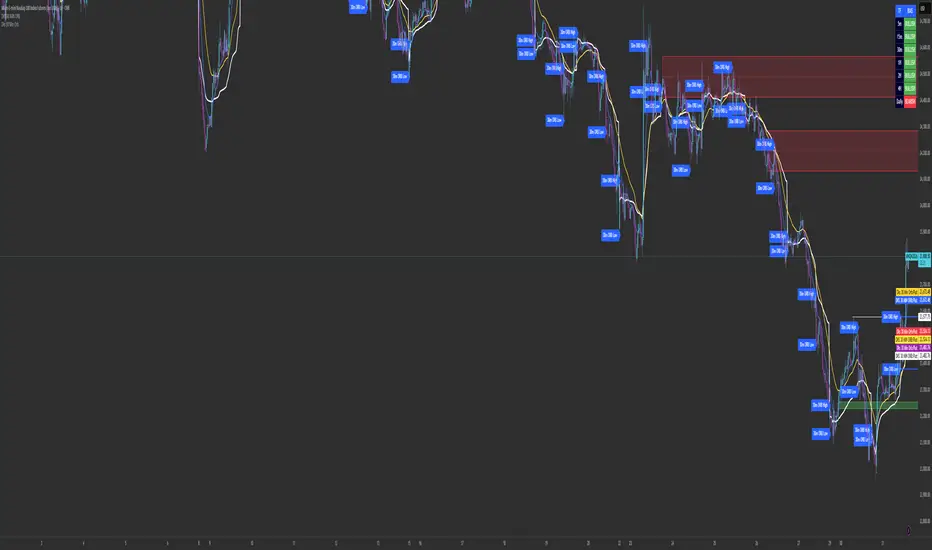
This script combines a 30-minute Opening Range Breakout (ORB) model with higher-timeframe supply and demand zones and a multi-timeframe directional bias dashboard to create a structured intraday trading framework.
🔹 Core Components
Opening Range Breakout (ORB):
The script defines the first 30-minute range of the selected session and highlights the high and low. These levels act as key breakout points, where price is monitored for continuation or rejection.
Higher Timeframe Supply & Demand Zones:
Only higher timeframe zones (1H, 2H, and 4H) are plotted on lower timeframes to reduce noise and focus on stronger areas of interest. These zones help identify potential reversal or continuation areas in confluence with the ORB levels.
Multi-Timeframe Bias Dashboard:
A built-in bias table displays directional sentiment across multiple timeframes (5m, 15m, 30m, 1H, 2H, 4H, Daily).
Bullish conditions are highlighted in green
Bearish conditions are highlighted in red
This allows traders to align intraday entries with higher timeframe direction.
🔹 How It Works Together
The script is designed to:
Identify breakout opportunities from the ORB range
Confirm direction using higher timeframe bias
Use supply/demand zones as targets or invalidation areas
This combination helps filter low-probability trades and improves overall trade structure.
🔹 How To Use
Mark the ORB range during your session (e.g., market open)
Wait for price to break and retest the range
Confirm direction using the bias dashboard
Use HTF zones for entries, targets, or stop placement
🔹 Notes
This script is intended as a decision-support tool and should be used alongside proper risk management.
🔹 Core Components
Opening Range Breakout (ORB):
The script defines the first 30-minute range of the selected session and highlights the high and low. These levels act as key breakout points, where price is monitored for continuation or rejection.
Higher Timeframe Supply & Demand Zones:
Only higher timeframe zones (1H, 2H, and 4H) are plotted on lower timeframes to reduce noise and focus on stronger areas of interest. These zones help identify potential reversal or continuation areas in confluence with the ORB levels.
Multi-Timeframe Bias Dashboard:
A built-in bias table displays directional sentiment across multiple timeframes (5m, 15m, 30m, 1H, 2H, 4H, Daily).
Bullish conditions are highlighted in green
Bearish conditions are highlighted in red
This allows traders to align intraday entries with higher timeframe direction.
🔹 How It Works Together
The script is designed to:
Identify breakout opportunities from the ORB range
Confirm direction using higher timeframe bias
Use supply/demand zones as targets or invalidation areas
This combination helps filter low-probability trades and improves overall trade structure.
🔹 How To Use
Mark the ORB range during your session (e.g., market open)
Wait for price to break and retest the range
Confirm direction using the bias dashboard
Use HTF zones for entries, targets, or stop placement
🔹 Notes
This script is intended as a decision-support tool and should be used alongside proper risk management.
開源腳本
秉持TradingView一貫精神,這個腳本的創作者將其設為開源,以便交易者檢視並驗證其功能。向作者致敬!您可以免費使用此腳本,但請注意,重新發佈代碼需遵守我們的社群規範。

免責聲明
這些資訊和出版物並非旨在提供,也不構成TradingView提供或認可的任何形式的財務、投資、交易或其他類型的建議或推薦。請閱讀使用條款以了解更多資訊。
開源腳本
秉持TradingView一貫精神,這個腳本的創作者將其設為開源,以便交易者檢視並驗證其功能。向作者致敬!您可以免費使用此腳本,但請注意,重新發佈代碼需遵守我們的社群規範。
免責聲明
這些資訊和出版物並非旨在提供,也不構成TradingView提供或認可的任何形式的財務、投資、交易或其他類型的建議或推薦。請閱讀使用條款以了解更多資訊。