Custom Moving Averages group WW
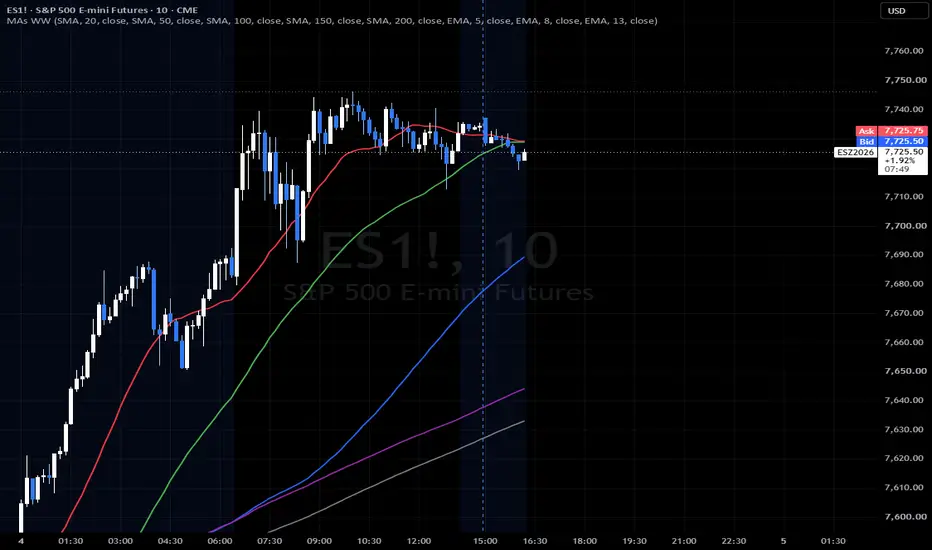
Custom Moving Averages group WW (MAs WW)
🌟 Overview
Say goodbye to chart clutter and rigid, single-purpose indicator scripts. Custom Moving Averages group WW is a sleek, highly versatile Pine Script v6 indicator engineered to give you ultimate control over your chart layout.
Whether you are swing trading macro indices and futures using classic SMAs or day trading equity options with fast-paced EMAs, this single script replaces multiple built-in indicators while keeping your workspace pristine.
🚀 Key Features
8 Independent, Fully Customizable Lines: Toggle, configure, and mix-and-match up to eight moving average lines simultaneously.
Dynamic Type Selection: Easily switch any individual line between SMA (Simple Moving Average) and EMA (Exponential Moving Average) via clean, inline dropdowns.
Flexible Sources & Lengths: Tailor every line's length and calculation source (close, open, high, low, etc.) to fit your exact strategy.
Pre-Configured for Macro & Day Trading:
Lines 1–5 (Default: ON): Pre-loaded with classic macro/index levels (20 Red, 50 Green, 100 Blue, 150 Purple, 200 Gray).
Lines 6–8 (Default: OFF): Primed for fast intraday equity options momentum (5, 8, 13 EMAs).
Native Style Management: Built lightweight without hardcoded style limitations. Use TradingView’s native Style tab to adjust line thickness, custom colors, and transparency to match your preferred chart aesthetic.
⚙️ How to Use
Add to Chart: Drop the indicator onto any timeframe or asset.
Configure Your Setup: Open the Settings panel. Rows MA 1 through MA 8 are neatly organized with horizontal alignment for fast configuration.
Toggle & Tune: Enable or disable lines depending on whether you are tracking macro trends or looking for intraday scalping triggers.
Save Templates: Save your favorite multi-timeframe setups using TradingView’s native Indicator Templates or Chart Layouts.
Designed for clean performance, strict Pine Script v6 optimization, and an unmatched user experience.
🌟 Overview
Say goodbye to chart clutter and rigid, single-purpose indicator scripts. Custom Moving Averages group WW is a sleek, highly versatile Pine Script v6 indicator engineered to give you ultimate control over your chart layout.
Whether you are swing trading macro indices and futures using classic SMAs or day trading equity options with fast-paced EMAs, this single script replaces multiple built-in indicators while keeping your workspace pristine.
🚀 Key Features
8 Independent, Fully Customizable Lines: Toggle, configure, and mix-and-match up to eight moving average lines simultaneously.
Dynamic Type Selection: Easily switch any individual line between SMA (Simple Moving Average) and EMA (Exponential Moving Average) via clean, inline dropdowns.
Flexible Sources & Lengths: Tailor every line's length and calculation source (close, open, high, low, etc.) to fit your exact strategy.
Pre-Configured for Macro & Day Trading:
Lines 1–5 (Default: ON): Pre-loaded with classic macro/index levels (20 Red, 50 Green, 100 Blue, 150 Purple, 200 Gray).
Lines 6–8 (Default: OFF): Primed for fast intraday equity options momentum (5, 8, 13 EMAs).
Native Style Management: Built lightweight without hardcoded style limitations. Use TradingView’s native Style tab to adjust line thickness, custom colors, and transparency to match your preferred chart aesthetic.
⚙️ How to Use
Add to Chart: Drop the indicator onto any timeframe or asset.
Configure Your Setup: Open the Settings panel. Rows MA 1 through MA 8 are neatly organized with horizontal alignment for fast configuration.
Toggle & Tune: Enable or disable lines depending on whether you are tracking macro trends or looking for intraday scalping triggers.
Save Templates: Save your favorite multi-timeframe setups using TradingView’s native Indicator Templates or Chart Layouts.
Designed for clean performance, strict Pine Script v6 optimization, and an unmatched user experience.

免責聲明
這些資訊和出版物並非旨在提供,也不構成TradingView提供或認可的任何形式的財務、投資、交易或其他類型的建議或推薦。請閱讀使用條款以了解更多資訊。
免責聲明
這些資訊和出版物並非旨在提供,也不構成TradingView提供或認可的任何形式的財務、投資、交易或其他類型的建議或推薦。請閱讀使用條款以了解更多資訊。