INVITE-ONLY SCRIPT
SmartFlow Position Sizer Pro
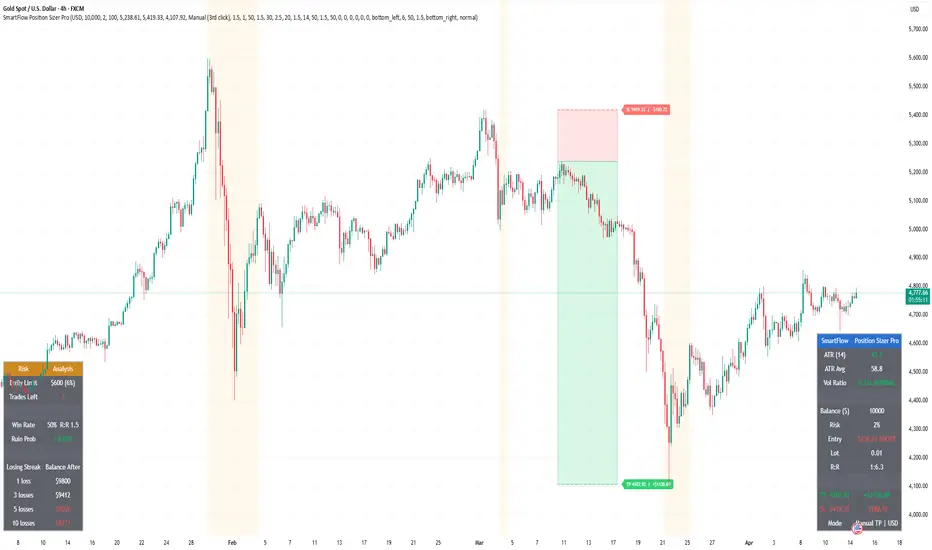
SmartFlow Position Sizer Pro calculates lot size, risk, and reward with precision. Click three points on the chart — Entry, Stop Loss, and Take Profit — and see your entire trade plan instantly. Supports partial take profit, ATR-based volatility adjustment, trailing SL simulation, and multi-currency accounts.
═══════════════════════════════════════
█ HOW IT WORKS
Click three points on the chart:
All three lines are draggable after placement. The indicator works in future (empty) chart areas, allowing you to plan trades before price arrives. Long/Short direction is auto-detected from the Entry vs SL position.
═══════════════════════════════════════
█ FEATURES
Position Sizing
Take Profit Modes
ATR Volatility Engine
Trailing SL Simulation
Risk Analysis (Separate Table)
Multi-Currency Accounts
Multi-Position Risk
Trade Journal
═══════════════════════════════════════
█ LOT CALCULATION
Lot = (Balance × Risk%) / (SL Distance × Contract Size)
For non-USD accounts, balance is converted to USD for calculation, then P&L is converted back to account currency using live FX rates.
When ATR volatility exceeds the threshold, lot size is automatically reduced by the configured percentage (default: 50% reduction).
═══════════════════════════════════════
█ CHART DISPLAY
═══════════════════════════════════════
█ SETTINGS OVERVIEW
═══════════════════════════════════════
█ NOTES
═══════════════════════════════════════
█ HOW IT WORKS
Click three points on the chart:
- 1st click — Entry Price
- 2nd click — Stop Loss
- 3rd click — Take Profit
All three lines are draggable after placement. The indicator works in future (empty) chart areas, allowing you to plan trades before price arrives. Long/Short direction is auto-detected from the Entry vs SL position.
═══════════════════════════════════════
█ FEATURES
Position Sizing
- Automatic lot calculation: Balance × Risk% / (SL Distance × Contract Size)
- Rounds down to 0.01 to never exceed your risk limit
- Supports any instrument: Gold, Forex, Crypto, Indices
Take Profit Modes
- Manual — use 3rd click position, drag to adjust
- R:R Auto — TP calculated from SL distance × R:R ratio
- Partial TP — split exits across TP1/TP2/TP3 with custom allocation percentages and independent R:R targets
ATR Volatility Engine
- Current ATR vs average ATR comparison with Vol Ratio display
- Automatic lot reduction when volatility exceeds a configurable threshold
- Visual background warning during high volatility periods
- Customizable ATR period, average period, and threshold multiplier
Trailing SL Simulation
- Shows where a trailing stop loss would sit based on ATR × multiplier from current price
- Visualized as a separate dotted line — does not interfere with your SL/TP zones
Risk Analysis (Separate Table)
- Max Daily Loss — tracks your daily drawdown cap and shows remaining trades before hitting the limit. Essential for prop firm traders (FTMO, MFF, etc.)
- Ruin Probability — Balsara-based calculation using your win rate, average R:R, and risk percentage. Color-coded: green (< 10%), red (> 10%)
- Losing Streak Simulation — projected account balance after 1, 3, 5, and 10 consecutive losses at your current risk level
Multi-Currency Accounts
- Supports USD, EUR, GBP, JPY, AUD, CHF
- Live FX conversion via request.security() — all P&L, daily limits, and balance projections displayed in your account currency
Multi-Position Risk
- Add up to 2 additional positions manually to calculate combined risk exposure
- Combined risk % shown with warning when exceeding daily limit
Trade Journal
- Formatted trade summary label on chart: symbol, direction, entry, SL, TP, lot, risk, P&L, R:R
═══════════════════════════════════════
█ LOT CALCULATION
Lot = (Balance × Risk%) / (SL Distance × Contract Size)
For non-USD accounts, balance is converted to USD for calculation, then P&L is converted back to account currency using live FX rates.
When ATR volatility exceeds the threshold, lot size is automatically reduced by the configured percentage (default: 50% reduction).
═══════════════════════════════════════
█ CHART DISPLAY
- White line — Entry price with lot size
- Red zone + label — SL area with loss amount in account currency
- Green zone + label — TP area with profit amount (single or TP1/TP2/TP3)
- Orange dotted line — Trailing SL simulation (when enabled)
- Trade table — ATR, trade info, P&L (position configurable)
- Risk table — Daily limit, ruin probability, losing streak (position configurable)
═══════════════════════════════════════
█ SETTINGS OVERVIEW
- Account: Currency, Balance, Risk %, Contract Size
- TP Mode: Manual / R:R Auto / Partial TP (TP1-TP3 with R:R and allocation %)
- ATR: Period, Average Period, High Vol Threshold, Lot Reduction %
- Trailing SL: ATR Multiplier
- Risk Analysis: Max Daily Loss %, Win Rate, Avg R:R
- Multi-Position: Up to 2 additional entries with lot and SL
- Display: Table positions, text size, zone visibility
═══════════════════════════════════════
█ NOTES
- All drawing positions use time-based coordinates — works in future chart areas
- Designed for MT5/MT4 lot sizing — adjust Contract Size for your broker
- Partial TP allocations use R:R-based levels; lot is split proportionally with rounding protection
- Alerts available for high volatility entry and normalization
- Tip: Disable magnet mode (press A) before adding the indicator to avoid price snapping during clicks
僅限邀請腳本
只有作者授權的用戶才能訪問此腳本。您需要申請並獲得使用許可。通常情況下,付款後即可獲得許可。更多詳情,請按照下方作者的說明操作,或直接聯絡SmartFlow2026。
TradingView不建議在未完全信任作者並了解其運作方式的情況下購買或使用腳本。您也可以在我們的社群腳本中找到免費的開源替代方案。
作者的說明
Subscribe: https://whop.com/smartflow-indicators/smartflow-pro/
After subscribing, enter your TradingView username to receive access within 24 hours.
Includes SMC Pro + Position Sizer Pro. 7-day money-back guarantee.

🏆 Founding Member pricing — first 20 subscribers only
Lock in 60% discount for life.
whop.com/smartflow-indicators/smartflow-pro/
Lock in 60% discount for life.
whop.com/smartflow-indicators/smartflow-pro/
免責聲明
這些資訊和出版物並非旨在提供,也不構成TradingView提供或認可的任何形式的財務、投資、交易或其他類型的建議或推薦。請閱讀使用條款以了解更多資訊。
僅限邀請腳本
只有作者授權的用戶才能訪問此腳本。您需要申請並獲得使用許可。通常情況下,付款後即可獲得許可。更多詳情,請按照下方作者的說明操作,或直接聯絡SmartFlow2026。
TradingView不建議在未完全信任作者並了解其運作方式的情況下購買或使用腳本。您也可以在我們的社群腳本中找到免費的開源替代方案。
作者的說明
Subscribe: https://whop.com/smartflow-indicators/smartflow-pro/
After subscribing, enter your TradingView username to receive access within 24 hours.
Includes SMC Pro + Position Sizer Pro. 7-day money-back guarantee.
🏆 Founding Member pricing — first 20 subscribers only
Lock in 60% discount for life.
whop.com/smartflow-indicators/smartflow-pro/
Lock in 60% discount for life.
whop.com/smartflow-indicators/smartflow-pro/
免責聲明
這些資訊和出版物並非旨在提供,也不構成TradingView提供或認可的任何形式的財務、投資、交易或其他類型的建議或推薦。請閱讀使用條款以了解更多資訊。