已更新
BK AK-Reaper Drone
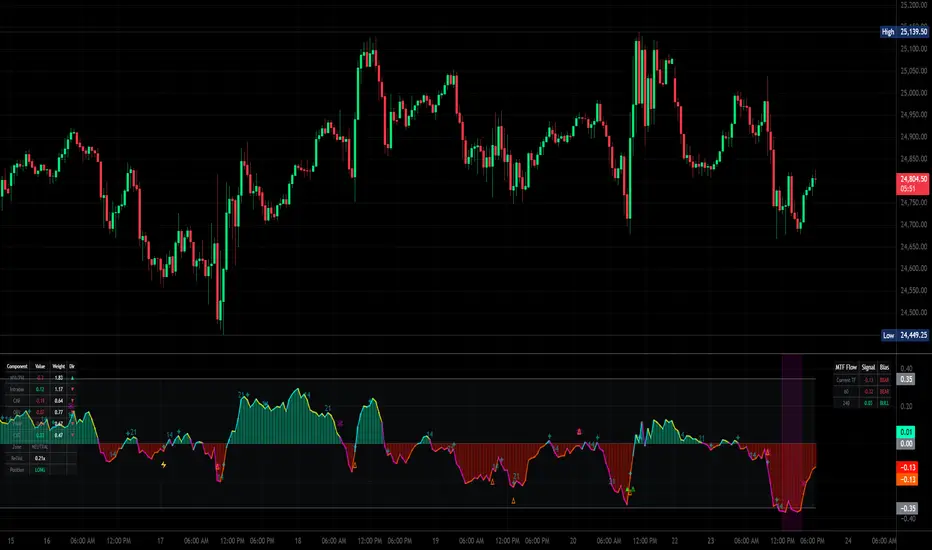
🕹️ BK AK-REAPER-Drone — Multi-Source Flow Composite Engine 🕹️
All glory to G-d — wisdom, restraint, endurance.
Respect to AK — honor, discipline, patience, clean execution.
BK AK-REAPER-Drone is a non-overlay oscillator that builds a single net “flow” signal by fusing multiple volume/participation measurements (and optional external proxies). It is designed to help you distinguish:
SPRING: a quick push into an extreme flow zone that snaps back fast (potential exhaustion / reversal)
TRAP: a prolonged stay in an extreme flow zone (often real pressure / continuation)
It also includes optional exits, MTF confluence, conviction scoring, adaptive weights, divergences, and time-window markers.
Important: This indicator measures flow/participation conditions, not guaranteed price direction. Use risk management. Not financial advice.
1) What You See
Core plots
Net histogram (green/red) and/or Net line (neon 4-quadrant coloring).
Zero line.
Threshold lines/bands (manual or auto).
Markers / events
▲ Long Spring (valley spring)
▼ Short Spring (peak spring)
✕ Exit (if exit engine enabled)
Trap markers + shading (prolonged extremes)
Divergence icons (flow vs price + optional CVD divergence)
Gann time windows (bar-count cycles from an anchor)
Dashboards (optional)
MTF panel (higher timeframe net readings)
Component dashboard (live component values + weights + direction)
ML stats panel (outcome tracking)
2) What The Net Signal Is
The indicator creates normalized component signals, each squashed into a stable range using:
z-score normalization (normLen)
soft cap using tanh (zSoftCap)
hard ratio cap on certain ratios (ratioCap)
Then it computes a weighted composite:
Default “core 5-pack”
NVI/PVI Core (smart vs public participation)
Compares NVI vs PVI deviations from a long EMA, then RSI and ratio logic to estimate “quiet” vs “loud” participation.
1m Intrabar Flow Engine (optional)
If enabled and the selected LTF is truly lower, it reads micro-direction on the 1-minute stream using:
Tick, Candle, or CLV direction method.
If lower-TF data isn’t available/usable, it falls back to a chart-TF approximation.
CMF (Chaikin Money Flow style pressure)
OBV Impulse
EMA of signed volume changes to detect “participation shocks”.
VWAP Deviation
Distance from VWAP (or SMA fallback) scaled by ATR.
Optional add-ons
CVD component (Cumulative Volume Delta approximation) + optional CVD divergence
Decorrelated components (optional): breadth (UVOL/DVOL), IV proxy (VIX), spread proxy (HL range vs ATR)
Auto-decorrelation: reduces weights when CMF/OBV/LTF become too correlated
Finally, the composite becomes:
netRaw → smoothed into netSig via EMA (netSmoothL)
3) Thresholds: How Extremes Are Defined
The engine uses a symmetric threshold ±thrUse:
Manual (thrManual)
Auto (useAutoThr): dynamic threshold from the rolling distribution of |netSig|
thrDyn = mean(|netSig|) + autoK * stdev(|netSig|)
clamped between thrMin and thrMax
Interpretation
netSig > +thrUse = bullish extreme zone
netSig < -thrUse = bearish extreme zone
Between = neutral / non-extreme
4) The SPRING vs TRAP Logic (Key Concept)
This script’s signature feature is time-in-extreme:
Spring (reversal candidate)
A Spring happens when net flow:
enters an extreme zone, then
exits quickly within maxLinger bars, and
the net slope flips in the reversal direction.
Valley Spring (Long) = quick dip into bearish extreme → snaps back out
Peak Spring (Short) = quick spike into bullish extreme → snaps back out
Trap (continuation risk)
A Trap happens when net flow:
stays in the extreme zone longer than maxLinger
Optional trap behavior:
show markers / shade background
block entries for trapBlockBars after a trap (if enabled)
This is what prevents “fading a freight train”: prolonged extremes are treated as pressure, not “overbought/oversold guarantees”.
5) When An Entry Prints (▲ / ▼)
A Spring signal is only printed if these gates pass:
Mandatory (core spring rules)
Spring condition (wasSpringValley or wasSpringPeak)
Slope confirms reversal (slope > 0 for long, < 0 for short)
Component agreement:
At least minCompAgree of the original 5 components confirm
CVD counts as a bonus, not required
Optional gates
Confirm on bar close (confirmBar) to avoid intrabar flicker
Trend filter (trendMode):
Off / Gate / Extremes (allows countertrend only if very deep spring)
Reclaim filter (reclaimFilter):
EMA fast and/or VWAP reclaim requirement
MTF confluence (enableMTF):
Gate mode blocks countertrend
Grade mode allows but tags ✓ / ⚠
Trap blocking (if enabled): blocks entries after trap events
Cooldown (cooldown): minimum bars between signals
6) Conviction Scoring (0–100)
If enabled, every entry gets a score based on:
Component agreement
Penetration depth past the threshold
Reversal speed (how fast it snapped back)
Recent divergence presence
By default it does not hide signals — it just grades them.
If you want fewer signals: raise convMinScore (ex: 30–50).
Arrow color/size can reflect score using:
Gradient
Tier grading (A/B/C/D)
Original colors
7) Exit Signal Engine (Completes the Loop)
If enabled, the script can print explicit exit markers:
Flow reversal
Zero cross
Opposite extreme (profit-target style)
ATR trail stop
Time stop
Composite (any enabled condition)
Exit labels include tooltips with the reason and live component state.
8) Divergences + CVD Divergences
Flow divergence: price makes HH/LL but netSig fails to confirm
Optional CVD divergence: price makes HH/LL but CVD cumulative fails to confirm
These are treated as context, not automatic entries.
9) MTF Confluence + Dashboards
MTF uses a simplified HTF net (core + CMF) on selectable TFs (1H/4H/D).
You can:
block countertrend signals (Gate)
or keep signals but grade alignment (Grade)
Dashboards can display:
MTF values + bias
component values/weights + zone state
ML stats (if enabled)
10) “ML Engine” (What It Really Is)
This module is outcome tracking, not a predictive ML model:
It measures how signals performed after mlOutcomeBars
Tracks win rate and average R (ATR-based proxy)
Optional auto-threshold adjustment and weight adaptation (if enabled)
Use it as feedback / calibration, not as “prediction”.
11) Practical Use
Springs are best treated as reversal opportunities (mean-reversion / exhaustion), not trend continuation.
Traps tell you “this extreme is holding” → avoid fading.
Use MTF to decide whether to scalp small (countertrend) or press (aligned).
If signals feel noisy: increase cooldown, increase minCompAgree, enable confirmBar, and/or raise convMinScore.
12) Limitations / Notes
Lower-TF intrabar and CVD are approximations based on the available volume feed and chosen direction method.
Breadth / VIX symbols may require the right data access and may not exist for all markets.
In thin markets or off-hours, flow tools can behave differently due to liquidity/volume structure.
All glory to G-d — wisdom, restraint, endurance.
Respect to AK — honor, discipline, patience, clean execution.
BK AK-REAPER-Drone is a non-overlay oscillator that builds a single net “flow” signal by fusing multiple volume/participation measurements (and optional external proxies). It is designed to help you distinguish:
SPRING: a quick push into an extreme flow zone that snaps back fast (potential exhaustion / reversal)
TRAP: a prolonged stay in an extreme flow zone (often real pressure / continuation)
It also includes optional exits, MTF confluence, conviction scoring, adaptive weights, divergences, and time-window markers.
Important: This indicator measures flow/participation conditions, not guaranteed price direction. Use risk management. Not financial advice.
1) What You See
Core plots
Net histogram (green/red) and/or Net line (neon 4-quadrant coloring).
Zero line.
Threshold lines/bands (manual or auto).
Markers / events
▲ Long Spring (valley spring)
▼ Short Spring (peak spring)
✕ Exit (if exit engine enabled)
Trap markers + shading (prolonged extremes)
Divergence icons (flow vs price + optional CVD divergence)
Gann time windows (bar-count cycles from an anchor)
Dashboards (optional)
MTF panel (higher timeframe net readings)
Component dashboard (live component values + weights + direction)
ML stats panel (outcome tracking)
2) What The Net Signal Is
The indicator creates normalized component signals, each squashed into a stable range using:
z-score normalization (normLen)
soft cap using tanh (zSoftCap)
hard ratio cap on certain ratios (ratioCap)
Then it computes a weighted composite:
Default “core 5-pack”
NVI/PVI Core (smart vs public participation)
Compares NVI vs PVI deviations from a long EMA, then RSI and ratio logic to estimate “quiet” vs “loud” participation.
1m Intrabar Flow Engine (optional)
If enabled and the selected LTF is truly lower, it reads micro-direction on the 1-minute stream using:
Tick, Candle, or CLV direction method.
If lower-TF data isn’t available/usable, it falls back to a chart-TF approximation.
CMF (Chaikin Money Flow style pressure)
OBV Impulse
EMA of signed volume changes to detect “participation shocks”.
VWAP Deviation
Distance from VWAP (or SMA fallback) scaled by ATR.
Optional add-ons
CVD component (Cumulative Volume Delta approximation) + optional CVD divergence
Decorrelated components (optional): breadth (UVOL/DVOL), IV proxy (VIX), spread proxy (HL range vs ATR)
Auto-decorrelation: reduces weights when CMF/OBV/LTF become too correlated
Finally, the composite becomes:
netRaw → smoothed into netSig via EMA (netSmoothL)
3) Thresholds: How Extremes Are Defined
The engine uses a symmetric threshold ±thrUse:
Manual (thrManual)
Auto (useAutoThr): dynamic threshold from the rolling distribution of |netSig|
thrDyn = mean(|netSig|) + autoK * stdev(|netSig|)
clamped between thrMin and thrMax
Interpretation
netSig > +thrUse = bullish extreme zone
netSig < -thrUse = bearish extreme zone
Between = neutral / non-extreme
4) The SPRING vs TRAP Logic (Key Concept)
This script’s signature feature is time-in-extreme:
Spring (reversal candidate)
A Spring happens when net flow:
enters an extreme zone, then
exits quickly within maxLinger bars, and
the net slope flips in the reversal direction.
Valley Spring (Long) = quick dip into bearish extreme → snaps back out
Peak Spring (Short) = quick spike into bullish extreme → snaps back out
Trap (continuation risk)
A Trap happens when net flow:
stays in the extreme zone longer than maxLinger
Optional trap behavior:
show markers / shade background
block entries for trapBlockBars after a trap (if enabled)
This is what prevents “fading a freight train”: prolonged extremes are treated as pressure, not “overbought/oversold guarantees”.
5) When An Entry Prints (▲ / ▼)
A Spring signal is only printed if these gates pass:
Mandatory (core spring rules)
Spring condition (wasSpringValley or wasSpringPeak)
Slope confirms reversal (slope > 0 for long, < 0 for short)
Component agreement:
At least minCompAgree of the original 5 components confirm
CVD counts as a bonus, not required
Optional gates
Confirm on bar close (confirmBar) to avoid intrabar flicker
Trend filter (trendMode):
Off / Gate / Extremes (allows countertrend only if very deep spring)
Reclaim filter (reclaimFilter):
EMA fast and/or VWAP reclaim requirement
MTF confluence (enableMTF):
Gate mode blocks countertrend
Grade mode allows but tags ✓ / ⚠
Trap blocking (if enabled): blocks entries after trap events
Cooldown (cooldown): minimum bars between signals
6) Conviction Scoring (0–100)
If enabled, every entry gets a score based on:
Component agreement
Penetration depth past the threshold
Reversal speed (how fast it snapped back)
Recent divergence presence
By default it does not hide signals — it just grades them.
If you want fewer signals: raise convMinScore (ex: 30–50).
Arrow color/size can reflect score using:
Gradient
Tier grading (A/B/C/D)
Original colors
7) Exit Signal Engine (Completes the Loop)
If enabled, the script can print explicit exit markers:
Flow reversal
Zero cross
Opposite extreme (profit-target style)
ATR trail stop
Time stop
Composite (any enabled condition)
Exit labels include tooltips with the reason and live component state.
8) Divergences + CVD Divergences
Flow divergence: price makes HH/LL but netSig fails to confirm
Optional CVD divergence: price makes HH/LL but CVD cumulative fails to confirm
These are treated as context, not automatic entries.
9) MTF Confluence + Dashboards
MTF uses a simplified HTF net (core + CMF) on selectable TFs (1H/4H/D).
You can:
block countertrend signals (Gate)
or keep signals but grade alignment (Grade)
Dashboards can display:
MTF values + bias
component values/weights + zone state
ML stats (if enabled)
10) “ML Engine” (What It Really Is)
This module is outcome tracking, not a predictive ML model:
It measures how signals performed after mlOutcomeBars
Tracks win rate and average R (ATR-based proxy)
Optional auto-threshold adjustment and weight adaptation (if enabled)
Use it as feedback / calibration, not as “prediction”.
11) Practical Use
Springs are best treated as reversal opportunities (mean-reversion / exhaustion), not trend continuation.
Traps tell you “this extreme is holding” → avoid fading.
Use MTF to decide whether to scalp small (countertrend) or press (aligned).
If signals feel noisy: increase cooldown, increase minCompAgree, enable confirmBar, and/or raise convMinScore.
12) Limitations / Notes
Lower-TF intrabar and CVD are approximations based on the available volume feed and chosen direction method.
Breadth / VIX symbols may require the right data access and may not exist for all markets.
In thin markets or off-hours, flow tools can behave differently due to liquidity/volume structure.
發行說明
FP
免責聲明
這些資訊和出版物並非旨在提供,也不構成TradingView提供或認可的任何形式的財務、投資、交易或其他類型的建議或推薦。請閱讀使用條款以了解更多資訊。