OPEN-SOURCE SCRIPT
RSI + MACD
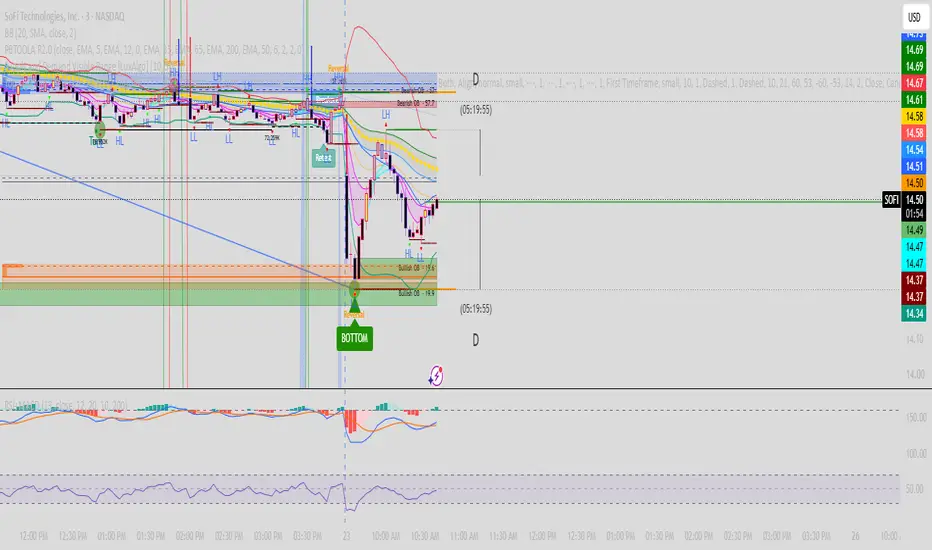
I got tired of burning two indicator slots on RSI and MACD, so I put both into one script. Same classic RSI and MACD you already know, just stacked in a single pane so you only use one slot.
What it does
RSI sits on the bottom (0 to 100) with the usual 30, 50 and 70 levels and the shaded band between 30 and 70. MACD sits on top with the MACD line, signal line and the four-color histogram that shows whether momentum is building or fading. Both use the standard TradingView colors and formulas, nothing custom or modified.
How it works
A script can only live in one pane, so I stacked them instead. RSI uses its normal 0 to 100 scale. MACD is auto-scaled to fit its own band above RSI, based on its recent range, and the lookback for that is adjustable in the settings. The numbers on the price axis aren’t the real MACD values because of that scaling. The actual RSI, MACD, signal and histogram readings are in the status line at the top of the pane, so you always see the true numbers.
Settings
RSI length and source (default 14, close)
MACD fast, slow and signal lengths (default 12, 26, 9)
MACD scale lookback (default 200 bars), which controls how tall the MACD swings look
Alerts included
MACD crossing above or below the signal line
RSI moving back above 30 or back below 70
How to use it
Use it the same way you would use RSI and MACD separately. Look at MACD crosses and histogram momentum for trend and timing, and RSI for overbought and oversold conditions. It works best when you look for the two agreeing with each other, like a MACD bullish cross while RSI is coming up out of oversold.
Heads up
This is a standard RSI and MACD, so it isn’t a signal generator on its own. Both indicators lag and can give false signals in choppy markets, so use it alongside your own analysis and risk management. This is for educational purposes only and isn’t financial advice.
If you find it useful, a like or a comment helps. Let me know if you want any changes or additions.
What it does
RSI sits on the bottom (0 to 100) with the usual 30, 50 and 70 levels and the shaded band between 30 and 70. MACD sits on top with the MACD line, signal line and the four-color histogram that shows whether momentum is building or fading. Both use the standard TradingView colors and formulas, nothing custom or modified.
How it works
A script can only live in one pane, so I stacked them instead. RSI uses its normal 0 to 100 scale. MACD is auto-scaled to fit its own band above RSI, based on its recent range, and the lookback for that is adjustable in the settings. The numbers on the price axis aren’t the real MACD values because of that scaling. The actual RSI, MACD, signal and histogram readings are in the status line at the top of the pane, so you always see the true numbers.
Settings
RSI length and source (default 14, close)
MACD fast, slow and signal lengths (default 12, 26, 9)
MACD scale lookback (default 200 bars), which controls how tall the MACD swings look
Alerts included
MACD crossing above or below the signal line
RSI moving back above 30 or back below 70
How to use it
Use it the same way you would use RSI and MACD separately. Look at MACD crosses and histogram momentum for trend and timing, and RSI for overbought and oversold conditions. It works best when you look for the two agreeing with each other, like a MACD bullish cross while RSI is coming up out of oversold.
Heads up
This is a standard RSI and MACD, so it isn’t a signal generator on its own. Both indicators lag and can give false signals in choppy markets, so use it alongside your own analysis and risk management. This is for educational purposes only and isn’t financial advice.
If you find it useful, a like or a comment helps. Let me know if you want any changes or additions.
開源腳本
秉持TradingView一貫精神,這個腳本的創作者將其設為開源,以便交易者檢視並驗證其功能。向作者致敬!您可以免費使用此腳本,但請注意,重新發佈代碼需遵守我們的社群規範。

免責聲明
這些資訊和出版物並非旨在提供,也不構成TradingView提供或認可的任何形式的財務、投資、交易或其他類型的建議或推薦。請閱讀使用條款以了解更多資訊。
免責聲明
這些資訊和出版物並非旨在提供,也不構成TradingView提供或認可的任何形式的財務、投資、交易或其他類型的建議或推薦。請閱讀使用條款以了解更多資訊。