OPEN-SOURCE SCRIPT
已更新 Candle Countdown & Position Sizer
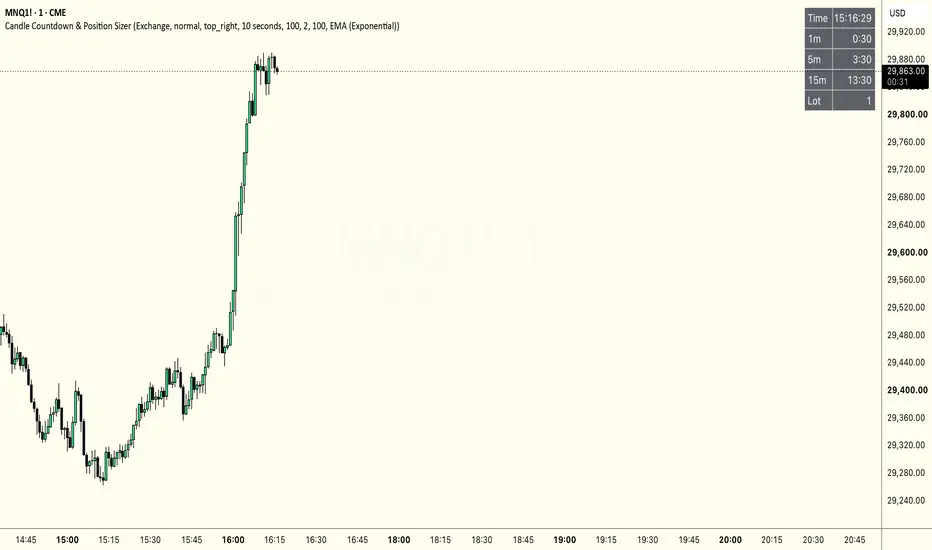
Candle Countdown & Position Sizer
A compact on-chart table that keeps the two things a scalper checks most in one place: time and size.
It shows:
- Live clock with seconds, in the timezone you pick (Exchange, UTC, NY, London, Tokyo, Sydney).
- Countdown to the next 1m, 5m and 15m candle — so you always know how long the current bar has left. Each row turns to your chosen alert color in the final seconds before the candle closes.
- Suggested lot size based on ATR volatility, so your risk stays constant trade to trade.
How the sizing works
Tell it three things:
- how many dollars you're willing to lose on the trade,
- how wide your stop is, as a multiple of ATR (default 2× ATR),
- the ATR length and smoothing (Wilder or exponential — default EMA 100).
It computes the stop distance from current ATR and returns the lot size that caps your loss at that dollar amount if the stop is hit, rounded to a whole number. Flip on the debug toggle to also see the raw ATR and stop
distance behind the calculation.
Notes
- Updates arrive on price ticks, so during very quiet periods the clock may skip a second.
- Lot size uses the symbol's point value — always confirm it against your broker's contract specs before trading.
- Candle countdowns are anchored to UTC and are exact for intraday timeframes on 24h markets.
Not financial advice — a position-sizing aid. You are responsible for your own risk.
A compact on-chart table that keeps the two things a scalper checks most in one place: time and size.
It shows:
- Live clock with seconds, in the timezone you pick (Exchange, UTC, NY, London, Tokyo, Sydney).
- Countdown to the next 1m, 5m and 15m candle — so you always know how long the current bar has left. Each row turns to your chosen alert color in the final seconds before the candle closes.
- Suggested lot size based on ATR volatility, so your risk stays constant trade to trade.
How the sizing works
Tell it three things:
- how many dollars you're willing to lose on the trade,
- how wide your stop is, as a multiple of ATR (default 2× ATR),
- the ATR length and smoothing (Wilder or exponential — default EMA 100).
It computes the stop distance from current ATR and returns the lot size that caps your loss at that dollar amount if the stop is hit, rounded to a whole number. Flip on the debug toggle to also see the raw ATR and stop
distance behind the calculation.
Notes
- Updates arrive on price ticks, so during very quiet periods the clock may skip a second.
- Lot size uses the symbol's point value — always confirm it against your broker's contract specs before trading.
- Candle countdowns are anchored to UTC and are exact for intraday timeframes on 24h markets.
Not financial advice — a position-sizing aid. You are responsible for your own risk.
發行說明
- Risk Mode: Fixed $ or % of Account. Size your position by a fixed dollar risk, or by a percentage of your account balance (new Account Size and Risk % inputs).- Stop split into two rows. Stop ATR (n) shows the stop distance in points (n = your ATR multiple). Stop Cash (x%) shows the actual cash at risk for the suggested lot count — displayed only in % of Account mode, where it's meaningful.
- ATR & Stop now shown by default (the old debug toggle is gone).
- Configurable countdowns. Master show/hide plus three timeframe slots you can each pick and toggle — no longer locked to 1m/5m/15m.
- ATR default is now EMA length 5 (was EMA 100) for a faster read on current volatility.
開源腳本
秉持TradingView一貫精神,這個腳本的創作者將其設為開源,以便交易者檢視並驗證其功能。向作者致敬!您可以免費使用此腳本,但請注意,重新發佈代碼需遵守我們的社群規範。

免責聲明
這些資訊和出版物並非旨在提供,也不構成TradingView提供或認可的任何形式的財務、投資、交易或其他類型的建議或推薦。請閱讀使用條款以了解更多資訊。
開源腳本
秉持TradingView一貫精神,這個腳本的創作者將其設為開源,以便交易者檢視並驗證其功能。向作者致敬!您可以免費使用此腳本,但請注意,重新發佈代碼需遵守我們的社群規範。
免責聲明
這些資訊和出版物並非旨在提供,也不構成TradingView提供或認可的任何形式的財務、投資、交易或其他類型的建議或推薦。請閱讀使用條款以了解更多資訊。