OPEN-SOURCE SCRIPT
已更新 OMSF Learning Space

Welcome to the Omsf Learning Space.
This is not a commercial "holy grail" indicator, nor is it a rigid, corporate course. This is my personal sandbox and educational archive where I dissect market structure, breakout mechanics, and reversal setups.
THE CORE PHILOSOPHY:
Everything in this space is built upon my Omsf (Objective Market Structure Framework). Whether you are a beginner trying to understand how charts breathe, or an advanced trader looking for mechanical rules – this space is designed to give you a clear, visual reality check.
WHAT TO EXPECT:
This script is dynamic and will change organically over time. As I publish new trading ideas, research notes, or structural concepts, this indicator will adapt. Old parts might get swapped out, new experiments will be added, or it might evolve into a v2.0 down the road. There is no fixed schedule. It updates when it updates.
CURRENT VERSION (Launch):
Right now, we are looking at the foundational mechanics: Classic, rigid Pivots alongside the dynamic volatility adjustment of the Omsf.
- Toggle "Exercise 1" to stress-test both engines in the configuration sandbox.
- Toggle "Outlook" to see how classic Pivots perform when taken literally as a trend filter.
Enjoy the sandbox, play with the parameters, and use the Bar Replay. See you in the ideas section!
— arni
This is not a commercial "holy grail" indicator, nor is it a rigid, corporate course. This is my personal sandbox and educational archive where I dissect market structure, breakout mechanics, and reversal setups.
THE CORE PHILOSOPHY:
Everything in this space is built upon my Omsf (Objective Market Structure Framework). Whether you are a beginner trying to understand how charts breathe, or an advanced trader looking for mechanical rules – this space is designed to give you a clear, visual reality check.
WHAT TO EXPECT:
This script is dynamic and will change organically over time. As I publish new trading ideas, research notes, or structural concepts, this indicator will adapt. Old parts might get swapped out, new experiments will be added, or it might evolve into a v2.0 down the road. There is no fixed schedule. It updates when it updates.
CURRENT VERSION (Launch):
Right now, we are looking at the foundational mechanics: Classic, rigid Pivots alongside the dynamic volatility adjustment of the Omsf.
- Toggle "Exercise 1" to stress-test both engines in the configuration sandbox.
- Toggle "Outlook" to see how classic Pivots perform when taken literally as a trend filter.
Enjoy the sandbox, play with the parameters, and use the Bar Replay. See you in the ideas section!
— arni
發行說明
OMSF Learning Space — Update v1.1This update transitions the environment into a structured, chapter-driven interface and prepares the ground for the upcoming trend validation modules.
Key Changes:
New Chapter Menu Structure: Cleaned up the settings menu for a precise, step-by-step navigation through the educational content.
Transition to "Recap": The former "Outlook" module has been upgraded to an interactive "Recap" section, visualizing a pure, price-action-driven Pivot Trend Filter.
Dynamic Trend Overlays: Added real-time background color shading within the Recap chapter to visually demonstrate the mechanical confirmation delay inherent to time-based indicators.
The sandbox is fully prepared for Chapter 4. The deeper breakdown of these structural mechanics can be found in the accompanying weekly chart idea series.
發行說明
Release Notes: OMSF Learning Space v1.2New Navigation Hub: Added 'Chapter 3 - Introduce Kaufman Efficiency Ratio' and 'Chapter 4 - Trendfilter Validation' to inputs selection.
Layout Isolation: Introduced chapter_intro_overlay table function with force_overlay = true to push Chapter 3 text box to main pane while preserving workspace below.
Extension: Programmed complete 14-period Kaufman Efficiency Ratio (KER) oscillator calculations directly inside the script.
Dynamic Alpha Coloring: Added reactive transparency engine for the KER line plots and zero-line fills based on direction and absolute values.
Static Overbought/Oversold Benchmarks: Added key hline thresholds at $\pm1.0$, $\pm0.50$, and $0.0$.
State Expansion: Re-engineered visibility matrix (render_active_pivot, is_render_uptrend, is_render_downtrend) to carry the background trend fills flawlessly over from Recap into Chapter
發行說明
Update Notes: Chapter 4 (KER Validation)- New Two-Column Chapter Layout: Redesigned the on-chart text engine into a two-column format for optimal readability directly on the screen.
- Chapters 4a, 4b & 4c Activated: Added interactive tutorial chapters focusing on mathematical trend validation using the Kaufman Efficiency Ratio (KER).
- Real-Time Statistics Table: Integrated a data table displaying the average KER broken down by active trend conditions for both Pivot and OMSF engines.
- Visual KER Filter Validation: Added a toggle to highlight candle ranges when structural trend direction matches mathematical efficiency (Positive KER in Uptrend / Negative KER in Downtrend).
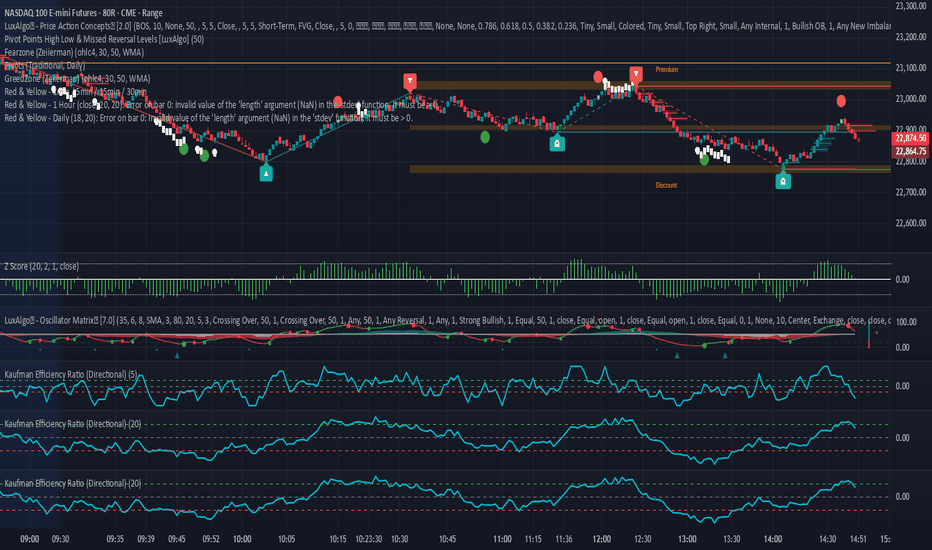
KER Implementation References:
- Kaufman Efficiency Ratio - Directional:
- Kaufman's Efficiency Ratio Indicator:
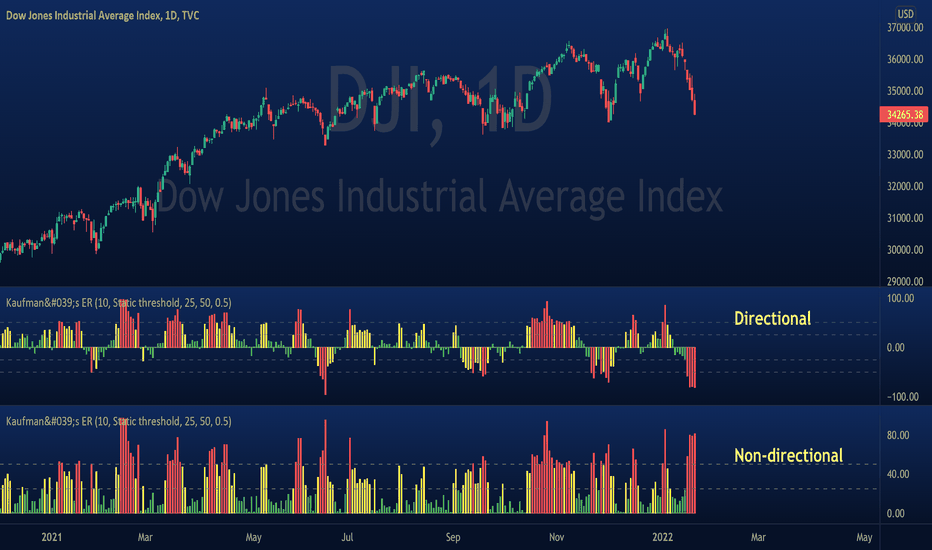
Note: Go to the indicator settings and click 'Reset settings' at the very bottom to ensure all new elements load correctly.
開源腳本
秉持TradingView一貫精神,這個腳本的創作者將其設為開源,以便交易者檢視並驗證其功能。向作者致敬!您可以免費使用此腳本,但請注意,重新發佈代碼需遵守我們的社群規範。

免責聲明
這些資訊和出版物並非旨在提供,也不構成TradingView提供或認可的任何形式的財務、投資、交易或其他類型的建議或推薦。請閱讀使用條款以了解更多資訊。
免責聲明
這些資訊和出版物並非旨在提供,也不構成TradingView提供或認可的任何形式的財務、投資、交易或其他類型的建議或推薦。請閱讀使用條款以了解更多資訊。