KPS Session-Range Mapping
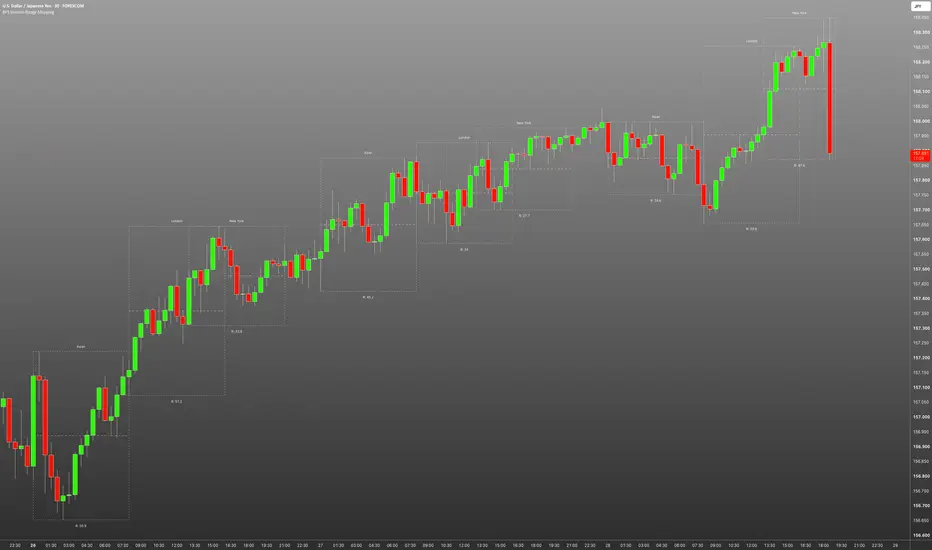
KPS Session-Range Mapping draws the high/low range of each trading session as a box on intraday charts, with the session name, the range size, and an optional 50% equilibrium line. It is designed to give a clear, consistent view of how price behaves inside the Asian, London and New York sessions.
HOW IT WORKS
For each enabled session, the script tracks the highest high and lowest low of all candles inside the session window and draws a box from the open of the first candle to the close of the last candle. Using the candle close time means a session set to 00:00-08:00 ends exactly at 08:00 on any intraday timeframe, rather than at the start of the final candle. The box updates live while the session is open.
FEATURES
- Up to 4 sessions (Asian, London, New York and one custom session), each with its own on/off toggle, name, start/end time, background and border colour.
- Range label below each box, shown in pips, points (1/10 pip) or price. Pip sizes are fixed so ranges read the same on every broker: forex 0.0001 (JPY pairs 0.01), gold 0.10 and silver 0.01. Indices, crypto and other markets have no pip, so their range is shown in price. A manual pip size override is available.
- Optional equilibrium (50%) line at the midpoint of each session's range, with its own colour, style and width.
- Two timezone modes: Region (auto DST), where session times follow a chosen region's clock (e.g. Europe/London, America/New_York) and adjust automatically when clocks change; and Manual (UTC offset), where session times use a fixed offset from UTC-12 to UTC+14, including :30 and :45 offsets, and do not adjust for daylight saving.
- Box style options: background and border on/off, border style (solid, dashed, dotted) and width.
- Settings that do not apply are greyed out automatically (e.g. the UTC offset when Region mode is selected).
WHAT MAKES IT DIFFERENT
Many session indicators place boxes by bar position, which can make a session appear to end one candle early and shift depending on the timeframe. This script anchors each box to the candles' actual open and close times, so sessions start and end at their configured times on any intraday timeframe. It also combines a daylight-saving-aware region mode with a fixed UTC offset mode (including :30 and :45 offsets) in one tool, and uses fixed pip sizes so range values are consistent across brokers.
HOW TO USE
1. Add the indicator to an intraday chart.
2. Choose a timezone mode. Region mode is recommended if your country changes its clocks.
3. Set each session's start and end time in that timezone.
4. Use the boxes to see each session's range at a glance, compare session ranges over time, and identify where price is trading relative to a session's high, low or midpoint.
LIMITATIONS
- Works on intraday timeframes only.
- Sessions that start or end between candles (e.g. 13:30 on a 1-hour chart) begin on the first candle that opens inside the session window; use a lower timeframe for exact placement.
- Shows up to 60 past sessions of each type (default 20) to stay within TradingView's drawing limits.
- History is limited to the bars loaded on the chart.
- Boxes end early when the market closes, such as on Friday evenings.
- Gold pip conventions vary between traders; this script uses 1 pip = 0.10. Use the pip size override if you use a different convention, noting that the override applies to every symbol.
This indicator is a visual analysis tool. It does not generate buy or sell signals.
HOW IT WORKS
For each enabled session, the script tracks the highest high and lowest low of all candles inside the session window and draws a box from the open of the first candle to the close of the last candle. Using the candle close time means a session set to 00:00-08:00 ends exactly at 08:00 on any intraday timeframe, rather than at the start of the final candle. The box updates live while the session is open.
FEATURES
- Up to 4 sessions (Asian, London, New York and one custom session), each with its own on/off toggle, name, start/end time, background and border colour.
- Range label below each box, shown in pips, points (1/10 pip) or price. Pip sizes are fixed so ranges read the same on every broker: forex 0.0001 (JPY pairs 0.01), gold 0.10 and silver 0.01. Indices, crypto and other markets have no pip, so their range is shown in price. A manual pip size override is available.
- Optional equilibrium (50%) line at the midpoint of each session's range, with its own colour, style and width.
- Two timezone modes: Region (auto DST), where session times follow a chosen region's clock (e.g. Europe/London, America/New_York) and adjust automatically when clocks change; and Manual (UTC offset), where session times use a fixed offset from UTC-12 to UTC+14, including :30 and :45 offsets, and do not adjust for daylight saving.
- Box style options: background and border on/off, border style (solid, dashed, dotted) and width.
- Settings that do not apply are greyed out automatically (e.g. the UTC offset when Region mode is selected).
WHAT MAKES IT DIFFERENT
Many session indicators place boxes by bar position, which can make a session appear to end one candle early and shift depending on the timeframe. This script anchors each box to the candles' actual open and close times, so sessions start and end at their configured times on any intraday timeframe. It also combines a daylight-saving-aware region mode with a fixed UTC offset mode (including :30 and :45 offsets) in one tool, and uses fixed pip sizes so range values are consistent across brokers.
HOW TO USE
1. Add the indicator to an intraday chart.
2. Choose a timezone mode. Region mode is recommended if your country changes its clocks.
3. Set each session's start and end time in that timezone.
4. Use the boxes to see each session's range at a glance, compare session ranges over time, and identify where price is trading relative to a session's high, low or midpoint.
LIMITATIONS
- Works on intraday timeframes only.
- Sessions that start or end between candles (e.g. 13:30 on a 1-hour chart) begin on the first candle that opens inside the session window; use a lower timeframe for exact placement.
- Shows up to 60 past sessions of each type (default 20) to stay within TradingView's drawing limits.
- History is limited to the bars loaded on the chart.
- Boxes end early when the market closes, such as on Friday evenings.
- Gold pip conventions vary between traders; this script uses 1 pip = 0.10. Use the pip size override if you use a different convention, noting that the override applies to every symbol.
This indicator is a visual analysis tool. It does not generate buy or sell signals.

免責聲明
這些資訊和出版物並非旨在提供,也不構成TradingView提供或認可的任何形式的財務、投資、交易或其他類型的建議或推薦。請閱讀使用條款以了解更多資訊。