OPEN-SOURCE SCRIPT
[WW_AM] UTC Week Day Sessions
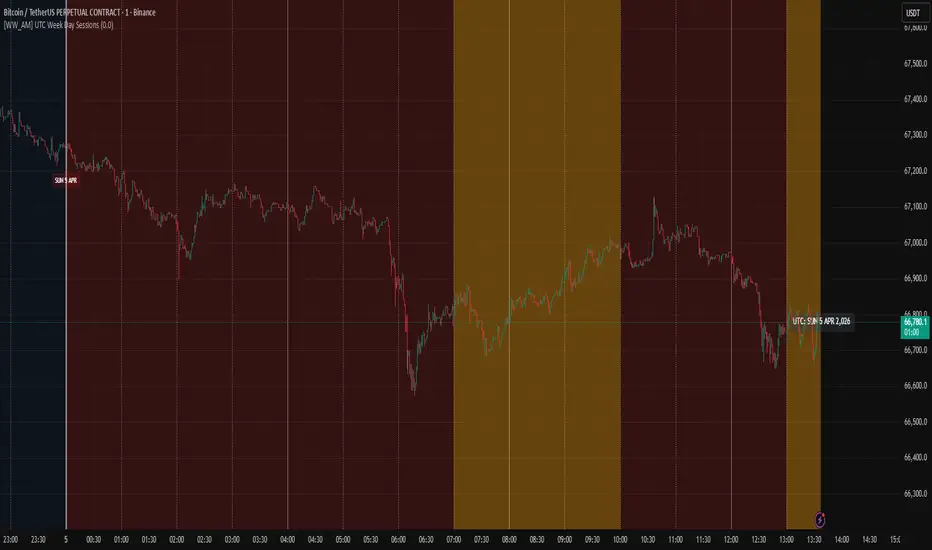
UTC Week Day Sessions – What it does
This indicator helps you understand the market context based on UTC time, regardless of your local timezone or the chart's timezone.
Main features:
Coloured weekdays – Each weekday gets a different background shade (Monday to Saturday). Sunday turns red if you wish. This makes it easy to spot day transitions at a glance.
Active session highlight – London (07:00–10:00 UTC) and NY/Overlap (13:00–17:00 UTC) are highlighted in yellow, so you know when liquidity typically picks up.
Time boundaries – Draws vertical lines at the start of every hour, 4‑hour block, day, and week. You can toggle each level on/off. The line thickness increases with importance (thickest for weekly boundaries).
Date labels – A small label appears below the chart at 00:00 UTC showing the day, date, and month. Hover to see the full weekday and year.
UTC watermark – Displays the current UTC date in the top‑right corner, so you always know the reference time.
Price % calculator – Enter a target price (click the crosshair icon to pick a level from the chart). The script then shows a dashed line at that price and a label with the percentage difference from the current close. Very handy for measuring potential targets or stop distances.
How to use it:
Add the indicator to any intraday chart (it works best on minute or hourly timeframes).
Adjust the toggles in the settings to show/hide backgrounds, lines, labels, and the watermark.
For the price calculator: go to the indicator’s settings → "Price % Calculator" → click the crosshair icon next to "Target Price Level", then click any price on the chart.
The indicator uses UTC exclusively – no need to change your chart’s timezone.
Note: All session times and boundaries are based on UTC, not your broker’s time or local time. This ensures consistency across different platforms and regions.
This indicator helps you understand the market context based on UTC time, regardless of your local timezone or the chart's timezone.
Main features:
Coloured weekdays – Each weekday gets a different background shade (Monday to Saturday). Sunday turns red if you wish. This makes it easy to spot day transitions at a glance.
Active session highlight – London (07:00–10:00 UTC) and NY/Overlap (13:00–17:00 UTC) are highlighted in yellow, so you know when liquidity typically picks up.
Time boundaries – Draws vertical lines at the start of every hour, 4‑hour block, day, and week. You can toggle each level on/off. The line thickness increases with importance (thickest for weekly boundaries).
Date labels – A small label appears below the chart at 00:00 UTC showing the day, date, and month. Hover to see the full weekday and year.
UTC watermark – Displays the current UTC date in the top‑right corner, so you always know the reference time.
Price % calculator – Enter a target price (click the crosshair icon to pick a level from the chart). The script then shows a dashed line at that price and a label with the percentage difference from the current close. Very handy for measuring potential targets or stop distances.
How to use it:
Add the indicator to any intraday chart (it works best on minute or hourly timeframes).
Adjust the toggles in the settings to show/hide backgrounds, lines, labels, and the watermark.
For the price calculator: go to the indicator’s settings → "Price % Calculator" → click the crosshair icon next to "Target Price Level", then click any price on the chart.
The indicator uses UTC exclusively – no need to change your chart’s timezone.
Note: All session times and boundaries are based on UTC, not your broker’s time or local time. This ensures consistency across different platforms and regions.
開源腳本
秉持TradingView一貫精神,這個腳本的創作者將其設為開源,以便交易者檢視並驗證其功能。向作者致敬!您可以免費使用此腳本,但請注意,重新發佈代碼需遵守我們的社群規範。

免責聲明
這些資訊和出版物並非旨在提供,也不構成TradingView提供或認可的任何形式的財務、投資、交易或其他類型的建議或推薦。請閱讀使用條款以了解更多資訊。
開源腳本
秉持TradingView一貫精神,這個腳本的創作者將其設為開源,以便交易者檢視並驗證其功能。向作者致敬!您可以免費使用此腳本,但請注意,重新發佈代碼需遵守我們的社群規範。
免責聲明
這些資訊和出版物並非旨在提供,也不構成TradingView提供或認可的任何形式的財務、投資、交易或其他類型的建議或推薦。請閱讀使用條款以了解更多資訊。