OPEN-SOURCE SCRIPT
已更新 Decision zone V2
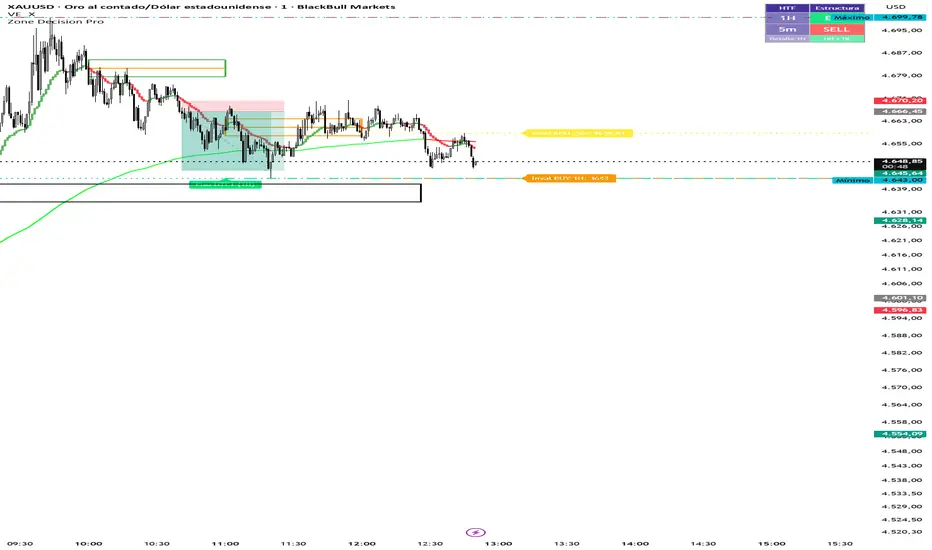
Multi Cuadros PRO + HTF Levels is a trading indicator that plots configurable time-based boxes with midlines, along with the latest higher timeframe (HTF) support and resistance levels using pivot detection. It is fully customizable in size, style, and timing, designed to identify key market zones efficiently
發行說明
Multi Cuadros PRO + HTF Levels is a trading indicator that plots configurable time-based boxes with midlines, along with the latest higher timeframe (HTF) support and resistance levels using pivot detection. It is fully customizable in size, style, and timing, designed to identify key market zones efficiently發行說明
Multi Cuadros PRO + HTF Levels is a trading indicator that plots configurable time-based boxes with midlines, along with the latest higher timeframe (HTF) support and resistance levels using pivot detection. It is fully customizable in size, style, and timing, designed to identify key market zones efficiently.發行說明
Evaluates market structure (HH/HL vs LH/LL) across two configurable timeframes and displays a BUY/SELL/NEUTRAL panel in the corner of the chart. Includes invalidation lines.發行說明
Zone Decision Pro — Update Summary (April 2026)1. HTF Pisos y Techos — Group Renaming (Modules 2 & 3)
Groups renamed to ━━ HTF 1 — Pisos y Techos and ━━ HTF 2 — Pisos y Techos for clarity.
Settings compacted using inline rows: timeframe + ON toggle on one row, pivot bars + visibility on the next, colors + style on the last.
Bug fix: added h2Level / l2Level tracking to Module 3 so lines correctly disappear when price touches them.
2. HTF Structure Bias — Settings Compacted (Module 4)
Former separate groups gBiasPanel, gInval1, gInval2 eliminated.
━━ Bias — Configuración now holds the direction mode and the three BUY / SELL / NEUTRAL colors in a single inline row.
━━ Bias HTF 1 and ━━ Bias HTF 2 each consolidate their timeframe, pivot bars, invalidation toggle, color, weight, and style into one single row per group.
HTF 2 includes its own ON/OFF toggle at the start of the row.
3. Time-Based Alerts & Icons Per Box (Module 1)
Each of the 8 boxes received a new inline row (c1d … c8d) with three fields:
開源腳本
秉持TradingView一貫精神,這個腳本的創作者將其設為開源,以便交易者檢視並驗證其功能。向作者致敬!您可以免費使用此腳本,但請注意,重新發佈代碼需遵守我們的社群規範。

免責聲明
這些資訊和出版物並非旨在提供,也不構成TradingView提供或認可的任何形式的財務、投資、交易或其他類型的建議或推薦。請閱讀使用條款以了解更多資訊。
開源腳本
秉持TradingView一貫精神,這個腳本的創作者將其設為開源,以便交易者檢視並驗證其功能。向作者致敬!您可以免費使用此腳本,但請注意,重新發佈代碼需遵守我們的社群規範。
免責聲明
這些資訊和出版物並非旨在提供,也不構成TradingView提供或認可的任何形式的財務、投資、交易或其他類型的建議或推薦。請閱讀使用條款以了解更多資訊。