OPEN-SOURCE SCRIPT
Past Session POC / VAH / VAL (Full Day)
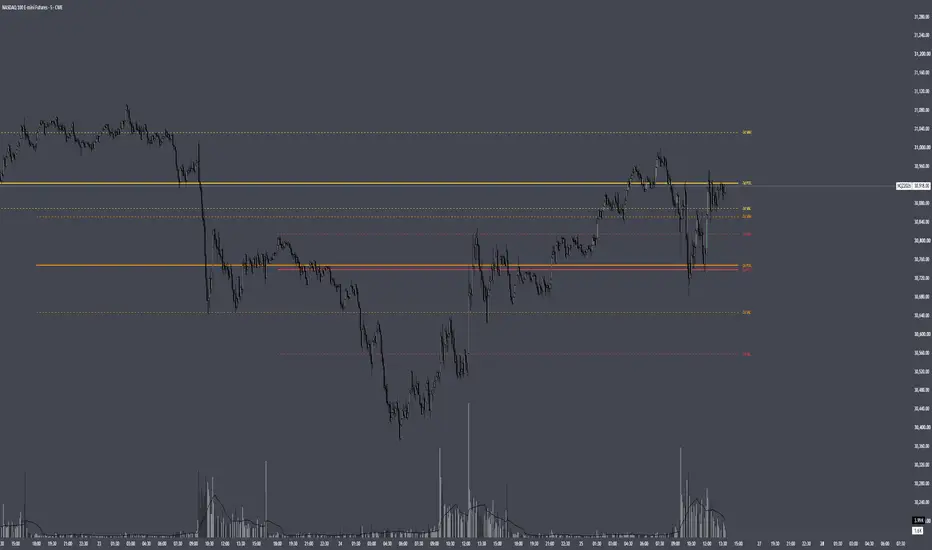
Past Session POC / VAH / VAL (Full Day)
Plots the Point of Control, Value Area High and Value Area Low from up to 5 previous full trading sessions (for CME futures, the 18:00 ET open through the 17:00 ET close).
HOW IT WORKS
Instead of estimating volume from chart candles, the script pulls lower-timeframe data (1 minute by default) and distributes each intrabar's volume across the price levels it actually traded through. This builds a full volume-at-price profile for each session, so the levels closely match TradingView's built-in Session Volume Profile when the row settings are the same.
- POC: the price row with the highest traded volume
- Value Area: expands outward from the POC, comparing the next two rows above and below and adding the larger side, until the chosen % of session volume (default 70%) is covered
- VAH / VAL: the top and bottom of that value area
SETTINGS
Profile: set Rows Layout, Row Size and Value Area % to match your Session Volume Profile. "Ticks Per Row" is recommended for precise levels (e.g. 4 ticks = 1 point on NQ).
Sessions: show or hide the POC, VAH and VAL for each of the last 5 sessions individually, each with its own colour.
Display: line widths and styles, how far lines extend past the current bar, and label position and size.
NOTES
- Intrabar Timeframe must be equal to or lower than the chart timeframe.
- Levels are calculated once each session closes, so they do not repaint.
- Built from intrabar candle data, not tick data, so on sessions where two rows are nearly tied the POC can occasionally differ by one row from the built-in profile.
Plots the Point of Control, Value Area High and Value Area Low from up to 5 previous full trading sessions (for CME futures, the 18:00 ET open through the 17:00 ET close).
HOW IT WORKS
Instead of estimating volume from chart candles, the script pulls lower-timeframe data (1 minute by default) and distributes each intrabar's volume across the price levels it actually traded through. This builds a full volume-at-price profile for each session, so the levels closely match TradingView's built-in Session Volume Profile when the row settings are the same.
- POC: the price row with the highest traded volume
- Value Area: expands outward from the POC, comparing the next two rows above and below and adding the larger side, until the chosen % of session volume (default 70%) is covered
- VAH / VAL: the top and bottom of that value area
SETTINGS
Profile: set Rows Layout, Row Size and Value Area % to match your Session Volume Profile. "Ticks Per Row" is recommended for precise levels (e.g. 4 ticks = 1 point on NQ).
Sessions: show or hide the POC, VAH and VAL for each of the last 5 sessions individually, each with its own colour.
Display: line widths and styles, how far lines extend past the current bar, and label position and size.
NOTES
- Intrabar Timeframe must be equal to or lower than the chart timeframe.
- Levels are calculated once each session closes, so they do not repaint.
- Built from intrabar candle data, not tick data, so on sessions where two rows are nearly tied the POC can occasionally differ by one row from the built-in profile.
開源腳本
秉持TradingView一貫精神,這個腳本的創作者將其設為開源,以便交易者檢視並驗證其功能。向作者致敬!您可以免費使用此腳本,但請注意,重新發佈代碼需遵守我們的社群規範。

免責聲明
這些資訊和出版物並非旨在提供,也不構成TradingView提供或認可的任何形式的財務、投資、交易或其他類型的建議或推薦。請閱讀使用條款以了解更多資訊。
開源腳本
秉持TradingView一貫精神,這個腳本的創作者將其設為開源,以便交易者檢視並驗證其功能。向作者致敬!您可以免費使用此腳本,但請注意,重新發佈代碼需遵守我們的社群規範。
免責聲明
這些資訊和出版物並非旨在提供,也不構成TradingView提供或認可的任何形式的財務、投資、交易或其他類型的建議或推薦。請閱讀使用條款以了解更多資訊。