Order Block Finder
Order Block Finder
OVERVIEW
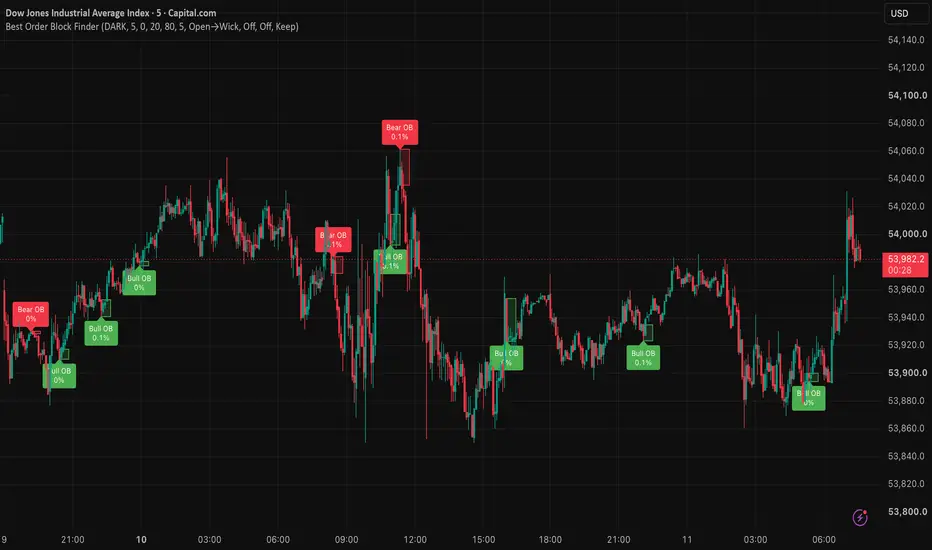
Order Block Finder is a rules-based Order Block tool that highlights bullish and bearish OB zones using a classic “OB candle + consecutive candles” confirmation model.
It is designed for traders who want simple, consistent OB marking without repaint-style guesswork.
Built by the Xcelerate Trade team.
━━━━━━━━━━━━━━━━━━━━━━━━━━━━━━━━━━━━━━━━
BEST USED WITH
━━━━━━━━━━━━━━━━━━━━━━━━━━━━━━━━━━━━━━━━
Works much better together with:
→ “Fluid Liquidity Zones - CHoCH + Mitigation + HTF | Xcelerate Trade”
(or “Fluid Liquidity Zones - CHoCH | Xcelerate Trade”)
→ Market Structure (HH / HL / LH / LL) + session context
Use structure / liquidity context first, then Order Blocks as zones of interest — not as a standalone entry system.
CONCEPT
An Order Block marks the last opposing candle before a strong directional move.
Bullish OB: a bearish candle followed by N consecutive bullish candles (Relevant Periods), with an optional minimum % move filter.
Bearish OB: a bullish candle followed by N consecutive bearish candles, with the same optional filter.
Zones are drawn as boxes and labeled once confirmation is met.
HOW IT WORKS
1) Set Relevant Periods (default 5) — how many confirming candles after the OB candle
2) Optionally raise Min. Percent move to filter weak moves
3) Choose Order Block Zone mode:
• Open→Wick (default) — bullish: open→low · bearish: high→open
• Body — open↔close
• Full Wick — high↔low
4) Optionally enable Mitigation / Invalidation and After mitigation (Keep / Fade / Delete)
5) Optionally Extend zone right until mitigated
FEATURES
• Bullish and bearish OB boxes + labels (move % on label)
• Color scheme: DARK (green/red) or BRIGHT (blue/orange)
• Max OB boxes (total) to keep charts clean
• Fixed box length or extend-right until mitigated
• Optional mitigation and invalidation modes
• Alerts: new Bullish OB · new Bearish OB · optional mitigation alerts
HOW TO USE
1) Prefer higher timeframes (30m–4H+) for stronger / “major” OB zones
2) Mark OB zones, then refine entries on a lower timeframe
3) Look for reactions (rejection / reclaim) when price retests an OB
4) Combine with structure (HH/HL/LH/LL), liquidity zones, and session context
5) Use alerts if you want notification on new OB formation
SKIP / AVOID
• Trading every OB as an automatic entry
• Weak moves with threshold at 0 on noisy low timeframes
• Ignoring mitigation / invalidation when you need cleaner charts
• Acting without structure or higher-timeframe bias
LIMITATIONS
• This is a visualization and alert tool. It does not place trades and does not guarantee results.
• Order Blocks are a model of price action, not true institutional order-book data.
• On very low timeframes, more OBs appear and noise increases.
• Always confirm with your own risk management and market context.
OVERVIEW
Order Block Finder is a rules-based Order Block tool that highlights bullish and bearish OB zones using a classic “OB candle + consecutive candles” confirmation model.
It is designed for traders who want simple, consistent OB marking without repaint-style guesswork.
Built by the Xcelerate Trade team.
━━━━━━━━━━━━━━━━━━━━━━━━━━━━━━━━━━━━━━━━
BEST USED WITH
━━━━━━━━━━━━━━━━━━━━━━━━━━━━━━━━━━━━━━━━
Works much better together with:
→ “Fluid Liquidity Zones - CHoCH + Mitigation + HTF | Xcelerate Trade”
(or “Fluid Liquidity Zones - CHoCH | Xcelerate Trade”)
→ Market Structure (HH / HL / LH / LL) + session context
Use structure / liquidity context first, then Order Blocks as zones of interest — not as a standalone entry system.
CONCEPT
An Order Block marks the last opposing candle before a strong directional move.
Bullish OB: a bearish candle followed by N consecutive bullish candles (Relevant Periods), with an optional minimum % move filter.
Bearish OB: a bullish candle followed by N consecutive bearish candles, with the same optional filter.
Zones are drawn as boxes and labeled once confirmation is met.
HOW IT WORKS
1) Set Relevant Periods (default 5) — how many confirming candles after the OB candle
2) Optionally raise Min. Percent move to filter weak moves
3) Choose Order Block Zone mode:
• Open→Wick (default) — bullish: open→low · bearish: high→open
• Body — open↔close
• Full Wick — high↔low
4) Optionally enable Mitigation / Invalidation and After mitigation (Keep / Fade / Delete)
5) Optionally Extend zone right until mitigated
FEATURES
• Bullish and bearish OB boxes + labels (move % on label)
• Color scheme: DARK (green/red) or BRIGHT (blue/orange)
• Max OB boxes (total) to keep charts clean
• Fixed box length or extend-right until mitigated
• Optional mitigation and invalidation modes
• Alerts: new Bullish OB · new Bearish OB · optional mitigation alerts
HOW TO USE
1) Prefer higher timeframes (30m–4H+) for stronger / “major” OB zones
2) Mark OB zones, then refine entries on a lower timeframe
3) Look for reactions (rejection / reclaim) when price retests an OB
4) Combine with structure (HH/HL/LH/LL), liquidity zones, and session context
5) Use alerts if you want notification on new OB formation
SKIP / AVOID
• Trading every OB as an automatic entry
• Weak moves with threshold at 0 on noisy low timeframes
• Ignoring mitigation / invalidation when you need cleaner charts
• Acting without structure or higher-timeframe bias
LIMITATIONS
• This is a visualization and alert tool. It does not place trades and does not guarantee results.
• Order Blocks are a model of price action, not true institutional order-book data.
• On very low timeframes, more OBs appear and noise increases.
• Always confirm with your own risk management and market context.

免責聲明
這些資訊和出版物並非旨在提供,也不構成TradingView提供或認可的任何形式的財務、投資、交易或其他類型的建議或推薦。請閱讀使用條款以了解更多資訊。
免責聲明
這些資訊和出版物並非旨在提供,也不構成TradingView提供或認可的任何形式的財務、投資、交易或其他類型的建議或推薦。請閱讀使用條款以了解更多資訊。