OPEN-SOURCE SCRIPT
Index Futures Position Size Calculator
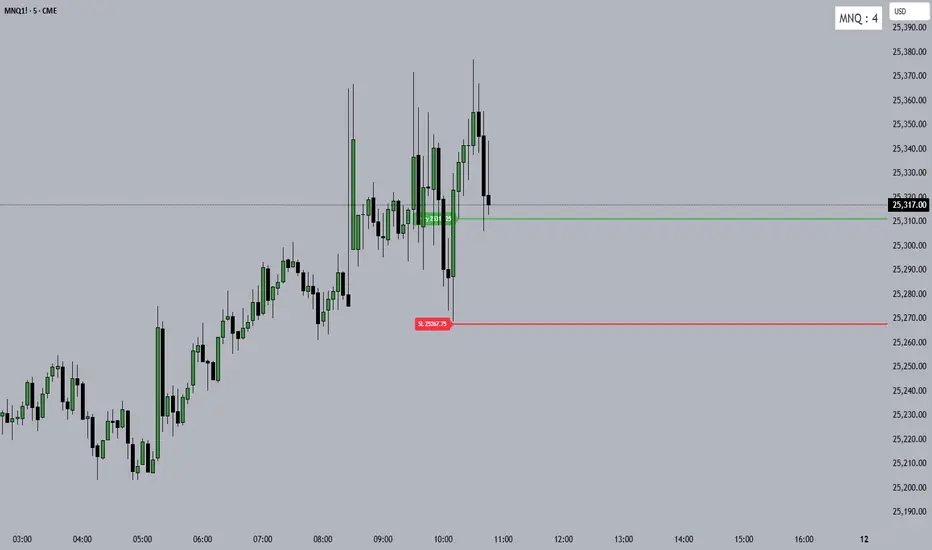
A simple, free position size calculator for CME index futures.
Click Entry, click Stop Loss, pick your asset, get your contract size. That's it.
═══════════════════════════════════
✦ SUPPORTED INSTRUMENTS
MNQ • MES • NQ • ES — all CME tick values hardcoded.
═══════════════════════════════════
✦ FEATURES
→ One-click Entry & Stop Loss directly on chart
→ Auto 1-handle SL buffer (protects against wick hunts)
→ Asset dropdown — no manual tick value entry
→ Custom rounding (≥0.75 rounds up, else down)
→ Green Entry / Red SL lines with price labels
→ Clean black-on-white size panel, top right
═══════════════════════════════════
✦ HOW TO USE
Add to chart → click Entry → click Stop Loss
Settings → pick asset, enter Account Size & Risk %
Read your size from the top-right panel
═══════════════════════════════════
✦ TIP
If you're trading a funded challenge, here are two clean ways to use this tool with your max loss limit:
Method 1 — Loss budget split
Decide how many consecutive losses you can take before you're out. Divide your max loss by that number, and use the result as your "Account Size" with Risk % at 100.
Example: $2,000 max loss ÷ 5 losses = $400 per trade
→ Account Size: $400 | Risk %: 100
Method 2 — Direct percentage
Enter your full max loss as Account Size and set Risk % to your per-trade percentage.
Example: $2,000 max loss, risking 20% per trade
→ Account Size: $2,000 | Risk %: 20
Both give the same result — pick whichever feels more natural.
═══════════════════════════════════
✦ A NOTE FROM THE AUTHOR
Built with Claude AI for my own daily trading. Sharing it free because clean tools shouldn't be locked behind paywalls.
100% free. 100% open source. No Discord, no course, no affiliate links, nothing to buy. Copy it, modify it, republish your own version — it's yours.
═══════════════════════════════════
✦ DISCLAIMER
Educational tool only. Not financial advice. Futures trading carries substantial risk of loss. Always verify calculations against your broker's parameters before trading.
Built with ❤️ by REDz & Claude
Click Entry, click Stop Loss, pick your asset, get your contract size. That's it.
═══════════════════════════════════
✦ SUPPORTED INSTRUMENTS
MNQ • MES • NQ • ES — all CME tick values hardcoded.
═══════════════════════════════════
✦ FEATURES
→ One-click Entry & Stop Loss directly on chart
→ Auto 1-handle SL buffer (protects against wick hunts)
→ Asset dropdown — no manual tick value entry
→ Custom rounding (≥0.75 rounds up, else down)
→ Green Entry / Red SL lines with price labels
→ Clean black-on-white size panel, top right
═══════════════════════════════════
✦ HOW TO USE
Add to chart → click Entry → click Stop Loss
Settings → pick asset, enter Account Size & Risk %
Read your size from the top-right panel
═══════════════════════════════════
✦ TIP
If you're trading a funded challenge, here are two clean ways to use this tool with your max loss limit:
Method 1 — Loss budget split
Decide how many consecutive losses you can take before you're out. Divide your max loss by that number, and use the result as your "Account Size" with Risk % at 100.
Example: $2,000 max loss ÷ 5 losses = $400 per trade
→ Account Size: $400 | Risk %: 100
Method 2 — Direct percentage
Enter your full max loss as Account Size and set Risk % to your per-trade percentage.
Example: $2,000 max loss, risking 20% per trade
→ Account Size: $2,000 | Risk %: 20
Both give the same result — pick whichever feels more natural.
═══════════════════════════════════
✦ A NOTE FROM THE AUTHOR
Built with Claude AI for my own daily trading. Sharing it free because clean tools shouldn't be locked behind paywalls.
100% free. 100% open source. No Discord, no course, no affiliate links, nothing to buy. Copy it, modify it, republish your own version — it's yours.
═══════════════════════════════════
✦ DISCLAIMER
Educational tool only. Not financial advice. Futures trading carries substantial risk of loss. Always verify calculations against your broker's parameters before trading.
Built with ❤️ by REDz & Claude
開源腳本
秉持TradingView一貫精神,這個腳本的創作者將其設為開源,以便交易者檢視並驗證其功能。向作者致敬!您可以免費使用此腳本,但請注意,重新發佈代碼需遵守我們的社群規範。

REDz
免責聲明
這些資訊和出版物並非旨在提供,也不構成TradingView提供或認可的任何形式的財務、投資、交易或其他類型的建議或推薦。請閱讀使用條款以了解更多資訊。
開源腳本
秉持TradingView一貫精神,這個腳本的創作者將其設為開源,以便交易者檢視並驗證其功能。向作者致敬!您可以免費使用此腳本,但請注意,重新發佈代碼需遵守我們的社群規範。
REDz
免責聲明
這些資訊和出版物並非旨在提供,也不構成TradingView提供或認可的任何形式的財務、投資、交易或其他類型的建議或推薦。請閱讀使用條款以了解更多資訊。