已更新
SPX Fly Zone
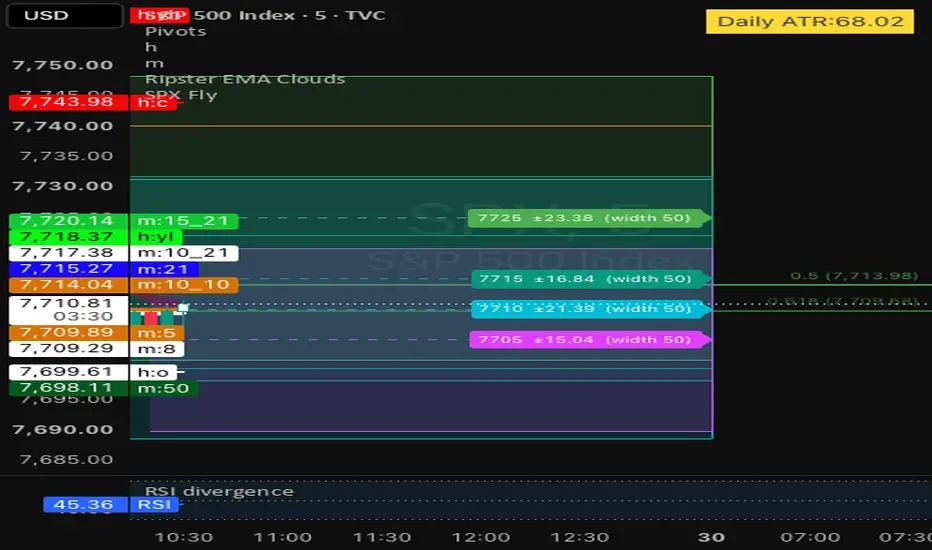
What each fly draws
Rectangle: the top is the fly price plus the premium, and the bottom is the fly price minus the premium.
Middle line: a dashed line at the fly price.
Label: it sits at the rectangle’s right edge on the middle line. It reads like 7720 ±20 (width 50). Hovering shows the top, center, bottom, premium and width. The text is black or white depending on how light the fly’s color is.
Width: it only appears in the label and doesn’t affect the rectangle.
When it draws: a fly appears only when its checkbox is on and its premium is above 0.
Settings
Style: fill transparency (85), border width (2) and a show-labels switch.
SPX Flies, one row per fly:
the checkbox, off by default
Px (the fly price), which starts as Auto
Wd (width), default 50
Pr (premium), default 20
Start time (New York) and color, one row per fly: a start time and a color swatch. Each fly has a different default color, and Fly 1 is blue.
Fly price (Px)
A number: typing 7720 uses that price.
Auto: this uses the SPX price at the fly’s start time. It is the open of the first bar that starts within 30 minutes of that time, and it stays fixed once captured. Before that time arrives it uses the day’s open.
Open: this uses today’s open, taken from the first bar of the day, and it stays fixed all day.
Start and end times
Start times: Fly 1 starts at 10:30 New York time and each later fly 30 minutes after the previous one. You can type any HH:MM to change one.
Left and right edges: the left edge is that start time today, and it is never earlier than the session open. The right edge is always the session close.
Late flies: a fly that starts at or after the close isn’t drawn. That covers Flies 12 to 15 by default.
Other behavior
Redraw: all the drawings are deleted and redrawn on the last bar.
Chart readouts: the day’s open and Fly 1’s start-time price show in the status line. The other flies’ start-time prices are listed in the Data Window.
Removed: the drag markers and their prompts are gone, so the boundaries can’t be dragged.
Why the file is long: Pine can’t loop over inputs, so all 15 flies are declared out in full.
Rectangle: the top is the fly price plus the premium, and the bottom is the fly price minus the premium.
Middle line: a dashed line at the fly price.
Label: it sits at the rectangle’s right edge on the middle line. It reads like 7720 ±20 (width 50). Hovering shows the top, center, bottom, premium and width. The text is black or white depending on how light the fly’s color is.
Width: it only appears in the label and doesn’t affect the rectangle.
When it draws: a fly appears only when its checkbox is on and its premium is above 0.
Settings
Style: fill transparency (85), border width (2) and a show-labels switch.
SPX Flies, one row per fly:
the checkbox, off by default
Px (the fly price), which starts as Auto
Wd (width), default 50
Pr (premium), default 20
Start time (New York) and color, one row per fly: a start time and a color swatch. Each fly has a different default color, and Fly 1 is blue.
Fly price (Px)
A number: typing 7720 uses that price.
Auto: this uses the SPX price at the fly’s start time. It is the open of the first bar that starts within 30 minutes of that time, and it stays fixed once captured. Before that time arrives it uses the day’s open.
Open: this uses today’s open, taken from the first bar of the day, and it stays fixed all day.
Start and end times
Start times: Fly 1 starts at 10:30 New York time and each later fly 30 minutes after the previous one. You can type any HH:MM to change one.
Left and right edges: the left edge is that start time today, and it is never earlier than the session open. The right edge is always the session close.
Late flies: a fly that starts at or after the close isn’t drawn. That covers Flies 12 to 15 by default.
Other behavior
Redraw: all the drawings are deleted and redrawn on the last bar.
Chart readouts: the day’s open and Fly 1’s start-time price show in the status line. The other flies’ start-time prices are listed in the Data Window.
Removed: the drag markers and their prompts are gone, so the boundaries can’t be dragged.
Why the file is long: Pine can’t loop over inputs, so all 15 flies are declared out in full.
發行說明
Made the rectangle draggable發行說明
Added start time for the fly發行說明
Added start time in EST for each flys發行說明
Removed left border from the box, so we can see the price candle more clearly
免責聲明
這些資訊和出版物並非旨在提供,也不構成TradingView提供或認可的任何形式的財務、投資、交易或其他類型的建議或推薦。請閱讀使用條款以了解更多資訊。
免責聲明
這些資訊和出版物並非旨在提供,也不構成TradingView提供或認可的任何形式的財務、投資、交易或其他類型的建議或推薦。請閱讀使用條款以了解更多資訊。