Killzones
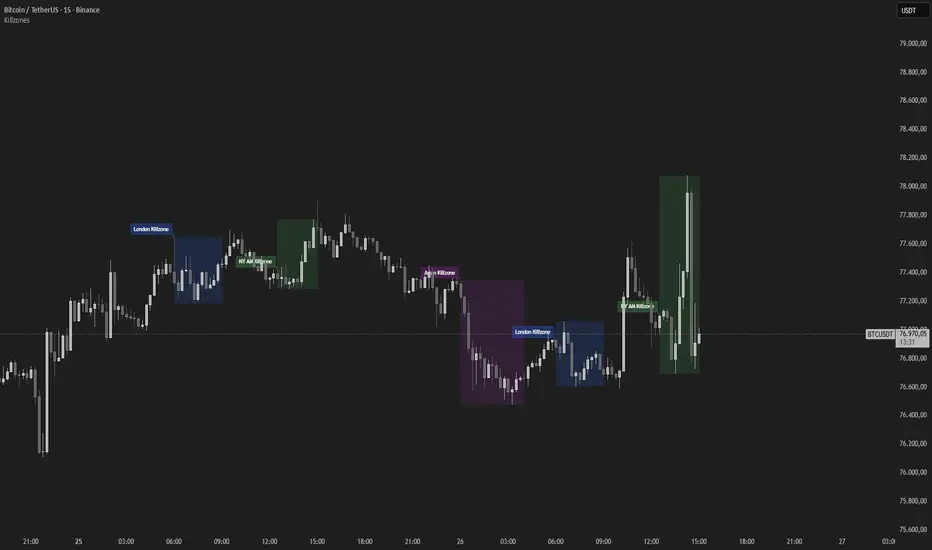
Plots the major intraday killzones used in orderflow/ICT analysis as session
boxes. Up to five fully configurable sessions (Asian, London, NY AM, London
Close, NY PM by default) are drawn on the chart, so you instantly see the
windows where intraday liquidity is typically built and swept.
Each box automatically tracks the high and low of its session, giving you the
session range and its liquidity edges at a glance. All sessions are calculated
in a selectable timezone (default New York, with automatic DST handling so the
windows match ICT killzone times year-round). Optional vertical lines mark each
session's open and close, and labels name each zone.
Because the sessions are purely time-based, completed killzones are fixed and do
not repaint; only the active session updates in real time as price extends.
Use the killzones to frame WHEN you look for setups (e.g. sweeps and reversals
into London/NY after the Asian range), not as standalone signals.
Settings: enable/disable each session, custom times and timezone, weekdays-only
filter, per-session colors, optional open/close lines and labels, extend-after-
session, and a historical zone limit.
This tool is for visualization only. It issues no buy/sell signals and makes no
claim about future performance.
boxes. Up to five fully configurable sessions (Asian, London, NY AM, London
Close, NY PM by default) are drawn on the chart, so you instantly see the
windows where intraday liquidity is typically built and swept.
Each box automatically tracks the high and low of its session, giving you the
session range and its liquidity edges at a glance. All sessions are calculated
in a selectable timezone (default New York, with automatic DST handling so the
windows match ICT killzone times year-round). Optional vertical lines mark each
session's open and close, and labels name each zone.
Because the sessions are purely time-based, completed killzones are fixed and do
not repaint; only the active session updates in real time as price extends.
Use the killzones to frame WHEN you look for setups (e.g. sweeps and reversals
into London/NY after the Asian range), not as standalone signals.
Settings: enable/disable each session, custom times and timezone, weekdays-only
filter, per-session colors, optional open/close lines and labels, extend-after-
session, and a historical zone limit.
This tool is for visualization only. It issues no buy/sell signals and makes no
claim about future performance.

AssayCharts — premium TradingView indicators
assaycharts.com
assaycharts.com
免責聲明
這些資訊和出版物並非旨在提供,也不構成TradingView提供或認可的任何形式的財務、投資、交易或其他類型的建議或推薦。請閱讀使用條款以了解更多資訊。
AssayCharts — premium TradingView indicators
assaycharts.com
assaycharts.com
免責聲明
這些資訊和出版物並非旨在提供,也不構成TradingView提供或認可的任何形式的財務、投資、交易或其他類型的建議或推薦。請閱讀使用條款以了解更多資訊。