OPEN-SOURCE SCRIPT
Dual Moving Average Exponential
Overview
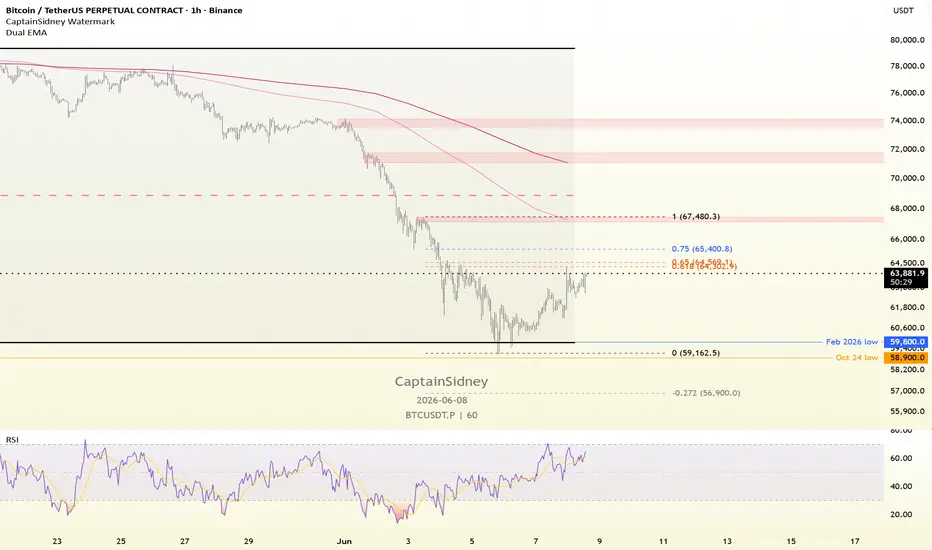
This script is a clean, optimized extension of TradingView's official, built-in Moving Average Exponential (EMA) indicator. Instead of cluttering your chart by loading multiple single indicators, this script allows you to plot two independent EMAs simultaneously within a single indicator slot, saving you valuable layout space.
It retains the full functionality of the original script, including the advanced Moving Average Smoothing and Bollinger Band features, applying them directly to the primary EMA.
Key Features
Dual EMA Plotting: Set independent lengths, sources, and offsets for two separate exponential moving averages (e.g., a fast EMA and a slow EMA for trend crossovers).
UI Customization: Color pickers have been added directly to the inputs menu, allowing you to change the line colors on the fly without entering the script settings style tab or editing the code.
Organized Input Groups: Settings are cleanly separated into "EMA 1", "EMA 2", and "Smoothing" sections for easy navigation.
Original Smoothing Matrix: Includes the native script's ability to smooth EMA 1 using SMA, EMA, SMMA, WMA, VWMA, or to generate EMA-based Bollinger Bands.
How to Use
Trend Identification: Use a fast EMA (e.g., 9 or 21) alongside a slow EMA (e.g., 50 or 200) to quickly identify trend direction and potential crossover signals.
Support & Resistance: Utilize the dual lines to identify dynamic support and resistance zones (the "space" between the two EMAs) rather than relying on a single price point.
Advanced Filtering: Turn on the "Smoothing" options in the settings menu to apply secondary filters or Bollinger Bands to your primary EMA for volatility and momentum analysis.
This script is a clean, optimized extension of TradingView's official, built-in Moving Average Exponential (EMA) indicator. Instead of cluttering your chart by loading multiple single indicators, this script allows you to plot two independent EMAs simultaneously within a single indicator slot, saving you valuable layout space.
It retains the full functionality of the original script, including the advanced Moving Average Smoothing and Bollinger Band features, applying them directly to the primary EMA.
Key Features
Dual EMA Plotting: Set independent lengths, sources, and offsets for two separate exponential moving averages (e.g., a fast EMA and a slow EMA for trend crossovers).
UI Customization: Color pickers have been added directly to the inputs menu, allowing you to change the line colors on the fly without entering the script settings style tab or editing the code.
Organized Input Groups: Settings are cleanly separated into "EMA 1", "EMA 2", and "Smoothing" sections for easy navigation.
Original Smoothing Matrix: Includes the native script's ability to smooth EMA 1 using SMA, EMA, SMMA, WMA, VWMA, or to generate EMA-based Bollinger Bands.
How to Use
Trend Identification: Use a fast EMA (e.g., 9 or 21) alongside a slow EMA (e.g., 50 or 200) to quickly identify trend direction and potential crossover signals.
Support & Resistance: Utilize the dual lines to identify dynamic support and resistance zones (the "space" between the two EMAs) rather than relying on a single price point.
Advanced Filtering: Turn on the "Smoothing" options in the settings menu to apply secondary filters or Bollinger Bands to your primary EMA for volatility and momentum analysis.
開源腳本
秉持TradingView一貫精神,這個腳本的創作者將其設為開源,以便交易者檢視並驗證其功能。向作者致敬!您可以免費使用此腳本,但請注意,重新發佈代碼需遵守我們的社群規範。

免責聲明
這些資訊和出版物並非旨在提供,也不構成TradingView提供或認可的任何形式的財務、投資、交易或其他類型的建議或推薦。請閱讀使用條款以了解更多資訊。
開源腳本
秉持TradingView一貫精神,這個腳本的創作者將其設為開源,以便交易者檢視並驗證其功能。向作者致敬!您可以免費使用此腳本,但請注意,重新發佈代碼需遵守我們的社群規範。
免責聲明
這些資訊和出版物並非旨在提供,也不構成TradingView提供或認可的任何形式的財務、投資、交易或其他類型的建議或推薦。請閱讀使用條款以了解更多資訊。