OPEN-SOURCE SCRIPT
ICT Algo MACRO Tracker by Leveragedincome
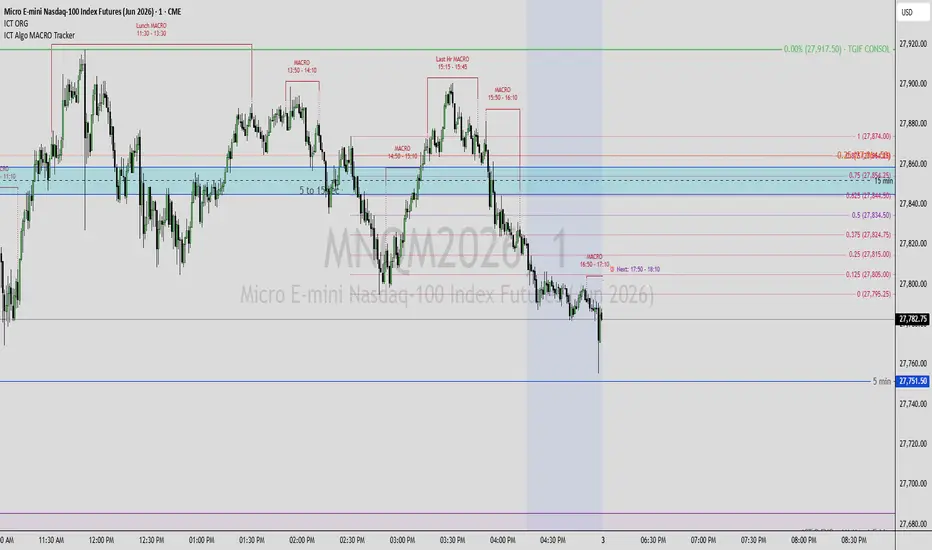
# ICT Algo MACRO Tracker by Leveragedincome
A fully customizable visual tracker for ICT-style algorithmic macro time windows on intraday charts. Marks every active macro with a labeled bracket on chart (or a colored box in a separate pane), and projects a forward-looking marker for the next upcoming macro so you can prepare ahead of each session.
---
## What is a "macro"?
ICT methodology identifies recurring intraday windows — typically 20 minutes long, around the :50–:10 of each hour — when algorithmic order flow is observably more active in liquid instruments such as ES, NQ, YM, RTY, gold, oil, and FX majors. Traders use these windows to time entries, exits, and confirmations rather than reacting at random points during the session.
This indicator highlights every macro window directly on your chart in **America/New_York** time, regardless of your chart's timezone, so all bracketed regions line up with the algorithm's clock.
---
## Key features
- **26 fully customizable macro slots.** Every macro has an independent enable toggle and editable Start/End hour and minute. Re-time them, disable the ones you don't trade, or repurpose them for any session-based template — equity open, FX London/NY overlap, news prints, or your own playbook.
- **Two display modes.**
- *On Chart*: bracket-style overlay drawn just above price, with a label and tooltip on each macro.
- *New Pane*: compact colored boxes in a separate pane below the chart, ideal for keeping price clean.
- **Macro projections** *(optional)*: extend each macro's vertical lines down to current price for a clear visual anchor against highs/lows formed inside the window.
- **Next Upcoming Macro marker.** A forward-projected line + label on the right edge of the chart shows which macro fires next and when. Color, line style (Solid / Dashed / Dotted), and vertical span (Above Price / Full Visible Range) are all configurable. The marker updates in real time as macros come and go.
- **Friday weekend handling.** On non-crypto symbols, New-Pane macro boxes that close on Friday extend across the weekend so they remain visible at Sunday open.
---
## Default macro set
Out of the box, the indicator covers the standard ICT macros plus a few extras:
**Hourly Macros** (default-on for the active US session, off for overnight)
- 02:50 – 03:10
- 03:50 – 04:10
- 04:50 – 05:10
- 09:50 – 10:10
- 10:50 – 11:10
- 11:50 – 12:10
- 12:50 – 13:10
- 13:50 – 14:10
- (additional disabled-by-default hourly slots covering every other hour of the day, ready to enable or re-time)
**Other Macros**
- 14:50 – 15:10 (NY PM open)
- **Last Hr MACRO** — 15:15 – 15:45
- 15:50 – 16:10 (NY close)
- **Lunch MACRO** — 11:30 – 13:30 (the broader NY lunch consolidation window)
Every time and label is editable in the settings — defaults are merely a starting point.
---
## How to use
1. Add the indicator to an intraday chart. Works on any timeframe; **1m to 15m** is the typical range for ICT macro analysis.
2. Open the indicator settings. For each macro, toggle it on/off and edit the Start/End hour and minute fields if you want to depart from the default.
3. Choose your preferred display mode under the Macro Color row: *On Chart* or *New Pane*. If you pick New Pane, drag the indicator into its own pane (TradingView does not do this automatically).
4. Optional add-ons:
- Enable **Macro Projections** to drop vertical guides from each macro down to price.
- Enable **Show Next Macro Marker** to see the next session previewed on the right edge of the chart, with a tooltip naming the upcoming macro and its time.
---
## Notes
- All times are evaluated in **America/New_York** time (handles DST automatically). Your chart's display timezone does not need to match.
- On lower timeframes the macro window aligns precisely with bar boundaries. On higher timeframes (e.g. 1H), the window snaps to the nearest enclosing bar and may appear wider than the literal HH:MM range.
- The on-chart label is anchored just above recent price highs and tracks intrabar highs throughout the macro for visibility.
---
## Credits
Based on the open-source **ICT Algorithmic Macro Tracker°** by © **toodegrees**, released under MPL-2.0.
This version adds:
- Fully editable Start/End times for every macro
- A dedicated **Lunch MACRO** slot (11:30 – 13:30) and **Last Hr MACRO** rename for the 15:15 macro
- Forward-looking **Next Upcoming Macro** marker
- Updated to **Pine Script v6** with stricter type safety and defensive rendering fixes
---
*This script is a chart-marking tool. It does not generate trade signals or execute orders. Use it alongside your own analysis and risk management.*
A fully customizable visual tracker for ICT-style algorithmic macro time windows on intraday charts. Marks every active macro with a labeled bracket on chart (or a colored box in a separate pane), and projects a forward-looking marker for the next upcoming macro so you can prepare ahead of each session.
---
## What is a "macro"?
ICT methodology identifies recurring intraday windows — typically 20 minutes long, around the :50–:10 of each hour — when algorithmic order flow is observably more active in liquid instruments such as ES, NQ, YM, RTY, gold, oil, and FX majors. Traders use these windows to time entries, exits, and confirmations rather than reacting at random points during the session.
This indicator highlights every macro window directly on your chart in **America/New_York** time, regardless of your chart's timezone, so all bracketed regions line up with the algorithm's clock.
---
## Key features
- **26 fully customizable macro slots.** Every macro has an independent enable toggle and editable Start/End hour and minute. Re-time them, disable the ones you don't trade, or repurpose them for any session-based template — equity open, FX London/NY overlap, news prints, or your own playbook.
- **Two display modes.**
- *On Chart*: bracket-style overlay drawn just above price, with a label and tooltip on each macro.
- *New Pane*: compact colored boxes in a separate pane below the chart, ideal for keeping price clean.
- **Macro projections** *(optional)*: extend each macro's vertical lines down to current price for a clear visual anchor against highs/lows formed inside the window.
- **Next Upcoming Macro marker.** A forward-projected line + label on the right edge of the chart shows which macro fires next and when. Color, line style (Solid / Dashed / Dotted), and vertical span (Above Price / Full Visible Range) are all configurable. The marker updates in real time as macros come and go.
- **Friday weekend handling.** On non-crypto symbols, New-Pane macro boxes that close on Friday extend across the weekend so they remain visible at Sunday open.
---
## Default macro set
Out of the box, the indicator covers the standard ICT macros plus a few extras:
**Hourly Macros** (default-on for the active US session, off for overnight)
- 02:50 – 03:10
- 03:50 – 04:10
- 04:50 – 05:10
- 09:50 – 10:10
- 10:50 – 11:10
- 11:50 – 12:10
- 12:50 – 13:10
- 13:50 – 14:10
- (additional disabled-by-default hourly slots covering every other hour of the day, ready to enable or re-time)
**Other Macros**
- 14:50 – 15:10 (NY PM open)
- **Last Hr MACRO** — 15:15 – 15:45
- 15:50 – 16:10 (NY close)
- **Lunch MACRO** — 11:30 – 13:30 (the broader NY lunch consolidation window)
Every time and label is editable in the settings — defaults are merely a starting point.
---
## How to use
1. Add the indicator to an intraday chart. Works on any timeframe; **1m to 15m** is the typical range for ICT macro analysis.
2. Open the indicator settings. For each macro, toggle it on/off and edit the Start/End hour and minute fields if you want to depart from the default.
3. Choose your preferred display mode under the Macro Color row: *On Chart* or *New Pane*. If you pick New Pane, drag the indicator into its own pane (TradingView does not do this automatically).
4. Optional add-ons:
- Enable **Macro Projections** to drop vertical guides from each macro down to price.
- Enable **Show Next Macro Marker** to see the next session previewed on the right edge of the chart, with a tooltip naming the upcoming macro and its time.
---
## Notes
- All times are evaluated in **America/New_York** time (handles DST automatically). Your chart's display timezone does not need to match.
- On lower timeframes the macro window aligns precisely with bar boundaries. On higher timeframes (e.g. 1H), the window snaps to the nearest enclosing bar and may appear wider than the literal HH:MM range.
- The on-chart label is anchored just above recent price highs and tracks intrabar highs throughout the macro for visibility.
---
## Credits
Based on the open-source **ICT Algorithmic Macro Tracker°** by © **toodegrees**, released under MPL-2.0.
This version adds:
- Fully editable Start/End times for every macro
- A dedicated **Lunch MACRO** slot (11:30 – 13:30) and **Last Hr MACRO** rename for the 15:15 macro
- Forward-looking **Next Upcoming Macro** marker
- Updated to **Pine Script v6** with stricter type safety and defensive rendering fixes
---
*This script is a chart-marking tool. It does not generate trade signals or execute orders. Use it alongside your own analysis and risk management.*
開源腳本
秉持TradingView一貫精神,這個腳本的創作者將其設為開源,以便交易者檢視並驗證其功能。向作者致敬!您可以免費使用此腳本,但請注意,重新發佈代碼需遵守我們的社群規範。

免責聲明
這些資訊和出版物並非旨在提供,也不構成TradingView提供或認可的任何形式的財務、投資、交易或其他類型的建議或推薦。請閱讀使用條款以了解更多資訊。
開源腳本
秉持TradingView一貫精神,這個腳本的創作者將其設為開源,以便交易者檢視並驗證其功能。向作者致敬!您可以免費使用此腳本,但請注意,重新發佈代碼需遵守我們的社群規範。
免責聲明
這些資訊和出版物並非旨在提供,也不構成TradingView提供或認可的任何形式的財務、投資、交易或其他類型的建議或推薦。請閱讀使用條款以了解更多資訊。