已更新
tncylyv - Improved Delta Volume Bubble
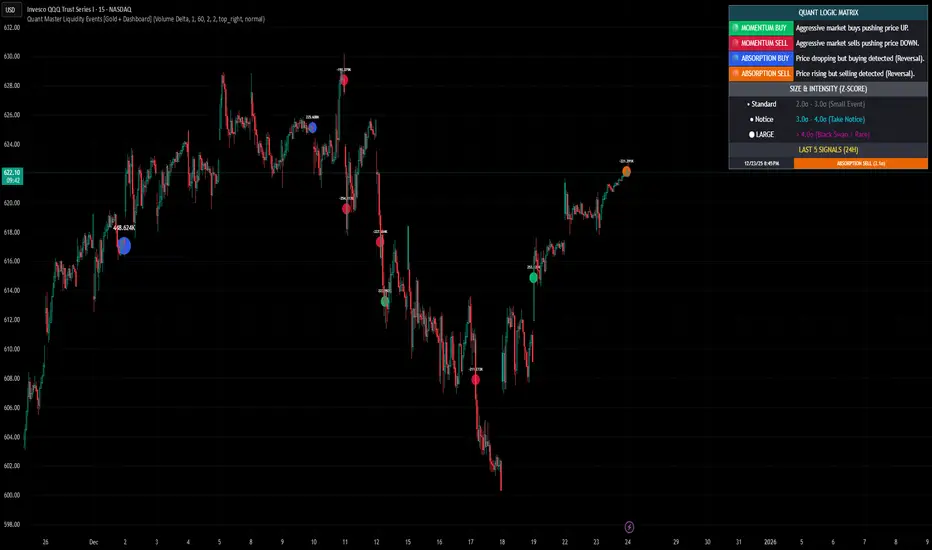
This script is a specialized modification and structural upgrade of the excellent "Delta Volume Bubble [Quant Z-Score]" by tncylyv.
While the original tool provided a fantastic foundation for statistical volume analysis, this "Zero Float" Edition was built to solve specific visual challenges faced by active traders—specifically the issue of indicators "floating" or disconnecting from price when zooming in on lower timeframes.
The Straight Improvements
This version turns a "Signal Indicator" into a complete "Trading System" with five specific upgrades:
1. Visual Stability (The "Zero Float" Fix)
Original: Used complex coordinates that could desynchronize, causing bubbles to drift or float away from candles on fast charts (1m/5m).
My Upgrade: Implemented "Magnetic Anchoring." Labels and bubbles are now physically locked to the candle wicks. They never drift, overlap, or float, no matter how much you zoom or resize the chart.
2. Cognitive Load (The HUD)
Original: Displayed raw numbers inside colored circles, requiring you to memorize color codes.
My Upgrade: Replaced numbers with Semantic Text Labels (e.g., "ABSORB", "SQUEEZE", "MOMENTUM"). You can read the market intent instantly without decoding it.
3. Regime Adaptation (AI Engine)
Original: Used a fixed threshold (e.g., Z-Score > 2.0).
My Upgrade: Added an Adaptive Learning Window. The script scans recent volatility to automatically raise the threshold during choppy markets (filtering noise) and lower it during quiet sessions (catching subtle entries).
4. Market Memory (Smart Structure)
Original: Signals disappeared into history.
My Upgrade: Draws Support/Resistance Rails extending from major volume events. This helps you visualize exactly where institutions are defending their positions.
5. Robust Data Handling
My Upgrade: Added a Hybrid Fallback Engine. If granular 1-minute data isn't available (e.g., on historical charts), the script seamlessly switches to an estimation model so the indicator never "breaks" or disappears.
Core Logic
Z-Score Normalization: We don't look at raw volume; we look at statistical anomalies (Standard Deviations).
Absorption: Detects "Effort vs. Result"—high volume with tiny price movement (Trapped Traders).
Squeeze: Highlights areas where a breakout is imminent due to volatility compression.
Credits
Original Concept & Code: tncylyv (Delta Volume Bubble [Quant Z-Score]). This script would not exist without his brilliant groundwork.
Modifications: Visual Anchoring, HUD Text System, AI Thresholding, and Structure Rails added in this edition.
This script is open-source to keep the spirit of the original author alive. Use it to understand the "Why" behind the move.
While the original tool provided a fantastic foundation for statistical volume analysis, this "Zero Float" Edition was built to solve specific visual challenges faced by active traders—specifically the issue of indicators "floating" or disconnecting from price when zooming in on lower timeframes.
The Straight Improvements
This version turns a "Signal Indicator" into a complete "Trading System" with five specific upgrades:
1. Visual Stability (The "Zero Float" Fix)
Original: Used complex coordinates that could desynchronize, causing bubbles to drift or float away from candles on fast charts (1m/5m).
My Upgrade: Implemented "Magnetic Anchoring." Labels and bubbles are now physically locked to the candle wicks. They never drift, overlap, or float, no matter how much you zoom or resize the chart.
2. Cognitive Load (The HUD)
Original: Displayed raw numbers inside colored circles, requiring you to memorize color codes.
My Upgrade: Replaced numbers with Semantic Text Labels (e.g., "ABSORB", "SQUEEZE", "MOMENTUM"). You can read the market intent instantly without decoding it.
3. Regime Adaptation (AI Engine)
Original: Used a fixed threshold (e.g., Z-Score > 2.0).
My Upgrade: Added an Adaptive Learning Window. The script scans recent volatility to automatically raise the threshold during choppy markets (filtering noise) and lower it during quiet sessions (catching subtle entries).
4. Market Memory (Smart Structure)
Original: Signals disappeared into history.
My Upgrade: Draws Support/Resistance Rails extending from major volume events. This helps you visualize exactly where institutions are defending their positions.
5. Robust Data Handling
My Upgrade: Added a Hybrid Fallback Engine. If granular 1-minute data isn't available (e.g., on historical charts), the script seamlessly switches to an estimation model so the indicator never "breaks" or disappears.
Core Logic
Z-Score Normalization: We don't look at raw volume; we look at statistical anomalies (Standard Deviations).
Absorption: Detects "Effort vs. Result"—high volume with tiny price movement (Trapped Traders).
Squeeze: Highlights areas where a breakout is imminent due to volatility compression.
Credits
Original Concept & Code: tncylyv (Delta Volume Bubble [Quant Z-Score]). This script would not exist without his brilliant groundwork.
Modifications: Visual Anchoring, HUD Text System, AI Thresholding, and Structure Rails added in this edition.
This script is open-source to keep the spirit of the original author alive. Use it to understand the "Why" behind the move.
發行說明
The Quant Master Liquidity Events engine is a forensic volume analysis tool designed to uncover hidden institutional activity. Unlike standard volume indicators that simply show "how much" was traded, this engine uses Statistical Z-Score Analysis to determine "how rare" a liquidity injection is relative to recent history.By combining Intrabar Volume Delta (Aggressor Data) with Price Action, the indicator categorizes every significant volume spike into two distinct institutional behaviors: Aggression (Momentum) or Absorption (Reversals).
1. The Logic: Why Z-Scores?
Markets are noisy. A "high volume" bar during the market open is normal, but that same volume during a lunch hour is an anomaly. This script normalizes data using Standard Deviations (Sigma - σ).
2.0σ (Standard): A statistically significant event (Top 5% of activity).
3.0σ (Take Notice): A major liquidity injection.
4.0σ+ (Black Swan): Rare, massive events that often mark trend initiations or climactic tops/bottoms.
2. Visual Guide & Dashboard
The on-screen Quant Dashboard provides a real-time legend and a "Tape Reader" showing the last 5 detected whales.
A. Momentum Events (Aggression)
These occur when aggressive market orders overwhelm the order book, pushing price rapidly in one direction.
🟢 Green Bubble (Momentum Buy): Aggressive buying + Price moving UP. The bulls are chasing price.
🔴 Red Bubble (Momentum Sell): Aggressive selling + Price moving DOWN. Panic selling or initiated shorts.
Bias: Trend Continuation / Breakout.
B. Absorption Events (Icebergs)
These identify "Hidden Walls" in the market—where Smart Money is passively absorbing orders to reverse the trend.
🔵 Blue Bubble (Absorption Buy): Price is dropping, but Volume Delta is POSITIVE.
Translation: Sellers are hitting a massive "Limit Buy Wall" (Iceberg). Expect a bounce.
🟠 Orange Bubble (Absorption Sell): Price is rising, but Volume Delta is NEGATIVE.
Translation: Buyers are hitting a "Limit Sell Wall." Expect a rejection.
Bias: Reversal / Bottoming or Topping.
3. Key Features
📊 Dynamic Size & Intensity The bubbles automatically scale based on the rarity of the event:
Small Bubble: ~2.0σ (Routine institutional maintenance).
Large Bubble: >3.0σ (Significant intervention).
👻 Liquidity Memory (Ghost Lines) Market makers often defend the levels where they deployed capital.
When a Significant Event occurs, the script draws a dotted "Ghost Line" extending forward.
Strategy: Use these lines as high-probability Support/Resistance levels. If price re-tests a "Ghost Line" from a major buying event, look for a reaction.
🎛️ Hybrid Data Engine
Volume Delta Mode (Default): Uses intrabar precision (lower timeframes) to calculate true Buy vs. Sell pressure.
Total Volume Mode: Can be switched in settings for classic liquidity spike detection on assets without tick data.
How to Use
Trend Trading: Look for Green/Red Momentum bubbles breaking out of consolidation.
Reversal Trading: Look for Blue/Orange Absorption bubbles at key Support/Resistance levels. A Blue bubble at a double bottom is a high-conviction long signal.
Risk Management: Use the Ghost Lines as invalidation points (Stop Loss levels).
Settings Configuration:
Lookback: Default 60. Adjusts how far back the Z-Score looks.
Threshold: Default 2.0σ. Increase to 3.0σ to see only the absolute largest whales.
Dashboard: Fully customizable size and position to fit your screen.

免責聲明
這些資訊和出版物並非旨在提供,也不構成TradingView提供或認可的任何形式的財務、投資、交易或其他類型的建議或推薦。請閱讀使用條款以了解更多資訊。
免責聲明
這些資訊和出版物並非旨在提供,也不構成TradingView提供或認可的任何形式的財務、投資、交易或其他類型的建議或推薦。請閱讀使用條款以了解更多資訊。