OPEN-SOURCE SCRIPT
Position Sizer
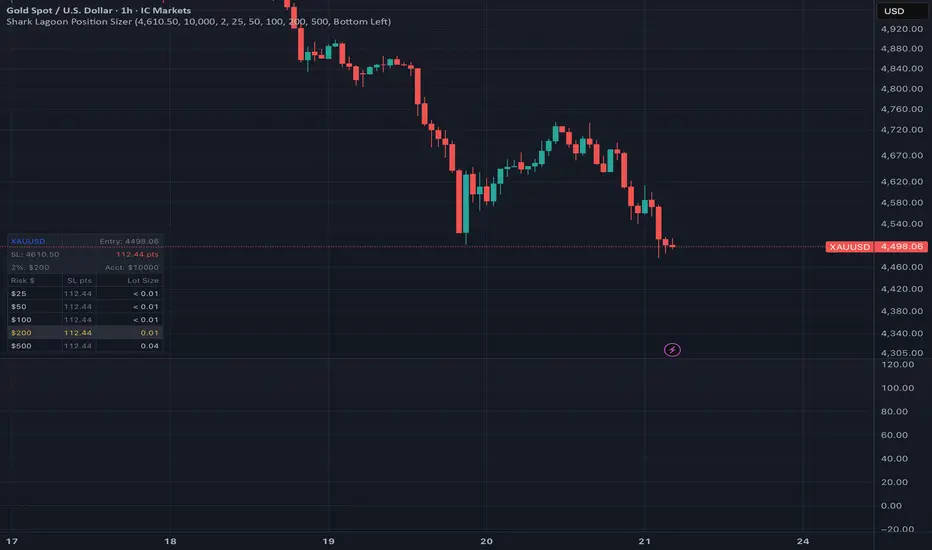
Position Sizer is a lightweight on-chart helper that calculates the correct lot size for your trade — instantly, across
any instrument.
Set your stop-loss level by dragging the red line to your intended SL price. The table updates in real time, showing you
the exact lot size for each of your configured risk amounts.
---
How It Works
The lot size formula is fully instrument-agnostic — it uses TradingView's built-in syminfo.pointvalue and syminfo.mintick
to automatically handle the different pip/point values across Forex pairs, Gold, Oil, indices, and more. No manual pip
value lookup needed.
Lot Size = Risk Amount / (SL Distance in Ticks × Point Value per Tick)
---
How To Use
1. Add the indicator to any chart
2. Open Settings → Stop Loss and type your SL price, or drag the red line directly on the chart to your stop level
3. Read off the lot size for your chosen risk amount from the table
---
Table Layout
The table shows an info header and 5 data rows:
- Info header — instrument, current entry price, SL level, SL distance, account size, and your risk threshold dollar
amount
- Data rows — Risk ($) · SL pts · Lot Size
- The row closest to your Risk Per Trade % threshold is highlighted in gold as a reminder of your max risk
---
Settings
- SL Price — drag the line on the chart or type a price directly
- Account Size ($) — your total account value
- Risk Per Trade (%) — your risk threshold (default 2%). The closest row is highlighted in gold
- Risk Rows 1–5 ($) — five configurable dollar risk amounts (default: $25 / $50 / $100 / $200 / $500)
- Table Position — Top Left / Top Right / Bottom Left / Bottom Right
---
Edge Cases
- No SL set → shows Set SL
- SL within 2 ticks of entry → shows SL too close
- Unsupported symbol → shows N/A symbol
- Valid position too small to display → shows < 0.01
- Works for both long and short setups
---
Tested on: EURUSD · XAUUSD · XTIUSD · USDJPY
---
This tool assists with position sizing calculations. It does not constitute financial advice. Always verify lot sizes with your broker before placing orders.
any instrument.
Set your stop-loss level by dragging the red line to your intended SL price. The table updates in real time, showing you
the exact lot size for each of your configured risk amounts.
---
How It Works
The lot size formula is fully instrument-agnostic — it uses TradingView's built-in syminfo.pointvalue and syminfo.mintick
to automatically handle the different pip/point values across Forex pairs, Gold, Oil, indices, and more. No manual pip
value lookup needed.
Lot Size = Risk Amount / (SL Distance in Ticks × Point Value per Tick)
---
How To Use
1. Add the indicator to any chart
2. Open Settings → Stop Loss and type your SL price, or drag the red line directly on the chart to your stop level
3. Read off the lot size for your chosen risk amount from the table
---
Table Layout
The table shows an info header and 5 data rows:
- Info header — instrument, current entry price, SL level, SL distance, account size, and your risk threshold dollar
amount
- Data rows — Risk ($) · SL pts · Lot Size
- The row closest to your Risk Per Trade % threshold is highlighted in gold as a reminder of your max risk
---
Settings
- SL Price — drag the line on the chart or type a price directly
- Account Size ($) — your total account value
- Risk Per Trade (%) — your risk threshold (default 2%). The closest row is highlighted in gold
- Risk Rows 1–5 ($) — five configurable dollar risk amounts (default: $25 / $50 / $100 / $200 / $500)
- Table Position — Top Left / Top Right / Bottom Left / Bottom Right
---
Edge Cases
- No SL set → shows Set SL
- SL within 2 ticks of entry → shows SL too close
- Unsupported symbol → shows N/A symbol
- Valid position too small to display → shows < 0.01
- Works for both long and short setups
---
Tested on: EURUSD · XAUUSD · XTIUSD · USDJPY
---
This tool assists with position sizing calculations. It does not constitute financial advice. Always verify lot sizes with your broker before placing orders.
開源腳本
秉持TradingView一貫精神,這個腳本的創作者將其設為開源,以便交易者檢視並驗證其功能。向作者致敬!您可以免費使用此腳本,但請注意,重新發佈代碼需遵守我們的社群規範。

免責聲明
這些資訊和出版物並非旨在提供,也不構成TradingView提供或認可的任何形式的財務、投資、交易或其他類型的建議或推薦。請閱讀使用條款以了解更多資訊。
免責聲明
這些資訊和出版物並非旨在提供,也不構成TradingView提供或認可的任何形式的財務、投資、交易或其他類型的建議或推薦。請閱讀使用條款以了解更多資訊。