Day Cheese - Trading Sessions
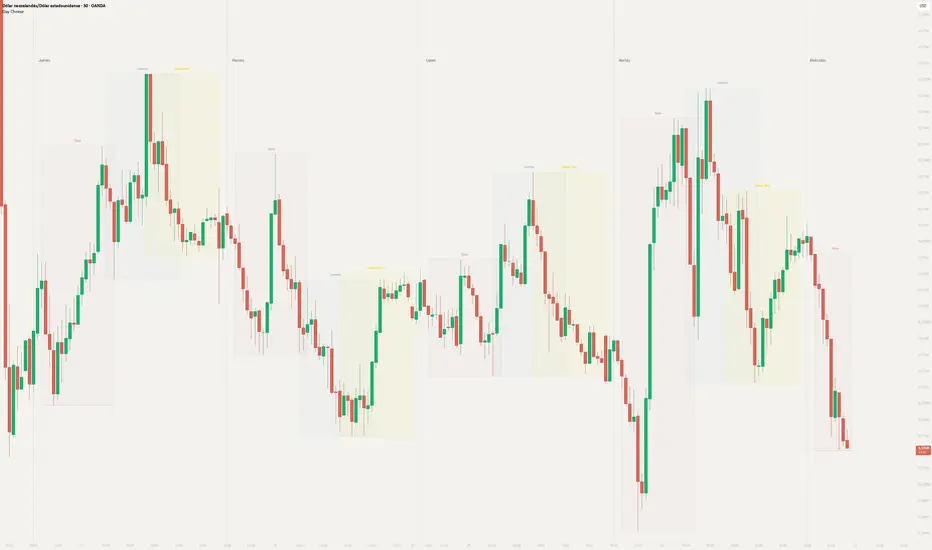
Day Cheese is an intraday session visualization indicator developed by The Cheese Trading as a modified and expanded version of LuxAlgo’s open-source “Sessions [LuxAlgo]” script. We sincerely thank LuxAlgo and give full credit for the original work that serves as the foundation for this indicator.
The modified version adds independently configurable sessions, session VWAP and average-close displays, historical level rays, estimated volume profiles, color palettes, and additional display controls.
Day Cheese is shared publicly with open-source code as a contribution to the wider trading community.
Sessions and controls
Calculation and limitations
English translations for the Spanish interface
The modified version adds independently configurable sessions, session VWAP and average-close displays, historical level rays, estimated volume profiles, color palettes, and additional display controls.
Day Cheese is shared publicly with open-source code as a contribution to the wider trading community.
Sessions and controls
- Configure New York, London, Tokyo, Sydney, and one custom session independently. Sydney and the custom session are disabled by default.
- All session hours use the America/New_York time zone. Set the chart clock to New York so session hours, day dividers, and weekday names align with the indicator.
- Choose a Cheese palette or select “Customize Here” to set session colors individually. Available palettes include Cheese Very Soft, Cheese Soft, Cheese Vivid, Cheese Contrast, Cheese Dark, Cheese Warm, Cheese Cool, and Cheese Colorblind.
- Set visible history from 1 to 14 days. Ray history can be set from 1 to 14 days when at least one session’s Rays option is enabled. Profile history can be set from 1 to 4 days when a session’s Volume Profile option is enabled.
- Set each volume profile to 12–20 rows and a width of 10%–60%.
- Configure day dividers, the day-start time, and weekday names separately from the session settings.
Calculation and limitations
A session’s range is based on its highest and lowest prices. Average Close is the arithmetic mean of the session’s bar closing prices. VWAP uses the available bar prices and volume. Rays extend selected session levels into later bars according to the ray-history setting.
The volume profile is an estimate calculated from chart bars. It distributes each bar’s volume across its price range; it does not use individual trades, bid/ask volume, or order-book data. Results depend on the symbol’s volume feed and the chart data available to the script.
Use Day Cheese on intraday, time-based charts. Session boundaries should align with chart bars. A bar that crosses a configured boundary may prevent the indicator from drawing that boundary precisely.
English translations for the Spanish interface
- “Paleta de colores” = Color Palette; “Personaliza aquí” = Customize Here; “Historial visible” = Visible History.
- “Nueva York” = New York; “Londres” = London; “Tokio” = Tokyo; “Sídney” = Sydney; “Sesión personalizada” = Custom Session.
- “Mostrar sesión” = Show Session; “Nombre” = Name; “Horario” = Session Hours; “Rango” = Range; “Contorno” = Outline; “Nombre visible” = Show Label.
- “Media” = Average Close; “VWAP” = VWAP; “Máx./Mín.” = High/Low; “Rayos” = Rays; “Perfil de volumen” = Volume Profile.
- “Filas” = Rows; “Ancho %” = Width %; “Días visibles” = Visible Days; “Historial de rayos” = Ray History; “Días de perfiles” = Profile Days.
- “Días y separadores” = Days and Dividers; “Separadores” = Dividers; “Inicio del día” = Day Start; “Nombres de días” = Day Names.
- “Arriba” = Above; “Abajo” = Below; “Muy pequeño” = Very Small; “Pequeño” = Small; “Normal” = Normal; “Grande” = Large; “Muy grande” = Very Large.
- “Continua” = Solid; “Discontinua” = Dashed; “Punteada” = Dotted.
- “Cheese muy suave” = Cheese Very Soft; “Cheese suave” = Cheese Soft; “Cheese vivo” = Cheese Vivid; “Cheese contraste” = Cheese Contrast; “Cheese oscuro” = Cheese Dark; “Cheese cálido” = Cheese Warm; “Cheese frío” = Cheese Cool; “Cheese daltónico” = Cheese Colorblind.
- “Lunes” = Monday; “Martes” = Tuesday; “Miércoles” = Wednesday; “Jueves” = Thursday; “Viernes” = Friday; “Sábado” = Saturday; “Domingo” = Sunday.

免責聲明
這些資訊和出版物並非旨在提供,也不構成TradingView提供或認可的任何形式的財務、投資、交易或其他類型的建議或推薦。請閱讀使用條款以了解更多資訊。
免責聲明
這些資訊和出版物並非旨在提供,也不構成TradingView提供或認可的任何形式的財務、投資、交易或其他類型的建議或推薦。請閱讀使用條款以了解更多資訊。