已更新
Candle Bracket - Mark Any HTF Candle's Range at a Specific Time
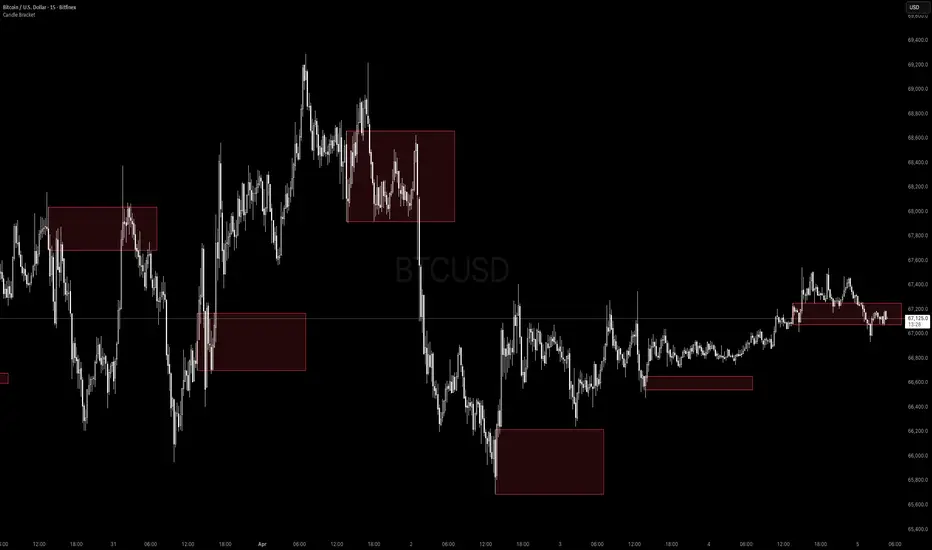
What It Does
Candle Bracket draws a visual range box using the High and Low of any higher timeframe candle at a user-defined time of day. Set it to the 9:30 AM 15-minute candle and you get the Opening Range. Set it to the London open, the New York open, or any key session candle — the indicator marks it automatically, every day.
Use Cases
- Opening Range Breakout (ORB) - Mark the 9:30 or 9:45 AM candle as your initial range
- Session Opens - London (3:00 AM ET), New York (9:30 AM ET), Asia (8:00 PM ET)
- News Candles - Mark a recurring economic release time (e.g. 8:30 AM CPI/NFP candle)
- Custom Reference Ranges - Any time-based candle you want as a daily anchor
Settings
- Fixed Timeframe - The HTF candle to pull from (e.g. 15, 30, 60, D)
- Target Hour / Minute - The exact time of the candle you want to mark
- Timezone - Defaults to America/New_York. Adjustable for any global session
- Rectangle Width (Bars) - How far the box extends to the right
- Box Color + Opacity Full visual customization
How to Use It
1. Set the timeframe to match your candle of interest (e.g. '15' for a 15-minute candle)
2. Set the target time to the candle's open time (e.g. '9:30' for the NY open candle)
3. The box draws automatically on every matching candle going back in history
4. Use the High and Low of the box as your key levels breakout, rejection, or retest
Notes
- Works on any asset and any chart timeframe
- Keeps the last 20 boxes by default to manage memory efficiently
- Best used on intraday charts (1m, 5m, 15m) when targeting session-level candles
Candle Bracket draws a visual range box using the High and Low of any higher timeframe candle at a user-defined time of day. Set it to the 9:30 AM 15-minute candle and you get the Opening Range. Set it to the London open, the New York open, or any key session candle — the indicator marks it automatically, every day.
Use Cases
- Opening Range Breakout (ORB) - Mark the 9:30 or 9:45 AM candle as your initial range
- Session Opens - London (3:00 AM ET), New York (9:30 AM ET), Asia (8:00 PM ET)
- News Candles - Mark a recurring economic release time (e.g. 8:30 AM CPI/NFP candle)
- Custom Reference Ranges - Any time-based candle you want as a daily anchor
Settings
- Fixed Timeframe - The HTF candle to pull from (e.g. 15, 30, 60, D)
- Target Hour / Minute - The exact time of the candle you want to mark
- Timezone - Defaults to America/New_York. Adjustable for any global session
- Rectangle Width (Bars) - How far the box extends to the right
- Box Color + Opacity Full visual customization
How to Use It
1. Set the timeframe to match your candle of interest (e.g. '15' for a 15-minute candle)
2. Set the target time to the candle's open time (e.g. '9:30' for the NY open candle)
3. The box draws automatically on every matching candle going back in history
4. Use the High and Low of the box as your key levels breakout, rejection, or retest
Notes
- Works on any asset and any chart timeframe
- Keeps the last 20 boxes by default to manage memory efficiently
- Best used on intraday charts (1m, 5m, 15m) when targeting session-level candles
發行說明
What It DoesCandle Bracket draws a visual range box using the High and Low of any higher timeframe candle at a user-defined time of day. Set it to the 9:30 AM 15-minute candle and you get the Opening Range. Set it to the London open, the New York open, or any key session candle — the indicator marks it automatically, every day.
Use Cases
- Opening Range Breakout (ORB) - Mark the 9:30 or 9:45 AM candle as your initial range
- Session Opens - London (3:00 AM ET), New York (9:30 AM ET), Asia (8:00 PM ET)
- News Candles - Mark a recurring economic release time (e.g. 8:30 AM CPI/NFP candle)
- Custom Reference Ranges - Any time-based candle you want as a daily anchor
Settings
- Fixed Timeframe - The HTF candle to pull from (e.g. 15, 30, 60, D)
- Target Hour / Minute - The exact time of the candle you want to mark
- Timezone - Defaults to America/New_York. Adjustable for any global session
- Rectangle Width (Bars) - How far the box extends to the right
- Box Color + Opacity Full visual customization
How to Use It
1. Set the timeframe to match your candle of interest (e.g. '15' for a 15-minute candle)
2. Set the target time to the candle's open time (e.g. '9:30' for the NY open candle)
3. The box draws automatically on every matching candle going back in history
4. Use the High and Low of the box as your key levels breakout, rejection, or retest
Notes
- Works on any asset and any chart timeframe
- Keeps the last 20 boxes by default to manage memory efficiently
- Best used on intraday charts (1m, 5m, 15m) when targeting session-level candles

免責聲明
這些資訊和出版物並非旨在提供,也不構成TradingView提供或認可的任何形式的財務、投資、交易或其他類型的建議或推薦。請閱讀使用條款以了解更多資訊。
免責聲明
這些資訊和出版物並非旨在提供,也不構成TradingView提供或認可的任何形式的財務、投資、交易或其他類型的建議或推薦。請閱讀使用條款以了解更多資訊。