Season Timed Range Breakout (STRB) by Olympus Cipher
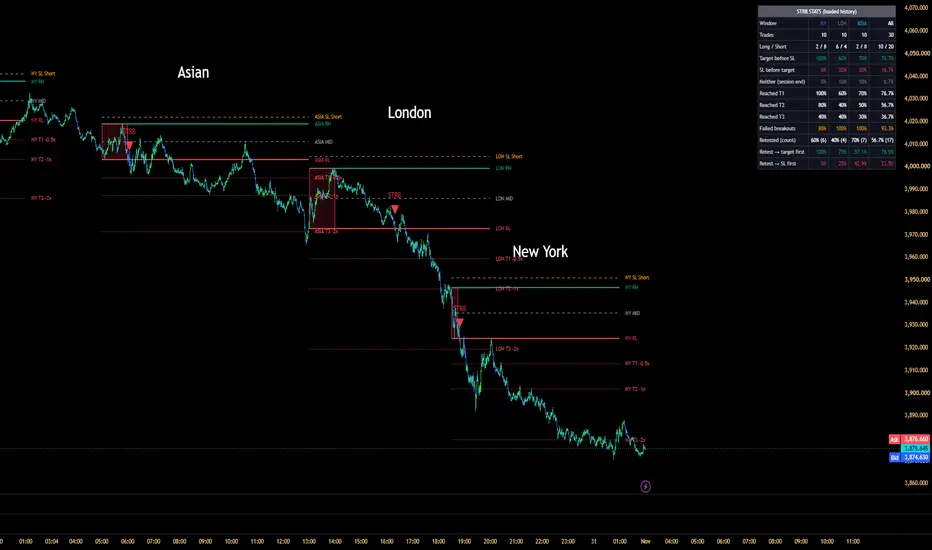
STRB builds a price range inside a time window you define (for example, the first 15 minutes of the New York open), projects levels from it, watches for breakouts, and then measures how those breakouts actually behaved on your chart. It is a range-breakout tool and a small statistics tool in one: the chart shows today's setup, and the table shows how the same setup has played out in the history loaded on your chart.
The range is the highest high and lowest low of the candles inside your range window. You enter the window as a session string, for example 0930-0945 (the end is exclusive), or you can use the first N candles of the trading session instead. A candle belongs to the range if its open time falls inside the window, so choose a chart timeframe that lines up with the window start. Windows that cross midnight are supported. When the window ends.
Here is an example of a single window:
It also draws up to three targets on each side as multiples of the range size, plus a stop-loss reference for longs and shorts. The stop is either a multiple of the range or a percentage of the entry level. Levels can run to the end of the trading session, stop at the breakout candle, or not extend at all.
MULTI-WINDOW MODE
With Multi-Window Mode on, up to three independent windows run at once (the defaults are New York, London and Asia). Each window has its own range, trading session, levels, signals, tracked breakout, and statistics, and the table adds an "All" column that combines them.
An example of MULTI WINDOW MODE is in the main picture(Default version)
BREAKOUTS, FAILURES AND RETESTS:
A breakout is evaluated on closed candles only, so signals never repaint. You choose whether the candle close or the wick must clear the range, and you can add a buffer in ticks.
Signals can be limited to the first breakout of a session or allowed once per side. When a breakout happens, the box is tinted, and the targets and stop of the opposite side are removed from the chart, so only the relevant side stays.
A failure is marked with an X when a later candle closes back beyond the entry level. A retest is marked with a diamond when a candle touches the broken level and closes back on the breakout side. Only the first retest after a breakout is marked, and no retest is counted after a failure. ( However, to have all of these function, you have to enable them in the settings)
OPTIONAL FILTERS:
The size of the range can be compared with the previous completed daily ATR, so that only ranges that are neither Narrow nor Wide (thresholds you set) are traded. A relative-volume filter requires the breakout candle's volume to exceed a multiple of its recent average, and a VWAP filter requires longs to close above VWAP and shorts below it. A breakout that fails a filter is ignored and does not use up the session's signal. All filters are off by default, so you can first see every breakout and then switch filters on one at a time.
HOW TO USE IT:
1. Add it to an intraday chart.
2. Set the timezone, then type your range window and trading session for the market you trade.
3. Adjust the target and stop settings.
4. Read the table to see how breakouts have behaved with your current settings.
5. Change one setting at a time (a filter, the stop, the window) and watch how the table changes.
6. For alerts, choose one of the STRB alert conditions and set it to "Once Per Bar Close".
LIMITATIONS:
- Works on intraday timeframes only.
- The statistics only cover the history loaded on your chart, which depends on your TradingView plan.
- They track only the first breakout of each session, assume entry at the range level, and ignore commissions, slippage, and position sizing.
- Targets and stop lines are visual references, not trade recommendations.
- The default windows assume New York time. Change the timezone and windows to match your market.
DISCLAIMER:
For educational and informational purposes only. This is not financial advice. Trading involves risk, and past performance does not guarantee future results.
Open-source under the Mozilla Public License 2.0. Feel free to use it in your trading.

免責聲明
這些資訊和出版物並非旨在提供,也不構成TradingView提供或認可的任何形式的財務、投資、交易或其他類型的建議或推薦。請閱讀使用條款以了解更多資訊。
免責聲明
這些資訊和出版物並非旨在提供,也不構成TradingView提供或認可的任何形式的財務、投資、交易或其他類型的建議或推薦。請閱讀使用條款以了解更多資訊。