OPEN-SOURCE SCRIPT
Cowboy's Recursion Squares (CRS)
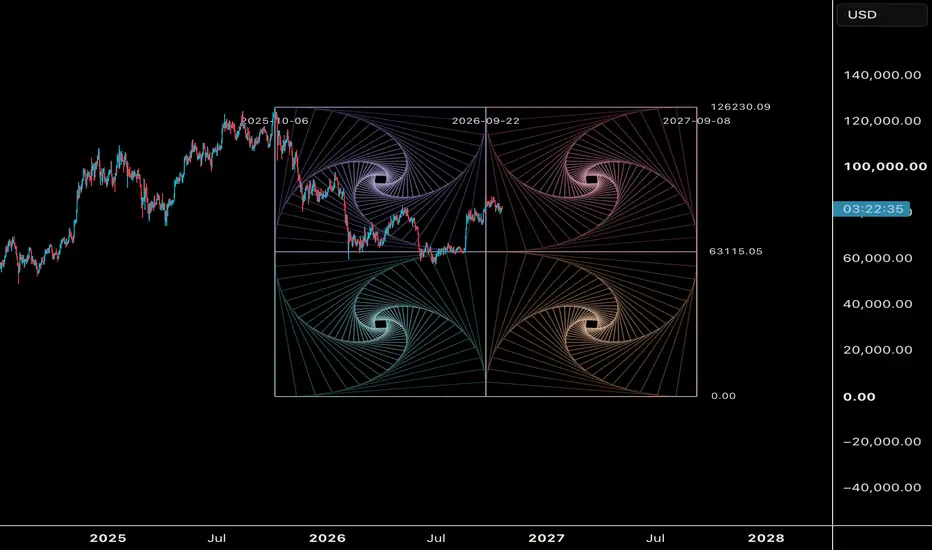
COWBOY RECURSION SQUARES
Straight lines + rotation + recursion = curves that aren't there.
THE CONCEPT
Start with one square. Move each corner 10% of the way toward the next corner, then connect the four new points. You get a smaller square, slightly rotated. Repeat this many times and spirals appear, even though every line on the chart is perfectly straight.
Each step uses the same rule:
A(n+1) = (1 − λ)·A(n) + λ·B(n)
With λ = 0.10, every new square turns about 6.34° and shrinks to about 90.55% of the one before it. The four quadrants are mirror images of each other, so their spirals turn in opposite directions and meet along the center line.
HOW TO USE
1. Add the indicator to your chart.
2. Click two points: the bottom-left corner (time and price), then the top-right corner.
3. The master square is drawn between those two points, the same way you'd anchor a Gann Box. You can extend it into the future to project time.
4. To move it later, open Settings and edit the anchor times and prices.
CUSTOMIZE
• Layout: a 2x2 mirrored grid, or a single square
• λ (step size): smaller values make tighter, slower spirals; larger values make faster rotation
• Depth: how many nested squares each quadrant draws
• Mirror quadrants: turn on or off
• Reverse spin: flip the rotation direction
• Colors: a separate color for each quadrant, or one color for everything (Mono)
• Outer fade and core glow: lines brighten toward the center of each spiral
• Overlays: frame, 50% price/time cross, diagonals, the highlighted corner spiral, and price/date labels
NOTES
• The geometry is drawn inside your box, so it stretches with whatever price and time range you set.
• Price and time scale differently, so the squares can look like rectangles on some charts. Adjust the chart's scale for a true square.
• This is a geometry and visualization tool, not a buy or sell signal. Use it together with your own analysis of structure, levels and timing.
YEEHAW
Straight lines + rotation + recursion = curves that aren't there.
THE CONCEPT
Start with one square. Move each corner 10% of the way toward the next corner, then connect the four new points. You get a smaller square, slightly rotated. Repeat this many times and spirals appear, even though every line on the chart is perfectly straight.
Each step uses the same rule:
A(n+1) = (1 − λ)·A(n) + λ·B(n)
With λ = 0.10, every new square turns about 6.34° and shrinks to about 90.55% of the one before it. The four quadrants are mirror images of each other, so their spirals turn in opposite directions and meet along the center line.
HOW TO USE
1. Add the indicator to your chart.
2. Click two points: the bottom-left corner (time and price), then the top-right corner.
3. The master square is drawn between those two points, the same way you'd anchor a Gann Box. You can extend it into the future to project time.
4. To move it later, open Settings and edit the anchor times and prices.
CUSTOMIZE
• Layout: a 2x2 mirrored grid, or a single square
• λ (step size): smaller values make tighter, slower spirals; larger values make faster rotation
• Depth: how many nested squares each quadrant draws
• Mirror quadrants: turn on or off
• Reverse spin: flip the rotation direction
• Colors: a separate color for each quadrant, or one color for everything (Mono)
• Outer fade and core glow: lines brighten toward the center of each spiral
• Overlays: frame, 50% price/time cross, diagonals, the highlighted corner spiral, and price/date labels
NOTES
• The geometry is drawn inside your box, so it stretches with whatever price and time range you set.
• Price and time scale differently, so the squares can look like rectangles on some charts. Adjust the chart's scale for a true square.
• This is a geometry and visualization tool, not a buy or sell signal. Use it together with your own analysis of structure, levels and timing.
YEEHAW
開源腳本
秉持TradingView一貫精神,這個腳本的創作者將其設為開源,以便交易者檢視並驗證其功能。向作者致敬!您可以免費使用此腳本,但請注意,重新發佈代碼需遵守我們的社群規範。

免責聲明
這些資訊和出版物並非旨在提供,也不構成TradingView提供或認可的任何形式的財務、投資、交易或其他類型的建議或推薦。請閱讀使用條款以了解更多資訊。
開源腳本
秉持TradingView一貫精神,這個腳本的創作者將其設為開源,以便交易者檢視並驗證其功能。向作者致敬!您可以免費使用此腳本,但請注意,重新發佈代碼需遵守我們的社群規範。
免責聲明
這些資訊和出版物並非旨在提供,也不構成TradingView提供或認可的任何形式的財務、投資、交易或其他類型的建議或推薦。請閱讀使用條款以了解更多資訊。