1 Minute Scalping Indicator
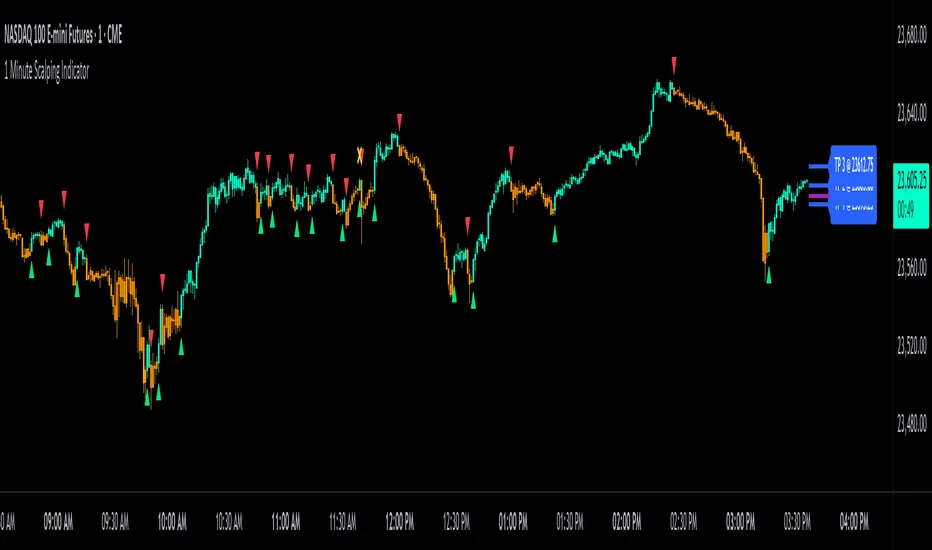
This 1 Minute Scalping Indicator gives buy and sell signals using pure price action, comparing the current candle against the candles before it, so there is no lag from other indicators built into the signals. It is made for getting in and out of trades quickly on the 1 minute chart, and since it only needs price data, it works on every market and every timeframe, even symbols with no volume data at all.
Developed by Trend Friend, this indicator runs every candle through a library of custom price action formulas and prints a green arrow when it detects bullish price action or a red arrow when it detects bearish price action. The candles also paint by signal direction, which is a great way to help reduce anxiety while watching the candles bounce back and forth during a trade. On top of the signals you get:

-------------------------------------------------------------------
How the Signals Are Calculated
Every candle is checked against a library of custom price action setups. Each setup evaluates a mix of the following:
The average sizes come from rolling calculations over recent candles that automatically adjust to current conditions, so the same settings work across quiet and volatile tickers. A buy arrow prints when a candle matches one of the bullish setups and a sell arrow prints when a candle matches one of the bearish setups. Rejection checks block signals on weak candles, like candles with small bodies, when Average Candle Size Rejection is turned on (it is on by default). You can turn it off if you want signals to come in no matter how small the candle is, but keeping it on filters out many of the false signals that small candles create.
Signals also alternate one at a time. After a buy signal, the next signal can only be a sell, and after a sell, the next can only be a buy, which keeps the chart clean and makes each arrow a clear turning point. The exact formulas, thresholds and lookback lengths behind the setups are proprietary and are what make this script worth protecting, but the categories above are what those formulas measure.
-------------------------------------------------------------------
Trade Modes
When using Smooth But Fast, the setting Number Of Previous Candles To Analyze For Signals controls how the indicator reacts. Lower numbers react faster and give earlier entries and exits, and higher numbers react slower and hold positions longer. It only affects some of the setups, so the indicator still reacts to major moves either way. This setting does not affect Fast or Medium.
-------------------------------------------------------------------
Signal Filtering
Auto Signal Filtering Using Moving Averages - Uses two built in moving averages that automatically scale to your chart timeframe for trend detection. You can filter with the short MA only, the long MA only, or both at once. Buy signals only come through when price is above your chosen moving averages and sell signals only come through when price is below them, so you stay on the right side of the trend. This filter is programmed for the 15 second, 30 second, 1, 2, 3 and 5 minute charts. On any other timeframe the moving averages will not appear and the filter turns itself off automatically, so use the external indicator filters instead on those timeframes.
Higher Timeframe Candle Filter - Blocks new signals until price closes above the high of the previous higher timeframe candle for buys, or below its low for sells, using the timeframe you choose, from 30 seconds up to 1 week. The normal signal checks still have to pass as well. This smooths out how many signals you get and helps hold trades longer. You can also turn on lines that mark that candle's high and low so you can see exactly what levels price needs to pass before a new signal is allowed. Keep in mind this filter can give late entries during major volatility, so turn it off during fast moves if you want the earliest entries and exits.
External Indicator Filters - You can use up to three other indicators on your chart as signal filters. Each filter reads a value from the other indicator: 1 means bullish, -1 means bearish and 0 means no trades. When filters are on, signals only come through when every enabled filter agrees with the signal direction. Some of our other indicators include a compatible output named Trend Direction To Send To External Indicators that is built for this feature, and any indicator that outputs a 1, -1 or 0 value will work. If a filter is set to a source that does not output those values, a message shows at the top of the chart and signals stay blocked until you fix the source. The auto moving average filter and the external filters can be used at the same time.
Trade Direction Output - This indicator also sends out its own 1, -1 or 0 value, so other indicators with filtering can use this script's signal direction as a filter. That lets you chain indicators together so you only get signals when they agree.
When any filter is active, the candles paint the neutral color any time conditions are not lined up, so you can see at a glance when the script wants you flat.

-------------------------------------------------------------------
Stoploss and Take Profit Levels
Automatic Stoploss - The stoploss starts from the lowest low or highest high of the previous few candles, set by the Candle Trail Length, then adds padding based on the average candle size multiplied by the number you choose. It trails in your trade direction only, updates live on the open candle, and flips to the other side when a new signal confirms. When price hits the stoploss, the line and label change to your chosen hit color to notify you, and hits still count when a candle gaps completely through the level.
Trailing Stoploss Exit From Here - After you enter a trade, turn this mode on to block all new signals and just trail your stop, so you can hold the move without conflicting signals coming in. The trailing line starts from the bar you turn the mode on and locks to the signal direction at that moment. Once you exit your position, make sure to turn this setting off again to start seeing signals as usual. If the chart will not update to the newest signal after toggling it, save your chart layout and refresh your browser to clear the caching issue.
Take Profit Levels - Three take profit levels are drawn using the average candle size multiplied by your settings, with defaults of 3, 6 and 9. The levels are measured from the price where the most recent signal locked in, and they stay fixed until an opposing signal confirms, so your targets never drift while you are in the trade. Take profit hits also count candles that gap through the level.

-------------------------------------------------------------------
Caution and Confirmation Warnings
Both warnings can be turned on or off, and every arrow, dot and X cross has its own named entry in the Style tab so you can style or hide each one individually.
-------------------------------------------------------------------
On-Chart Display and Customization
-------------------------------------------------------------------
How to Trade with This Indicator
-------------------------------------------------------------------
Alerts
Set these up through TradingView's alert menu so you do not have to watch the chart all day, and they can also be routed to trading bots if you automate your entries. The buy and sell alerts only fire on locked in signals at the candle close. The stoploss and take profit alerts fire when price actually hits the level.
-------------------------------------------------------------------
Higher Timeframe Data, Signal Confirmation and Repainting
Signals form on the live candle and lock in at the close. All of the signal checks run on the current, still forming candle, which is what makes early entries possible. While that candle is open, a preview arrow can appear and then disappear if conditions change before the close. The moment the candle closes with a signal showing, that signal is locked in permanently. A signal on a closed candle can never be removed, moved or repainted afterward, so every solid arrow you see on closed candles printed in real time and stayed. If you only want confirmed entries, wait for the candle to close with the arrow still showing before you enter.
Higher timeframe data. The only higher timeframe data this script requests is the high and low of the last fully closed higher timeframe candle, used by the optional Higher Timeframe Candle Filter and its level lines. That is locked historical data, so those levels never repaint. They only move when a new higher timeframe candle closes and the levels shift to that candle's high and low. The script does not use lookahead to read future data anywhere.
Live values on the open candle. The candle colors, moving averages, stoploss trail and labels update in real time on the open candle the same way any standard indicator does. Once a candle closes, its values are final and never change.
-------------------------------------------------------------------
Settings Overview
-------------------------------------------------------------------
Markets and Timeframes
This indicator works on all markets, including stocks, crypto, forex and futures, and on all timeframes. It is designed for scalping the 1 minute chart, but since the signals come from pure price action, it works the same way on any timeframe you trade. It uses no volume data at all, so it also works on symbols that have no volume, like indices. Keep in mind the auto moving average filtering only works on the 15 second through 5 minute charts, so use the external indicator filters for trend filtering on higher timeframes.
-------------------------------------------------------------------
Important Notes and Limitations
Developed by Trend Friend, this indicator runs every candle through a library of custom price action formulas and prints a green arrow when it detects bullish price action or a red arrow when it detects bearish price action. The candles also paint by signal direction, which is a great way to help reduce anxiety while watching the candles bounce back and forth during a trade. On top of the signals you get:
- Three trade modes to match how fast you want your entries and exits
- An automatic trailing stoploss and three take profit levels
- Built in trend filtering with moving averages, plus up to three external indicator filters
- Candle coloring by signal direction
- Wait dots and false signal X warnings that tell you when to be careful
- Alerts for signals, the stoploss and every take profit level
-------------------------------------------------------------------
How the Signals Are Calculated
Every candle is checked against a library of custom price action setups. Each setup evaluates a mix of the following:
- Candle Direction - whether the candle is bullish or bearish
- Body and Wick Size - the size of the candle body and its wicks compared to adaptive average sizes, so the setups adjust to the market you are on instead of using fixed sizes
- Breaks of Previous Candles - whether the close pushed past the highs or lows of recent candles
- Market Structure - where the candle sits compared to recent market structure
- Multi-Candle Patterns - runs of candles in one direction, engulfing moves and other patterns that take more than one candle to form
- Gap Behavior - how price gaps at the open of new sessions
The average sizes come from rolling calculations over recent candles that automatically adjust to current conditions, so the same settings work across quiet and volatile tickers. A buy arrow prints when a candle matches one of the bullish setups and a sell arrow prints when a candle matches one of the bearish setups. Rejection checks block signals on weak candles, like candles with small bodies, when Average Candle Size Rejection is turned on (it is on by default). You can turn it off if you want signals to come in no matter how small the candle is, but keeping it on filters out many of the false signals that small candles create.
Signals also alternate one at a time. After a buy signal, the next signal can only be a sell, and after a sell, the next can only be a buy, which keeps the chart clean and makes each arrow a clear turning point. The exact formulas, thresholds and lookback lengths behind the setups are proprietary and are what make this script worth protecting, but the categories above are what those formulas measure.
-------------------------------------------------------------------
Trade Modes
- Fast - Compares the current candle to the previous candle for the earliest entries and exits. Gives the most signals, and the most false signals.
- Medium - Uses the same checks as Fast, but also requires the close to pass more recent candle ranges for signals to trigger, so entries come slightly later with fewer false signals.
- Smooth But Fast (default and recommended) - Uses the full library of price action setups to give early entries while holding positions longer.
When using Smooth But Fast, the setting Number Of Previous Candles To Analyze For Signals controls how the indicator reacts. Lower numbers react faster and give earlier entries and exits, and higher numbers react slower and hold positions longer. It only affects some of the setups, so the indicator still reacts to major moves either way. This setting does not affect Fast or Medium.
-------------------------------------------------------------------
Signal Filtering
Auto Signal Filtering Using Moving Averages - Uses two built in moving averages that automatically scale to your chart timeframe for trend detection. You can filter with the short MA only, the long MA only, or both at once. Buy signals only come through when price is above your chosen moving averages and sell signals only come through when price is below them, so you stay on the right side of the trend. This filter is programmed for the 15 second, 30 second, 1, 2, 3 and 5 minute charts. On any other timeframe the moving averages will not appear and the filter turns itself off automatically, so use the external indicator filters instead on those timeframes.
Higher Timeframe Candle Filter - Blocks new signals until price closes above the high of the previous higher timeframe candle for buys, or below its low for sells, using the timeframe you choose, from 30 seconds up to 1 week. The normal signal checks still have to pass as well. This smooths out how many signals you get and helps hold trades longer. You can also turn on lines that mark that candle's high and low so you can see exactly what levels price needs to pass before a new signal is allowed. Keep in mind this filter can give late entries during major volatility, so turn it off during fast moves if you want the earliest entries and exits.
External Indicator Filters - You can use up to three other indicators on your chart as signal filters. Each filter reads a value from the other indicator: 1 means bullish, -1 means bearish and 0 means no trades. When filters are on, signals only come through when every enabled filter agrees with the signal direction. Some of our other indicators include a compatible output named Trend Direction To Send To External Indicators that is built for this feature, and any indicator that outputs a 1, -1 or 0 value will work. If a filter is set to a source that does not output those values, a message shows at the top of the chart and signals stay blocked until you fix the source. The auto moving average filter and the external filters can be used at the same time.
Trade Direction Output - This indicator also sends out its own 1, -1 or 0 value, so other indicators with filtering can use this script's signal direction as a filter. That lets you chain indicators together so you only get signals when they agree.
When any filter is active, the candles paint the neutral color any time conditions are not lined up, so you can see at a glance when the script wants you flat.
-------------------------------------------------------------------
Stoploss and Take Profit Levels
Automatic Stoploss - The stoploss starts from the lowest low or highest high of the previous few candles, set by the Candle Trail Length, then adds padding based on the average candle size multiplied by the number you choose. It trails in your trade direction only, updates live on the open candle, and flips to the other side when a new signal confirms. When price hits the stoploss, the line and label change to your chosen hit color to notify you, and hits still count when a candle gaps completely through the level.
Trailing Stoploss Exit From Here - After you enter a trade, turn this mode on to block all new signals and just trail your stop, so you can hold the move without conflicting signals coming in. The trailing line starts from the bar you turn the mode on and locks to the signal direction at that moment. Once you exit your position, make sure to turn this setting off again to start seeing signals as usual. If the chart will not update to the newest signal after toggling it, save your chart layout and refresh your browser to clear the caching issue.
Take Profit Levels - Three take profit levels are drawn using the average candle size multiplied by your settings, with defaults of 3, 6 and 9. The levels are measured from the price where the most recent signal locked in, and they stay fixed until an opposing signal confirms, so your targets never drift while you are in the trade. Take profit hits also count candles that gap through the level.
-------------------------------------------------------------------
Caution and Confirmation Warnings
- Wait For Confirming Price Action Dots - A yellow dot prints above or below a new signal when the signal candle is smaller than normal. That signal meets the criteria but is riskier, so wait for the next candle to show confirming price action before entering and use a tight stoploss for extra safety.
- False Signal X Cross - When the very next candle completely wipes out the last signal and flips direction, a yellow X marks that signal so you know to get out right away or tighten your stoploss if you followed it.
Both warnings can be turned on or off, and every arrow, dot and X cross has its own named entry in the Style tab so you can style or hide each one individually.
-------------------------------------------------------------------
On-Chart Display and Customization
- Candle Coloring by Signal Direction - Candles paint the bullish color from a buy signal until the next sell signal, and the bearish color from a sell until the next buy, so you can hold positions without second guessing every small candle that goes against you. All three colors are adjustable, and the coloring can be turned off if you prefer normal candles.
- Signal Arrows - Bull and bear arrows with adjustable colors and three sizes. While a candle is still open, preview arrows show semi transparent. If you only want to see locked in signals, slide the transparency of the unconfirmed arrow colors down to 0.
- Moving Average Lines - The short and long moving averages can be shown on your chart, and each line paints your bullish color when price is above it and your bearish color when price is below it. They can be displayed whether or not the auto filter is on.
- Reload Button - A checkbox at the top of the settings reloads the indicator if you ever get a loading or timeout error, so you never have to remove it from your chart and re-add it.
- Every setting has a tooltip. Hover over the i icon next to any setting for a detailed explanation of what it does.
-------------------------------------------------------------------
How to Trade with This Indicator
- Trade in the direction of the trend. Turn on the auto moving average filter or an external filter so you only get signals with the trend instead of against it.
- Take signals near support and resistance. Arrows that print when price bounces off a level you are already watching are the ones worth acting on.
- Wait for the candle to close if you want confirmed entries. Semi transparent arrows are previews and can disappear before the close.
- If a yellow wait dot prints, let the next candle confirm the direction before you enter.
- Use the opposite signal as your exit cue, or turn on Trailing Stoploss Exit From Here after entering to ride the move without new signals coming in.
- Use the take profit levels to plan your exits and take profits along the way instead of doing chart math in your head.
- If a yellow X cross appears, the market flipped fast. Get out or tighten your stop right away.
-------------------------------------------------------------------
Alerts
- Buy Signal
- Sell Signal
- Stoploss Hit
- Stoploss Updated
- Take Profit 1 Hit
- Take Profit 2 Hit
- Take Profit 3 Hit
Set these up through TradingView's alert menu so you do not have to watch the chart all day, and they can also be routed to trading bots if you automate your entries. The buy and sell alerts only fire on locked in signals at the candle close. The stoploss and take profit alerts fire when price actually hits the level.
-------------------------------------------------------------------
Higher Timeframe Data, Signal Confirmation and Repainting
Signals form on the live candle and lock in at the close. All of the signal checks run on the current, still forming candle, which is what makes early entries possible. While that candle is open, a preview arrow can appear and then disappear if conditions change before the close. The moment the candle closes with a signal showing, that signal is locked in permanently. A signal on a closed candle can never be removed, moved or repainted afterward, so every solid arrow you see on closed candles printed in real time and stayed. If you only want confirmed entries, wait for the candle to close with the arrow still showing before you enter.
Higher timeframe data. The only higher timeframe data this script requests is the high and low of the last fully closed higher timeframe candle, used by the optional Higher Timeframe Candle Filter and its level lines. That is locked historical data, so those levels never repaint. They only move when a new higher timeframe candle closes and the levels shift to that candle's high and low. The script does not use lookahead to read future data anywhere.
Live values on the open candle. The candle colors, moving averages, stoploss trail and labels update in real time on the open candle the same way any standard indicator does. Once a candle closes, its values are final and never change.
-------------------------------------------------------------------
Settings Overview
- Signal Settings - Trade mode, number of previous candles to analyze, auto moving average filtering, average candle size rejection (on by default), and the higher timeframe candle filter with its timeframe and level lines
- External Indicator Filters - Three filter slots, each with an on/off toggle and a source selector
- Caution & Confirmation Signals - Wait dots and false signal X crosses on/off
- Moving Averages - Short and long moving average toggles plus the bullish and bearish line colors
- Stoploss - On/off, trailing stoploss mode, candle trail length, average candle multiple, line colors and the price label
- Take Profit - On/off, the three multiples, line color and price labels
- Bull & Bear Arrows - Arrow toggles, arrow size, and the confirmed and unconfirmed arrow colors
- Candle Color - Candle coloring on/off plus the bullish, bearish and neutral colors
-------------------------------------------------------------------
Markets and Timeframes
This indicator works on all markets, including stocks, crypto, forex and futures, and on all timeframes. It is designed for scalping the 1 minute chart, but since the signals come from pure price action, it works the same way on any timeframe you trade. It uses no volume data at all, so it also works on symbols that have no volume, like indices. Keep in mind the auto moving average filtering only works on the 15 second through 5 minute charts, so use the external indicator filters for trend filtering on higher timeframes.
-------------------------------------------------------------------
Important Notes and Limitations
- For the candle coloring to display, go to your chart settings (gear icon top right) and in the Symbol tab turn off body, wicks and borders.
- Preview arrows on the open candle can disappear before the candle closes if signal conditions are no longer met during the open candle. Only signals on closed candles are confirmed.
- The auto moving average filter only works on the 15s, 30s, 1m, 2m, 3m and 5m charts. On other timeframes the moving averages will not show and the filter turns off automatically.
- An external filter set to a source that does not output 1, -1 or 0 shows a message on the chart and blocks signals until the source is corrected.
- Trailing Stoploss Exit From Here blocks all new signals until you turn it off. If the chart will not update after toggling it, save your chart layout and refresh your browser.
- The Higher Timeframe Candle Filter can give late entries during major volatility, so turn it off during fast moves for the earliest entries and exits.
- If the indicator ever shows a loading or timeout error, check or uncheck the reload box at the top of the settings to reload it without losing your settings.
- No indicator is right all of the time, and past results never guarantee future performance. The signals are decision tools, not promises, so always use your own judgment and manage your risk on every trade.
可在付費空間使用
此指標僅對Premium Indicator Suite訂閱用戶開放。加入訂閱即可訪問此腳本及TrendFriendIndicators的其他腳本。

Trend Friend - Professionally Built Trading Indicators For All Your Favorite Markets
Get Access To Our Pro Indicator Suites > friendofthetrend.com/pricing/
Join Our Trading Group - facebook.com/groups/stockandcryptotradingstrategies
Get Access To Our Pro Indicator Suites > friendofthetrend.com/pricing/
Join Our Trading Group - facebook.com/groups/stockandcryptotradingstrategies
免責聲明
這些資訊和出版物並非旨在提供,也不構成TradingView提供或認可的任何形式的財務、投資、交易或其他類型的建議或推薦。請閱讀使用條款以了解更多資訊。
可在付費空間使用
此指標僅對Premium Indicator Suite訂閱用戶開放。加入訂閱即可訪問此腳本及TrendFriendIndicators的其他腳本。
Trend Friend - Professionally Built Trading Indicators For All Your Favorite Markets
Get Access To Our Pro Indicator Suites > friendofthetrend.com/pricing/
Join Our Trading Group - facebook.com/groups/stockandcryptotradingstrategies
Get Access To Our Pro Indicator Suites > friendofthetrend.com/pricing/
Join Our Trading Group - facebook.com/groups/stockandcryptotradingstrategies
免責聲明
這些資訊和出版物並非旨在提供,也不構成TradingView提供或認可的任何形式的財務、投資、交易或其他類型的建議或推薦。請閱讀使用條款以了解更多資訊。