3 EMA + RSI Filtered
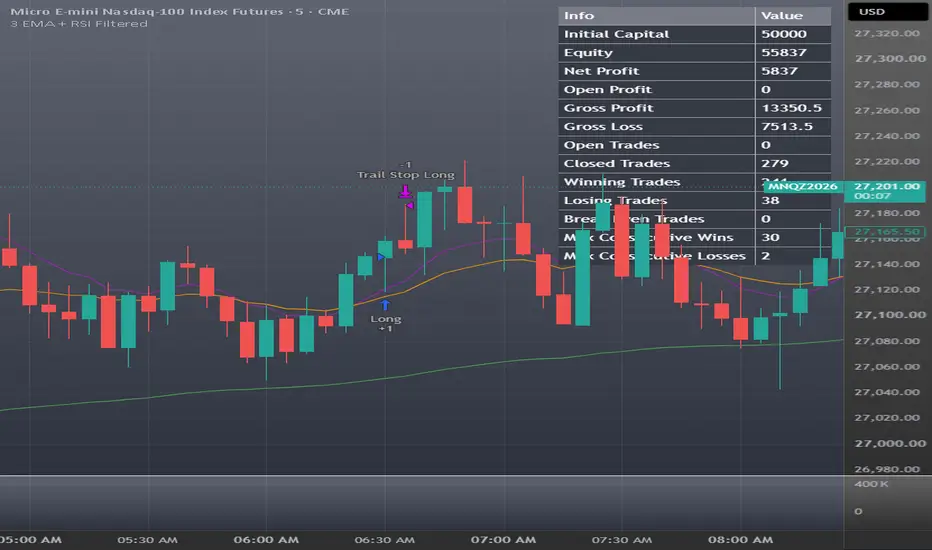
3 EMA + RSI Filtered
CREDIT This strategy is built on "v.5 - 3 EMA + RSI with Trail Stop" by Free990, published open source under the Mozilla Public License 2.0. All credit for the core idea and the entry/exit logic goes to Free990: the three-EMA crossover entries, the RSI exits, the trailing stop and the fixed stop are theirs. The optional monthly performance table is by Dr. Maurya (MAURYA_ALGO_TRADER). This version keeps the original MPL 2.0 license and credit header, and is published open source so anyone can see exactly what was changed.
WHAT THE ORIGINAL DOES (unchanged here)
Long entry: EMA A crosses above EMA B, EMA A is above EMA C (trend filter), and the signal bar closes green.
Short entry: EMA A crosses below EMA B, EMA A is below EMA C, and the signal bar closes red.
An opposite signal closes the open trade before reversing.
Exits: RSI exit (long closes when RSI is above the upper level, short when it is below the lower level), a trailing stop, a fixed stop loss, and an optional "close after X bars if in profit".
WHAT THIS VERSION ADDS
Fixed stop in points. The fixed stop can be set as a distance in price points from entry (new default, 150 points) or as a percent of entry (the original behavior). A point stop keeps the same dollar risk per contract as the price level changes, which suits futures.
Daily flat rule (on by default). Any open trade is closed on the first bar at or after 16:55 New York time, and no new entries are taken until the 18:00 reopen. This keeps trades out of the daily CME maintenance break and means positions are never held over the weekend.
Holiday early closes (on by default). On the listed CME early-close dates (editable list) there is no 16:55 bar, so trades are flattened at 12:55 New York time instead, with no entries until 18:00.
Daily risk rules, with the trading day running 18:00-17:00 New York time:
Daily loss lock (on, $700 by default): when the day's closed plus open P&L reaches the limit, everything is closed and no new entries are taken until the next trading day. It is checked at each bar close, so a fast move can overshoot the limit slightly.
Max losing trades per day (off by default): after the set number of losing trades, no more entries that day.
Flat-and-pause window (off by default): on weekdays, close any open trade at a start time and take no new entries until an end time, for example 09:15-10:00 to stay out of the New York open.
Day-of-week filter for new entries (Sunday evening through Friday, each on/off).
Session filter for new entries (off by default): Asia 18:00-03:00, London 03:00-09:30, New York 09:30-16:55, all New York time and all editable. Filters block only NEW entries; exits and opposite-signal closes always run.
Ghost alerts for QuantCrawler. Every order fill carries a JSON message in the format QuantCrawler's Ghost execution engine reads, so the strategy can trade automatically through Ghost (see ALERTS below). Standard TradingView alerts still work as usual.
Settings tuned for 1 MNQ contract on a 5-minute chart (see Default properties). EMA C plot label corrected (it was labelled "EMA B" in the original).
DEFAULT PROPERTIES
Initial capital $50,000, 1 contract per trade, no pyramiding.
Commission $0.75 per contract per side, slippage 2 ticks.
RSI 13, exit levels 26 / 70. EMA 10 / 20 / 111.
Trailing stop 61 / 1. Note: TradingView measures trail values in TICKS (on MNQ, 4 ticks = 1 point).
Fixed stop 150 points (about $300 per MNQ contract).
Daily loss lock $700. Daily flat 16:55, holiday flat 12:55 (New York time).
Margin settings 3.33% long and short. The default risk per trade (about $300 on $50,000) is well under 1% of the account.
HOW TO USE
Add to a 5-minute MNQ (or NQ) chart. Other markets and timeframes need their own testing; the trail and stop are in ticks/points, so adjust them to the instrument. MGC and MYM yield some favorable settings.
Check the Strategy Tester with "Bar Magnifier" enabled (Properties tab, needs a plan that supports it). Many trades are short and exit on the trailing stop, so intrabar fill assumptions matter a lot for this strategy.
Set up alerts as described below.
ALERTS: STANDARD vs GHOST Both kinds are created the same way (Alert > Condition = "3 EMA + RSI Filtered", "Order fills only"). The difference is the Message box and the webhook.
Standard alerts (notifications only)
Leave TradingView's default message, or use for example: {{strategy.order.action}} {{strategy.order.contracts}} {{ticker}} @ {{strategy.order.price}} - {{strategy.order.comment}}
{{strategy.order.comment}} shows why the order fired: RSI Exit Long/Short, Trail Stop Long/Short, Close Long -> New Short (and the reverse), Daily Flat 16:55, Holiday Early Close, Pause Window Flat, Daily Loss Lock.
Delivered as a pop-up, app push, email or sound. Nothing is traded.
Ghost alerts (automated execution through QuantCrawler's Ghost engine)
Message box must contain exactly: {{strategy.order.alert_message}}
Notifications tab: tick Webhook URL and paste your Ghost webhook URL.
The script fills in the message on every fill: Entry long: {"ticker":"MNQ1!","action":"buy","price":28450.25,"sl":28300.25} Entry short: {"ticker":"MNQ1!","action":"sell","price":28450.25,"sl":28600.25} Any exit: {"ticker":"MNQ1!","action":"exit","price":28455.50} "sl" is the fixed stop price (points or percent, whichever is selected), sent with the entry so Ghost can place the protective stop with the order.
Settings > "Ghost Webhook Alerts":
Ticker sent to Ghost: blank sends the chart ticker (e.g. MNQ1!). Enter the symbol your Ghost account expects if it differs (e.g. MNQZ2026), and update it at each contract roll.
Include the fixed stop price ("sl"): on by default.
Every exit type (RSI, trail, stop, reversal close, daily flat, holiday close, pause window, loss lock) sends "exit", so Ghost goes flat whenever the strategy does.
A reversal sends two messages in a row: "exit" for the open trade, then "buy" or "sell" for the new one.
Ghost allows one open trade per ticker. Don't run a second Ghost strategy on the same ticker, or its signals will be ignored while this one is in a trade.
After changing any setting, delete and re-create the alert; TradingView alerts keep the settings they were created with.
Test on a sim or evaluation account first, and set the strategy's daily loss lock at or below your account's daily loss limit.
Want both? Create two alerts, one with each Message. A single alert can't do both: a Ghost alert's message is JSON, which is unreadable as a notification, and a standard message sent to Ghost won't place a trade.
LIMITATIONS
High win rate, small average win and larger average loss: one stop can erase several winners. Judge it on drawdown and worst day, not win rate.
Trailing-stop results on 5-minute bars can be optimistic without Bar Magnifier, and live fills will differ from the backtest.
The daily flat rule closes on the next bar's open after 16:55, so check that your chart's session and exchange time zone line up.
Past results do not guarantee future results. This is a research tool, not financial advice.
CREDIT This strategy is built on "v.5 - 3 EMA + RSI with Trail Stop" by Free990, published open source under the Mozilla Public License 2.0. All credit for the core idea and the entry/exit logic goes to Free990: the three-EMA crossover entries, the RSI exits, the trailing stop and the fixed stop are theirs. The optional monthly performance table is by Dr. Maurya (MAURYA_ALGO_TRADER). This version keeps the original MPL 2.0 license and credit header, and is published open source so anyone can see exactly what was changed.
WHAT THE ORIGINAL DOES (unchanged here)
Long entry: EMA A crosses above EMA B, EMA A is above EMA C (trend filter), and the signal bar closes green.
Short entry: EMA A crosses below EMA B, EMA A is below EMA C, and the signal bar closes red.
An opposite signal closes the open trade before reversing.
Exits: RSI exit (long closes when RSI is above the upper level, short when it is below the lower level), a trailing stop, a fixed stop loss, and an optional "close after X bars if in profit".
WHAT THIS VERSION ADDS
Fixed stop in points. The fixed stop can be set as a distance in price points from entry (new default, 150 points) or as a percent of entry (the original behavior). A point stop keeps the same dollar risk per contract as the price level changes, which suits futures.
Daily flat rule (on by default). Any open trade is closed on the first bar at or after 16:55 New York time, and no new entries are taken until the 18:00 reopen. This keeps trades out of the daily CME maintenance break and means positions are never held over the weekend.
Holiday early closes (on by default). On the listed CME early-close dates (editable list) there is no 16:55 bar, so trades are flattened at 12:55 New York time instead, with no entries until 18:00.
Daily risk rules, with the trading day running 18:00-17:00 New York time:
Daily loss lock (on, $700 by default): when the day's closed plus open P&L reaches the limit, everything is closed and no new entries are taken until the next trading day. It is checked at each bar close, so a fast move can overshoot the limit slightly.
Max losing trades per day (off by default): after the set number of losing trades, no more entries that day.
Flat-and-pause window (off by default): on weekdays, close any open trade at a start time and take no new entries until an end time, for example 09:15-10:00 to stay out of the New York open.
Day-of-week filter for new entries (Sunday evening through Friday, each on/off).
Session filter for new entries (off by default): Asia 18:00-03:00, London 03:00-09:30, New York 09:30-16:55, all New York time and all editable. Filters block only NEW entries; exits and opposite-signal closes always run.
Ghost alerts for QuantCrawler. Every order fill carries a JSON message in the format QuantCrawler's Ghost execution engine reads, so the strategy can trade automatically through Ghost (see ALERTS below). Standard TradingView alerts still work as usual.
Settings tuned for 1 MNQ contract on a 5-minute chart (see Default properties). EMA C plot label corrected (it was labelled "EMA B" in the original).
DEFAULT PROPERTIES
Initial capital $50,000, 1 contract per trade, no pyramiding.
Commission $0.75 per contract per side, slippage 2 ticks.
RSI 13, exit levels 26 / 70. EMA 10 / 20 / 111.
Trailing stop 61 / 1. Note: TradingView measures trail values in TICKS (on MNQ, 4 ticks = 1 point).
Fixed stop 150 points (about $300 per MNQ contract).
Daily loss lock $700. Daily flat 16:55, holiday flat 12:55 (New York time).
Margin settings 3.33% long and short. The default risk per trade (about $300 on $50,000) is well under 1% of the account.
HOW TO USE
Add to a 5-minute MNQ (or NQ) chart. Other markets and timeframes need their own testing; the trail and stop are in ticks/points, so adjust them to the instrument. MGC and MYM yield some favorable settings.
Check the Strategy Tester with "Bar Magnifier" enabled (Properties tab, needs a plan that supports it). Many trades are short and exit on the trailing stop, so intrabar fill assumptions matter a lot for this strategy.
Set up alerts as described below.
ALERTS: STANDARD vs GHOST Both kinds are created the same way (Alert > Condition = "3 EMA + RSI Filtered", "Order fills only"). The difference is the Message box and the webhook.
Standard alerts (notifications only)
Leave TradingView's default message, or use for example: {{strategy.order.action}} {{strategy.order.contracts}} {{ticker}} @ {{strategy.order.price}} - {{strategy.order.comment}}
{{strategy.order.comment}} shows why the order fired: RSI Exit Long/Short, Trail Stop Long/Short, Close Long -> New Short (and the reverse), Daily Flat 16:55, Holiday Early Close, Pause Window Flat, Daily Loss Lock.
Delivered as a pop-up, app push, email or sound. Nothing is traded.
Ghost alerts (automated execution through QuantCrawler's Ghost engine)
Message box must contain exactly: {{strategy.order.alert_message}}
Notifications tab: tick Webhook URL and paste your Ghost webhook URL.
The script fills in the message on every fill: Entry long: {"ticker":"MNQ1!","action":"buy","price":28450.25,"sl":28300.25} Entry short: {"ticker":"MNQ1!","action":"sell","price":28450.25,"sl":28600.25} Any exit: {"ticker":"MNQ1!","action":"exit","price":28455.50} "sl" is the fixed stop price (points or percent, whichever is selected), sent with the entry so Ghost can place the protective stop with the order.
Settings > "Ghost Webhook Alerts":
Ticker sent to Ghost: blank sends the chart ticker (e.g. MNQ1!). Enter the symbol your Ghost account expects if it differs (e.g. MNQZ2026), and update it at each contract roll.
Include the fixed stop price ("sl"): on by default.
Every exit type (RSI, trail, stop, reversal close, daily flat, holiday close, pause window, loss lock) sends "exit", so Ghost goes flat whenever the strategy does.
A reversal sends two messages in a row: "exit" for the open trade, then "buy" or "sell" for the new one.
Ghost allows one open trade per ticker. Don't run a second Ghost strategy on the same ticker, or its signals will be ignored while this one is in a trade.
After changing any setting, delete and re-create the alert; TradingView alerts keep the settings they were created with.
Test on a sim or evaluation account first, and set the strategy's daily loss lock at or below your account's daily loss limit.
Want both? Create two alerts, one with each Message. A single alert can't do both: a Ghost alert's message is JSON, which is unreadable as a notification, and a standard message sent to Ghost won't place a trade.
LIMITATIONS
High win rate, small average win and larger average loss: one stop can erase several winners. Judge it on drawdown and worst day, not win rate.
Trailing-stop results on 5-minute bars can be optimistic without Bar Magnifier, and live fills will differ from the backtest.
The daily flat rule closes on the next bar's open after 16:55, so check that your chart's session and exchange time zone line up.
Past results do not guarantee future results. This is a research tool, not financial advice.

免責聲明
這些資訊和出版物並非旨在提供,也不構成TradingView提供或認可的任何形式的財務、投資、交易或其他類型的建議或推薦。請閱讀使用條款以了解更多資訊。
免責聲明
這些資訊和出版物並非旨在提供,也不構成TradingView提供或認可的任何形式的財務、投資、交易或其他類型的建議或推薦。請閱讀使用條款以了解更多資訊。