OPEN-SOURCE SCRIPT
H4 Open Marker + 2H Trendline (ICT Times)
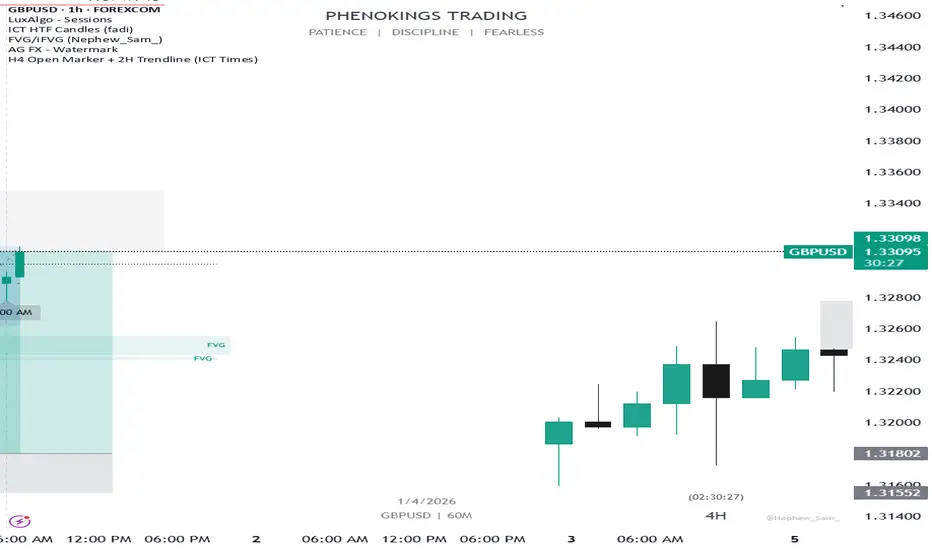
This indicator helps ICT traders visualize H4 session opens and the first 2 hours of price action with dynamic labeling. ( Note: insight came from personal study of ICT concepts)
🔹 FEATURES:
• Marks H4 candle opens at ICT times (1AM, 5AM, 9AM, 1PM, 5PM, 9PM) based on your local time zone
• Draws a horizontal trendline at the open price that extends for the first 2 hours only
• Time labels positioned dynamically:
- Bullish candles → label BELOW the candle (pointing up)
- Bearish candles → label ABOVE the candle (pointing down)
• Optional vertical lines at each selected H4 open
• Configurable colors, line styles, and label sizes
🔹 SETTINGS:
• UTC Offset – Adjust to your time zone (e.g., -5 for New York EST)
• Individual toggles for each H4 session (1AM, 5AM, 9AM, 1PM, 5PM, 9PM)
• Vertical line: color, style (Solid/Dashed/Dotted)
• 2H Trendline: color, style
• Label: background color, text color, size
🔹 HOW TO USE:
1. Add the indicator to your chart
2. Set your UTC offset correctly for your time zone
3. Toggle on/off specific H4 sessions you want to see
4. The horizontal line will appear at the H4 open and extend for the next 2 hours
5. Labels automatically position based on candle direction
🔹 NOTES:
• Only shows the last 7 days of data to avoid clutter
• Works on any timeframe, but designed for H4 analysis
• Max 500 lines drawn for performance.
🔹 FEATURES:
• Marks H4 candle opens at ICT times (1AM, 5AM, 9AM, 1PM, 5PM, 9PM) based on your local time zone
• Draws a horizontal trendline at the open price that extends for the first 2 hours only
• Time labels positioned dynamically:
- Bullish candles → label BELOW the candle (pointing up)
- Bearish candles → label ABOVE the candle (pointing down)
• Optional vertical lines at each selected H4 open
• Configurable colors, line styles, and label sizes
🔹 SETTINGS:
• UTC Offset – Adjust to your time zone (e.g., -5 for New York EST)
• Individual toggles for each H4 session (1AM, 5AM, 9AM, 1PM, 5PM, 9PM)
• Vertical line: color, style (Solid/Dashed/Dotted)
• 2H Trendline: color, style
• Label: background color, text color, size
🔹 HOW TO USE:
1. Add the indicator to your chart
2. Set your UTC offset correctly for your time zone
3. Toggle on/off specific H4 sessions you want to see
4. The horizontal line will appear at the H4 open and extend for the next 2 hours
5. Labels automatically position based on candle direction
🔹 NOTES:
• Only shows the last 7 days of data to avoid clutter
• Works on any timeframe, but designed for H4 analysis
• Max 500 lines drawn for performance.
開源腳本
秉持TradingView一貫精神,這個腳本的創作者將其設為開源,以便交易者檢視並驗證其功能。向作者致敬!您可以免費使用此腳本,但請注意,重新發佈代碼需遵守我們的社群規範。

免責聲明
這些資訊和出版物並非旨在提供,也不構成TradingView提供或認可的任何形式的財務、投資、交易或其他類型的建議或推薦。請閱讀使用條款以了解更多資訊。
開源腳本
秉持TradingView一貫精神,這個腳本的創作者將其設為開源,以便交易者檢視並驗證其功能。向作者致敬!您可以免費使用此腳本,但請注意,重新發佈代碼需遵守我們的社群規範。
免責聲明
這些資訊和出版物並非旨在提供,也不構成TradingView提供或認可的任何形式的財務、投資、交易或其他類型的建議或推薦。請閱讀使用條款以了解更多資訊。