[MAD] L5 Riskmanagement MK6.2 Wizard Edition
來自djmad的更多獨家指標
以每月$19.00的價格訂閱Premium selection,即可取得該作者的獨家指標。您可直接在TradingView付款並立即於圖表上使用。
探索Premium selectionFirst of all, this Backtest module comes WITHOUT a Strategy, only Riskmanagement
Modular L6 Backtest
For testing your own Indicators in this backtest use this script snipped below in your indicator Suite
After this you can include every L1 Indicator and test it.
todo this, select Digitalsignal @ your specific indicator as source, so the backtester can see its signals.
To have correct data at the exchange, use alarms after successful backtest on the indicator with "on candle close"
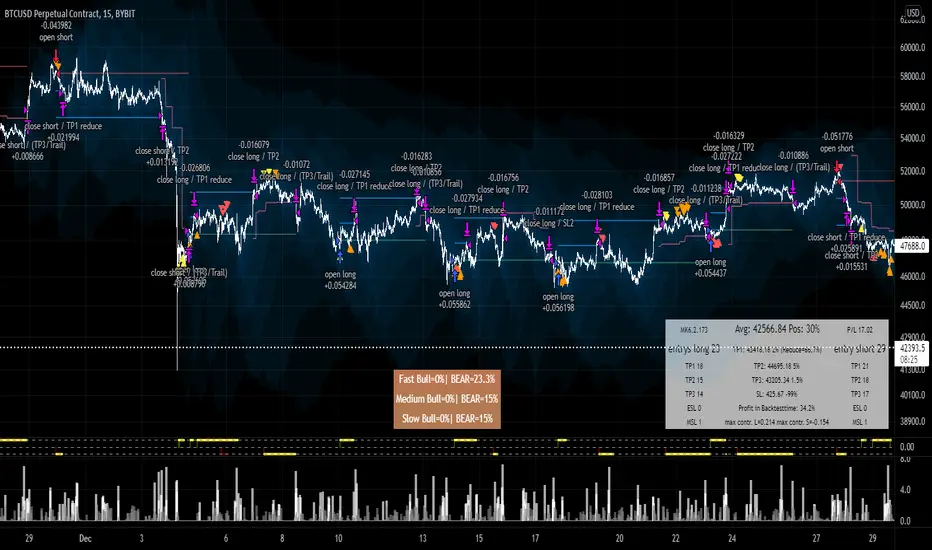
Steps of a entry, which you can see the in the screenshot:
L1 Strategy/Indicator sends "long"
buy of position setting of SL @%
after TP1 SL is set to entry
after TP2 position is closed 100%
If there a running position but in negative P/L each Signal adds up to the position + Growfactor
so a 1.0 would increase the next buy +100% 1, 2, 4, 8 .... (double up)
Shrinkfactor detecs a position is to large. If position is at average price it reduces to allowed percentage and continues
-------------------
Where to buy and how often.... has to come from your own indicator
This is the codesnipped for a external indicator to plot the signal as needed
<CODE>
signalout = 0
signalout := (signal_buy? 1: signal_sell? -1: 0)
BM_color_signal = signal_buy? #4C9900 : signal_sell? #CC0000: color.black
L_digital_signal = plot(signalout, title ="Digitalsignal", color=BM_color_signal, transp=0, style=plot.style_columns, display=display.none)
Modular L6 Backtest
For testing your own Indicators in this backtest use this script snipped below in your indicator Suite
After this you can include every L1 Indicator and test it.
todo this, select Digitalsignal @ your specific indicator as source, so the backtester can see its signals.
To have correct data at the exchange, use alarms after successful backtest on the indicator with "on candle close"
Steps of a entry, which you can see the in the screenshot:
L1 Strategy/Indicator sends "long"
buy of position setting of SL @%
after TP1 SL is set to entry
after TP2 position is closed 100%
If there a running position but in negative P/L each Signal adds up to the position + Growfactor
so a 1.0 would increase the next buy +100% 1, 2, 4, 8 .... (double up)
Shrinkfactor detecs a position is to large. If position is at average price it reduces to allowed percentage and continues
-------------------
Where to buy and how often.... has to come from your own indicator
This is the codesnipped for a external indicator to plot the signal as needed
<CODE>
signalout = 0
signalout := (signal_buy? 1: signal_sell? -1: 0)
BM_color_signal = signal_buy? #4C9900 : signal_sell? #CC0000: color.black
L_digital_signal = plot(signalout, title ="Digitalsignal", color=BM_color_signal, transp=0, style=plot.style_columns, display=display.none)
發行說明
alerts發行說明
bugfix發行說明
update again發行說明
Update to 6.1發行說明
Statistics and Cleanup發行說明
lots of bugfixing發行說明
MSL Counter Long was counting on the short sideVersionnumber in Textbox

telegram - @djmad_0815
免責聲明
這些資訊和出版物並非旨在提供,也不構成TradingView提供或認可的任何形式的財務、投資、交易或其他類型的建議或推薦。請閱讀使用條款以了解更多資訊。
telegram - @djmad_0815
免責聲明
這些資訊和出版物並非旨在提供,也不構成TradingView提供或認可的任何形式的財務、投資、交易或其他類型的建議或推薦。請閱讀使用條款以了解更多資訊。