
Thêm nhiều chỉ báo độc quyền từ traddictiv
Đăng ký UFO Trading Suite — AutoClimate™ + AutoUFOs® (patented) với giá $55.00/tháng để sử dụng các chỉ báo độc quyền của nhà sáng tạo này. Bạn thanh toán ngay trên TradingView và có thể sử dụng các chỉ báo đó trên biểu đồ ngay lập tức.
Khám phá UFO Trading Suite — AutoClimate™ + AutoUFOs® (patented)The word “confirmed” can cause confusion when reading an indicator beside a candlestick chart.
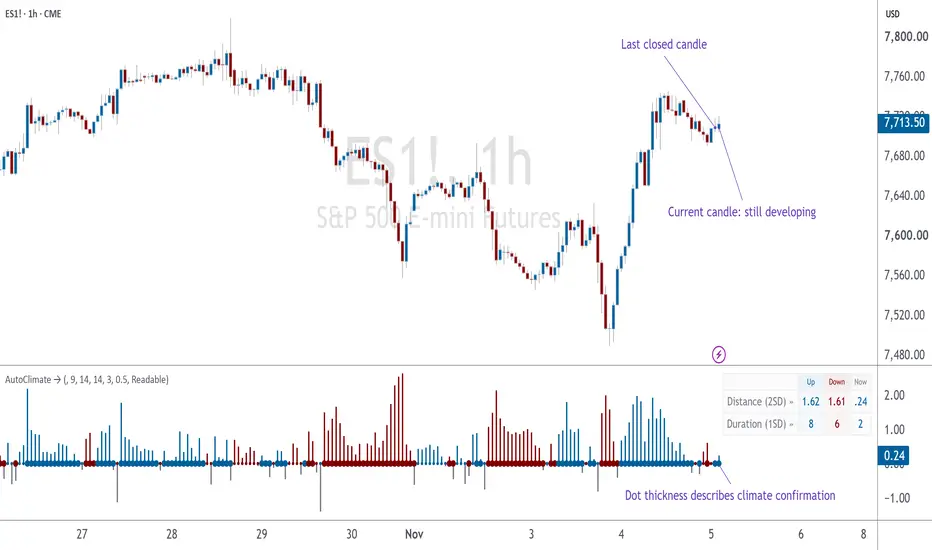
In AutoClimate™, climate confirmation describes a condition identified by the indicator. Candle close describes whether a particular price bar has finished forming.
These are separate questions. Understanding the difference helps keep chart observations consistent.
1. Read the climate classification
AutoClimate™ uses blue dots for an up climate and red dots for a down climate. Thick dots represent confirmed climate conditions; thin dots represent unconfirmed conditions.
“Confirmed” describes the indicator's assessment of the climate. It does not mean that the next price movement is certain or that a trade should be entered.
2. Check whether the candle has closed
A developing candle can still receive new price updates. Its close, high and low may change before the interval ends.
A completed candle has finished its interval. That tells us when the observation was made; it does not automatically establish a confirmed AutoClimate condition.
Do not use dot thickness as a substitute for checking whether the candle is still developing.
3. Keep the two observations separate
When reviewing a chart, record both pieces of information:
For example, observing a thin dot on a completed candle means the climate was unconfirmed in that displayed observation. The candle's completion does not require the dot to become thick.
Likewise, the term “confirmed climate” should not be interpreted as a general promise that every displayed value is final or that market direction will continue.
4. Compare the same candle before and after its close
A useful observation exercise is to capture a chart while a candle is developing, then capture the same view after that candle closes.
Keep the symbol, timeframe, session and indicator settings unchanged.
Compare the candle and the corresponding AutoClimate reading. Record what actually changed, including cases where nothing changed. Do not assume that a status change must occur.
Historical candles show the resulting chart observations. They do not, by themselves, document every reading that appeared during the candle's formation.
5. Define the observation point in your plan
If your process evaluates conditions at candle close, assess the appropriate completed candle consistently.
If your process examines developing candles, account for the possibility that readings may change before the interval ends.
When using an indicator calculated on a different timeframe, also identify whether that calculation's candle has closed. Completion of a lower-timeframe chart candle does not establish completion of a higher-timeframe candle.
The practical lesson
Read climate confirmation and candle completion separately. Then apply the observation timing, entry criteria and risk limits defined in your own plan.
AutoClimate™ provides analytical context and is not a standalone trade signal. Confirmed climates can fail, and historical observations do not guarantee future outcomes.
This publication is educational and does not constitute financial, investment or trading advice. Futures involve leverage and substantial risk; losses can exceed the initial margin deposited. AI-assisted content may contain inaccuracies.
In AutoClimate™, climate confirmation describes a condition identified by the indicator. Candle close describes whether a particular price bar has finished forming.
These are separate questions. Understanding the difference helps keep chart observations consistent.
1. Read the climate classification
AutoClimate™ uses blue dots for an up climate and red dots for a down climate. Thick dots represent confirmed climate conditions; thin dots represent unconfirmed conditions.
“Confirmed” describes the indicator's assessment of the climate. It does not mean that the next price movement is certain or that a trade should be entered.
2. Check whether the candle has closed
A developing candle can still receive new price updates. Its close, high and low may change before the interval ends.
A completed candle has finished its interval. That tells us when the observation was made; it does not automatically establish a confirmed AutoClimate condition.
Do not use dot thickness as a substitute for checking whether the candle is still developing.
3. Keep the two observations separate
When reviewing a chart, record both pieces of information:
- Climate status: confirmed or unconfirmed, according to AutoClimate.
- Candle status: developing or closed, according to the chart interval.
For example, observing a thin dot on a completed candle means the climate was unconfirmed in that displayed observation. The candle's completion does not require the dot to become thick.
Likewise, the term “confirmed climate” should not be interpreted as a general promise that every displayed value is final or that market direction will continue.
4. Compare the same candle before and after its close
A useful observation exercise is to capture a chart while a candle is developing, then capture the same view after that candle closes.
Keep the symbol, timeframe, session and indicator settings unchanged.
Compare the candle and the corresponding AutoClimate reading. Record what actually changed, including cases where nothing changed. Do not assume that a status change must occur.
Historical candles show the resulting chart observations. They do not, by themselves, document every reading that appeared during the candle's formation.
5. Define the observation point in your plan
If your process evaluates conditions at candle close, assess the appropriate completed candle consistently.
If your process examines developing candles, account for the possibility that readings may change before the interval ends.
When using an indicator calculated on a different timeframe, also identify whether that calculation's candle has closed. Completion of a lower-timeframe chart candle does not establish completion of a higher-timeframe candle.
The practical lesson
Read climate confirmation and candle completion separately. Then apply the observation timing, entry criteria and risk limits defined in your own plan.
AutoClimate™ provides analytical context and is not a standalone trade signal. Confirmed climates can fail, and historical observations do not guarantee future outcomes.
This publication is educational and does not constitute financial, investment or trading advice. Futures involve leverage and substantial risk; losses can exceed the initial margin deposited. AI-assisted content may contain inaccuracies.

Trade Smarter — See What Most Traders Don’t. Explore AutoClimate™ and AutoUFOs® (patented) in the UFO Trading Suite: tradingview.com/spaces/traddictiv/
Bài đăng liên quan
Thông báo miễn trừ trách nhiệm
Thông tin và các ấn phẩm này không nhằm mục đích, và không cấu thành, lời khuyên hoặc khuyến nghị về tài chính, đầu tư, giao dịch hay các loại khác do TradingView cung cấp hoặc xác nhận. Đọc thêm tại Điều khoản Sử dụng.