
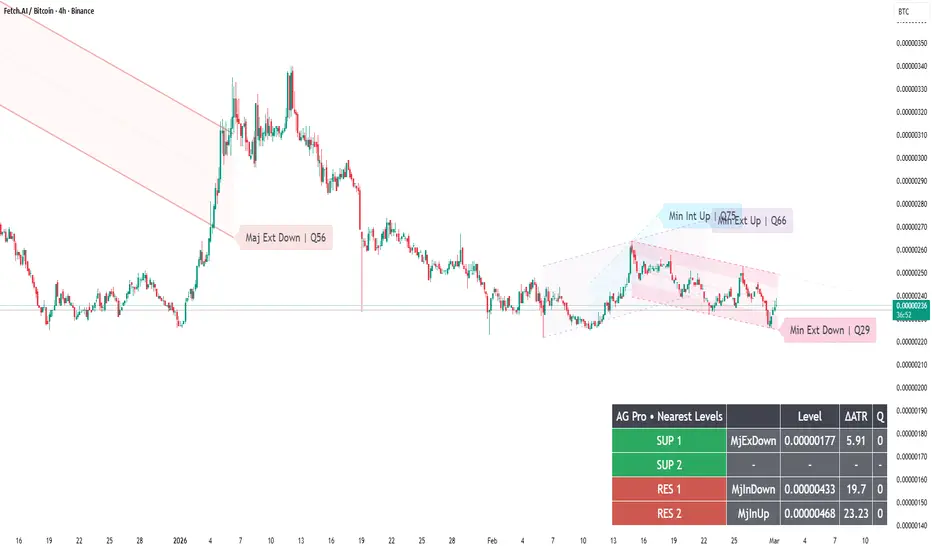
Compact Labels & Major‑Only Text — How to Make Your Structure Charts Shareable and Usable
A structure tool should work in two environments:
- live execution (where you need clarity),
- and sharing/review (where you need readable explanation).
Dynamic Channels Elite provides label controls that help both:
- Compact Labels (badge style)
- Label font sizing
- Major-only labels (reduce noise)
- Optional panel summaries (nearest levels)
A practical “shareable chart” recipe:
1) Visual Preset = Clean
2) Compact Labels = ON
3) Labels = Major only (or disable minors)
4) Projection = OFF (reduces narrative bias for readers)
5) Broken channels = faded or auto-hidden (keeps chart clean)
Why this matters:
If your labels overlap, your audience will not understand the structure.
If your labels are too big, you lose price visibility.
A professional structure chart reads like a map:
primary corridors are obvious, secondary rails are subtle.
Execution variant:
- Keep labels smaller
- Keep only what you actively use
- Prefer fewer, higher-quality channels (use Q and de‑clutter)
Limitations:
Label readability depends on zoom and timeframe. You may need to adjust font size when switching between intraday and higher TF charts.
Risk disclosure:
Educational content only. Not financial advice.
A structure tool should work in two environments:
- live execution (where you need clarity),
- and sharing/review (where you need readable explanation).
Dynamic Channels Elite provides label controls that help both:
- Compact Labels (badge style)
- Label font sizing
- Major-only labels (reduce noise)
- Optional panel summaries (nearest levels)
A practical “shareable chart” recipe:
1) Visual Preset = Clean
2) Compact Labels = ON
3) Labels = Major only (or disable minors)
4) Projection = OFF (reduces narrative bias for readers)
5) Broken channels = faded or auto-hidden (keeps chart clean)
Why this matters:
If your labels overlap, your audience will not understand the structure.
If your labels are too big, you lose price visibility.
A professional structure chart reads like a map:
primary corridors are obvious, secondary rails are subtle.
Execution variant:
- Keep labels smaller
- Keep only what you actively use
- Prefer fewer, higher-quality channels (use Q and de‑clutter)
Limitations:
Label readability depends on zoom and timeframe. You may need to adjust font size when switching between intraday and higher TF charts.
Risk disclosure:
Educational content only. Not financial advice.

🧠 Trading Suite - Flagship Workflow
tradingview.com/script/XJmX3p98-Trading-Suite-AGPro-Series/
🔷 Crypto Setup Planner - Multi-Symbol Planner
tradingview.com/script/LgVRo7Ql-Crypto-Setup-Planner-AGPro-Series/
tradingview.com/script/XJmX3p98-Trading-Suite-AGPro-Series/
🔷 Crypto Setup Planner - Multi-Symbol Planner
tradingview.com/script/LgVRo7Ql-Crypto-Setup-Planner-AGPro-Series/
Thông báo miễn trừ trách nhiệm
Thông tin và các ấn phẩm này không nhằm mục đích, và không cấu thành, lời khuyên hoặc khuyến nghị về tài chính, đầu tư, giao dịch hay các loại khác do TradingView cung cấp hoặc xác nhận. Đọc thêm tại Điều khoản Sử dụng.
🧠 Trading Suite - Flagship Workflow
tradingview.com/script/XJmX3p98-Trading-Suite-AGPro-Series/
🔷 Crypto Setup Planner - Multi-Symbol Planner
tradingview.com/script/LgVRo7Ql-Crypto-Setup-Planner-AGPro-Series/
tradingview.com/script/XJmX3p98-Trading-Suite-AGPro-Series/
🔷 Crypto Setup Planner - Multi-Symbol Planner
tradingview.com/script/LgVRo7Ql-Crypto-Setup-Planner-AGPro-Series/
Thông báo miễn trừ trách nhiệm
Thông tin và các ấn phẩm này không nhằm mục đích, và không cấu thành, lời khuyên hoặc khuyến nghị về tài chính, đầu tư, giao dịch hay các loại khác do TradingView cung cấp hoặc xác nhận. Đọc thêm tại Điều khoản Sử dụng.